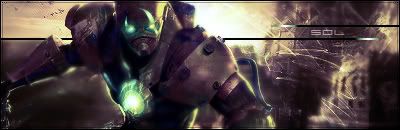
New Sig: Serenity

Digital art design, renderings, signatures and anything art related. Upload pictures of your newest work or ask for feedback. Post graphics requests or discuss art in general.
Post Reply
User avatar
HOLLAstir
Loyal Member
Posts: 1637
Joined: Tue Aug 28, 2007 7:17 pm
Quick Reply: Yes
Location: 206
Contact:

New Sig: Serenity

Post by HOLLAstir »

Took your advice broken, worked on my light source, used a lens flare. Dodge and burned her face. First time using clipping masks. A lot of smudging, and a c4d thrown in there. Tried a new border. Lot's of gradients, tried to keep the simplicity vibe yet at the same time random and curious.

c/c <3

Image
Image

Image

User avatar
Faiien
Active Member
Posts: 889
Joined: Sun Oct 28, 2007 5:10 pm
Quick Reply: Yes
Location: Artist Corner

Post by Faiien »

best sig you've made so far
the clipping masks and light source add alot of depth to your picture
good job!

User avatar
christina
Frequent Member
Posts: 1017
Joined: Sun Oct 07, 2007 6:58 pm
Quick Reply: Yes
Location: Artist Corner

Post by christina »

Faiien wrote:best sig you've made so far
the clipping masks and light source add alot of depth to your picture
good job!

+1
<<Left because of dumbshit people like stallowned>>

User avatar
BrokenSaint
Veteran Member
Posts: 3473
Joined: Sun Jan 01, 2006 8:49 pm
Quick Reply: Yes
Location: Stuntin'.
Contact:

Post by BrokenSaint »

Very nice. If you did that to your trapped sig im sure it would look good too. Good job.

User avatar
Faiien
Active Member
Posts: 889
Joined: Sun Oct 28, 2007 5:10 pm
Quick Reply: Yes
Location: Artist Corner

Post by Faiien »

ya just those two things alone give your sig alot of flow

User avatar
HOLLAstir
Loyal Member
Posts: 1637
Joined: Tue Aug 28, 2007 7:17 pm
Quick Reply: Yes
Location: 206
Contact:

Post by HOLLAstir »

Yeah, Took me a while to get used to clipping masks. Any other comments?
Image

Image

User avatar
aazumak
Active Member
Posts: 918
Joined: Sat Jun 09, 2007 12:56 pm
Quick Reply: Yes
Location: Artist Corner
Contact:

Post by aazumak »

HOLLAstir wrote:Yeah, Took me a while to get used to clipping masks. Any other comments?


is that what it is, clipping masks? i thought it was the stamp tool, either way its ill, great sig, i love sigs with clipping masks in em
Image
Image
_____________________!!!!!!Rogue 7X !!!!!!
Image

User avatar
HOLLAstir
Loyal Member
Posts: 1637
Joined: Tue Aug 28, 2007 7:17 pm
Quick Reply: Yes
Location: 206
Contact:

Post by HOLLAstir »

aazumak wrote:
HOLLAstir wrote:Yeah, Took me a while to get used to clipping masks. Any other comments?


is that what it is, clipping masks? i thought it was the stamp tool, either way its ill, great sig, i love sigs with clipping masks in em


Yeah clipping masks. I'm liking it more, helps add "flow" at times.
Image

Image

User avatar
0l3n
Elite Member
Posts: 5184
Joined: Fri Jun 16, 2006 1:45 pm
Quick Reply: Yes
Location: Artists Corner

Post by 0l3n »

Try sharpening the render a bit to add to the focal, and text look soft to me, id put the "name" closer to the "title".
Image
Image

User avatar
HOLLAstir
Loyal Member
Posts: 1637
Joined: Tue Aug 28, 2007 7:17 pm
Quick Reply: Yes
Location: 206
Contact:

Post by HOLLAstir »

I was going for "soft." It looks like she's wondering something, thinking. So I wanted the text to be really simple and soft to correlate with that. Yeah I sharpened it, I guess I could have done it once more, but it looked a little "over" sharpened with I did it again. Anyways thanks for the comments as always <3
Image

Image

so STOOPS
Common Member
Posts: 137
Joined: Sat Dec 08, 2007 8:11 pm
Quick Reply: Yes
Location: Hercules
Contact:

Post by so STOOPS »

how do you make those funky lines? are they just brushes with different settings and colors?
<<banned from SRF for rules violations: rule #5. -SG>>

User avatar
Sol
Regular Member
Posts: 321
Joined: Tue Jan 30, 2007 9:21 am
Quick Reply: Yes
Location: Sparta
Contact:

Post by Sol »

quiet nice. :) that stock gets used quiet alot but lets not take anything away from your sig :)
Image
Image

User avatar
fena
Ex-Staff
Posts: 4441
Joined: Sun May 06, 2007 5:15 am
Quick Reply: Yes
Location: Life

Post by fena »

I love it. Personally, I think it's your best one before.
First of all, I absolutely love the use of colors. The bright colors on the right and the more basic brown on the left create a real feeling of serenity, hence the name of the Sig.
Also love the render. First perfectly in with the mood you were going for.

The only thing that I SLIGHTLY don't like is the guy's hood on the very left. It's starting to blur a bit, and for some reason, contrasted with the very solid right side of the render (his face), it looks slightly strange. Like he was smeared a bit.

Still, I absolutely love the Sig. Nothing much else to say. 10/10 from me!

User avatar
HOLLAstir
Loyal Member
Posts: 1637
Joined: Tue Aug 28, 2007 7:17 pm
Quick Reply: Yes
Location: 206
Contact:

Post by HOLLAstir »

Thanks fena! <3 you. Anyways yeah I smudged quite a bit on the hood tried to get the feeling like it was being pulled away so it would go with the brushing and clipping masks. I see what you mean though. It was just the style I was going for, I could have made the smearing a bit more gradual. Anyways thanks for the comments as always guys <3
Image

Image

User avatar
HOLLAstir
Loyal Member
Posts: 1637
Joined: Tue Aug 28, 2007 7:17 pm
Quick Reply: Yes
Location: 206
Contact:

Post by HOLLAstir »

so STOOPS wrote:how do you make those funky lines? are they just brushes with different settings and colors?


Which funky lines? I think I know what you mean, and I used a certain brush and smudged with it on high scatter.
Image

Image

User avatar
Rizla
Ex-Staff
Posts: 1197
Joined: Sun Jun 11, 2006 4:17 am
Quick Reply: Yes
Location: Artist's Corner

Post by Rizla »

A complimenting effect to the masks would help balance the piece.
Image

Post Reply

Return to “Artists Corner”