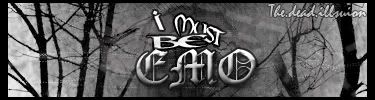
New sig..

Digital art design, renderings, signatures and anything art related. Upload pictures of your newest work or ask for feedback. Post graphics requests or discuss art in general.
Post Reply
TwelveEleven
Veteran Member
Posts: 3806
Joined: Sat Mar 17, 2007 1:11 am
Quick Reply: Yes
Location: Heaven
Contact:

New sig..

Post by TwelveEleven »

Image

Rate it please, I don't really like it myself, but who knows maybe you do..
<<banned from SRF for proof of botting. -SG>>

User avatar
Rizla
Ex-Staff
Posts: 1197
Joined: Sun Jun 11, 2006 4:17 am
Quick Reply: Yes
Location: Artist's Corner

Post by Rizla »

I hate popouts. Widening a focal point outside the flow of a piece is never a good idea. When doing a popout the only thing that should pop out are things other than your focal. I think the background is o.k., but dont fit your focal at all. Text is ick imo, first priority with text is readiability, when you skew it or type it along a wavy path you lose alot of it. 4/10.

Nice selection on your render though, if you did it.
Image

TwelveEleven
Veteran Member
Posts: 3806
Joined: Sat Mar 17, 2007 1:11 am
Quick Reply: Yes
Location: Heaven
Contact:

Post by TwelveEleven »

Rizla wrote:I hate popouts. Widening a focal point outside the flow of a piece is never a good idea. When doing a popout the only thing that should pop out are things other than your focal. I think the background is o.k., but dont fit your focal at all. Text is ick imo, first priority with text is readiability, when you skew it or type it along a wavy path you lose alot of it. 4/10.

Nice selection on your render though, if you did it.


After doing the render I didn't have much inspiration left :(. Anyways i know the bg totally doesn't fit with the render. :(. I'm not really good in making it a dark bg. Maybe you can help me? Here's the render.

Image

Giving it a new go myself tomorrow anyways.
Last edited by TwelveEleven on Thu Jun 14, 2007 6:25 pm, edited 1 time in total.
<<banned from SRF for proof of botting. -SG>>

User avatar
Rizla
Ex-Staff
Posts: 1197
Joined: Sun Jun 11, 2006 4:17 am
Quick Reply: Yes
Location: Artist's Corner

Post by Rizla »

Im confused...are you asking me to make a sig using your render :?

Like I said good render, but I dont know what exactly you are asking.
Image

TwelveEleven
Veteran Member
Posts: 3806
Joined: Sat Mar 17, 2007 1:11 am
Quick Reply: Yes
Location: Heaven
Contact:

Post by TwelveEleven »

Nah, just some help with making a dark background. I'm not so good with those things, i'll try to make one now and i'll post it here. :). Posted the render for others to use.
<<banned from SRF for proof of botting. -SG>>

User avatar
Rizla
Ex-Staff
Posts: 1197
Joined: Sun Jun 11, 2006 4:17 am
Quick Reply: Yes
Location: Artist's Corner

Post by Rizla »

this tutorial has some techniques that you could use to make a nice dark background.

http://www.tech-gfx.net/tutorials/vip/a ... ialPNG.png
Image

User avatar
aazumak
Active Member
Posts: 918
Joined: Sat Jun 09, 2007 12:56 pm
Quick Reply: Yes
Location: Artist Corner
Contact:

Post by aazumak »

take the render and stretch it so it covers entire screen, then just blur it a ton, or take a prominent color from teh render and use that as a solid background.

use that as your base and then add other bushings in, smudge and use filters
Image
Image
_____________________!!!!!!Rogue 7X !!!!!!
Image

User avatar
the.dead.illusion
Regular Member
Posts: 205
Joined: Thu Mar 29, 2007 8:05 am
Quick Reply: Yes
Location: in the corner
Contact:

Post by the.dead.illusion »

smudge the renders sides so that it would blend in with the bg
Image
Image
Image
^sig wars^

Post Reply

Return to “Artists Corner”