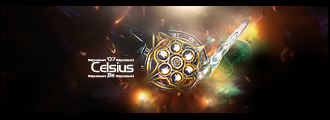
SG's in the Artists Corner, ZOMG!!! rate my sig pls...

Digital art design, renderings, signatures and anything art related. Upload pictures of your newest work or ask for feedback. Post graphics requests or discuss art in general.
Post Reply
User avatar
SuicideGrl
Retired Admin
Posts: 8004
Joined: Fri Jan 27, 2006 4:17 pm
Location: World of Warcraft

SG's in the Artists Corner, ZOMG!!! rate my sig pls...

Post by SuicideGrl »

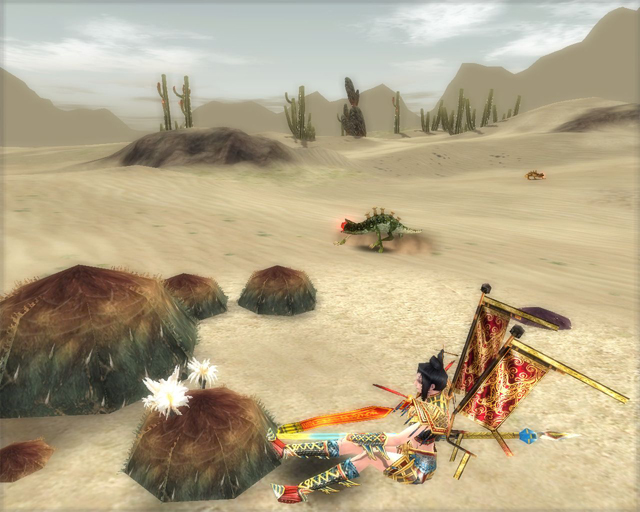
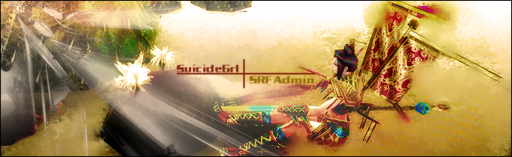
my current sig is my first attempt at photomanipulation. i looked through all the guides in this section of the site and decided i needed to learn a LOT more about photoshop, so i set out to take a nice SS of some flowers i found growing in takla:
Image
and turn it into something even more beautiful. i TOTALL want all the criticism and suggestions i can get here... i am trying to denubify my PS skills :)

extra thanks to Ol3n and Shimohime, whose techniques as suggested in their guides were actually used in this experiment. <3
Image
Thx IceCrash for my awesome sig :)
SRF Name Change Policy
Having trouble accessing SRF?

dom wrote:
RuYi wrote:Are you from outer space or something?
He's from Jersey. Close enough.

User avatar
[SD]happynoobing
Advanced Member
Posts: 2349
Joined: Thu Jan 04, 2007 2:06 am
Quick Reply: Yes
Location: Off Topic

Post by [SD]happynoobing »

well, the white thingy on the left seem kinda random, and it looks as if your character is floating (while sitting)-- even in your screenshot, but more apparent in your sig. better screenshot angle?
Image

User avatar
rek
Ex-Staff
Posts: 5607
Joined: Sun Dec 31, 2006 10:46 am
Quick Reply: Yes
Location: darkroot garden
Contact:

Post by rek »

try set up some flow
Image
<3
0len

User avatar
SuicideGrl
Retired Admin
Posts: 8004
Joined: Fri Jan 27, 2006 4:17 pm
Location: World of Warcraft

Post by SuicideGrl »

happynoobing wrote:well, the white thingy on the left seem kinda random, and it looks as if your character is floating (while sitting)-- even in your screenshot, but more apparent in your sig. better screenshot angle?

lol you caught me. i google-image-searched for something decent to add some texture to it, and that was what i came up with. it IS random.

as for a better SS, now i have to find those damn flowers again zzzzz...

reK wrote:try set up some flow

you lost me. how about a quick definition?
Image
Thx IceCrash for my awesome sig :)
SRF Name Change Policy
Having trouble accessing SRF?

dom wrote:
RuYi wrote:Are you from outer space or something?
He's from Jersey. Close enough.

User avatar
rek
Ex-Staff
Posts: 5607
Joined: Sun Dec 31, 2006 10:46 am
Quick Reply: Yes
Location: darkroot garden
Contact:

Post by rek »

hmmm....when evrything goes in one direction


like this:
Image
Image
<3
0len

User avatar
SuicideGrl
Retired Admin
Posts: 8004
Joined: Fri Jan 27, 2006 4:17 pm
Location: World of Warcraft

Post by SuicideGrl »

gotcha. i have NONE of that.

i read your tut, it's real nice... where to you get all your renders/textures/ect? is there somewhere you guys could recommend?
Image
Thx IceCrash for my awesome sig :)
SRF Name Change Policy
Having trouble accessing SRF?

dom wrote:
RuYi wrote:Are you from outer space or something?
He's from Jersey. Close enough.

User avatar
rek
Ex-Staff
Posts: 5607
Joined: Sun Dec 31, 2006 10:46 am
Quick Reply: Yes
Location: darkroot garden
Contact:

Post by rek »

Image
<3
0len

User avatar
Matsuko
Regular Member
Posts: 253
Joined: Sun Feb 04, 2007 4:39 pm
Quick Reply: Yes
Location: Babel

Post by Matsuko »

Woah SG it's really nice! props!

I am so bad at this ps business, i can never make a sig that flows or is detailed :(

Yours was though! good luck with playing around with it sum'ore!
Image
Quit SRO forever...
Image

User avatar
SuicideGrl
Retired Admin
Posts: 8004
Joined: Fri Jan 27, 2006 4:17 pm
Location: World of Warcraft

Post by SuicideGrl »

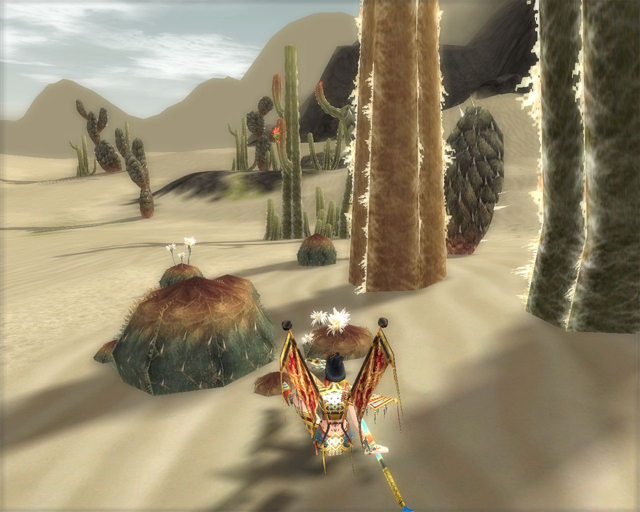
ok, 2nd attempt. source image:
Image

old sig:
Image

new sig is below. i think it is an improvement in just about every way. more flow, better effects, better source image, etc. thoughts?
Image
Thx IceCrash for my awesome sig :)
SRF Name Change Policy
Having trouble accessing SRF?

dom wrote:
RuYi wrote:Are you from outer space or something?
He's from Jersey. Close enough.

mmsicis
Active Member
Posts: 615
Joined: Tue Apr 03, 2007 7:04 am

Post by mmsicis »

OLD SIG is better, maybe more glows or effects but i dont like sig what you have bellow. Look at mine its clean! :P Your oldone is clean too but thatone what you have putted now, i dont like it sorry.
<<banned from SRF for bot admission. -SG>>

User avatar
CrimsonNuker
Dom's Slut
Posts: 13791
Joined: Sun Aug 06, 2006 3:31 am
Quick Reply: Yes
Location: guildwars2

Post by CrimsonNuker »

2nd one is MUCH better, you can actually see the shadows
ImageImageImage

User avatar
SuicideGrl
Retired Admin
Posts: 8004
Joined: Fri Jan 27, 2006 4:17 pm
Location: World of Warcraft

Post by SuicideGrl »

CrimsonNuker wrote:2nd one is MUCH better, you can actually see the shadows

i put all the gfx on high and shadows as detailed rather than circle. it was a HuGE help. then the first thing i did was overlay a white-to-black gradient at a down-left angle, so the white was in the top right and the black was in the bottom left, and WOW it made the shadows pop even more. i added a render in the upper right and set it to soft light as a further light source then smudged the edges. the rest was just some gradient mapping, hue/saturation overlays, and another render which gave me the wispy tendrils of fog/smoke/clouds.
Image
Thx IceCrash for my awesome sig :)
SRF Name Change Policy
Having trouble accessing SRF?

dom wrote:
RuYi wrote:Are you from outer space or something?
He's from Jersey. Close enough.

User avatar
Nimko
Regular Member
Posts: 303
Joined: Mon Jul 03, 2006 1:03 am
Quick Reply: Yes
Location: Oasis

Post by Nimko »

Thread hijacked
~~~~~~~~~~~~~~~~~~~~


I too just started using photoshop yesterday :)... Alot of the tut's here helped however suicidegrl some of these tut's Need to be stickyed!!! I would find one that helps, then go back to look and never find it again :( But i digress... Here is my magical creation of my dog :) Rendered and all that shiz myself ;)
Image
Yea yea i know its lame... stfu already >.>

User avatar
CrimsonNuker
Dom's Slut
Posts: 13791
Joined: Sun Aug 06, 2006 3:31 am
Quick Reply: Yes
Location: guildwars2

Post by CrimsonNuker »

SuicideGrl wrote:
CrimsonNuker wrote:2nd one is MUCH better, you can actually see the shadows

i put all the gfx on high and shadows as detailed rather than circle. it was a HuGE help. then the first thing i did was overlay a white-to-black gradient at a down-left angle, so the white was in the top right and the black was in the bottom left, and WOW it made the shadows pop even more. i added a render in the upper right and set it to soft light as a further light source then smudged the edges. the rest was just some gradient mapping, hue/saturation overlays, and another render which gave me the wispy tendrils of fog/smoke/clouds.


Lol my computer would crash and burn if i set it to maximum gfx.

Thread hijacked
~~~~~~~~~~~~~~~~~~~~


I too just started using photoshop yesterday ... Alot of the tut's here helped however suicidegrl some of these tut's Need to be stickyed!!! I would find one that helps, then go back to look and never find it again But i digress... Here is my magical creation of my dog Rendered and all that shiz myself


Thread NOT highjacked noob
ImageImageImage

User avatar
Quyxz
Advanced Member
Posts: 2364
Joined: Tue Apr 11, 2006 4:47 pm
Quick Reply: Yes
Location: The Netherlands

Post by Quyxz »

I'm going to make a tut on how you can add a pattern on your pic. That is also nice. I think I have it finished tonight. :)
A pattern could improve it.
One oldskool matherfacker
Image

User avatar
CrimsonNuker
Dom's Slut
Posts: 13791
Joined: Sun Aug 06, 2006 3:31 am
Quick Reply: Yes
Location: guildwars2

Post by CrimsonNuker »

noooo make a tut on your sig before ur superman one
ImageImageImage

User avatar
Draquish
Elite Member
Posts: 6423
Joined: Wed Mar 15, 2006 10:25 pm
Quick Reply: Yes
Location: ____

Post by Draquish »

I find your sig a tad blasé.

The light is taking up most of the sig. Plain, no real flow like stated before...If it was a horizontal pic of you, and the flower, and making the flower stick out more, and the right lighting...hmm.
Last edited by Draquish on Sun Apr 15, 2007 3:14 pm, edited 2 times in total.

User avatar
CrimsonNuker
Dom's Slut
Posts: 13791
Joined: Sun Aug 06, 2006 3:31 am
Quick Reply: Yes
Location: guildwars2

Post by CrimsonNuker »

draquish wrote:I find your sig kind of blasé.

The light is taking up most of the sig. Plain, no real flow like stated before...If it was a horizontal pic of you, and the flower, and making the flower stick out more, and the right lighting...hmm.


woops, yeah you need a focal point
ImageImageImage

User avatar
Quyxz
Advanced Member
Posts: 2364
Joined: Tue Apr 11, 2006 4:47 pm
Quick Reply: Yes
Location: The Netherlands

Post by Quyxz »

CrimsonNuker wrote:noooo make a tut on your sig before ur superman one

Well, ok. Maybe I'm also going to do that. :P
One oldskool matherfacker
Image

User avatar
Shimohime
Active Member
Posts: 788
Joined: Tue Feb 28, 2006 11:40 pm
Quick Reply: Yes
Location: Xian

Post by Shimohime »

=) C4d renders tend to be too harsh, too jagged.

Here's a c4d that I think is soft and blends nicely:

http://i87.photobucket.com/albums/k126/dokutenshi/5.png

and also a soft texture ^^:

http://i87.photobucket.com/albums/k126/ ... hi/027.jpg

Good luck!!! <3 Sui~
Lvl 5x- Ice Archer

Read my avatar tutorial here

User avatar
[SD]Kratos
Senior Member
Posts: 4785
Joined: Mon Apr 24, 2006 9:48 am
Quick Reply: Yes
Location: Venus

Post by [SD]Kratos »

Nice sui!

Just keep on reading tutorials, keep practicing and it can only go better

http://www.good-tutorials.com
Image

User avatar
SuicideGrl
Retired Admin
Posts: 8004
Joined: Fri Jan 27, 2006 4:17 pm
Location: World of Warcraft

Post by SuicideGrl »

ZOMG Shimo! i have been looking for some renders with white BGs.... all the ones i've been able to find have black ones and look shitty inverted. this will help immensely. <3


@draquish: ok, assumingi used the same stock for it, what could have been done differently?


and would SOMEONE PLEASE tell me what the hell a c4d is?? :P
Image
Thx IceCrash for my awesome sig :)
SRF Name Change Policy
Having trouble accessing SRF?

dom wrote:
RuYi wrote:Are you from outer space or something?
He's from Jersey. Close enough.

kycO.o
Common Member
Posts: 109
Joined: Mon May 08, 2006 7:18 am

Post by kycO.o »

C4D's are basically abstract designs, like what Shimohime posted in the first link, made in 3D designing program, usually Cinema 4D, hence, C4D :).

User avatar
Avalanche
Site Contributor
Posts: 3606
Joined: Mon Jan 30, 2006 4:08 am
Quick Reply: Yes
Location: guildwars2

Post by Avalanche »

When I saw the sig (second one I saw first), I said "Wow, nice sig."

Welcome to the artist corner, sui :p

User avatar
SuicideGrl
Retired Admin
Posts: 8004
Joined: Fri Jan 27, 2006 4:17 pm
Location: World of Warcraft

Post by SuicideGrl »

AvAlAnChE1 wrote:When I saw the sig (second one I saw first), I said "Wow, nice sig."

Welcome to the artist corner, sui :p

aww thx :)


<--- still learning lots.


and still waiting for a brushing tut...
Image
Thx IceCrash for my awesome sig :)
SRF Name Change Policy
Having trouble accessing SRF?

dom wrote:
RuYi wrote:Are you from outer space or something?
He's from Jersey. Close enough.

User avatar
Quyxz
Advanced Member
Posts: 2364
Joined: Tue Apr 11, 2006 4:47 pm
Quick Reply: Yes
Location: The Netherlands

Post by Quyxz »

SuicideGrl wrote:
AvAlAnChE1 wrote:When I saw the sig (second one I saw first), I said "Wow, nice sig."

Welcome to the artist corner, sui :p

aww thx :)


<--- still learning lots.


and still waiting for a brushing tut...

That is hard to make a tut for. Just click around. Maybe you should downlaod some old video tut bout brushing. That could help.
One oldskool matherfacker
Image

Snudge
Senior Member
Posts: 4200
Joined: Sun Jun 11, 2006 8:20 pm
Quick Reply: Yes
Location: Artist Corner
Contact:

Post by Snudge »

Quyxz wrote:
SuicideGrl wrote:
AvAlAnChE1 wrote:When I saw the sig (second one I saw first), I said "Wow, nice sig."

Welcome to the artist corner, sui :p

aww thx :)


<--- still learning lots.


and still waiting for a brushing tut...

That is hard to make a tut for. Just click around. Maybe you should downlaod some old video tut bout brushing. That could help.


IT'S ALIVE! *waves* Hi there, Quyxz. ^-^

Nice sigs though Sui, not bad at all ;3
<<banned from SRF for proof of botting. -SG>>

User avatar
hitokiri
Veteran Member
Posts: 3501
Joined: Fri Feb 17, 2006 5:27 pm
Location: here

Post by hitokiri »

As i said in that PM earlier, I really think its awesome. ESPECIALLY if you are new to this, its really amazing. Ill have to go look at the tutorials you mentioned. And thats the best way to use tutorials though, not copy them. but adopt some techniques into your own style of things. looking forward to your next one.

Image
[Stealth] / [Ninjitsu] / [Relentless] / Image [Scoundrels]
Troy / Pacific / Venus / Fembria / Salvation / Theta / Origin Online - Genesis

Post Reply

Return to “Artists Corner”