Basic Signature Tutorial (Made by Me)

Digital art design, renderings, signatures and anything art related. Upload pictures of your newest work or ask for feedback. Post graphics requests or discuss art in general.
User avatar
ThisIsChris
New Member
Posts: 44
Joined: Sun Sep 17, 2006 5:34 pm
Quick Reply: Yes
Location: Toledo, Ohio USA
Contact:

Basic Signature Tutorial (Made by Me)

Post by ThisIsChris »

First we need the basics.

1200+ Font Pack:
http://www.moviemakers.nu/?p=tutorial&id=38

Other Font Websites:
http://www.1001freefonts.com
http://www.dafont.com
http://www.acidfonts.com
http://www.simplythebest.net/fonts
http://www.1001fonts.com
http://www.fontfile.com

Renders:
http://files.filefront.com/Rendersrar/; ... einfo.html --- All of my renders.
http://www.clantemplates.com/renders/gallery/
http://www.gamerenders.com/forum/index. ... le=gallery
http://www.gfxgamers.net/gallery/index.php?cat=6
http://www.dilutedfx.com/index.php?s=fd ... owforum=47
http://www.gaming-memories.com/game-art.php
http://www.bungie.net/Games/Halo2/galle ... ers&page=1
http://perfectdark.3dactionplanet.gamespy.com/renders/
http://forums.fevergaming.com/archive/i ... f-344.html


Brushes:
http://veredgf.fredfarm.com/vbrush/main.html
http://www.echoica.net/
http://www.dubtastic.com/resources.php
http://www.angryblue.com/downloads.shtml
http://www.deviantart.com/
http://www.deviantart.com/deviation/14489074/
http://www.deviantart.com/deviation/14456696/
http://www.photoshopbrushes.com/


1. Open PhotoShop through a PhotoShop icon or .exe

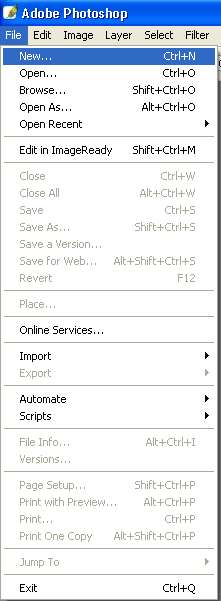
2. Hit File->New
Image

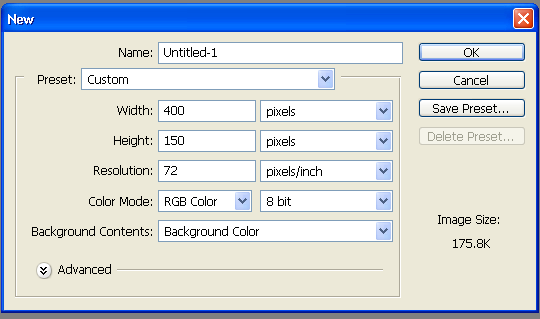
3. Apply these settings or 500x150 for signatures on this forum.
Image

4. Now Click your paintbrush icon.

Image

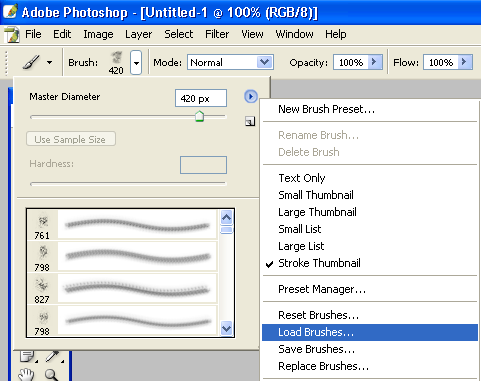
5. Now to upload those brushes you have just downloaded (brush part coming soon).
Image

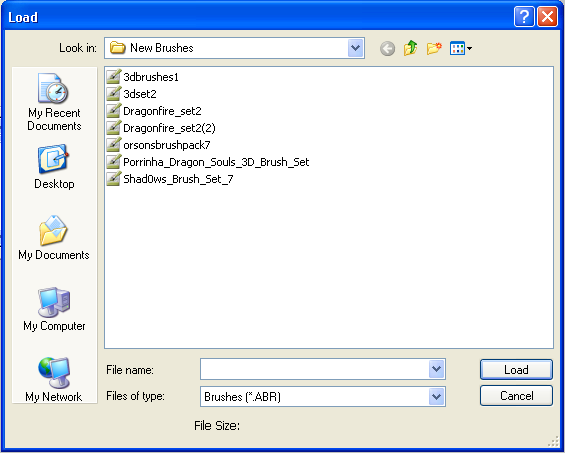
6. Here is the loading screen that pops up, you can only upload 1 set at a time a set can ave from 5-100 brushes.
Image

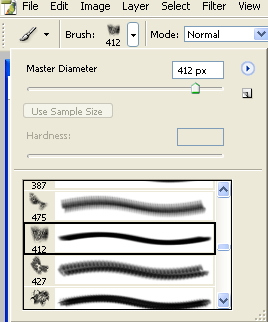
7. Then choose one of the brushes that we just downloaded.
Image

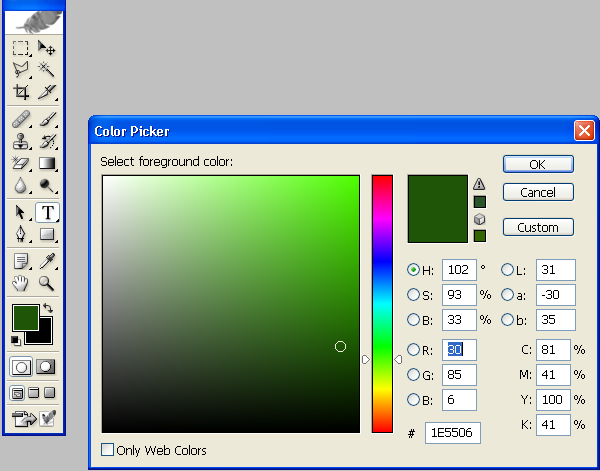
8. Now you must choose a color to brush with.

Image

9. Now brush a nice background with MANY different brushes (it makes it look better, i just made a 20 second brushing scheme just to show you).

Image

10. Now we must add a render (a picture that belind with the background).

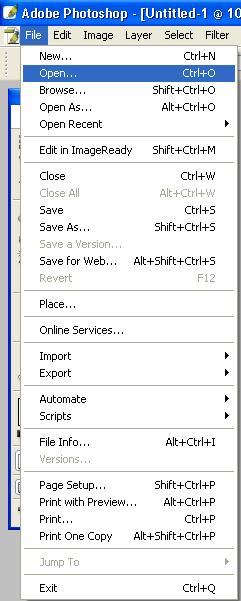
11. So we hit File->Open and open one of our previousley downloaded render packs and find a nice matching render.
Image

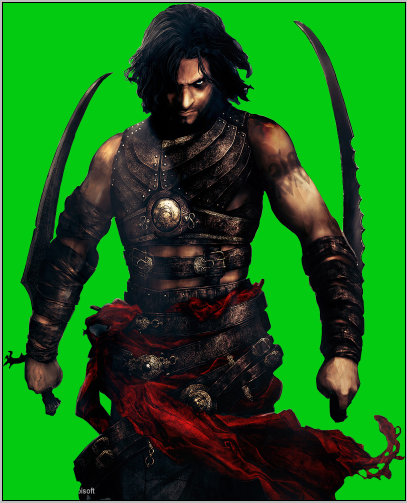
12. I chose this one.

Image

13. Now we must crop the image off of its background and copy it to the background we have just made, so we will need our magic wand tool.

Image

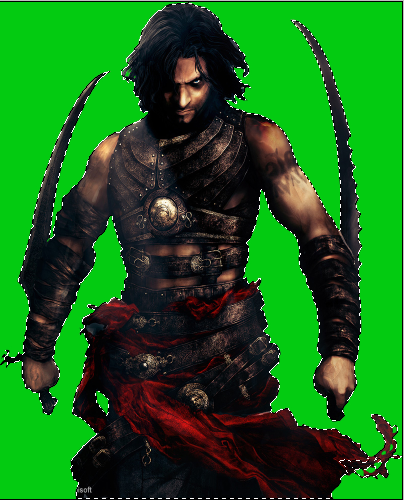
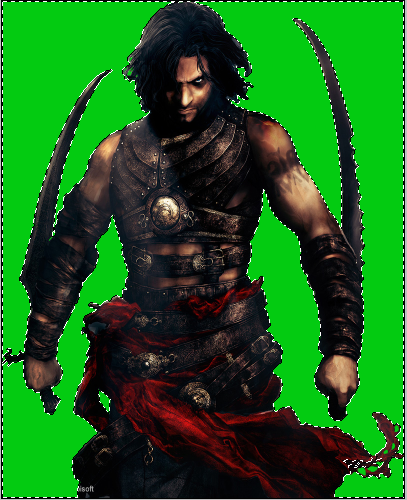
14. Now how Shift and Click around the edges of the render and when you have the whole render outlined it should look like this.
Image

15. Now we must select what you have just done so use these settings.
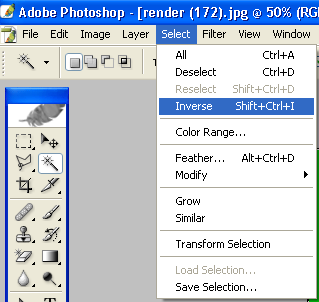
Image

16. Now it should look like this.

Image

17. Now hit Ctrl+C and copy it and then close the render document and hit Ctrl+V on the background we have made. And you your basic moving tool to move the image into the spot you would like it to be.
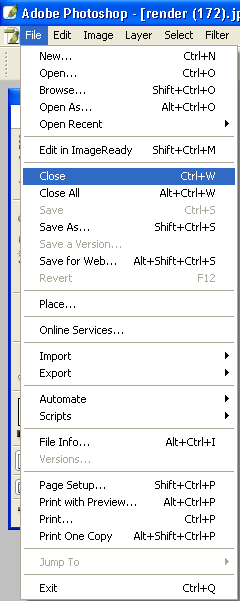
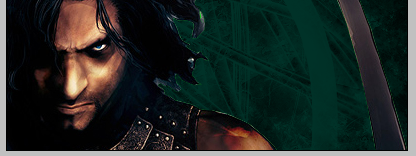
Image

Image

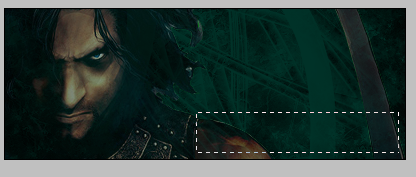
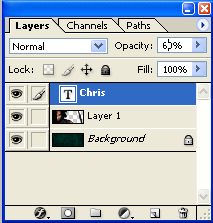
18. Now you may want to blend your render in (the easy way, for beginners). So you should mess with the opacity settings on the bottom right hand corner.
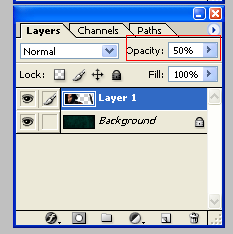
Image

19. Now we must add some text. First we need our text box tool.

Image

20. Now make a text box.

Image

21. Now find the size and font that you want to put in (try some of the ones we have previousley downloaded)

Image

22. Now write what you want select the text and choose a color that will match the background.
Image

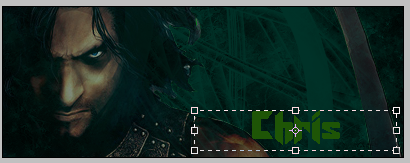
23. It should now look like this (for my name :P).

Image

24. Now again, you may want to blend it again, so you may use the basic opacity way.
Image

25. And move your text into the spot you want it, with the movement tool.

Image

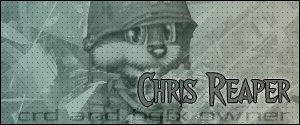
26. And here was my quick end result.

Image


Thank You,
Chris

Please post how yours comes out and also comment my tutorial and critique it.
Image

Image
Do you need a gam eserver, voice server, web hosting, or anything really internet gaming related? Check out Clan Base Live by clicking the image above!

User avatar
Priam
Forum Legend
Posts: 7885
Joined: Tue Jul 11, 2006 8:38 am
Quick Reply: Yes
Location: At the apple store, Cause i'm an iAddict.

Post by Priam »

Eeeeeeew Don’t you ever make that font green again!
Image

AoENuker
Valued Member
Posts: 376
Joined: Sat Oct 07, 2006 12:09 am
Quick Reply: Yes
Location: Xian
Contact:

Post by AoENuker »

its too dark, no light, no border, bad corloring, and i think the sig is way to big.
Image
Image
Image
Image

User avatar
Draquish
Elite Member
Posts: 6423
Joined: Wed Mar 15, 2006 10:25 pm
Quick Reply: Yes
Location: ____

Post by Draquish »

*thumbs down*


What is riddling me and puzzling me in my mind right now is that you actually wanted us to PAY for your work!

User avatar
Caras
Frequent Member
Posts: 1337
Joined: Fri Sep 01, 2006 3:15 am
Quick Reply: Yes
Location: Place to place.

Post by Caras »

Its not bad, good job Chris, But the green does does kill the entire sig. I would have used the darker color green that you used in the backround.

Kamoflage
Common Member
Posts: 133
Joined: Mon Jul 10, 2006 10:45 am
Quick Reply: Yes
Location: Oasis

Post by Kamoflage »

Are you serious only 3 layers. Even my most basic sigs have around 15 layers.
EDIT: Maybe I should comment on the sig
1) The brush look terrible
2) The text looks terrible (thats ok when I add text it ussualy looks terrible)
3) There seems to be a faint outline around the render
4) And ussualy sigs have 10 layers or more
Last edited by Kamoflage on Fri Oct 13, 2006 2:50 pm, edited 1 time in total.

User avatar
ThisIsChris
New Member
Posts: 44
Joined: Sun Sep 17, 2006 5:34 pm
Quick Reply: Yes
Location: Toledo, Ohio USA
Contact:

Post by ThisIsChris »

i know, it is to help peopel who have just bought or receuived photoshop, and get them started with brushes, text's, and renders. I will be creating a few others.
Image

Image
Do you need a gam eserver, voice server, web hosting, or anything really internet gaming related? Check out Clan Base Live by clicking the image above!

User avatar
Morgoth
Active Member
Posts: 854
Joined: Tue Feb 21, 2006 11:33 pm
Quick Reply: Yes
Location: Off Topic

Post by Morgoth »

thats a pretty nice tut. chris, although the result wasn't too good i think i will definitely be using this tut. :D
Image

User avatar
Blyth
Frequent Member
Posts: 1025
Joined: Fri Jul 21, 2006 10:01 pm
Quick Reply: Yes
Location: Off Topic

Post by Blyth »

A nice guide, but your sig's are :banghead:.

Are you serious only 3 layers. Even my most basic sigs have around 15 layers.

Crap lol, my last sig was made on 3 layers :banghead: but it looks fine, doesn't it? :? (points at his sig)

User avatar
Tatianasaphira
Active Member
Posts: 596
Joined: Fri May 12, 2006 1:12 pm
Quick Reply: Yes
Location: Oasis
Contact:

Post by Tatianasaphira »

Hell, this siggy below was 5, but the background originally was 4.

I guess what bothers me is that you seem to be two different people. This post is someone that 'believes' he knows something, and the other is a complete newbie to photoshop that is constantly asking others for help.

Especially since you are putting up some of the website I suggested as your own idea...just a thought
Image
ImageImage

User avatar
Reise
Forum Legend
Posts: 6650
Joined: Tue May 16, 2006 12:35 am
Location: Off Topic
Contact:

Post by Reise »

4) And ussualy sigs have 10 layers or more


Just want to point out that layers alone dont make a good sig. It all flattens out in the end anyway. As long as you get what you want on the thing you're good. It's possible to make really good looking pics with 3 or less.
Image

User avatar
Morgoth
Active Member
Posts: 854
Joined: Tue Feb 21, 2006 11:33 pm
Quick Reply: Yes
Location: Off Topic

Post by Morgoth »

ill be waiting for your next tut. on sig making :D
Image

User avatar
Caras
Frequent Member
Posts: 1337
Joined: Fri Sep 01, 2006 3:15 am
Quick Reply: Yes
Location: Place to place.

Post by Caras »

Most my sigs are 10-20 layers.

Snudge
Senior Member
Posts: 4200
Joined: Sun Jun 11, 2006 8:20 pm
Quick Reply: Yes
Location: Artist Corner
Contact:

Post by Snudge »

How do you guys manage to get that many layers?!
Mine are mostly 5-6.
Do you put every single object in e new layer orso? :S
<<banned from SRF for proof of botting. -SG>>

User avatar
Tatianasaphira
Active Member
Posts: 596
Joined: Fri May 12, 2006 1:12 pm
Quick Reply: Yes
Location: Oasis
Contact:

Post by Tatianasaphira »

Snudge wrote:How do you guys manage to get that many layers?!
Mine are mostly 5-6.
Do you put every single object in e new layer orso? :S


Some do. When I make skins for Ragnarok, I end up with nearly 100 layers for each skin. Depending on my complexity of the siggy, usually I have about 7-8 layers. If I had not cut out the background of my siggie I would have had about 10 layers instead of the 4
Image
ImageImage

User avatar
Priam
Forum Legend
Posts: 7885
Joined: Tue Jul 11, 2006 8:38 am
Quick Reply: Yes
Location: At the apple store, Cause i'm an iAddict.

Post by Priam »

All depends.. brushing can be done in 2 or 3 layers also.. using more layers just makes things a lot easier.
Image

User avatar
Caras
Frequent Member
Posts: 1337
Joined: Fri Sep 01, 2006 3:15 am
Quick Reply: Yes
Location: Place to place.

Post by Caras »

Snudge wrote:How do you guys manage to get that many layers?!
Mine are mostly 5-6.
Do you put every single object in e new layer orso? :S


I add alot of things to it, some c4d, alot of color overlays to get the perfect colors, and alot more stuff.

User avatar
RuYi
Ex-Staff
Posts: 7145
Joined: Tue Apr 25, 2006 7:39 am
Location: Done.

Post by RuYi »

I use about 10-15 layers, depends though. :)

About the tut:
I think it can be helpful for the people who just start working in Photoshop, so 3 layers to start with seems fine to me.

Nice avatar btw, made me lol :D
Image

User avatar
dom
Global Moderator
Global Moderator
Posts: 9962
Joined: Wed Mar 08, 2006 10:46 pm
Quick Reply: Yes
Location: västkustskt

Post by dom »

Tutorial: how to make a trend whore signature.

Funny part about this thread, most people complaining about the tutorial make theirs in the exact same way. Except for the fact that they use more whore tools.
Image

Snudge
Senior Member
Posts: 4200
Joined: Sun Jun 11, 2006 8:20 pm
Quick Reply: Yes
Location: Artist Corner
Contact:

Post by Snudge »

AAARGH! Sorry, I just am going to ask it here. Anyone got/able to create a tutorial on how to work with C4D renders? I looked on google but I only got with stuff on how to create a C4D render, and I want to work with them in PS. :banghead:
<<banned from SRF for proof of botting. -SG>>

User avatar
[SD]Master_Wong
Forum God
Posts: 9509
Joined: Wed Jan 04, 2006 8:02 pm
Quick Reply: Yes
Location: Plymouth, University

Post by [SD]Master_Wong »

my sig is only 3 layers and it to be honest shite lol butt...i dont use paintshop nor photoshop much soo....

now animations i can do haha
MaStEr
Image
credits zelzin ^^

User avatar
ThisIsChris
New Member
Posts: 44
Joined: Sun Sep 17, 2006 5:34 pm
Quick Reply: Yes
Location: Toledo, Ohio USA
Contact:

Post by ThisIsChris »

thanks for the input everyone, ill come out with a better tutorial here in the next month, if you liked this you can join my graphics community, http://www.mooseweb.net/graphics and see all of my new works, you can make show rooms and do whatever.
Image

Image
Do you need a gam eserver, voice server, web hosting, or anything really internet gaming related? Check out Clan Base Live by clicking the image above!

AoENuker
Valued Member
Posts: 376
Joined: Sat Oct 07, 2006 12:09 am
Quick Reply: Yes
Location: Xian
Contact:

Post by AoENuker »

This should be in the guide section... i dunno any1 else thinks same?
Image
Image
Image
Image

User avatar
Miyoko
Regular Member
Posts: 267
Joined: Fri Sep 15, 2006 11:46 am
Quick Reply: Yes
Location: Venice

Post by Miyoko »

Well.. he said it was a basic tutorial, atleast he didn't say it was premium this time.
He did try to help people.
Some people might find it useful ..
So a long story short, unless you are willing to make a whole tutorial just to help other people. Shut up.

Btw my last few signatures all end up having 35-45 layers. >.>
Image
Image
Mizuko: lvl 52 | Proud leader of: "Domination"

User avatar
ThisIsChris
New Member
Posts: 44
Joined: Sun Sep 17, 2006 5:34 pm
Quick Reply: Yes
Location: Toledo, Ohio USA
Contact:

Post by ThisIsChris »

is there anyone who can make this a sticky?
Image

Image
Do you need a gam eserver, voice server, web hosting, or anything really internet gaming related? Check out Clan Base Live by clicking the image above!

User avatar
Key-J
Retired Admin
Posts: 8237
Joined: Fri Jun 23, 2006 2:21 pm
Location: BF3 waiting for BF4
Contact:

Post by Key-J »

Ryoko is searching for a new MOD for this section.. So just have patience n dont worry your work wont go unoticed.. I personally found this quite insightfull GG!
Image

ElCapuccino
Frequent Member
Posts: 1122
Joined: Tue Sep 12, 2006 4:04 pm

Post by ElCapuccino »

well, i don't care what others say...
this helped me a lot! :D
I just started making sigs, and I need to thx this topic.
thx again xD.
<<banned from SRF got bot admission and illegal activities. -SG>>

User avatar
Scarletrouge
Hi, I'm New Here
Posts: 12
Joined: Tue Jun 06, 2006 2:59 pm
Quick Reply: Yes
Location: California, United States

Post by Scarletrouge »

wow, looking at everyone's siggy art, i relized that there's so many talented ppl. ^_^ so cool.
Image
Scar, Hiyo (Flogs the Whip xD)
Now Scarletfever

User avatar
Quyxz
Advanced Member
Posts: 2364
Joined: Tue Apr 11, 2006 4:47 pm
Quick Reply: Yes
Location: The Netherlands

Post by Quyxz »

When I was a beginner I always used brush from this exact link.

These days I'm not using brushes anymroe, because I think it's a bit lame to stamp backgrounds from other people in your sig. Then I don't feel that I made the sig.
But for beginners it is a nice way to learn some basics bout coloring and adjustment layers. :)
One oldskool matherfacker
Image

User avatar
Scarletrouge
Hi, I'm New Here
Posts: 12
Joined: Tue Jun 06, 2006 2:59 pm
Quick Reply: Yes
Location: California, United States

Post by Scarletrouge »

what if it is a whole artwork? depend's on the artist to include or make a new bg image right?
Image
Scar, Hiyo (Flogs the Whip xD)
Now Scarletfever

Post Reply

Return to “Artists Corner”