making an account in ROHANfirst you need to install Opera (the international version 6.3M)
http://www.opera.com/download/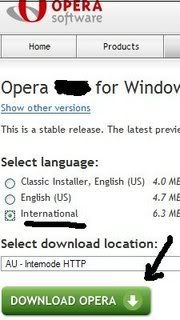
(basically hit enter as you go through the installing process)
open Opera
select Japanese
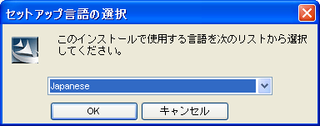
Note: when you go and in out of opera you'll get this.
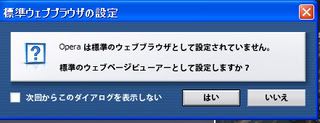
this is asking you if want it default or not
I don't want it default, so I hit the far right button
if you want it default! tick the box to the left and hit the first button (middle)
hit this button if no page shows up

Copy and paste this address in Opera.
http://www.rohan.jp you'll get a view similar to this.

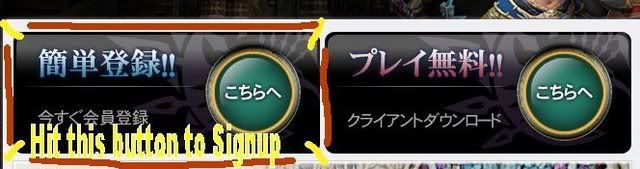
type after that your email adress :
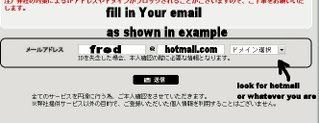
Go to EMAIL
Click Link set inside Rohan Japan email or copy and paste it into Opera.
Once loaded scroll down the page:
-Tick box and place Japanese writings
-first row your name in Hiragana alphabet
http://en.wikipedia.org/wiki/Hiragana-second row your name in Katakana alphabet
http://en.wikipedia.org/wiki/Katakana(just grab and copy random symbols from here)
or faster you can copy/paste my names example:
2ndname: け 1stname: け
2ndname: ケ 1stname: ケ
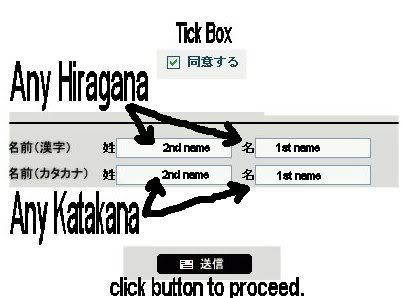
enter account details after that.
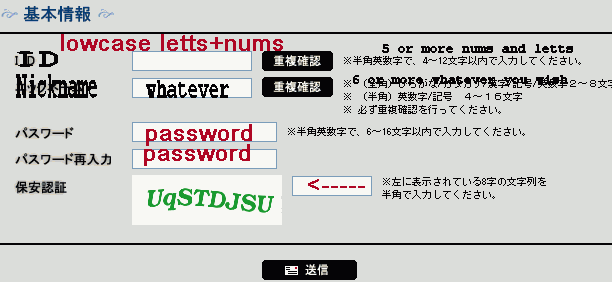
As follows,
Id name = 2 numbers and letters in lowercase
nick = whatever you want
use black buttons to verify
Password
Password again
to the right side, Type in the left Picture, as seen.
Bottom Black button ,
hit it when done!
click this button to conclude
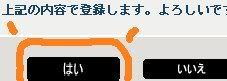
--PIECE OF CAKE

-