[Guide] How to display Chinese and use IME (Windows XP)

Discussion portal for kSRO, jSRO, vSRO, cSRO, and all other SRO versions.
User avatar
InsertName
Advanced Member
Posts: 2188
Joined: Sat Feb 03, 2007 3:47 pm
Quick Reply: Yes
Location: Canada

[Guide] How to display Chinese and use IME (Windows XP)

Post by InsertName »

This is a revised version of my previous guide with more clarifications and better grammer :wink: .
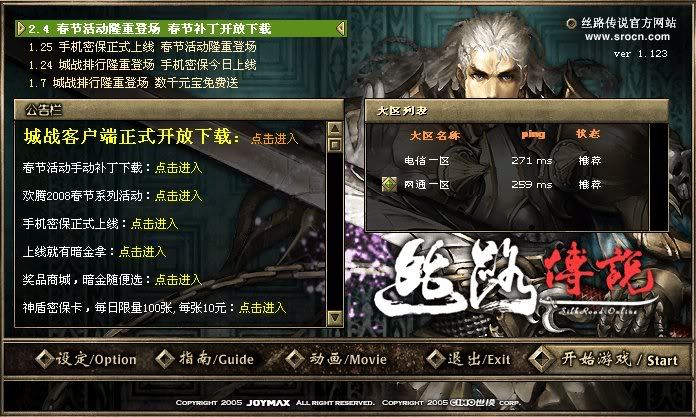
This is what it appears before without any modifications:
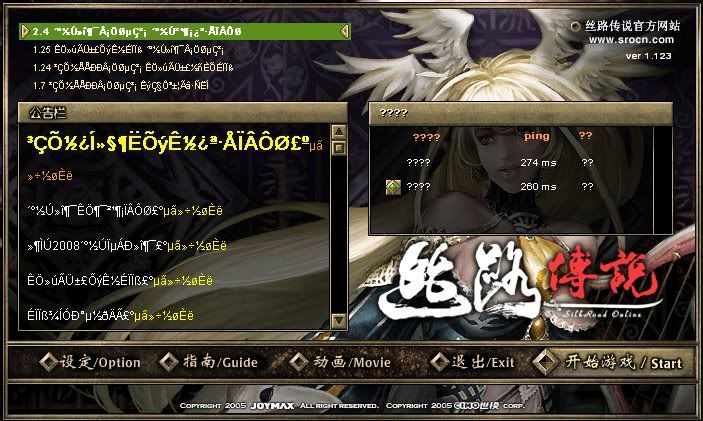
Image

Step 1.
Go here and search for the Chinese Language Pack or East Asian Language Pack. (I will not be posting the exact link because Microsoft links include my FamilyID)

Make sure you have a legit version of Microsoft XP. (a $5.00 boot-leg won't work :P )

Step 2.
-Part 1. Go to your Control Panel
-Part 2. Go to Regional and Language Options
-Part 3. Click on Advanced
-Part 4. Select your language for Non-Unicode Programs to Chinese (PRC)
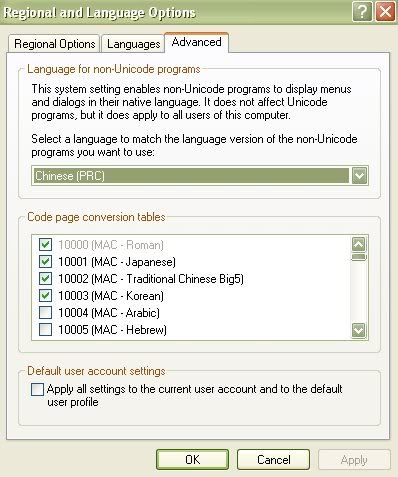
Image

Step 3.
-Part 1. Go to your Control Panel
-Part 2. Go to Regional and Language Options
-Part 3. Go to Languages
-Part 4. Click on Details
-Part 5. Click on Advanced
-Part 6. Check Extend Support of Advanced Text to All Programs(Important-a lot of people forget this step)
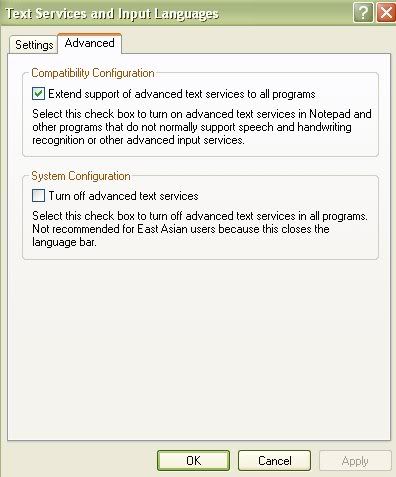
Image


If you done everything correctly, your display for cSRO should be all in Chinese :D
Image

Final Notes
Changing your language for Non-Unicode Programs to Chinese (PRC) will make some programs not work because your computer will assume it's in China and programs such as NavyField or Cabal will not work due to location restrictions.

--------------------------------------------------------------------------------------------
[Optional] How to use your IME (Read this if you KNOW Chinese)
-Part 1. Go to your Control Panel
-Part 2. Go to Regional and Language Options
-Part 3. Go to Languages
-Part 4. Click on Details
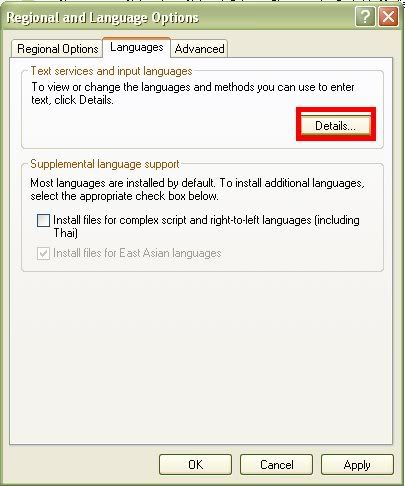
Image
-Part 5. Go to Settings
-Part 6. Click on Add
Image
-Part 7. Select Chinese (PRC) as your Input Language
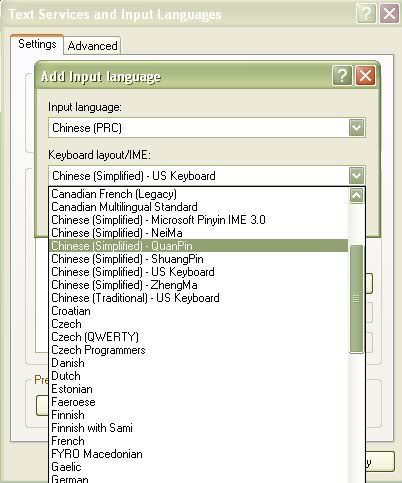
Image
-Part 8. Select whatever IME you use (I use QuanPin because it gives more choices to the pinyin you input)
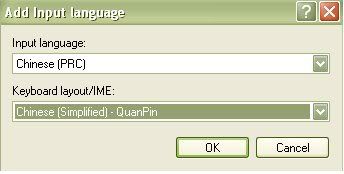
Image
-Part 9. Click Ok
-Part 10. Click Apply
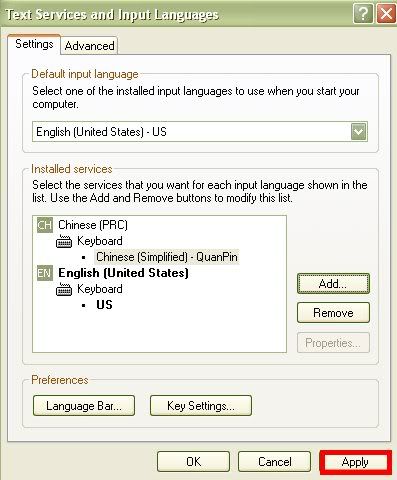
Image
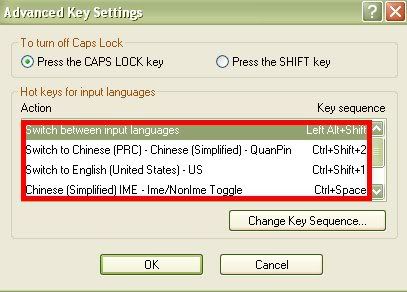
-Part 11. Click on Key Settings and choose your preferred keys to press to switch between languages. This is my preference, your's can be different
Image
-Part 12. Simply begin typing ingame. Use your key settings and your IME should appear. Type in the pinyin and the possible Chinese characters with the pinyin should be avaiable. They are numbered 1-9+0 and to go to the next page (if any) press [+/=] to go to the next page or [_/-] to go to the previous page.

--------------------------------------------------------------------------------------------
Basic Chinese Terms
wo 我=Myself
ni 你=Yourself
ni men 你们=Yourselves
ta 他/她=Him/Herself
ni hao 你好=Hello/Hi
zai jian 再见=Good bye [saying 88 for short]
jiu 救=Help Me (Emergency/Life threatening help/ Res (not normal "help me with my homework")) [saying 99999 for short]
dai 带=(Most of the time ingame)Powerlevel
bing 冰=Ice (Sonars/Penons)
wan 万=10k [saying W/w for short]
zu dui 组队=Party [saying zzzzz or +++++]

Last edited by InsertName on Sat May 24, 2008 1:27 am, edited 17 times in total.
Image

Master_Mind
Loyal Member
Posts: 1591
Joined: Wed May 23, 2007 8:07 am
Quick Reply: Yes
Location: Norway
Contact:

Re: [Guide] How to display your text in Chinese

Post by Master_Mind »

That only works for xp... Not vista -.- And there is a checkbox for auto doing that btw.. :P
<<Banned For Rules Violation>> - Key-J

User avatar
InsertName
Advanced Member
Posts: 2188
Joined: Sat Feb 03, 2007 3:47 pm
Quick Reply: Yes
Location: Canada

Re: [Guide] How to display your text in Chinese

Post by InsertName »

i still prefer xp than vista :P my firewall and other usefull programs isnt compatable with vista and i dont want to buy vista and new programs
Image

User avatar
Deadsolid
Loyal Member
Posts: 1789
Joined: Sun Dec 02, 2007 8:45 pm
Quick Reply: Yes
Location: Artist Corner
Contact:

Re: [Guide] How to display your text in Chinese

Post by Deadsolid »

Sticky!!! or in guide section...
Image

User avatar
Midnite91
Casual Member
Posts: 86
Joined: Fri Jan 04, 2008 6:09 am
Quick Reply: Yes
Location: west coast, cali

Re: [Guide] How to display your text in Chinese

Post by Midnite91 »

actually i does work on vista, i did it today, i have vista premium 32-bit.
O O
( ) ( ) <---- you girls are gonna get a lot of action, if theres a tsunami and all the attractive girls die...

User avatar
darkmaster21
Ex-Staff
Posts: 2156
Joined: Sun Jul 15, 2007 3:11 am
Quick Reply: Yes
Location: Off Topic

Post by darkmaster21 »

Nice guide InsertName, stickied it :)
Image

cSRO / Division 2 / Pure STR Bow / Lv 65

User avatar
user
Veteran Member
Posts: 3053
Joined: Sun Dec 03, 2006 11:28 pm
Quick Reply: Yes
Location: A place far far away

Re: [Guide] How to display your text in Chinese

Post by user »

Master_Mind wrote:That only works for xp... Not vista -.- And there is a checkbox for auto doing that btw.. :P

can you even run SRO on vista?

User avatar
Midnite91
Casual Member
Posts: 86
Joined: Fri Jan 04, 2008 6:09 am
Quick Reply: Yes
Location: west coast, cali

Re: [Guide] How to display your text in Chinese

Post by Midnite91 »

user wrote:
Master_Mind wrote:That only works for xp... Not vista -.- And there is a checkbox for auto doing that btw.. :P

can you even run SRO on vista?

running it right now :P
O O
( ) ( ) <---- you girls are gonna get a lot of action, if theres a tsunami and all the attractive girls die...

User avatar
Midnite91
Casual Member
Posts: 86
Joined: Fri Jan 04, 2008 6:09 am
Quick Reply: Yes
Location: west coast, cali

Re: [Guide] How to display your text in Chinese

Post by Midnite91 »

also, i dont really see a reason why we need it to be chinese...
i just want to figure out a way to like translate the text people type, i have a program where i can translate my english to chinese but i want it to be vise versa so i can see and interact with people@!
O O
( ) ( ) <---- you girls are gonna get a lot of action, if theres a tsunami and all the attractive girls die...

User avatar
user
Veteran Member
Posts: 3053
Joined: Sun Dec 03, 2006 11:28 pm
Quick Reply: Yes
Location: A place far far away

Re: [Guide] How to display your text in Chinese

Post by user »

Midnite91 wrote:
user wrote:
Master_Mind wrote:That only works for xp... Not vista -.- And there is a checkbox for auto doing that btw.. :P

can you even run SRO on vista?

running it right now :P

hm, my friend couldn't get sro to run on his vista

if from wat i understand, sro needs directx 9 but vista only has directx 10

User avatar
Midnite91
Casual Member
Posts: 86
Joined: Fri Jan 04, 2008 6:09 am
Quick Reply: Yes
Location: west coast, cali

Re: [Guide] How to display your text in Chinese

Post by Midnite91 »

wth? iuno but ur friends comp is stupid... i am running this crappy toshiba windows vista home premium
O O
( ) ( ) <---- you girls are gonna get a lot of action, if theres a tsunami and all the attractive girls die...

User avatar
BloodyBlade
Elite Member
Posts: 5219
Joined: Wed Nov 14, 2007 8:32 pm
Quick Reply: Yes
Location: Attending your mothers sexual needs :)

Re: [Guide] How to display your text in Chinese

Post by BloodyBlade »

Omg!
I did everything, except the last thing :D

Thats why it didnt work out :)

Thnx!


Offcourse you can play directX9 games on vista -.-
Vista misses only one file thats needed for directX9, download it, put it in your system32folder, and there ya go.


Btw, midnite,
How did you do it?
Cant find it on here..
My sig died

User avatar
user
Veteran Member
Posts: 3053
Joined: Sun Dec 03, 2006 11:28 pm
Quick Reply: Yes
Location: A place far far away

Re: [Guide] How to display your text in Chinese

Post by user »

BloodyBlade wrote:Offcourse you can play directX9 games on vista -.-
Vista misses only one file thats needed for directX9, download it, put it in your system32folder, and there ya go.

can you elaborate on "only one file thats needed for directX9"?

download link to that file is nice

User avatar
BloodyBlade
Elite Member
Posts: 5219
Joined: Wed Nov 14, 2007 8:32 pm
Quick Reply: Yes
Location: Attending your mothers sexual needs :)

Re: [Guide] How to display your text in Chinese

Post by BloodyBlade »

user wrote:
BloodyBlade wrote:Offcourse you can play directX9 games on vista -.-
Vista misses only one file thats needed for directX9, download it, put it in your system32folder, and there ya go.

can you elaborate on "only one file thats needed for directX9"?

download link to that file is nice

Yes, but it's easier for him to it himself.
I dont even know how the file is named, but when you try to launch a directX9 game on Vista, you get an error. It says you're missing a file, google for the file, and you get like 100 sites where you can download the file. Choose wisely wich site you think its the safest( I could do that too, but like I said, forgot the file name -.-).
Its pretty easy actually, google it, and you get a lot of help ;)

EDIT:
Forgot the text above, I searched my system32 folder, and found the file.
Here you can download it;
http://www.dll-files.com/dllindex/dll-f ... l?d3dx9_29

This site is 100% safe, I downloaded it from there too, and it works fine(Im playing directX9 games since Vista came out or so :p).
You're lucky, a readme is even included.
But for more information;
You need a program called WinZIP, or WinRAR to open it.
Then you click the file, and select extract when you've opened the file with WinRAR/WinZIP.
Then you can browse trough your folders, and you go to your HD where you've installed Windows Vista.Then you double click on 'Windows',and after that you search the folder 'System32'.
You extract the file to this location, then you can play DirectX9 games on Vista.

This worked on my computer, maybe it doesnt work there, because it maybe needs another file.
In that case, google the error, or ask your question here.
Good luck!
My sig died

User avatar
user
Veteran Member
Posts: 3053
Joined: Sun Dec 03, 2006 11:28 pm
Quick Reply: Yes
Location: A place far far away

Re: [Guide] How to display your text in Chinese (Windows XP)

Post by user »

well, thanks for your reply; i forwarded you msg to my friend, no replies from him yet

User avatar
InsertName
Advanced Member
Posts: 2188
Joined: Sat Feb 03, 2007 3:47 pm
Quick Reply: Yes
Location: Canada

Re: [Guide] How to display Chinese and use IME (Windows XP)

Post by InsertName »

bump i added more details of how to use IME by AutumnLeaves' request
Image

User avatar
AutumnLeaves
Active Member
Posts: 563
Joined: Mon Jan 21, 2008 1:31 am
Quick Reply: Yes
Location: TEXAS!!!

Re: [Guide] How to display Chinese and use IME (Windows XP)

Post by AutumnLeaves »

Great job insert, 10x more than I was requesting/expecting. I'll try it out tomorrow, hopefully I can score some free plvl with it.

User avatar
InsertName
Advanced Member
Posts: 2188
Joined: Sat Feb 03, 2007 3:47 pm
Quick Reply: Yes
Location: Canada

Re: [Guide] How to display Chinese and use IME (Windows XP)

Post by InsertName »

lol not likely :P
Image

User avatar
AutumnLeaves
Active Member
Posts: 563
Joined: Mon Jan 21, 2008 1:31 am
Quick Reply: Yes
Location: TEXAS!!!

Re: [Guide] How to display Chinese and use IME (Windows XP)

Post by AutumnLeaves »

I tried to use it. Its ALOT more complicated than I thought. I was expecting the little keyboard to show what a Chinese region keyboard would. Then you just click on the symbols.

User avatar
InsertName
Advanced Member
Posts: 2188
Joined: Sat Feb 03, 2007 3:47 pm
Quick Reply: Yes
Location: Canada

Re: [Guide] How to display Chinese and use IME (Windows XP)

Post by InsertName »

lol chinese got more than 5k characters and 47 letters in the alphabet

edit: lol xfire got hacked :x atm maybe it'll be fixed later :P
Image

User avatar
BloodyBlade
Elite Member
Posts: 5219
Joined: Wed Nov 14, 2007 8:32 pm
Quick Reply: Yes
Location: Attending your mothers sexual needs :)

Re: [Guide] How to display Chinese and use IME (Windows XP)

Post by BloodyBlade »

So when I need someone to ress me I just keep spamming 'jiu'?
My sig died

Airdack
Common Member
Posts: 136
Joined: Wed Feb 20, 2008 7:37 am
Quick Reply: Yes
Location: Finland

Re: [Guide] How to display Chinese and use IME (Windows XP)

Post by Airdack »

No ... you should type 99999, you can see Chinese do it all the time ... but please dont spam it ;)
<<banned from SRF for bot admission. -SG>>

User avatar
BloodyBlade
Elite Member
Posts: 5219
Joined: Wed Nov 14, 2007 8:32 pm
Quick Reply: Yes
Location: Attending your mothers sexual needs :)

Re: [Guide] How to display Chinese and use IME (Windows XP)

Post by BloodyBlade »

Airdack wrote:No ... you should type 99999, you can see Chinese do it all the time ... but please dont spam it ;)

Yes, that was just an example..

Another example, when I want to party, do I need to sai 'zu dui'? Or the chinese signs?
My sig died

User avatar
InsertName
Advanced Member
Posts: 2188
Joined: Sat Feb 03, 2007 3:47 pm
Quick Reply: Yes
Location: Canada

Re: [Guide] How to display Chinese and use IME (Windows XP)

Post by InsertName »

BloodyBlade wrote:
Airdack wrote:No ... you should type 99999, you can see Chinese do it all the time ... but please dont spam it ;)

Yes, that was just an example..

Another example, when I want to party, do I need to sai 'zu dui'? Or the chinese signs?


oops forgot to add party for short is zzzzz

or +++++ for some reason :?
Image

User avatar
BloodyBlade
Elite Member
Posts: 5219
Joined: Wed Nov 14, 2007 8:32 pm
Quick Reply: Yes
Location: Attending your mothers sexual needs :)

Re: [Guide] How to display Chinese and use IME (Windows XP)

Post by BloodyBlade »

InsertName wrote:
BloodyBlade wrote:
Airdack wrote:No ... you should type 99999, you can see Chinese do it all the time ... but please dont spam it ;)

Yes, that was just an example..

Another example, when I want to party, do I need to sai 'zu dui'? Or the chinese signs?


oops forgot to add party for short is zzzzz

or +++++ for some reason :?


+++ is more used for powerleveling I guess.
My sig died

User avatar
Swindler
Forum God
Posts: 11256
Joined: Tue Apr 10, 2007 7:49 am
Quick Reply: Yes
Location: Pimpas Paradise.

Re: [Guide] How to display Chinese and use IME (Windows XP)

Post by Swindler »

looks like a nice guide :) gonna try it out next week.. Ty! ;)

User avatar
Extrme_G
Active Member
Posts: 748
Joined: Tue Oct 16, 2007 2:38 pm
Quick Reply: Yes
Location: Aege

Re: [Guide] How to display Chinese and use IME (Windows XP)

Post by Extrme_G »

i cant find chinese languae pack :banghead: , anyone can give me a link? please :D

User avatar
Extrme_G
Active Member
Posts: 748
Joined: Tue Oct 16, 2007 2:38 pm
Quick Reply: Yes
Location: Aege

Re: [Guide] How to display Chinese and use IME (Windows XP)

Post by Extrme_G »

i found good site http://www.nciku.com/?gclid=CLHJjJDGm5MCFQUMuwodwi8Ptg its very easy to use it and to translate simple words

User avatar
benkowski
Hi, I'm New Here
Posts: 2
Joined: Thu Aug 13, 2009 1:10 am
Quick Reply: Yes
Location: usa

Re: [Guide] How to display Chinese and use IME (Windows XP)

Post by benkowski »

i cant find the language pack either :[ i need help

User avatar
iztupido
Advanced Member
Posts: 2081
Joined: Mon Mar 24, 2008 10:55 pm
Quick Reply: Yes
Location: somewhere around here

Re: [Guide] How to display Chinese and use IME (Windows XP)

Post by iztupido »

benkowski wrote:i cant find the language pack either :[ i need help


nice way to bump this 1 y-o thread, go on microsoft site and dl it, or install it from ur XP cd
Locar @ ecsro/fembria lvl 90/70
(got bored of sro, letting my chars rest for a long long long time)

I dare you to beat my brute!! http://malucodocrl.mybrute.com

Locar_ @ Azteca lvl 76 wiz (hope ur happy tasdik)

Post Reply

Return to “Other SRO versions”