[GUIDE] How to Modify a .DDJ ( PICS INCLUDED )

Here you can post guides and tutorials you have written for Silkroad Online. If submitting a guide from another forum, please post credit to the author.
Post Reply
User avatar
Babo
New Member
Posts: 29
Joined: Mon Jun 04, 2007 8:51 pm
Quick Reply: Yes
Location: Odin

[GUIDE] How to Modify a .DDJ ( PICS INCLUDED )

Post by Babo »

Lesson 1 : .DDJ Modification's

First of all , The files needed to do this kind of Modifications wont be posted unless the Mod's/Staff tell's me I can do so.


Step 1 :

Download PK2 Extractor if you havent so.

http://www.2shared.com/file/2665179/e5e ... orrar.html

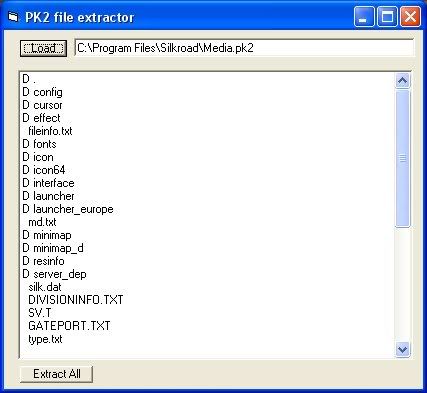
Step 2 : Open it up , click on (FILE) and look for your Media.pk2 , once you found it open it , and it should look like this at the end.
Image

Step 3 : Lets look for a .DDJ file , go to Interface/underbar/ub_window_01.ddj ( Extract it to somewhere )

Step 4 : Lets use a DDJ Viewer to view what's hidden inside this .DDJ. With this DDJ Viewer once you view the .DDJ a Data folder will automatically be generated with a .DDS and .BMP of the picture.

Download DDJ VIEWER: ( Once staff/mod approves of me adding the download link I will put it on here )

Step 5 : Next go to the Data folder and get the bmp , open it up and you will get something like this.

Image

^--- its small but you must click it to see it good

Step 6 : You may edit that BMP as many way as you want.

!!!IMPORTANT NEWS!!!!

/ Do not change the size of the BMP , try to keep it as the same size as possible to make this more successfull


Step 7 : After you are done , save the modify BMP to the same BMP inside the data folder , which the name is ub_window_01.bmp

Step 8 : We need to transfer this BMP to a DDS. What I use to do this is Paint.NET.

Download Paint.NET : ( Once staff/mod approves of me adding the download link I will put it on here )

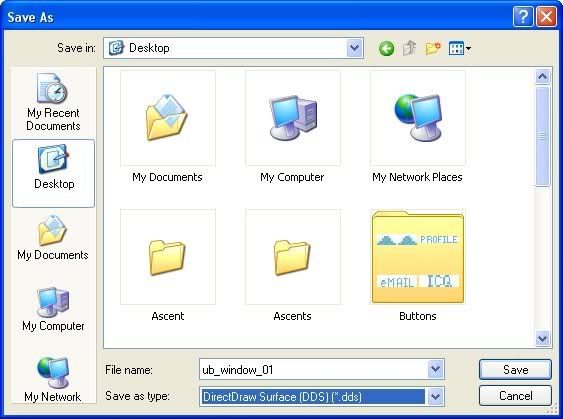
Step 9 : Open up the BMP with Paint.NET , and than go to files / save as /

/ Do this simple step's to get a good .DDS

File Name : ub_window_01
Save as Type : DriectDraw Surface (DDS) (*.dds)
Image

Step 10 : Once you save it will be a ub_windows_01.dds

Step 11 : Now its time to put it inside the Media.PK2

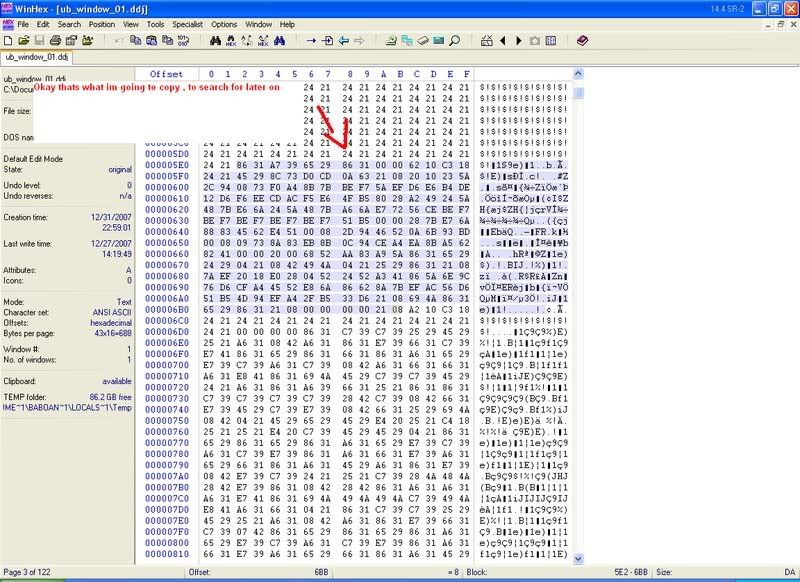
Step 12 : Now lets open up the original .DDJ you extracted from the Media.PK2 which is ub_window_01.ddj , with an HexEditor ( I will use WinHex )

Step 13 : Copy some hex values from the .DDJ
Image

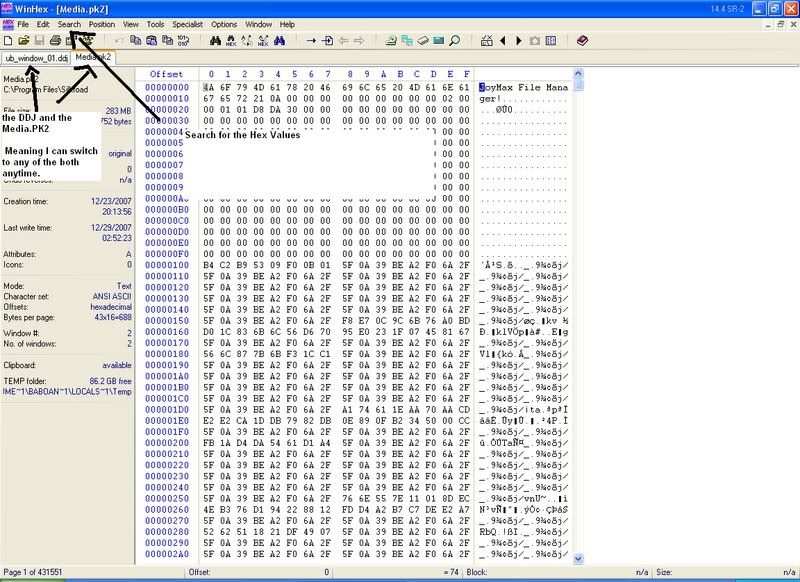
Step : 14 : Now open up the Media.PK2 with an Hex Editor. ( Search for the Hex Values you Copied )
Image


Step 15 : Now once you find the ddj inside the Media.PK2 , now scroll a bit under and you will find a DDS <--- thats where we will inser the ub_window_01.dds you created by the modified BMP.

( You dont really need to convert back to a DDJ , It is not needed as it is only a header of Joymax )

Step 16 : Now open the ub_window_01.dds you created by the modified DDJ , and paste the whole entire file in the DDS you found in the Media.PK2 by searching for the DDJ.

Step 17 : Save and Close ( Restart the game )

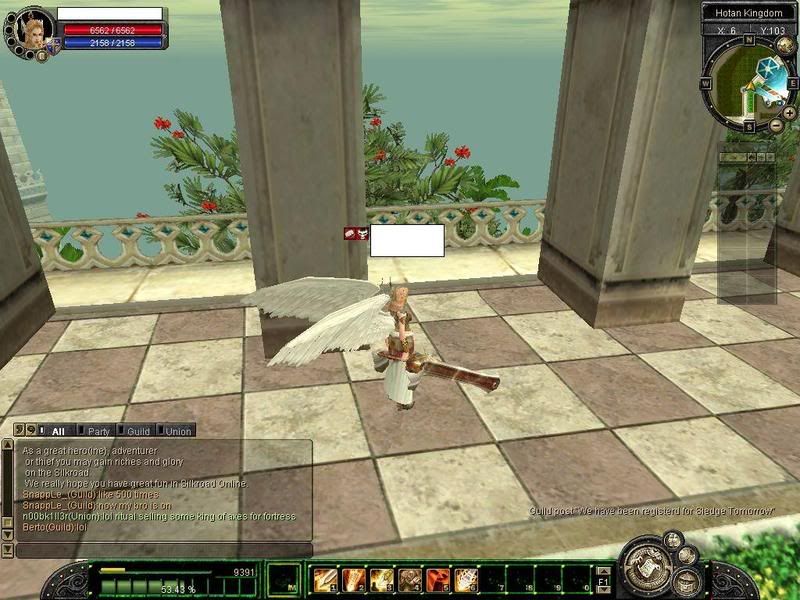
Preview of Bellow of my Modification's
Image


Programs Needed That It works Best for me:

-Pk2 Extractor
-Paint.NET ( It holds the right codes and extensions to make a successfull DDS)
-Hex Editor ( I Use WinHex :: It is not a free ware )


:!: ::::::: All Download Links will be posted correctly once i get permission to do so , by the Staff/Mod ::::::::::::

:!: To get WinHex you must PM me , I wont post it here for public.

:!: If you need more Previews of Pic , ask i will put them

User avatar
XMoshe
Ex-Staff
Posts: 17293
Joined: Sun Apr 09, 2006 10:13 am
Location: Ghosting around

Post by XMoshe »

What did you do? O_o that green bar around your xp/skills?
Image
Props to chrisorg for the sig <3

User avatar
borat2
Addicted Member
Posts: 2547
Joined: Fri Jan 12, 2007 1:39 pm
Quick Reply: Yes
Location: The Netherlands

Post by borat2 »

XMoshe wrote:What did you do? O_o that green bar around your xp/skills?

yes
this is actually nice for changing the loading screens for example.

User avatar
ranger4life
Addicted Member
Posts: 2526
Joined: Thu Mar 16, 2006 11:05 pm
Quick Reply: Yes
Location: Off Topic

Post by ranger4life »

or....... just find and replace ^^, that seems conusinf =X
Image

User avatar
Babo
New Member
Posts: 29
Joined: Mon Jun 04, 2007 8:51 pm
Quick Reply: Yes
Location: Odin

Post by Babo »

Yes must of the texture inside the game are in .DDJ format , this guide although I only modified the ub_window_01.DDJ which is the the bar in the buttom in the pic , still is the same way for each and every other .DDJ.

User avatar
maztermine
New Member
Posts: 30
Joined: Tue Jul 10, 2007 8:49 pm
Quick Reply: Yes
Location: at home

Post by maztermine »

ranger4life wrote:or....... just find and replace ^^, that seems conusinf =X


lol fine and replace... noob pk2 editor stay noob pk2 editor =P

User avatar
ranger4life
Addicted Member
Posts: 2526
Joined: Thu Mar 16, 2006 11:05 pm
Quick Reply: Yes
Location: Off Topic

Post by ranger4life »

maztermine wrote:
ranger4life wrote:or....... just find and replace ^^, that seems conusinf =X


lol fine and replace... noob pk2 editor stay noob pk2 editor =P

dude, ddj is very simple and has no point in going through all those steps, bsr is the ones needed to go through those steps :D
Image

User avatar
Babo
New Member
Posts: 29
Joined: Mon Jun 04, 2007 8:51 pm
Quick Reply: Yes
Location: Odin

Post by Babo »

ranger4life wrote:
maztermine wrote:
ranger4life wrote:or....... just find and replace ^^, that seems conusinf =X


lol fine and replace... noob pk2 editor stay noob pk2 editor =P

dude, ddj is very simple and has no point in going through all those steps, bsr is the ones needed to go through those steps :D


Well look again to the steps , there aint that much of work on it. Bsr is as simple as it is as well

User avatar
SCArchon
Regular Member
Posts: 233
Joined: Mon Apr 09, 2007 2:25 pm
Quick Reply: Yes
Location: Aege
Contact:

Post by SCArchon »

If i recall correctly, you can easily change the DDJ to DDS viewable by deleteing the first 20 bytes in the entry, and saving it as a DDS.

Why not stick that in your guide until the mods approve of your download links? btw if it is where i think it is.. >_>
Image
PK2 lover
Thank you HyorunmarouZ for signature =)

User avatar
RogueKiller
Loyal Member
Posts: 1893
Joined: Sat Jan 19, 2008 11:28 pm
Quick Reply: Yes
Location: GuildWars2

Re: [GUIDE] How to Modify a .DDJ ( PICS INCLUDED )

Post by RogueKiller »

For everyone who want to try to make their own underbar (part of the Silkroad GUI), here is a pretty decent PSD file with the right shapes and the right height's / width's.

I tried to make the PSD as structured as possible, and named every layer and sorted them into layer groups. Most shapes are vector shapes, so they won't be unsharp even if you choose to Edit/Free transform. If you use the base shapes, it should be pretty easy to get it in-game after, with some simple pk2 editing.


I made a few different base shapes. Included in the PSD (the images in the rar are just previews of the shapes). Here is one.

Image


Download Here (Sendspace) (v.1.1)
Mirror 1 (Rapidshare) (v.1.1)

361KB


==============================
Extra info:


You need to remember that the pk2 files cut these up into many images. Here's the basics of how the p2k cuts it up. (The orbs are also single images, "laying" on top of the rest.)
Image

So you haven't got much area to play around on ;)

This means, you will fail if you do like this, at least it wont be able to work in-game.
Image

This will work
Image


2 Examples. Hopefully some inspiration for someone.
Image


==============================
Underbars by users so far:

cryx

Image

ItachiKun
Image

timmey_x
Image

Saiyan
Image

JayDee
Image

spacejumper
Image

Tray
Image

Nicole
Image

Korhan
Image

aBDUCTr
Image

spacejumper
Image


SoraZ
Image

kaneco
Image

Pheonix_SRB
Image

lynxz
Image

What are you looking at? Open Photoshop already (;
Image

User avatar
penfold1992
Senior Member
Posts: 4059
Joined: Sun Apr 22, 2007 9:48 am
Quick Reply: Yes
Location: Uranus

Re: [GUIDE] How to Modify a .DDJ ( PICS INCLUDED )

Post by penfold1992 »

what do u mean by keep it the same size? you would have to keep adding things or taking things out of what you want? im not sure how you can keep it the same size appart from just changing a little bit like u have.

as i have said it would be easier if there was a templete you can try out first before making your own
Image

User avatar
JanChlpik
Common Member
Posts: 151
Joined: Sun Mar 23, 2008 11:46 pm
Quick Reply: Yes
Location: Czech
Contact:

Re: [GUIDE] How to Modify a .DDJ ( PICS INCLUDED )

Post by JanChlpik »

well the viewer if you find it does not work under win xp(not tested with other win)., anyway its outdated.
My threads:
CSRO/KSRO fully english(premade) + anySRO fully english
Media.pk2 Revealed [56k Warning]
[Release]DDJ/DDS converter
All europe quest

Inactive.
Send me pm if something is not working. But reply may take longer.

User avatar
Sovereign
Active Member
Posts: 749
Joined: Sat Apr 12, 2008 11:27 am
Quick Reply: Yes
Location: Guild Wars

Re: [GUIDE] How to Modify a .DDJ ( PICS INCLUDED )

Post by Sovereign »

Rogue Killer, that isnt your work, i would credit it....

User avatar
RogueKiller
Loyal Member
Posts: 1893
Joined: Sat Jan 19, 2008 11:28 pm
Quick Reply: Yes
Location: GuildWars2

Re: [GUIDE] How to Modify a .DDJ ( PICS INCLUDED )

Post by RogueKiller »

I'm well aware as to why i put it in quotes.
I got it off a random forum not crediting it either but saying it wasn't his work.
Image

123noob
Active Member
Posts: 666
Joined: Mon Jun 11, 2007 11:26 pm
Quick Reply: Yes
Location: Off Topic
Contact:

Re: [GUIDE] How to Modify a .DDJ ( PICS INCLUDED )

Post by 123noob »

those are nice anyhow... here comes the feeling of ingame modification.. the WOW feeling!!!! lol.
<<banned from SRF for bot admission. -SG>>

User avatar
zakeka
Hi, I'm New Here
Posts: 22
Joined: Thu Apr 24, 2008 11:16 pm
Quick Reply: Yes
Location: odin

Re: [GUIDE] How to Modify a .DDJ ( PICS INCLUDED )

Post by zakeka »

lol :banghead:

User avatar
WhyKillMe
Common Member
Posts: 130
Joined: Thu Mar 20, 2008 10:36 pm
Quick Reply: Yes
Location: Hercules
Contact:

Re: [GUIDE] How to Modify a .DDJ ( PICS INCLUDED )

Post by WhyKillMe »

when i edit the file with photoshop, the .bmp file.

Give colors to it at some places... then save it to .dds with irfanview ( free microsoft progrma)... then i edit it with xvi32 to a .ddj file ( adding the .ddj joymix codes )... when i go in-game, everything that i edited is.. White???
98% of the teenage population will try, does or has tried smoking pot.
If you're one of the 2% who hasn't, copy & paste this into your signature.


[ ]Kill Tiger Girl
[ ]Kill Cerberus
[ ]Kill Captain Ivy
[ ]Kill Uruchi
[ ]Kill Isyutaru
[ ]Kill Lord Yarkan

User avatar
JanChlpik
Common Member
Posts: 151
Joined: Sun Mar 23, 2008 11:46 pm
Quick Reply: Yes
Location: Czech
Contact:

Re: [GUIDE] How to Modify a .DDJ ( PICS INCLUDED )

Post by JanChlpik »

WhyKillMe wrote:when i edit the file with photoshop, the .bmp file.

Give colors to it at some places... then save it to .dds with irfanview ( free microsoft progrma)... then i edit it with xvi32 to a .ddj file ( adding the .ddj joymix codes )... when i go in-game, everything that i edited is.. White???


Because of you have wrong header
How to add header manually >
http://www.silkroadforums.com/viewtopic.php?f=5&t=86897&p=1113963#p1113963
My threads:
CSRO/KSRO fully english(premade) + anySRO fully english
Media.pk2 Revealed [56k Warning]
[Release]DDJ/DDS converter
All europe quest

Inactive.
Send me pm if something is not working. But reply may take longer.

User avatar
Sky
Common Member
Posts: 186
Joined: Fri May 23, 2008 7:32 am
Quick Reply: Yes
Location: Bed!^

Re: [GUIDE] How to Modify a .DDJ ( PICS INCLUDED )

Post by Sky »

RogueKiller wrote:
For everyone who want to try to make their own underbar (part of the Silkroad GUI), here is a pretty decent PSD file with the right shapes and the right height's / width's.

I tried to make the PSD as structured as possible, and named every layer and sorted them into layer groups. Most shapes are vector shapes, so they won't be unsharp even if you choose to Edit/Free transform. If you use the base shapes, it should be pretty easy to get it in-game after, with some simple pk2 editing.


I made a few different base shapes. Included in the PSD (the images in the rar are just previews of the shapes). Here is one.

Image


Download Here (Sendspace) (v.1.1)
Mirror 1 (Rapidshare) (v.1.1)

361KB


==============================
Extra info:


You need to remember that the pk2 files cut these up into many images. Here's the basics of how the p2k cuts it up. (The orbs are also single images, "laying" on top of the rest.)
Image

So you haven't got much area to play around on ;)

This means, you will fail if you do like this, at least it wont be able to work in-game.
Image

This will work
Image


2 Examples. Hopefully some inspiration for someone.
Image


==============================
Underbars by users so far:

cryx

Image

ItachiKun
Image

timmey_x
Image

Saiyan
Image

JayDee
Image

spacejumper
Image

Tray
Image

Nicole
Image

Korhan
Image

aBDUCTr
Image

spacejumper
Image


SoraZ
Image

kaneco
Image

Pheonix_SRB
Image

lynxz
Image

What are you looking at? Open Photoshop already (;

Hey,
Ok these bars looks sik. I wanna make my bar look like lynxz's. I have never done pk2 b4. Can someone help me? Yes i read the guide about it but I dont understand anything.
Image
[

User avatar
piXie_niXie
Active Member
Posts: 666
Joined: Wed Feb 13, 2008 2:23 pm
Quick Reply: Yes
Location: Venice

Re: [GUIDE] How to Modify a .DDJ ( PICS INCLUDED )

Post by piXie_niXie »

1. why do u use the extractor but not the editor to import them back into the media.pk2
2. you still need to edit the deco_left.ddj and deco_right.ddj(refer to my post in the guide of how to edit underbar) as yous till have the same silkroad ones on so ur underbar just looks stupid with the same things on left and right
Avalon = Big-Brother

User avatar
penfold1992
Senior Member
Posts: 4059
Joined: Sun Apr 22, 2007 9:48 am
Quick Reply: Yes
Location: Uranus

Re: [GUIDE] How to Modify a .DDJ ( PICS INCLUDED )

Post by penfold1992 »

read the guide its really not that complicated. download the tools, make sure u have photoshop and if not just try simple pk2 edits.
changing lvl 1 to look like 9d ect. and putting sox on items then come back to me
Image

User avatar
piXie_niXie
Active Member
Posts: 666
Joined: Wed Feb 13, 2008 2:23 pm
Quick Reply: Yes
Location: Venice

Re: [GUIDE] How to Modify a .DDJ ( PICS INCLUDED )

Post by piXie_niXie »

penfold1992 wrote:read the guide its really not that complicated. download the tools, make sure u have photoshop and if not just try simple pk2 edits.
changing lvl 1 to look like 9d ect. and putting sox on items then come back to me


??
Avalon = Big-Brother

User avatar
JanChlpik
Common Member
Posts: 151
Joined: Sun Mar 23, 2008 11:46 pm
Quick Reply: Yes
Location: Czech
Contact:

Re: [GUIDE] How to Modify a .DDJ ( PICS INCLUDED )

Post by JanChlpik »

Just go here to discuss underbars http://www.silkroadforums.com/viewtopic.php?f=5&t=88263, better have all in one thread.
My threads:
CSRO/KSRO fully english(premade) + anySRO fully english
Media.pk2 Revealed [56k Warning]
[Release]DDJ/DDS converter
All europe quest

Inactive.
Send me pm if something is not working. But reply may take longer.

Post Reply

Return to “Guides and Tutorials”