Registering, Installing, and Running kSRO For Dummies

Discussion portal for kSRO, jSRO, vSRO, cSRO, and all other SRO versions.
User avatar
ThatBluePerson
Loyal Member
Posts: 1647
Joined: Sat Jun 23, 2007 2:06 pm
Quick Reply: Yes
Location: Earth

Registering, Installing, and Running kSRO For Dummies

Post by ThatBluePerson »

If you decide to put this somewhere else please give credit, thank you. SRF I entitle full permission to take as your own.

Written by ThatBluePerson from SRF.

Playing Korean Silkroad Online for Dummies[kSRO]

Requirements:
•Internet Explorer
•Korean Social Security Number (KSSN)*
•Korean Silkroad Client
•Korean Keyboard or Korean IME Layout**
•Windows Asian Language Pack**
•Compatible System that can handle Silkroad Online

Registering With http://www.yahoo.co.kr

1.Open internet explorer and visit the following website:

Code: Select all

https://kr.member.yahoo.com/register.html


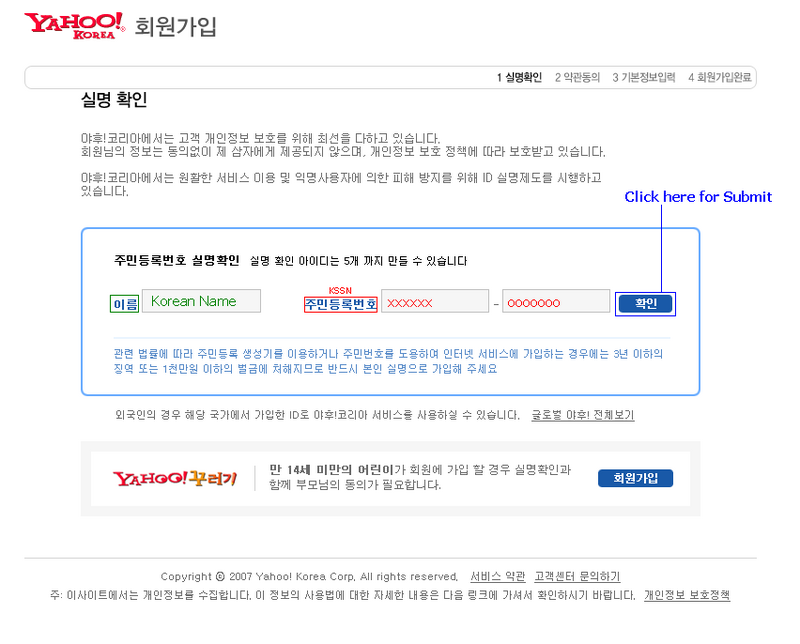
2.You will see something like this:

Image

-In the GREEN text field you will input your Korean name in Korean characters. (Korean names are usually three characters long)
-In the RED text field you will enter your Korean Social Security Number (KSSN) the first six characters will be displayed and then your other seven will be turned into asterisks or circles.
-After that then click the button that I have highlighted in BLUE.

3. After you have submitted your information and pressed the submit button you will get this:
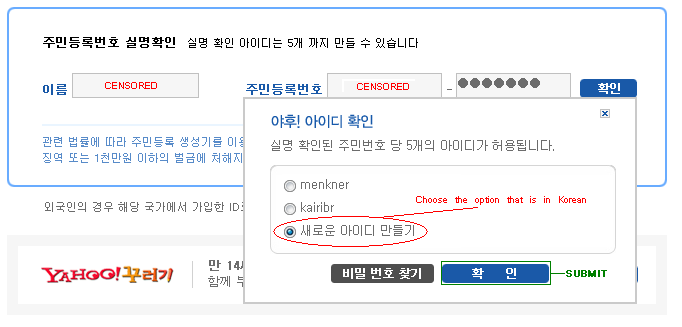
Image

Choose the option that is written in Korean, and then submit it by pressing the button highlighted in GREEN. (If you have no Korean options then your KSSN is stolen or already being used)

4. You will be taken here:
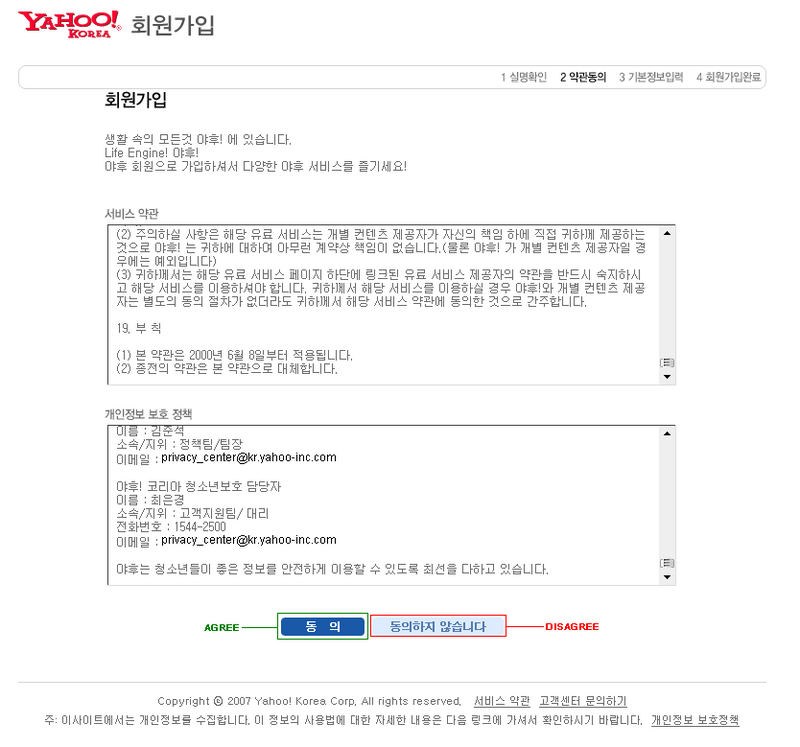
Image

Click the “AGREE” if you want a kSRO account. (Agreeing to their EULA and Privacy Policy)

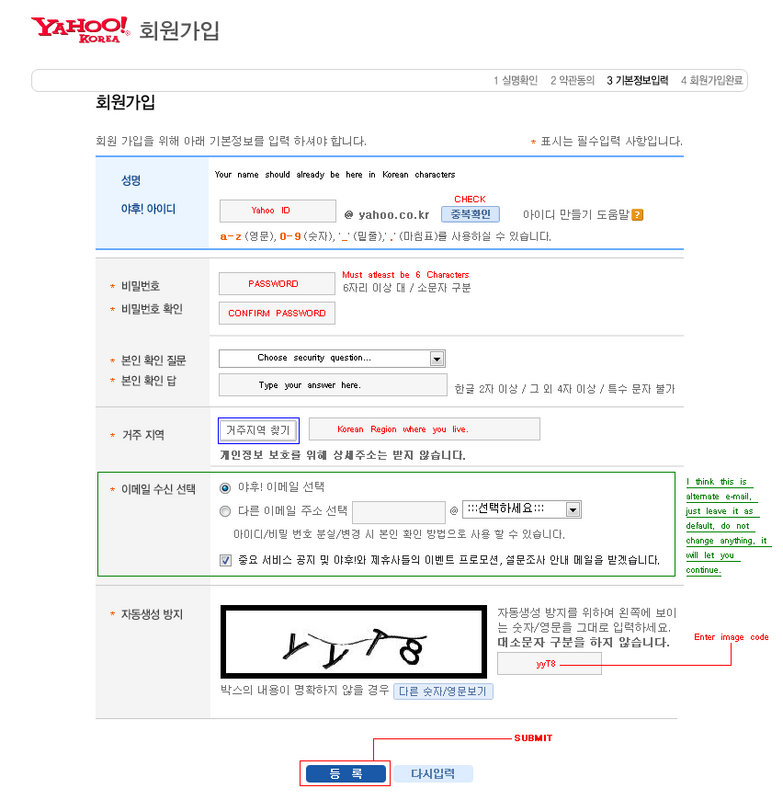
5. When you accept you will be taken here:
Image

Sub1. First, your name should already be at the top, in Korean characters.
Sub2. Choose your Yahoo ID, it also will be your Korean Yahoo e-mail, and your Silkroad login username (It can be in regular characters, ie. A, b, c, d, etc.”) Then click on the light blue button labeled CHECK, and you should get something like this if your nickname is available:
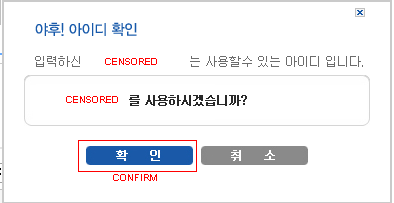
Image

If it doesn’t, then change your username to something until it’s available and then confirm it.
Sub3. Enter your password, and then enter it again, must be at least six characters or more.
Sub4. Choose a secret question and then answer, use for password recovery and other security measures. I recommend that you choose the first option and then enter something that you will always remember; answer does not have to make sense with question.
Sub5. Click the button highlighted in BLUE and you will get this:
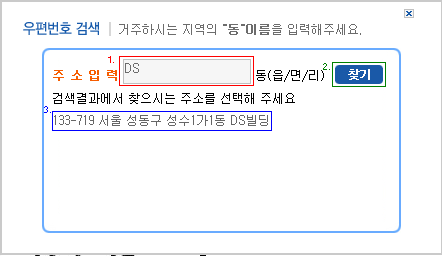
Image

A. Type in “DS”
B. Click the button highlighted in GREEN.
C. Click on the “133-719…” text that appears. (BLUE)

Sub6. Skip the green area.
Sub7. Type in the image verification code as it appears.
Sub8. Click the blue SUBMIT button.

6. If you did everything correct you should be taken to something that looks like this:
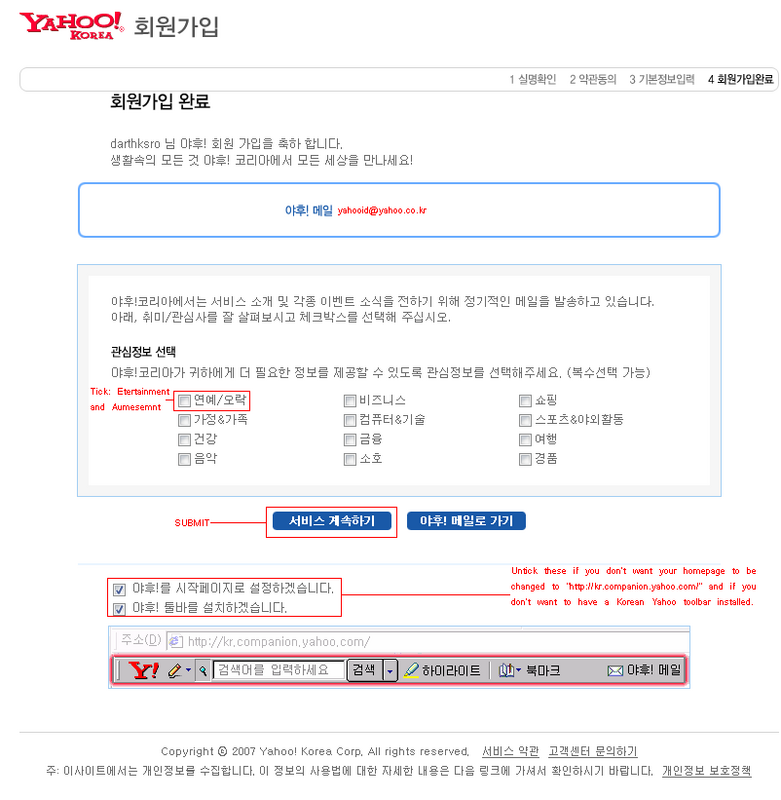
Image

Tick the first box, and if you want you can tick more, and then click submit.

****If you do not want your homepage to be changed then un-tick the bottom boxes, along with the toolbar one.

7. Congratulations, you have successfully configured and registered a Yahoo Korean account. Now we have to configure it so you can play with it in Korean Silkroad Online.

Setting Up Your Account with Joymax:

1. Visit the following website:

Code: Select all

http://kr.silkroad.yahoo.com/member/member_point.asp 


You will get something like this:
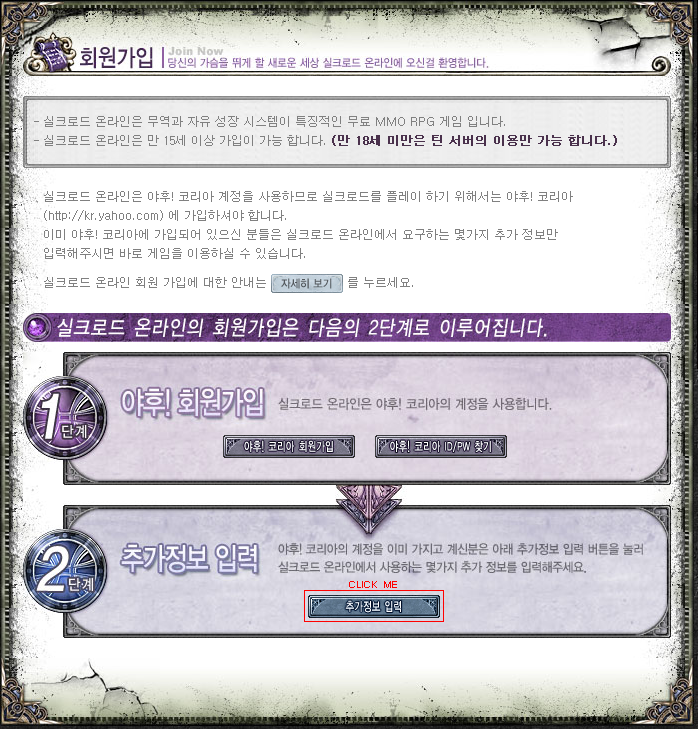
Image

Click on the last button at the bottom of the box with the big number two.

A little pop up will come up and just click “OK” it will take you to the classic Yahoo login page.

Enter your login information that you created earlier.

Click the big button to log in, it should bring you back to the same page, click the same button again.

2. This window should pop up:
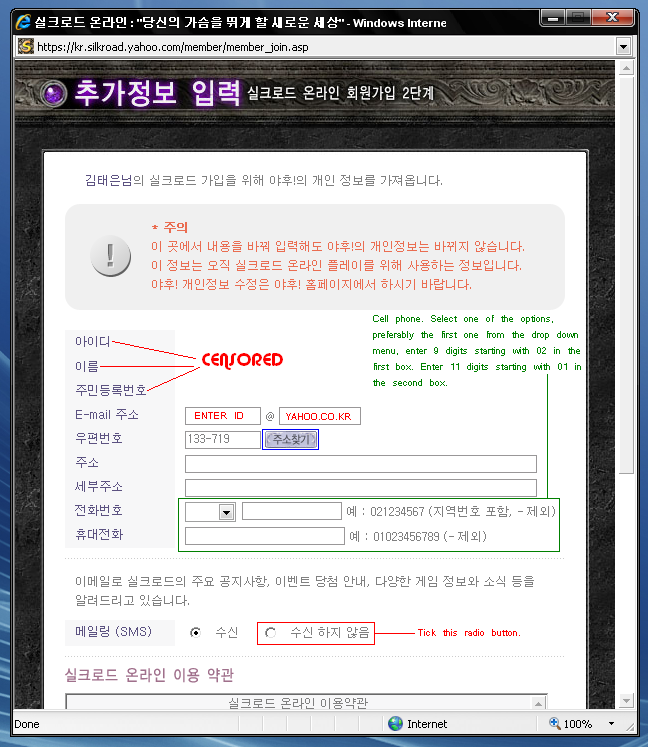
Image

Sub1. Enter your ID that you created and then input “yahoo.co.kr” into the second box.
Sub2. Click the purple button highlighted in BLUE, you should get this:

Image

Sub2. In the RED enter “DS” and press the GREEN button.
Sub3. The text highlighted in BLUE should appear, click it and then press then BROWN highlighted button.
Sub4. The fourth text box should now have something, highlight it, when you let go of the mouse it should open the same window back up, just close it and press “Ctrl+C” and click on the bottom text box and press “Ctrl+V” you should paste the same text in that box.
Sub5. Follow text in green in image.
Sub6. Tick the long option highlighted in RED in the “SMS” area.
Sub7. Scroll down to this:
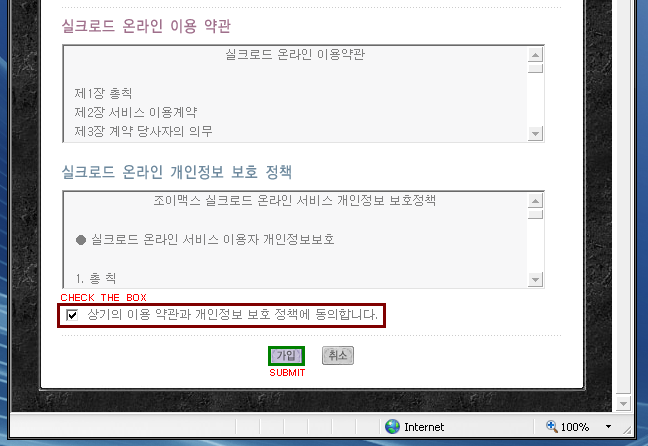
Image

Check the box and then press the SUBMIT button. You will get a message box, just click Ok, it should refresh to the Korean Silkroad homepage.

3. Congratulations you can now log in into the Korean version of Silkroad Online.

Downloading, Installing, and Logging Into the Game:

Downloading:
1. Visit the following website:

Code: Select all

ftp://yahoogame.nefficient.co.kr/pub/yahoogame/joymax/SRO_Client/SilkroadOnline_v2.04_501.exe


That should automatically start downloading the game.

*Installing*

1. Once the download has finished, locate the folder where you saved the .exe file.

2. Run it and follow instructions, the buttons are in Korean but just press as if you were installing the International version.

*WARNING!* This will overwrite your International Silkroad Version along with all screenshots! To avoid this please rename your International Silkroad folder most likely located in
…Program Files\Silkroad\ to something like “International Silkroad.”

3. Once installed you can now run it, the first time you do it will update, let it update.

Logging Into the Game:

BEFORE LOGGIN INTO GAME YOU MUST DO THE FOLLOWING: (Refer to bottom of guide.)

-Go to Congrol Panel and open the Regional and Language Options window.
-Click on the “Advanced” tab:

Click the down arrow and find Korean, select it and press apply, and restart your computer after clicking OK. It should ask you.
(This allows you to type Korean into the game and not just type squares)

NOW TO LOG IN:

1. When you have fully updated and you have the game running you will be presented with this screen:
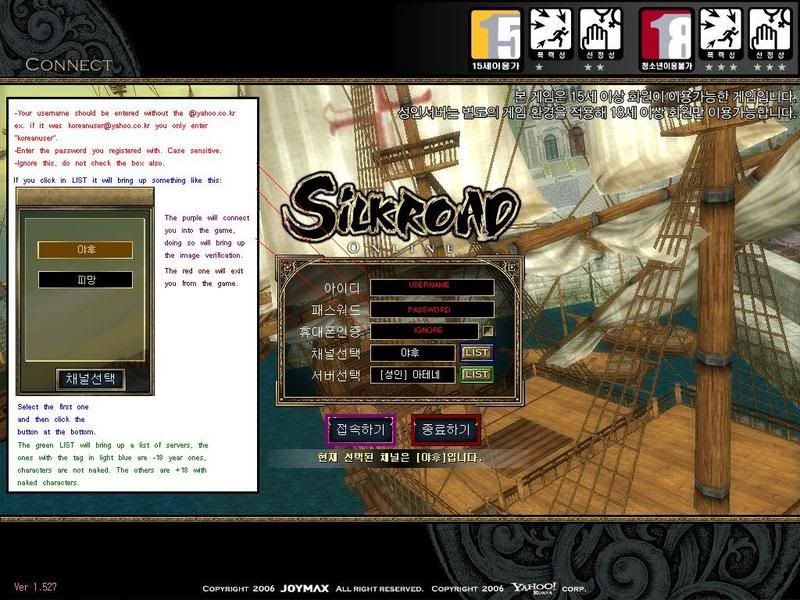
Image

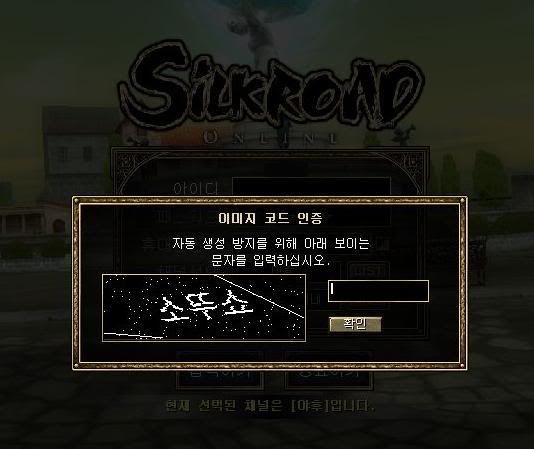
2. Entering the image verification code:
Image

Press the right Shift+Alt and test if you can type Korean, if not then press it again, and see if you can until you see Korean characters.

In this case, according to the picture above you will input the following:

“thEnty” or in other words: 소뚜쇼 (t=ㅅ h=ㅗ E=ㄸ n=ㅜ t=ㅅ y=ㅛ )

As you can see you start typing from left to right, starting from top character to bottom. You will get use to it with a couple of logins.

Use this to know what to press to type:
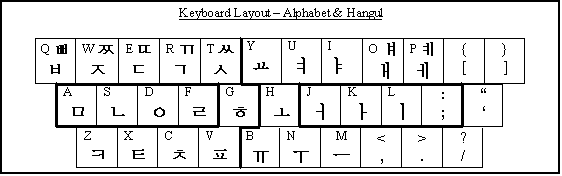
Image
Keys with both characters pressing the Shift key will allow you to type the other one.

3. You should know what to do from here.

Enjoy playing the latest Silkroad updates!

*Disclaimer: I recommend that you have your own KSSN because obtaining one that does not belong to you could lead you into federal criminal procedures. Or international, just be safe. I do not condone in any way stealing or “Googling” a KSSN. Any threats by the FBI or any authority towards you are solemnly your fault and I am not held responsible for any.

** How to Install Korean IME Layout:

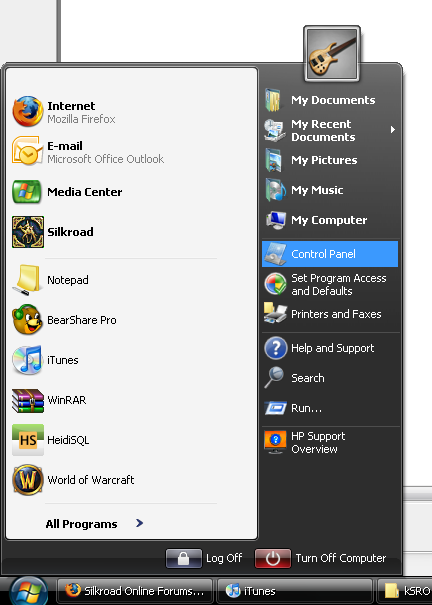
1.Go to Start

2.Go to Control Panel, if it’s set to “Category View” (For XP, Vista Users) switch to “Classic View.”
Image

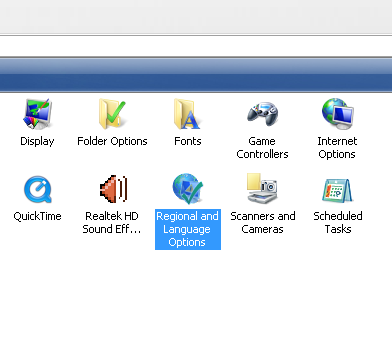
3.Double click “Regional and Language Options” icon.
Image

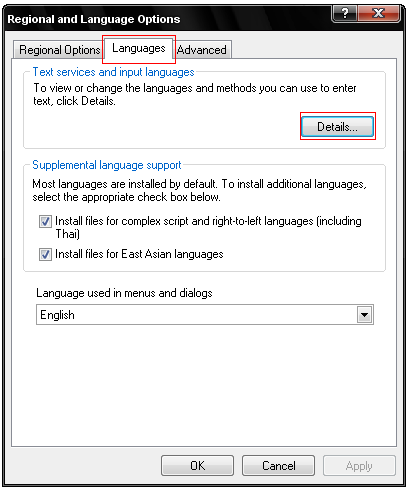
4.This window should pop-up:

Image

Click on the “Languages” tab, and then click on the “Details…” button.

**Note that under the “Supplemental language support” box the boxes “Install files for complex script and right-to-left languages (Including Thai)” and “Install files for East Asian languages,” are ticked on. When you do this it install the files required for your system to insert Asian language characters so when you run the game you won’t see many square like or alien like characters. When you tick them on it will request a Windows OS disc, if you have it insert it and confirm. If you have a recovery partition then it will notify you and ask that you can install from there, do whatever fits your boat. The “Install files for complex script and right-to-left languages (including Thai)” is NOT required to be installed.

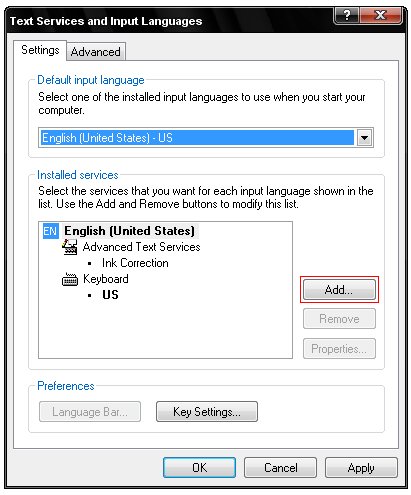
5.Moving on, after clicking “Details…” the following window should pop-up:
Image

Note that under “Installed services” I only have EN English (United States), you may have others already installed, I suggest you remove them if you do not need them.

6.After opening the above window, click on “Add…”
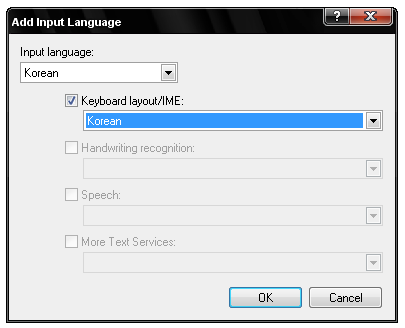
Image

Under the list box labeled “Input language” click the down arrow and locate “Korean,” select it and then tick the box “Keyboard layout/IME.” Click OK. Your Text Services and Input Languages should now look something like this:

Image

Click “Apply” and OK, or Apply on other windows that may have been left open also. Your Asian text input and display settings should now be ready to go.

***To switch between languages just press your right Shift + Alt in your keyboard, and type something to see which layout you are on. If it does not work then go back to the Text Services and Input Languages and click on “Key Settings…” and confirm your own settings.

User avatar
knubbka
Active Member
Posts: 619
Joined: Sun May 20, 2007 5:08 pm
Quick Reply: Yes
Location: out of reality

Post by knubbka »

nice guide, good job
Image

User avatar
bebrazz
Regular Member
Posts: 220
Joined: Thu Apr 05, 2007 6:41 pm
Quick Reply: Yes
Location: DeadRavine

Post by bebrazz »

yeah, but can u help with thing when my client not updating? :?

User avatar
ThatBluePerson
Loyal Member
Posts: 1647
Joined: Sat Jun 23, 2007 2:06 pm
Quick Reply: Yes
Location: Earth

Post by ThatBluePerson »

bebrazz wrote:yeah, but can u help with thing when my client not updating? :?


Is your firewall blocking silkraod.exe from running? Check your hosts file. Flush your DNS settings. Set your Local LAN settings to automatic.

DuaL
New Member
Posts: 40
Joined: Mon Dec 03, 2007 3:02 pm

Post by DuaL »

Pfff i made all like in tutorial but still cant type in korean ... :( why ? in wordpad or any program is typeing but in silkroad no :( ... why ? :( !
<<banned from SRF for the sale of digital items. -SG>>

DuaL
New Member
Posts: 40
Joined: Mon Dec 03, 2007 3:02 pm

Post by DuaL »

DuaL wrote:Pfff i made all like in tutorial but still cant type in korean ... :( why ? in wordpad or any program is typeing but in silkroad no :( ... why ? :( !


I found my problem was from media.pk2 .... but my media pk2 it`s other like from the one who made that person the tutorial :( ... and i dont know what byte should delete ... so it`s in korean now my silkroad ... pff hard with this :x
<<banned from SRF for the sale of digital items. -SG>>

User avatar
bebrazz
Regular Member
Posts: 220
Joined: Thu Apr 05, 2007 6:41 pm
Quick Reply: Yes
Location: DeadRavine

Post by bebrazz »

ThatBluePerson wrote:
bebrazz wrote:yeah, but can u help with thing when my client not updating? :?


Is your firewall blocking silkraod.exe from running? Check your hosts file. Flush your DNS settings. Set your Local LAN settings to automatic.


hosts? btw what i need to write for ksro?

User avatar
ThatBluePerson
Loyal Member
Posts: 1647
Joined: Sat Jun 23, 2007 2:06 pm
Quick Reply: Yes
Location: Earth

Post by ThatBluePerson »

bebrazz wrote:
ThatBluePerson wrote:
bebrazz wrote:yeah, but can u help with thing when my client not updating? :?


Is your firewall blocking silkraod.exe from running? Check your hosts file. Flush your DNS settings. Set your Local LAN settings to automatic.


hosts? btw what i need to write for ksro?


It should be the same, also try going to your network connections and then right click your connection and "repair" it.

DuaL wrote:
DuaL wrote:Pfff i made all like in tutorial but still cant type in korean ... :( why ? in wordpad or any program is typeing but in silkroad no :( ... why ? :( !


I found my problem was from media.pk2 .... but my media pk2 it`s other like from the one who made that person the tutorial :( ... and i dont know what byte should delete ... so it`s in korean now my silkroad ... pff hard with this :x


The current kSRO media.pk2 file is 373587968 bytes.
This is how it should be:
Image

User avatar
bebrazz
Regular Member
Posts: 220
Joined: Thu Apr 05, 2007 6:41 pm
Quick Reply: Yes
Location: DeadRavine

Post by bebrazz »

ThatBluePerson wrote:
bebrazz wrote:
ThatBluePerson wrote:
bebrazz wrote:yeah, but can u help with thing when my client not updating? :?


Is your firewall blocking silkraod.exe from running? Check your hosts file. Flush your DNS settings. Set your Local LAN settings to automatic.


hosts? btw what i need to write for ksro?


It should be the same, also try going to your network connections and then right click your connection and "repair" it.

tryied everything, nothing helps... btw i heared from someone its my country ip blocked from ksro, can be it true?

User avatar
ThatBluePerson
Loyal Member
Posts: 1647
Joined: Sat Jun 23, 2007 2:06 pm
Quick Reply: Yes
Location: Earth

Post by ThatBluePerson »

bebrazz wrote:
ThatBluePerson wrote:
bebrazz wrote:
ThatBluePerson wrote:
bebrazz wrote:yeah, but can u help with thing when my client not updating? :?


Is your firewall blocking silkraod.exe from running? Check your hosts file. Flush your DNS settings. Set your Local LAN settings to automatic.


hosts? btw what i need to write for ksro?


It should be the same, also try going to your network connections and then right click your connection and "repair" it.

tryied everything, nothing helps... btw i heared from someone its my country ip blocked from ksro, can be it true?


Could be.

DuaL
New Member
Posts: 40
Joined: Mon Dec 03, 2007 3:02 pm

Post by DuaL »

ThatBluePerson wrote:
bebrazz wrote:
ThatBluePerson wrote:
bebrazz wrote:yeah, but can u help with thing when my client not updating? :?


Is your firewall blocking silkraod.exe from running? Check your hosts file. Flush your DNS settings. Set your Local LAN settings to automatic.


hosts? btw what i need to write for ksro?


It should be the same, also try going to your network connections and then right click your connection and "repair" it.

DuaL wrote:
DuaL wrote:Pfff i made all like in tutorial but still cant type in korean ... :( why ? in wordpad or any program is typeing but in silkroad no :( ... why ? :( !


I found my problem was from media.pk2 .... but my media pk2 it`s other like from the one who made that person the tutorial :( ... and i dont know what byte should delete ... so it`s in korean now my silkroad ... pff hard with this :x


The current kSRO media.pk2 file is 373587968 bytes.
This is how it should be:
Image


Yes but if i delet 0A byte still cant type in korean :( ... uffff
<<banned from SRF for the sale of digital items. -SG>>

DuaL
New Member
Posts: 40
Joined: Mon Dec 03, 2007 3:02 pm

Post by DuaL »

This is what i have ... and the bytes are 396566528


Image
<<banned from SRF for the sale of digital items. -SG>>

DuaL
New Member
Posts: 40
Joined: Mon Dec 03, 2007 3:02 pm

Post by DuaL »

And if i delet that byte 0A i cant type in game korean laters ... but if i have it normal i can type .... :cry: :cry: :cry:
<<banned from SRF for the sale of digital items. -SG>>

User avatar
Fireblazer
Common Member
Posts: 111
Joined: Sun Jul 29, 2007 7:34 pm
Quick Reply: Yes
Location: Athens

Post by Fireblazer »

a friend of mine did all those things but the start button wont appear what should he do?

User avatar
ThatBluePerson
Loyal Member
Posts: 1647
Joined: Sat Jun 23, 2007 2:06 pm
Quick Reply: Yes
Location: Earth

Post by ThatBluePerson »

Fireblazer wrote:a friend of mine did all those things but the start button wont appear what should he do?


It should appear, tell him to make sure the firewall is not blocking it from running, also visiting the Silkroad website might work.

/Pi
Senior Member
Posts: 4590
Joined: Fri May 18, 2007 3:49 am
Quick Reply: Yes
Location: Off Topic

Post by /Pi »

Any good KSSN generator? :D

/Pi
Senior Member
Posts: 4590
Joined: Fri May 18, 2007 3:49 am
Quick Reply: Yes
Location: Off Topic

Post by /Pi »

Launched kSRO but I got this:

Image

Then this pops up:

Image

When I click No, it closes the client. When I click yes, it still closes the client but opens Internet Explorer and goes to kSRO download page.

/Pi
Senior Member
Posts: 4590
Joined: Fri May 18, 2007 3:49 am
Quick Reply: Yes
Location: Off Topic

Post by /Pi »

Blah. Nevermind. I checked the client I downloaded before and it turns out to be old. I had 2.04.501, but the new one is 2.05.530

/Pi
Senior Member
Posts: 4590
Joined: Fri May 18, 2007 3:49 am
Quick Reply: Yes
Location: Off Topic

Post by /Pi »

Downloaded the new client from the main site. Installed then launched it. I still got the same error. :?

User avatar
ThatBluePerson
Loyal Member
Posts: 1647
Joined: Sat Jun 23, 2007 2:06 pm
Quick Reply: Yes
Location: Earth

Post by ThatBluePerson »

Prophet Izaach wrote:Downloaded the new client from the main site. Installed then launched it. I still got the same error. :?


Let me see if I can translate, maybe it's saying it's under inspection.

Edit: It mentions something about the version... you have the wrong version...

Edit2: I tried running it and it also does the same to me, seems something new changed... o_O Ill see if I can find a solution or explanation.

/Pi
Senior Member
Posts: 4590
Joined: Fri May 18, 2007 3:49 am
Quick Reply: Yes
Location: Off Topic

Post by /Pi »

Crap! Nevermind. I installed 2.04.501, which I got from the link you had from this thread. Now I'm downloading the client that's up on the main download page.

/Pi
Senior Member
Posts: 4590
Joined: Fri May 18, 2007 3:49 am
Quick Reply: Yes
Location: Off Topic

Post by /Pi »

Quick question. Can we PK2 edit the Media file from Korean to English?

/Pi
Senior Member
Posts: 4590
Joined: Fri May 18, 2007 3:49 am
Quick Reply: Yes
Location: Off Topic

Post by /Pi »

Got it running. Which server should I join? @_@

User avatar
ThatBluePerson
Loyal Member
Posts: 1647
Joined: Sat Jun 23, 2007 2:06 pm
Quick Reply: Yes
Location: Earth

Post by ThatBluePerson »

Prophet Izaach wrote:Got it running. Which server should I join? @_@


Please use the edit button. :D

And yeah, it also gave me the problem, so I went to the download page and downloaded the file in there and installed and now it works for me also.

What server should you join? Idk, the blue ones seem to have more english speaking players. If you edit your pk2 into English you will not be able to type Korean into the game.

User avatar
Vuur
Common Member
Posts: 194
Joined: Mon Jul 23, 2007 3:44 pm
Quick Reply: Yes
Location: Venus

Post by Vuur »

2. Entering the image verification code:

Press the right Shift+Alt and test if you can type Korean, if not then press it again, and see if you can until you see Korean characters.

In this case, according to the picture above you will input the following:

“thEnty” or in other words: 소뚜쇼 (t=ㅅ h=ㅗ E=ㄸ n=ㅜ t=ㅅ y=ㅛ )

As you can see you start typing from left to right, starting from top character to bottom. You will get use to it with a couple of logins.

Use this to know what to press to type:

Keys with both characters pressing the Shift key will allow you to type the other one.


ok so I need to typ this in korean characters in sro or in normal characters? I tried it with the normal characters (like in iSRO) but that doesn't work. And I followed the language thing but I can't typ korean ingame so I can't typ the verficiation code :S
Image

5x Warrior/Warlock (Inactive)/2x Wizard/Cleric (Inactive)/2x Bard (Inactive)

/Pi
Senior Member
Posts: 4590
Joined: Fri May 18, 2007 3:49 am
Quick Reply: Yes
Location: Off Topic

Post by /Pi »

Vuur wrote:ok so I need to typ this in korean characters in sro or in normal characters? I tried it with the normal characters (like in iSRO) but that doesn't work. And I followed the language thing but I can't typ korean ingame so I can't typ the verficiation code :S


Left (not the left arrow key, but the Alt and Shift buttons on the left side of your keyboard) Alt+Shift toggles your keyboard's input between the different language keyboards you have. For example, if you have English and Korean keyboards installed, pressing (left) Alt+Shift switches from English to Korean. Pressing it again switches from Korean to English.

Now, if you are already in the Korean keyboard, by default your inputs are still in English characters. If you want to type in Korean characters, you have to press right (not the right arrow key, but the Alt and Shift buttons on the right side of your keyboard) Alt+Shift. Press those buttons again and you go back into English character input and still remain in the Korean keyboard.

On another note, the current keyboard you have on is not universal, in a sense that not all the open programs you have, like Notepad, MS Word or SRO Login Screen, are on the same language input. For example, if you are on Notepad and toggled to Korean input, switching to MS Word will have the default English input. So if you want to type Korean characters in MS Word, you have to toggle into Korean keyboard separately. In short, you have to toggle between keyboard inputs on different windows.

User avatar
Vuur
Common Member
Posts: 194
Joined: Mon Jul 23, 2007 3:44 pm
Quick Reply: Yes
Location: Venus

Post by Vuur »

Prophet Izaach wrote:
Vuur wrote:ok so I need to typ this in korean characters in sro or in normal characters? I tried it with the normal characters (like in iSRO) but that doesn't work. And I followed the language thing but I can't typ korean ingame so I can't typ the verficiation code :S


Left (not the left arrow key, but the Alt and Shift buttons on the left side of your keyboard) Alt+Shift toggles your keyboard's input between the different language keyboards you have. For example, if you have English and Korean keyboards installed, pressing (left) Alt+Shift switches from English to Korean. Pressing it again switches from Korean to English.

Now, if you are already in the Korean keyboard, by default your inputs are still in English characters. If you want to type in Korean characters, you have to press right (not the right arrow key, but the Alt and Shift buttons on the right side of your keyboard) Alt+Shift. Press those buttons again and you go back into English character input and still remain in the Korean keyboard.

On another note, the current keyboard you have on is not universal, in a sense that not all the open programs you have, like Notepad, MS Word or SRO Login Screen, are on the same language input. For example, if you are on Notepad and toggled to Korean input, switching to MS Word will have the default English input. So if you want to type Korean characters in MS Word, you have to toggle into Korean keyboard separately. In short, you have to toggle between keyboard inputs on different windows.


Ok but now when I typ "Hanja" I only see boxxes (not the verification code but when I typ them myself, I can see the symbols I need to typ) :? I need to download somekind of language pack to let mine computer understand those boxxes so I can typ them also or? (btw this is only in SRO when I typ with "Hanja" outside SRO (like in wordpad/IE/Word/Mozzila) I just see the symbols+I can write them :? (I'm not that smart at this point. :oops: )
Image

5x Warrior/Warlock (Inactive)/2x Wizard/Cleric (Inactive)/2x Bard (Inactive)

/Pi
Senior Member
Posts: 4590
Joined: Fri May 18, 2007 3:49 am
Quick Reply: Yes
Location: Off Topic

Post by /Pi »

Follow the first part of this guide, under Enabling the DISPLAY of Korean text.

User avatar
Vuur
Common Member
Posts: 194
Joined: Mon Jul 23, 2007 3:44 pm
Quick Reply: Yes
Location: Venus

Post by Vuur »

ty mate got it working :D
Image

5x Warrior/Warlock (Inactive)/2x Wizard/Cleric (Inactive)/2x Bard (Inactive)

User avatar
Hobu4
Hi, I'm New Here
Posts: 9
Joined: Sat Jun 23, 2007 12:40 pm
Quick Reply: Yes
Location: ksro :)

Post by Hobu4 »

can someone upload kSRO installer to filefront? because from official site my speed only 2kb/sec

Post Reply

Return to “Other SRO versions”