My second sig

Digital art design, renderings, signatures and anything art related. Upload pictures of your newest work or ask for feedback. Post graphics requests or discuss art in general.
Post Reply
User avatar
Necro-Mage
Valued Member
Posts: 458
Joined: Tue Apr 03, 2007 4:42 am
Quick Reply: Yes
Location: venice

My second sig

Post by Necro-Mage »

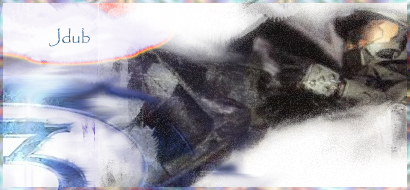
Hey guys. I'm pretty sure this sig is a bigger improvement over my last sig, or I hope.

Image

As usual, I would like some C/C.

PS: I know the font is very mediocre, but I'm using PS 6.0 so I have some outdated stuff.

Hope you enjoy!

cin

Post by cin »

its not bad, however

- no focal point, or too blurry focal point.

because of the amount of white here and the fact that the render is not that
sharp, the eyes dont focus on the render.
- no light source
best would be if you had less white, and make it so that the light (white) comes
from one direction and shines on your rendered figure. this is a great way to
make the sig look more 3D-like.
- text
the text, its good that its not close to the borders, but i personally favor a text
that kindof fits into the sig rather than stands out. if you would not have put it
on the white part of the sig, try to change the layer mode to overlay/soft light
and move it around over the sig. play a bit with it, and i'm sure you will find
a nice spot where the text will blend in but is still readable

- overall look
the overall look is imo a bit over contrasted. too much white and a too dark
render for it. also, the colors of the background dont really go with the
colors of the render you used.

^ not meant as a rant <3 just being honest ;)

its not bad at all for a 2nd sig, but i suggest you try out some tutorials in
the sticky. fena and SuicideGrl tried the BrokenSaint's tut not too long ago,
and both their sigs turned out awesome.
User avatar
Mafiaz
Regular Member
Posts: 210
Joined: Sat Sep 16, 2006 12:31 am
Quick Reply: Yes
Location: Xian

Post by Mafiaz »

Too much contrast, 7/10.
Mafiaz.

User avatar
Tig3ress
Loyal Member
Posts: 1800
Joined: Wed Aug 30, 2006 1:28 am
Quick Reply: Yes
Location: Zion

Post by Tig3ress »

I like it 8/10

User avatar
Necro-Mage
Valued Member
Posts: 458
Joined: Tue Apr 03, 2007 4:42 am
Quick Reply: Yes
Location: venice

Post by Necro-Mage »

Thanks guys for the c/c!

I agree with you, Cin, that the stock is pretty blurry. It's actually a drawing of some sorts and I shoulda picked a more clearer picture.

Thanks again guys for your comments although I think I should hold off photoshopping for a while until I get the newest version (whatever version that might be). As most of the brushes I try to download say it's incompatible with my vers. of PS.

Any more comments would be appreciated! :)

cin

Post by cin »

newest photoshop is cs3.

but its easier to get cs2 ;)

most noticable difference between cs2 and cs3 imo is the fact that your toolbars
can be mounted on the side of your screen instead of having them inside your
workspace all the time.. but thats the only big difference i've seen so far ;)

User avatar
Necro-Mage
Valued Member
Posts: 458
Joined: Tue Apr 03, 2007 4:42 am
Quick Reply: Yes
Location: venice

Post by Necro-Mage »

Oh, thanks Cin once again. I guess I'll be getting a cs2 then.

User avatar
Rizla
Ex-Staff
Posts: 1197
Joined: Sun Jun 11, 2006 4:17 am
Quick Reply: Yes
Location: Artist's Corner

Post by Rizla »

Try limiting yourself to basic fonts.

Arial
Helvetica
Garamond
Gill Sans
Century Gothic
Myriad

Once you master the appearance of basic fonts and can make them look good you will rapidly find yourself tossing styled/accent fonts aside for a more meld able palette.

Stay away from

Papyrus
Comic Sans
Anything cursive
Cooper (unless you have got mad skills)
Image

Post Reply

Return to “Artists Corner”