Requesting help from computer pros (Problem Solved)
-
wildwolf111

- Common Member
- Posts: 138
- Joined: Tue Nov 14, 2006 6:17 am
- Quick Reply: Yes
- Location: Earth (Not Moon or Mars or...)
Requesting help from computer pros (Problem Solved)
A few days ago, I uninstalled my old graphic card drive to install a new one. It is a Leadtek Winfast PX 7900 GT TDH graphic card. However, after I uninstalled the drive, the whole thing stopped working. It started up alright (can hear the windows start sound). However, nothing appears on the screen! The screen just say "No Signal". I checked the graphic card itself on another com of my friend's, it worked perfectly. Can any hardware pros out there please help me? Thank you very much!
Last edited by wildwolf111 on Wed Oct 17, 2007 6:26 am, edited 1 time in total.





-
Dark Shifty

- Frequent Member
- Posts: 1322
- Joined: Sun Jun 10, 2007 9:11 pm
- Quick Reply: Yes
- Location: Off Topic
- Contact:

 just thought this would make you feel a lil bit better


-
Innovacious
- Advanced Member
- Posts: 2446
- Joined: Mon Sep 11, 2006 9:24 pm
- Quick Reply: Yes
- Location: Off Topic
- Contact:
Have you tried turning it off and on again?
Is it plugged in?
Lol, sorry, i watch the IT crowd too much. Anywho, you dont really need to uninstall graphics card to get a new one, just take it out and put the new one in and then install the drivers for the new one. For now, is it possible to connect your monitor to your motherboard and use on board graphics until you've sorted out the new one?
Is it plugged in?
Lol, sorry, i watch the IT crowd too much. Anywho, you dont really need to uninstall graphics card to get a new one, just take it out and put the new one in and then install the drivers for the new one. For now, is it possible to connect your monitor to your motherboard and use on board graphics until you've sorted out the new one?



-
pentuim3HS

- Regular Member
- Posts: 209
- Joined: Tue Jul 17, 2007 5:25 pm
- Quick Reply: Yes
- Location: Venice
ok, i take it you've plugged in the power for the GPU. so thats not the problem, make sure you have the screen connected to the right DVI port
and if that fails... go into bios and make sure you've set your motherboard to desplay on the PCI-E slot and not on your onboard graphics - if you have it
and if that fails... your mo-bo cant handle it xD
and if that fails... go into bios and make sure you've set your motherboard to desplay on the PCI-E slot and not on your onboard graphics - if you have it
and if that fails... your mo-bo cant handle it xD

IGN : Quadrophenia
[b]Level : 8x - Finally!
Build : Rogue - Bard
Guild : _Fearless_ * Pumpkin_King
Union : *Silent

-
vindicated01

- Frequent Member
- Posts: 1094
- Joined: Thu May 31, 2007 2:07 pm
- Quick Reply: Yes
- Location: XE
- Contact:


-
Innovacious
- Advanced Member
- Posts: 2446
- Joined: Mon Sep 11, 2006 9:24 pm
- Quick Reply: Yes
- Location: Off Topic
- Contact:
-
wildwolf111
- Common Member
- Posts: 138
- Joined: Tue Nov 14, 2006 6:17 am
- Quick Reply: Yes
- Location: Earth (Not Moon or Mars or...)
Ty for all your suggestions. I finally solved the problem. The problem is... Well... To my amazement... lies within the RAM. It is burnt (don't ask me how and why). One of the copper connections turned charcoal (not chemically, I mean the colour).
I am so happy to be back online
Btw, nice pic Dark Shifty. I wish my cat can do that.
I am so happy to be back online
Btw, nice pic Dark Shifty. I wish my cat can do that.
-
TwelveEleven
- Veteran Member
- Posts: 3806
- Joined: Sat Mar 17, 2007 1:11 am
- Quick Reply: Yes
- Location: Heaven
- Contact:
Next time be sure to check your pci-e connector (from your power supply to your graphics card) this also belongs in Technical Help..
You solved your problem, next time be sure to check your other components, since you checked your graphics card.. It is most likely to be another component (which is true for this case as well)
Anyways gratz on fixing it..
You solved your problem, next time be sure to check your other components, since you checked your graphics card.. It is most likely to be another component (which is true for this case as well)
Anyways gratz on fixing it..
<<banned from SRF for proof of botting. -SG>>
-
dom

- Global Moderator

- Posts: 9962
- Joined: Wed Mar 08, 2006 10:46 pm
- Quick Reply: Yes
- Location: västkustskt
Innovacious wrote:dom wrote:Don't ever buy winfast again.
I bought a motherboard from them before, the instructions were in, and only in, Korean. I had a long weekend.
at least they didnt try to make english instructions, my mp3 player is japanese and the instuctions are in engrish.
MP3 player isn't too bad..you have play, stop, next track, etc.
Try finding specific connectors on a motherboard with no instructions of onboard markings.
I had to just guess for my front panel connectors, to give you an idea, this is what it looks like (google):
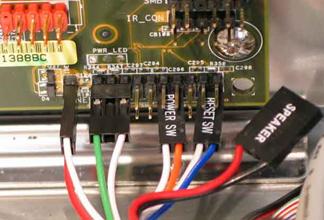
The connectors plug in randomly, mine isn't standard and it doesn't have any white markings on the board.

-
PR0METHEUS

- Senior Member
- Posts: 4093
- Joined: Tue Aug 22, 2006 7:30 pm
- Quick Reply: Yes
- Location: Earth
- Contact:
It's possible the new graphics drivers are not the right ones for the card, or they are misconfigured. I would say try booting the computer into safe mode. When you first turn on the computer, before the Windows XP (or vista) logo comes up, quickly hit F8 to get a menu where you can select "safe mode".
This should start the computer up with minimal drivers and services. You should then be able to reinstall your graphics driver there, and select an appropriate resolution and other settings.
This should start the computer up with minimal drivers and services. You should then be able to reinstall your graphics driver there, and select an appropriate resolution and other settings.
Missing the good times in SRO... 
SRO:
1x, STR Blader (Thebes)
54, STR blader (Venice)
0x, INT wizard (Venice)
19, INT spear (Venice)
34, STR rogue/bard (Venus)
0x, STR blader (Venus)
8x, INT bard/cleric (Gaia)
SRO:
1x, STR Blader (Thebes)
54, STR blader (Venice)
0x, INT wizard (Venice)
19, INT spear (Venice)
34, STR rogue/bard (Venus)
0x, STR blader (Venus)
8x, INT bard/cleric (Gaia)