[Guide]How to use Extract/Inject For pk.2 75% done

Here you can post guides and tutorials you have written for Silkroad Online. If submitting a guide from another forum, please post credit to the author.
Stormprobe
Frequent Member
Posts: 1172
Joined: Mon Jul 02, 2007 1:39 am

[Guide]How to use Extract/Inject For pk.2 75% done

Post by Stormprobe »

Cruor wrote:1. Stop using XVI32.
2. Go to http://catch22.net/ and download Hexedit.
3. Stop using the "find/replace" method and learn the "extract/inject" method.

Unfortunately, I can't just say that because surprisingly no one's written a tutorial on using the extract/inject method for replacing equipment. The extract/inject method has pretty much completely replaced the find/replace method.

The basic steps are:
1. Extract itemdata.txt from Media.pk2 using PK2Extractor.
2. Find the equipment you want to change in itemdata.txt and change the degree number in the BSR reference string. As you scroll to the right you should see two or three long strings. The BSR reference string will either be the first one, or there will be an "xxx" in it's place because there is no BSR to reference.
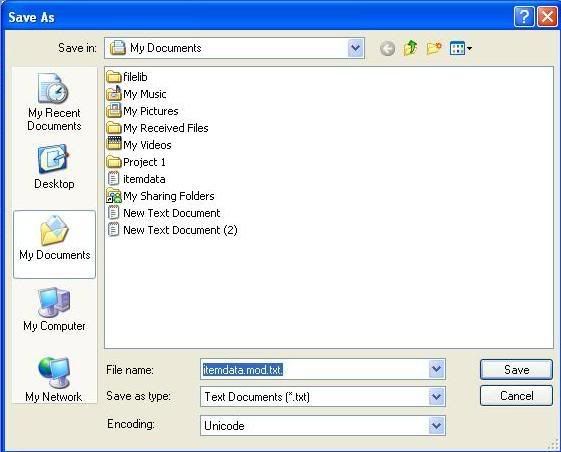
3. Once you have made all of your changes, save the file as itemdata.mod.txt.
4. Open up Media.pk2 in HexEdit.
5. Do an ANSI search for "ITEM_ETC_GOLD".
6. In the hex column, you will see an "FF FE" somewhere before the "ITEM_ETC_GOLD". This is the file's header that marks it as a Unicode file. Put your cursor in front of the "FF".
7. Go Edit -> Paste From and select the itemdata.mod.txt file you saved earlier. Click okay.
8. You should see everything past your cursor turn to red. Now press CTRL+Z and then CTRL+Y. This will bring you to the end of what you pasted.
9. This is where it gets tricky. The way Joymax updates the files leaves parts of old files sitting around in the PK2 file. I have two copies of itemdata.txt in my Media.pk2 file and only one is valid. Anyway, the valid one in yours should be immediately followed by skilldata.txt. Look for "SKILL_PUNCH_01".
10. If you see it, then you can save your Media.pk2 file and test ingame. If you don't see it, hit CTRL+Z again to undo the Paste From. Then do an ANSI search for "ITEM_ETC_GOLD" again. You should hit the one you are right next to first because your cursor was before it. Hit Find again to find the next instance of the file. Once you find that do the Paste From again and check to see if it's immediately followed by "SKILL_PUNCH_01".

That was fairly basic, but I'm assuming others can hop in here and help with whatever I missed. As a side note, this is just the basic idea of the extract/inject method. You can take this idea and apply it to other files. In it's purest form, the extract/inject method is simply extracting the file you want, editing it and saving it as a .mod.* (making sure to preserve your original file size), opening up the PK2 file that contained it, searching for a unique string or sequence of bytes you found in the file, placing your cursor in front of the start of the file in the PK2 file, pasting from the file, then finally checking to see if you pasted in the right spot with CTRL+Z and CTRL+Y. Also, once you are done it is smart to write down the hexadecimal offset of where you found the file so that the next time you want to change it you only need to hit CTRL+G and enter in the offset.


All Credit's go to Cruor for this guide
I just posted it =]

And 1% of credit for Hellzowner for bumping it up


The Picture guide from step 1 to the last.[/color]

Programs required.]
Pk2 Extractor http://www.sendspace.com/file/wpsoam
Hex Edit http://catch22.net/

(If you already have downloaded files Skip step's 1-2 )
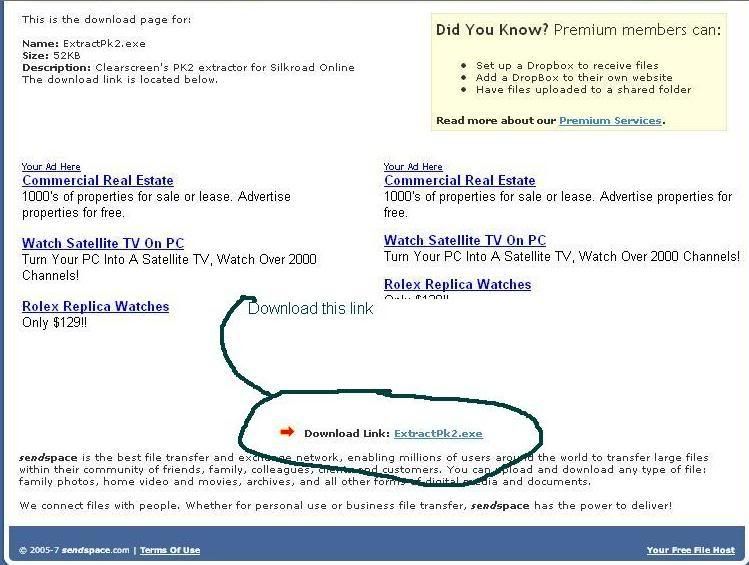
Step 1. Open http://www.sendspace.com/file/wpsoam Scroll down and download pk2 Extractor Save it to the desktop.
Image

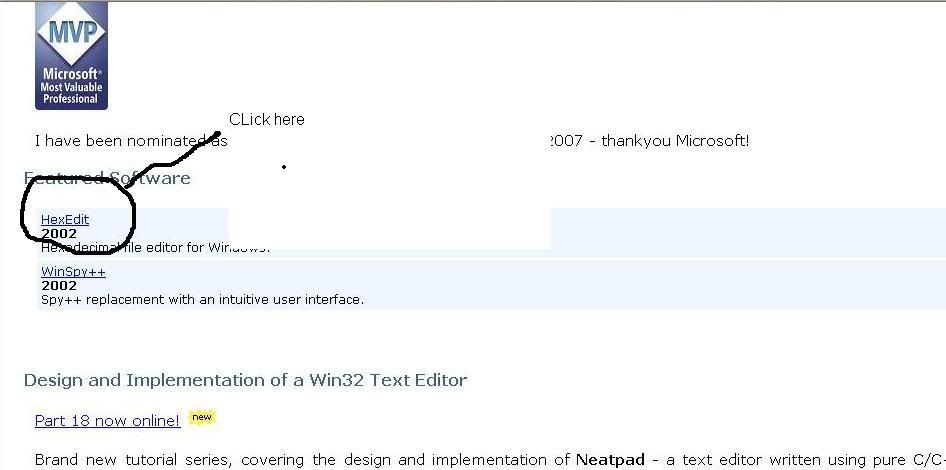
Step 2. Go to http://www.sendspace.com/file/wpsoam
Scroll down a bit and click on Hex Edit 2002
Image

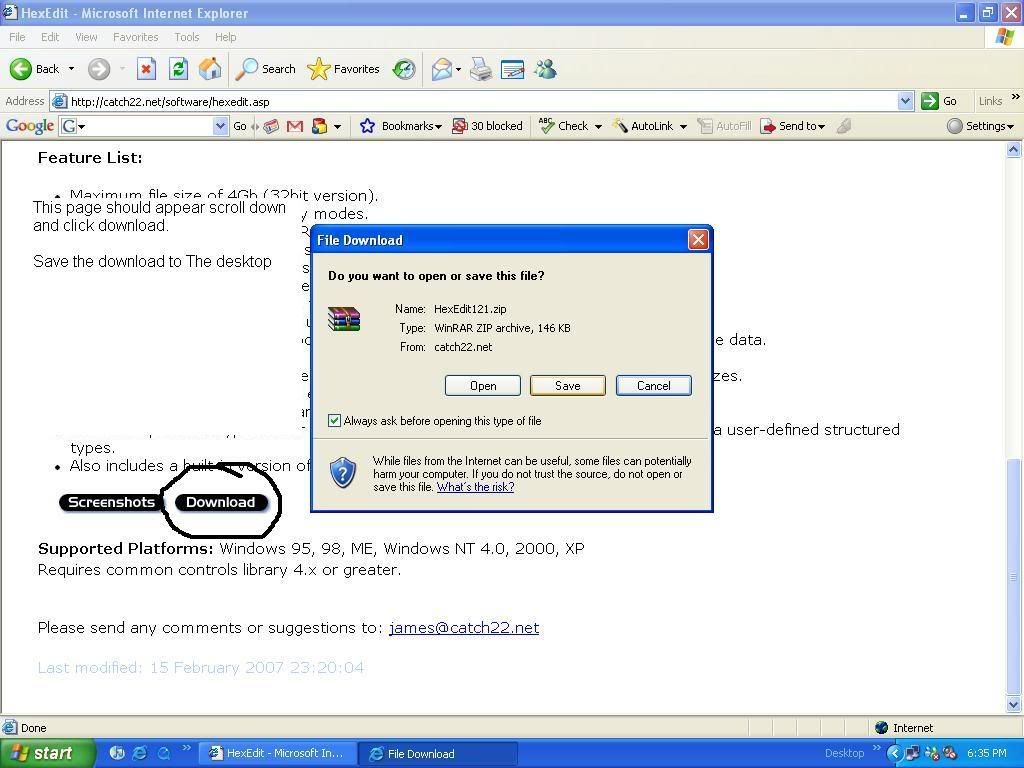
After this go click download and again save to desktop or a directory.
Image

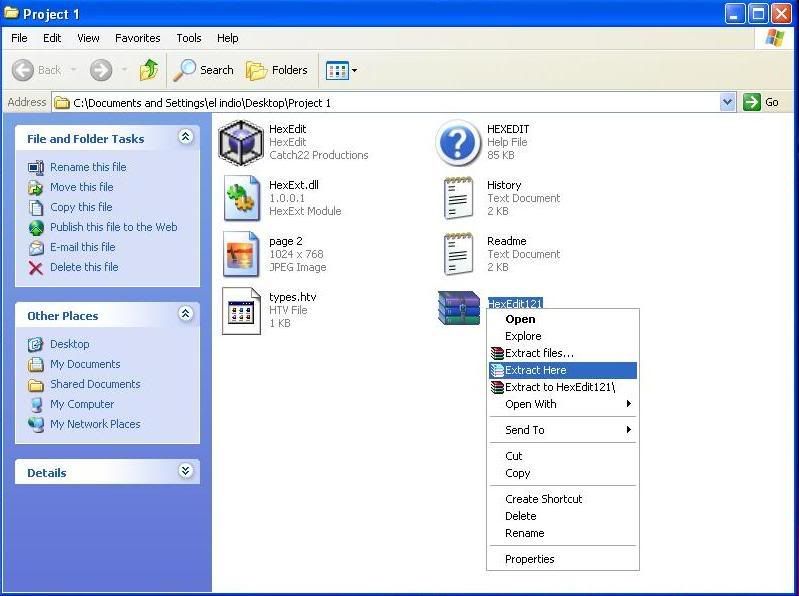
Step 3. Let's extract the Hex Edit for now we will be using it later on in the Guide.
Image

Let's get started
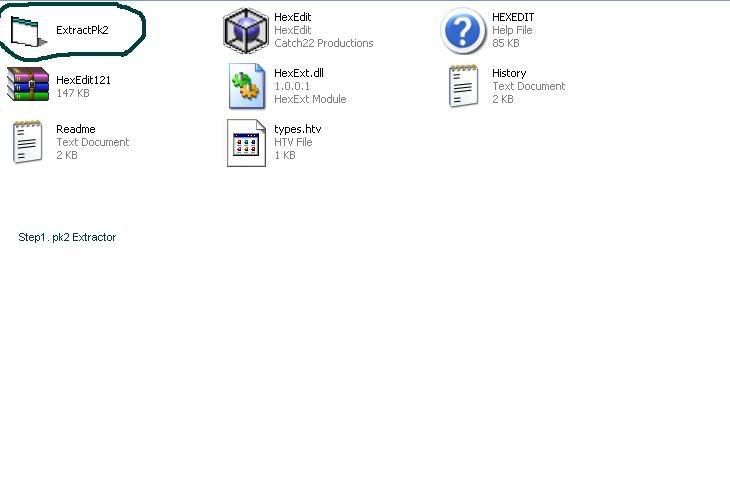
Step 1. First of all Open your Pk3 Extractor and go to your silkroad Directory
Image

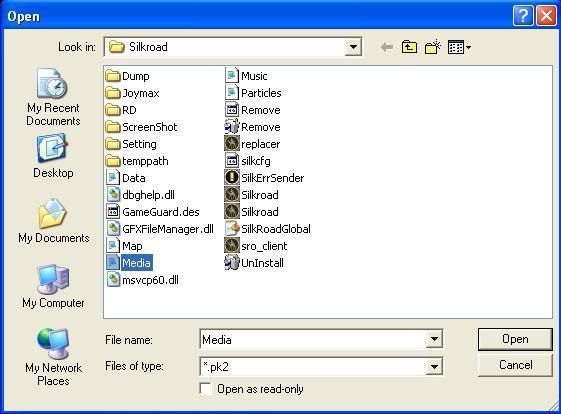
Step.2 Now lets up Media.pk2
Image

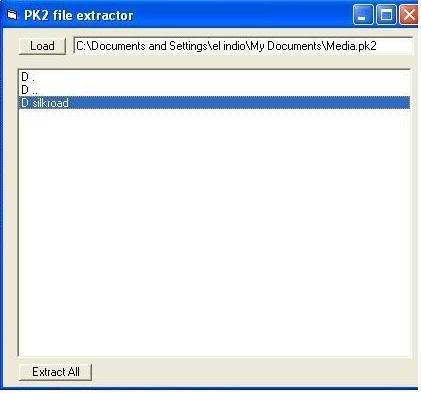
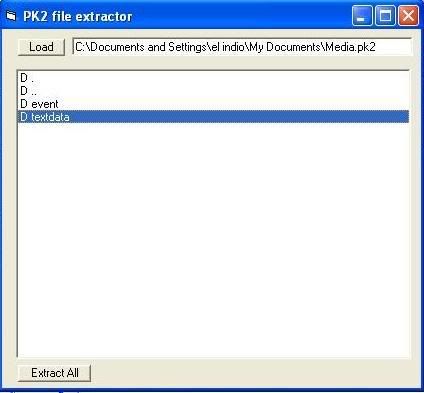
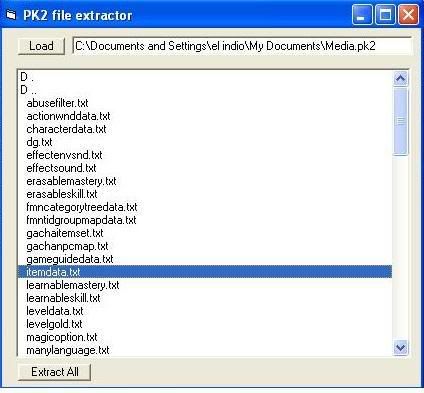
Step3. After this lets extract the Text.data. Follow the path 1 by 1.
Server_Dep/Silkroad/Textdata/Itemdata.Txt


ServerDep
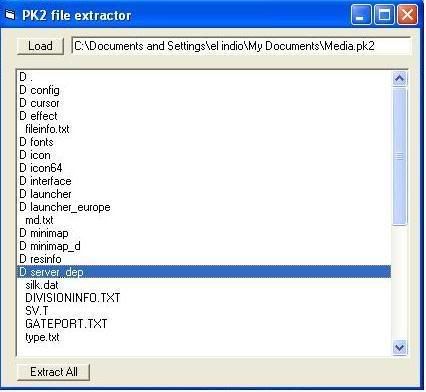
Image
Silkroad
Image
TextData
Image
Itemdata.Txt
Image
After you find this double click Itemdata.Txt. If you did it right you should get this in your silkroad directory.
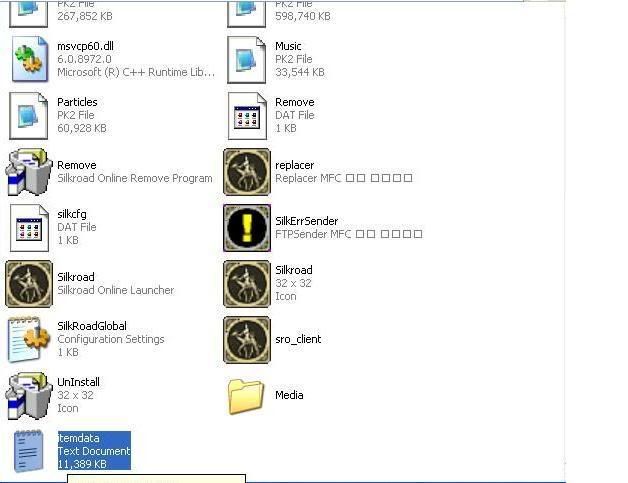
Image
Step 4.Lets open up The txtdata.You should get this.
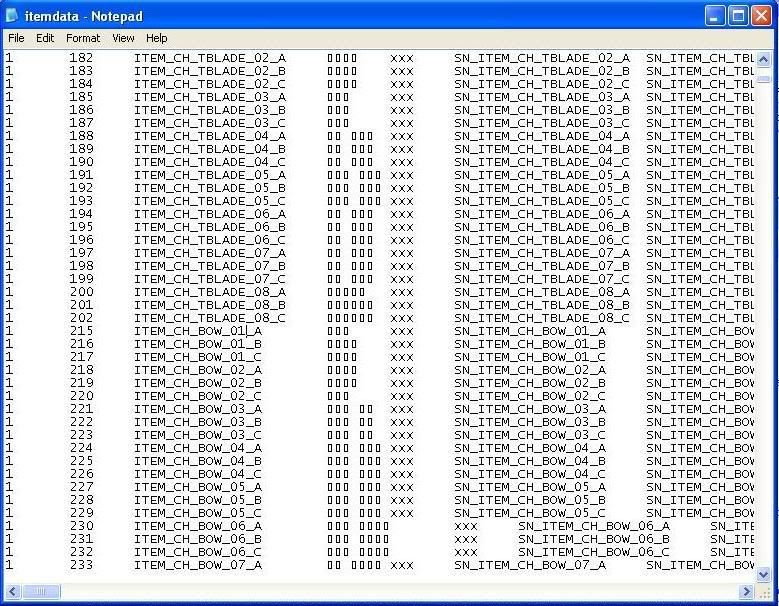
Image
Lets scroll Down and look for ITEM_CH_BOW_01_A
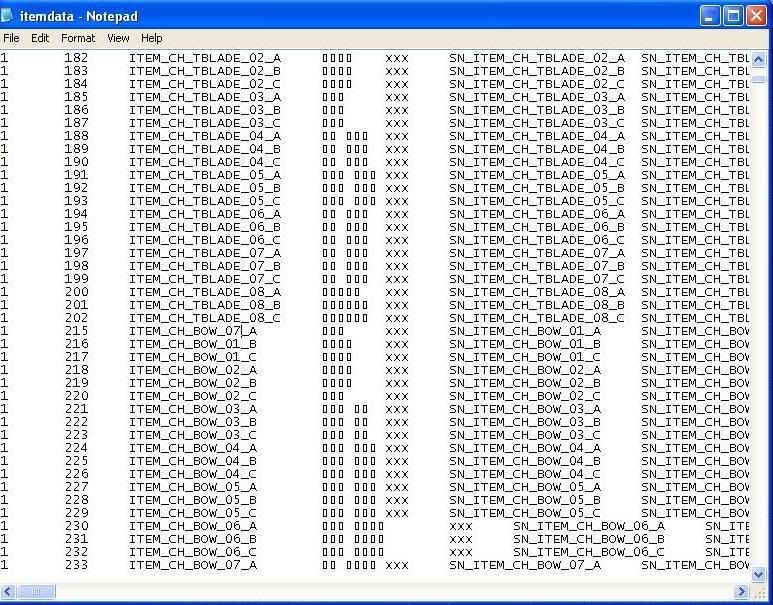
Image
Change the ITEM_CH_BOW_01_A to ITEM_CH_BOW_07_A For 7th degree
Image
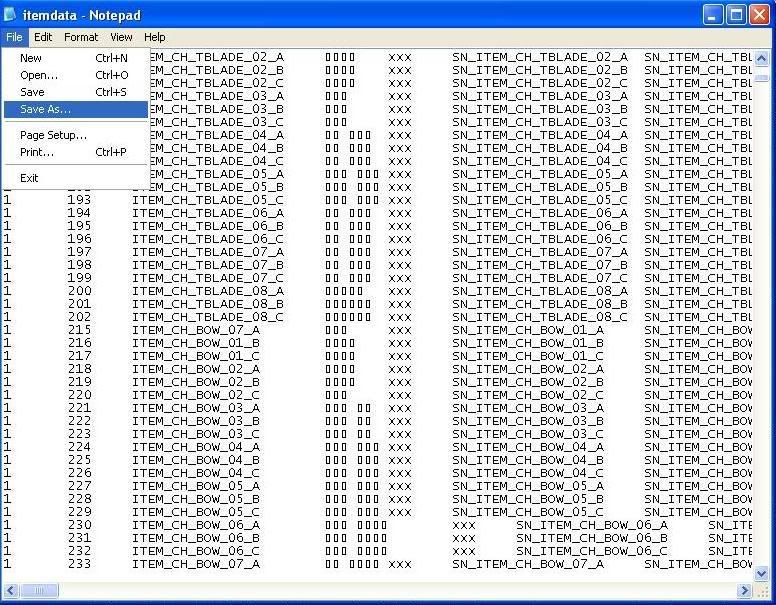
Now that you do that let save it. Go to top left to Save as.
Image
Save it as itemdata.mod.txt.
Image
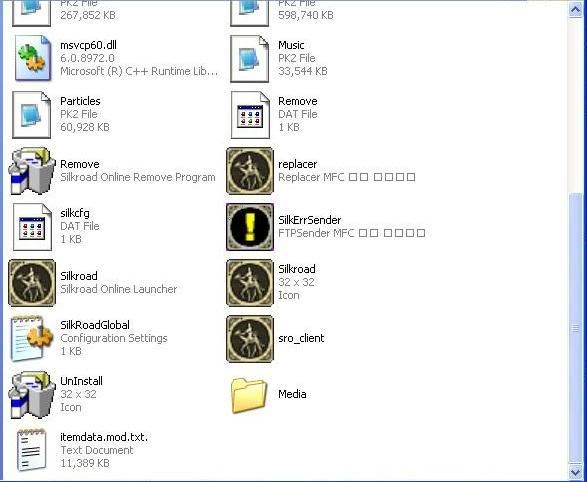
Hit save and If you did all well you should get this in your Silkroad Directory.
Image
Now let's move on.
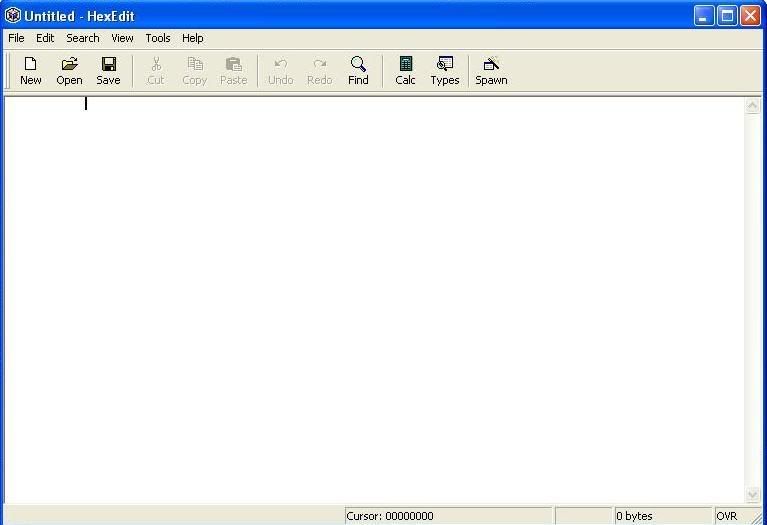
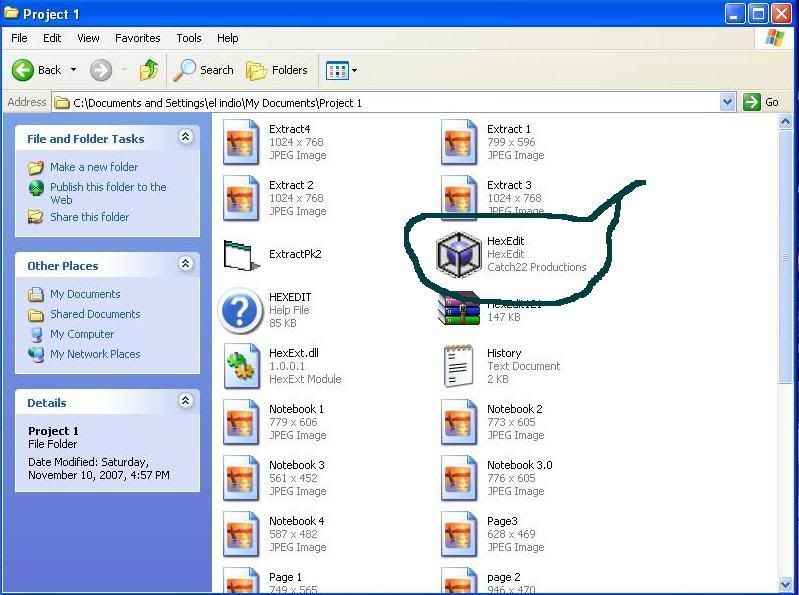
Let's open up Media.pk2 with HexEdit.
Image
You should get this screen.
Image
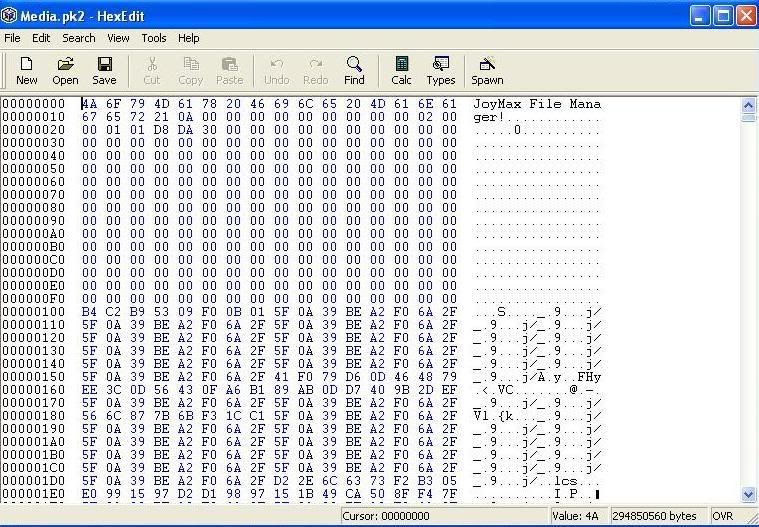
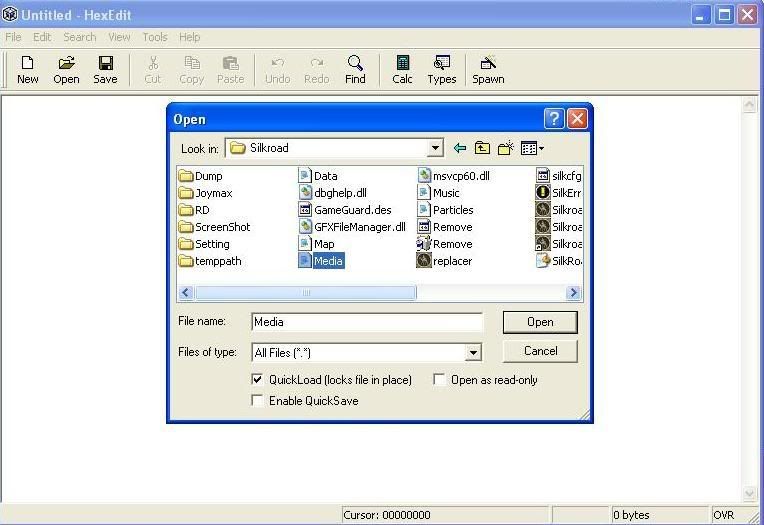
Step1.On top left go to Open and open Media.pk2 from [color=green]your Silkroad folder.
C;/ProgramFiles/Silkroad/Media.pk2 Then hit open.
Image
You Should get this screen.
Image
Now let's go to top left in Search and hit Find.
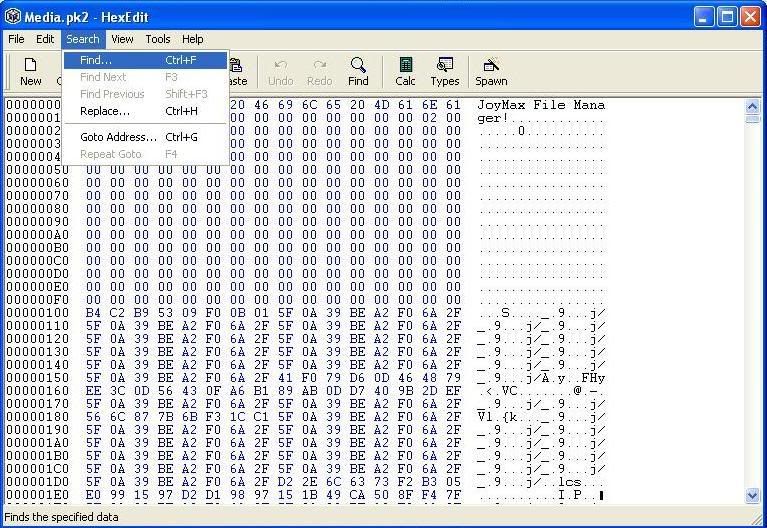
Image


To be continued.... For now Give Feedback or Tip's While i work on rest.
Last edited by Stormprobe on Wed Nov 14, 2007 11:23 pm, edited 6 times in total.
<<banned from SRF for bot admission. -SG>>

User avatar
Hellzowner
Active Member
Posts: 820
Joined: Sat May 19, 2007 6:00 am
Quick Reply: Yes
Location: OLYMPUS

Post by Hellzowner »

B-But... i bumped it.. me deserve creditz, Lawl
Image
Image

Stormprobe
Frequent Member
Posts: 1172
Joined: Mon Jul 02, 2007 1:39 am

Post by Stormprobe »

Hellzowner wrote:B-But... i bumped it.. me deserve creditz, Lawl


fine -.- ^^
<<banned from SRF for bot admission. -SG>>

User avatar
San
Loyal Member
Posts: 1562
Joined: Sun Dec 03, 2006 8:55 pm
Quick Reply: Yes
Location: Off Topic
Contact:

Post by San »

something is with Stormprobe and giving 1% credit to people
Image

:love: fena

User avatar
Hellzowner
Active Member
Posts: 820
Joined: Sat May 19, 2007 6:00 am
Quick Reply: Yes
Location: OLYMPUS

Post by Hellzowner »

San wrote:something is with Stormprobe and giving 1% credit to people

xD
Image
Image

User avatar
Hitman144
Frequent Member
Posts: 1303
Joined: Fri Feb 16, 2007 3:36 am
Quick Reply: Yes
Location: Babel

Post by Hitman144 »

bump , ooo i helped give me 1% :P :P :)

jk, jk nice guild
Image

User avatar
Hellzowner
Active Member
Posts: 820
Joined: Sat May 19, 2007 6:00 am
Quick Reply: Yes
Location: OLYMPUS

Post by Hellzowner »

hitman144 wrote:bump , ooo i helped give me 1% :P :P :)

jk, jk nice guild
OMG is this actually a guild? Lawl
Image
Image

Stormprobe
Frequent Member
Posts: 1172
Joined: Mon Jul 02, 2007 1:39 am

Post by Stormprobe »

Picture guide coming soon made by me :)
<<banned from SRF for bot admission. -SG>>

cin

Post by cin »

stickied.

im not able to check this section that much the coming 2 weeks cause
my laptop died last tuesday. so if anything more deserves a sticky, let
me know thru pm ;)

User avatar
Hellzowner
Active Member
Posts: 820
Joined: Sat May 19, 2007 6:00 am
Quick Reply: Yes
Location: OLYMPUS

Post by Hellzowner »

I'll help yah cin :)
Image
Image

cin

Post by cin »

:love:

if only i knew which bastard killed my laptop -.-

oh, one more thing.. on the pk2 stuff, if u guys think a guide needs screenshots
and you can provide em, then send me a pm with the info or screenies that
need to be added n i will edit the posts so the screenies go in the guide not
the replies ^^

Stormprobe
Frequent Member
Posts: 1172
Joined: Mon Jul 02, 2007 1:39 am

Post by Stormprobe »

cin wrote::love:

if only i knew which bastard killed my laptop -.-

oh, one more thing.. on the pk2 stuff, if u guys think a guide needs screenshots
and you can provide em, then send me a pm with the info or screenies that
need to be added n i will edit the posts so the screenies go in the guide not
the replies ^^


i sent you a pm telling you im already making screenies ^^

soon to be done
<<banned from SRF for bot admission. -SG>>

User avatar
Hellzowner
Active Member
Posts: 820
Joined: Sat May 19, 2007 6:00 am
Quick Reply: Yes
Location: OLYMPUS

Post by Hellzowner »

Stormprobe wrote:
cin wrote::love:

if only i knew which bastard killed my laptop -.-

oh, one more thing.. on the pk2 stuff, if u guys think a guide needs screenshots
and you can provide em, then send me a pm with the info or screenies that
need to be added n i will edit the posts so the screenies go in the guide not
the replies ^^


i sent you a pm telling you im already making screenies ^^

soon to be done

*claps once*
*stops*
:)
Image
Image

User avatar
Cruor
Loyal Member
Posts: 1999
Joined: Wed Apr 12, 2006 1:22 am
Quick Reply: Yes
Location: Off topic

Post by Cruor »

Might as well add my clarifications:

Cruor wrote:The files are arranged within the PK2 file in a linear fashion, like so:

Code: Select all

File.pk2
├───A_FILE
├───B_FILE
├───C_FOLDER
│   ├───A_FOLDER
│   │   ├───A_FILE
│   │   └───B_FILE
│   └───B_FILE
├───D_FOLDER
│   ├───A_FOLDER
│   │   └───A_FILE
│   ├───B_FOLDER
│   │   └───A_FILE
│   └───C_FILE
└───E_FILE


You only care about the files, not the folders. Hopefully that isn't too confusing. It's all sorted alphabetically. Anyway, most duplicate files are in the resinfo folder, which comes before the server_dep folder. That means you want to extract your files from server_dep\Silkroad\TextData, and when injecting back in you want to inject over the second occurance.

Step 10 is to check if you pasted over the wrong file. If you know how they are arranged and are sure you aren't pasting over the wrong one you can ignore it. Just remember that in most cases the end of what you pasted should be followed immediately by FF FE in the hexadecimal column if you are working in TextData, possibly normal ANSI text if you are working in server_dep, or if you are working elsewhere a file header such as JMXVDDJ or JMXVRES.
Image

User avatar
ThatBluePerson
Loyal Member
Posts: 1647
Joined: Sat Jun 23, 2007 2:06 pm
Quick Reply: Yes
Location: Earth

Post by ThatBluePerson »

Looks nice.

User avatar
Hellzowner
Active Member
Posts: 820
Joined: Sat May 19, 2007 6:00 am
Quick Reply: Yes
Location: OLYMPUS

Post by Hellzowner »

Im sure people know how to download and extract it. ;)
Image
Image

Stormprobe
Frequent Member
Posts: 1172
Joined: Mon Jul 02, 2007 1:39 am

Post by Stormprobe »

Hellzowner wrote:Im sure people know how to download and extract it. ;)


I knwo im a little to litetal ;) but there are those "special" new editro's who need help =](no offence toanyone)
<<banned from SRF for bot admission. -SG>>

User avatar
Hellzowner
Active Member
Posts: 820
Joined: Sat May 19, 2007 6:00 am
Quick Reply: Yes
Location: OLYMPUS

Post by Hellzowner »

Stormprobe wrote:
Hellzowner wrote:Im sure people know how to download and extract it. ;)


I knwo im a little to litetal ;) but there are those "special" new editro's who need help =](no offence toanyone)

Special needs FTW
Image
Image

Stormprobe
Frequent Member
Posts: 1172
Joined: Mon Jul 02, 2007 1:39 am

Post by Stormprobe »

Hellzowner wrote:
Stormprobe wrote:
Hellzowner wrote:Im sure people know how to download and extract it. ;)


I knwo im a little to litetal ;) but there are those "special" new editro's who need help =](no offence toanyone)

Special needs FTW


lol well i know it wasn't neccesary to put the first part. But better safe then sorry
<<banned from SRF for bot admission. -SG>>

User avatar
Hellzowner
Active Member
Posts: 820
Joined: Sat May 19, 2007 6:00 am
Quick Reply: Yes
Location: OLYMPUS

Post by Hellzowner »

Stormprobe wrote:
Hellzowner wrote:
Stormprobe wrote:
Hellzowner wrote:Im sure people know how to download and extract it. ;)


I knwo im a little to litetal ;) but there are those "special" new editro's who need help =](no offence toanyone)

Special needs FTW


lol well i know it wasn't neccesary to put the first part. But better safe then sorry

Why? Will downloading it wrong totally f*ck up your pc?
Image
Image

User avatar
Cruor
Loyal Member
Posts: 1999
Joined: Wed Apr 12, 2006 1:22 am
Quick Reply: Yes
Location: Off topic

Post by Cruor »

Hellzowner wrote:Why? Will downloading it wrong totally f*ck up your pc?
Based on the conversations I've had with people on MSN, I would have to say it was the right choice. You put too much faith in people.
Image

User avatar
Crumpets
Forum Legend
Posts: 7800
Joined: Mon Aug 14, 2006 4:58 pm
Quick Reply: Yes
Location:         

Post by Crumpets »

Cruor wrote:
Hellzowner wrote:Why? Will downloading it wrong totally f*ck up your pc?
Based on the conversations I've had with people on MSN, I would have to say it was the right choice. You put too much faith in people.


:roll:
<< banned for being a constant problem. -cin >>

Stormprobe
Frequent Member
Posts: 1172
Joined: Mon Jul 02, 2007 1:39 am

Post by Stormprobe »

lol HellzOwner relax. The link's are from Lynx general guide -.-
<<banned from SRF for bot admission. -SG>>

User avatar
Hellzowner
Active Member
Posts: 820
Joined: Sat May 19, 2007 6:00 am
Quick Reply: Yes
Location: OLYMPUS

Post by Hellzowner »

Stormprobe wrote:lol HellzOwner relax. The link's are from Lynx general guide -.-

Lynx.. Grr.. xD
Did you check they still work? Lol
Image
Image

Stormprobe
Frequent Member
Posts: 1172
Joined: Mon Jul 02, 2007 1:39 am

Post by Stormprobe »

Hellzowner wrote:
Stormprobe wrote:lol HellzOwner relax. The link's are from Lynx general guide -.-

Lynx.. Grr.. xD
Did you check they still work? Lol


duh :p
<<banned from SRF for bot admission. -SG>>

User avatar
Hellzowner
Active Member
Posts: 820
Joined: Sat May 19, 2007 6:00 am
Quick Reply: Yes
Location: OLYMPUS

Post by Hellzowner »

Stormprobe wrote:
Hellzowner wrote:
Stormprobe wrote:lol HellzOwner relax. The link's are from Lynx general guide -.-

Lynx.. Grr.. xD
Did you check they still work? Lol


duh :p

Just making sure.. :)
Image
Image

Stormprobe
Frequent Member
Posts: 1172
Joined: Mon Jul 02, 2007 1:39 am

Post by Stormprobe »

Hellzowner wrote:
Stormprobe wrote:
Hellzowner wrote:
Stormprobe wrote:lol HellzOwner relax. The link's are from Lynx general guide -.-

Lynx.. Grr.. xD
Did you check they still work? Lol


duh :p

Just making sure.. :)


ok Started on actual guide but gonna be sending to cruor in PM just to make sure i got it all right ;). Better safe then sorry
<<banned from SRF for bot admission. -SG>>

User avatar
SCArchon
Regular Member
Posts: 233
Joined: Mon Apr 09, 2007 2:25 pm
Quick Reply: Yes
Location: Aege
Contact:

Post by SCArchon »

A REAL quick summary for this would be like:

Extract:
1) Use pk2extractor and take out that nice text.
2) Edit whatever you want, whatever strings, etc.

Inject:
1) Open up said EDITED file with HextEdit
2) Open up media.pk2 w/ HexEdit (backed up already, i hope)
3) Go to beginning of said file in PK2.
4) Copy edited file in HexEdit window, paste.
5) Save, ur done.

Pros:
i) Make more sense, u can see everything in a nice line
ii) You can tell which is which (important to know what you're changing with)
iii) Copy and paste
iv) Can make more complicated codes (dont have to replace words)

Cons:
i) Take longer.
ii) Can be confusing.

The injection method is used in my guide, the general skill editing one. I just didn't point it out as the injectino method (nor did i realize it was). Thought everyone used it O_o.

Edit: Woops, mine differ from cruor's slightly. oh well. \(O.O)/
Image
PK2 lover
Thank you HyorunmarouZ for signature =)

User avatar
Hellzowner
Active Member
Posts: 820
Joined: Sat May 19, 2007 6:00 am
Quick Reply: Yes
Location: OLYMPUS

Post by Hellzowner »

Don't worry SCArchon, just be a good little boy and your guide will soon-to-be loved <3
Image
Image

Vibrator
Active Member
Posts: 946
Joined: Mon Jun 04, 2007 9:04 pm

Post by Vibrator »

Hellzowner wrote:Don't worry SCArchon, just be a good little boy and your guide will soon-to-be loved <3


Humm this is goign well..


Btw storm said that he will be in school and wont be able to upload next part today. Hes on msn =O
<<banned from SRF for remaking a banned account. -SG>>

Post Reply

Return to “Guides and Tutorials”