Digital art design, renderings, signatures and anything art related. Upload pictures of your newest work or ask for feedback. Post graphics requests or discuss art in general.
It seems dull, until you hit the lighting witch is kinda harsh
to me it seems to bland
maybe make it more vibrant with some photo filters
play around some with contrasting filters (not sure of the name something to do with contrast =/)
6/10 for now
change the colors up
XemnasXD wrote:also im not going to stop calling him a cosmic douche, anyone that knows everything about everything, then creates you knowing full you won't end up following the rules he's made up for you, then punishes you for all eternity for it....come on...thats just being a d*ck.
XemnasXD wrote:also im not going to stop calling him a cosmic douche, anyone that knows everything about everything, then creates you knowing full you won't end up following the rules he's made up for you, then punishes you for all eternity for it....come on...thats just being a d*ck.
cin wrote:ok grab the first one you posted. now make new layer go Image -> Aplly image now play around with your layer mode a bit to get some depth in your colors put it on.. idk, multiply or overlay or something.. then play around with the opacity if needed try that out n see if it works
Snudge wrote:Yeah, I probably could, but I could as well make him one from scratch then.
Making one from scratch could just be easier lol..
With pre-made ones there's always a certain style in it.. If that doesn't resemble your style at all you will most likely ruin it..
Not nescecarily(HOW THE **** DO YOU WRITE THAT?! XD), all I did this time was adding a few adjustment layers, which is the easiest way of adjusting an existing image.
Snudge wrote:Yeah, I probably could, but I could as well make him one from scratch then.
Making one from scratch could just be easier lol..
With pre-made ones there's always a certain style in it.. If that doesn't resemble your style at all you will most likely ruin it..
Not nescecarily(HOW THE **** DO YOU WRITE THAT?! XD), all I did this time was adding a few adjustment layers, which is the easiest way of adjusting an existing image.
True I guess, but that's just adding some layers, and not REALLY editing the image imo..







 V3
V3
 [/list]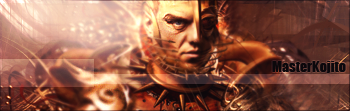


 The face looks better then in 'my' version, but I couldn't be arsed going into the details. 7/10 for you.