Digital art design, renderings, signatures and anything art related. Upload pictures of your newest work or ask for feedback. Post graphics requests or discuss art in general.
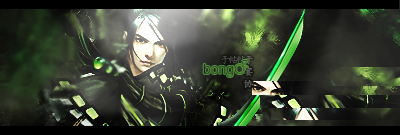
i usually dont like the whole render-over-the-border thing, but im likin this one for some reason. The background is kinda interesting and so is the render. A little bit of render blending and changing the font to a different color and your set =)
well, if your using PS, theres a thing called the "smudge" tool. This is the easiest and most effective way to blend the render into the background. If the render wasnt over the border, you could blend to the left of the render and at the bottom. Youll just have to play around with the brush settings in smudge to get it right for blending. And as for a color for the font, try to use a clipping mask (little too lazy to explain what this is) or just lower the opacity on the font layer. You could also add a stroke around the text in black or any color that fits. The font actually is really nice, just stands out too much.
you dont need to blend your render in any more, it would defeat the purpose of this piece. You are going for an in your face type of appeal with this (The gun pointing out, focal over border, etc.) so the smudge tool is only going to get you in trouble when it comes to overall composition. You need to make the lighting tones on your background/focal match more to achieve harmony.
Also, you might want to decide what you want to be the focal point. As the gun is kinda blurred, I suspect it's supposed to be the face. Try blurring -small bits of- the body a bit, and the BG as well.
Rizla wrote:you dont need to blend your render in any more, it would defeat the purpose of this piece. You are going for an in your face type of appeal with this (The gun pointing out, focal over border, etc.) so the smudge tool is only going to get you in trouble when it comes to overall composition. You need to make the lighting tones on your background/focal match more to achieve harmony.
if you read my previous post, i stated that if it wasnt an over-the-border tag, blending would suffice.
Rizla wrote:you dont need to blend your render in any more, it would defeat the purpose of this piece. You are going for an in your face type of appeal with this (The gun pointing out, focal over border, etc.) so the smudge tool is only going to get you in trouble when it comes to overall composition. You need to make the lighting tones on your background/focal match more to achieve harmony.
if you read my previous post, i stated that if it wasnt an over-the-border tag, blending would suffice.
Im not nor was I criticizing your opinion, everyones entitled to one - but if you werent suggesting blending for this signature why in the heck did you go into extraneous detail with the smudge tool? In fact you didnt suggest that due to it being an over-border-focal you shouldnt smudge it, you said he would have to play around with smudge to get it right...so Im just kinda confused.
Snudge wrote:Also, you might want to decide what you want to be the focal point. As the gun is kinda blurred, I suspect it's supposed to be the face. Try blurring -small bits of- the body a bit, and the BG as well.
No it needs to look as if he's pulling out his gun on you


 Blacklisted _ENDLESS_