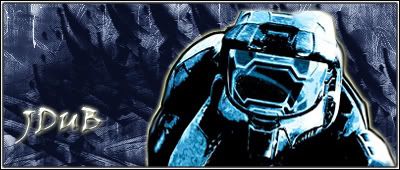
First sig!

Digital art design, renderings, signatures and anything art related. Upload pictures of your newest work or ask for feedback. Post graphics requests or discuss art in general.
Post Reply
User avatar
Necro-Mage
Valued Member
Posts: 458
Joined: Tue Apr 03, 2007 4:42 am
Quick Reply: Yes
Location: venice

First sig!

Post by Necro-Mage »

Hey guys!

I made my first-time sig ever! I used AvAlAnChE1's guide for my sig base and used Moogie's cut out character guide for my stock. It took my roughly about 2 to 3 days.

My stock:
http://screenshots.teamxbox.com/screen/61640/Halo-3/

Yes, BTW it's another Halo sig :D .

So I'm ready for some criticism/comments and ratings, hope it's not too bad :oops: .

Image
Image

User avatar
bluey
Valued Member
Posts: 400
Joined: Mon Jan 29, 2007 9:22 pm
Quick Reply: Yes
Location: Athens

Re: First sig!

Post by bluey »

Necro-Mage wrote:Hey guys!

I made my first sig! I used AvAlAnChE1's guide for my sig base and used Moogie's cut out character guide for my stock.

My stock:
http://screenshots.teamxbox.com/screen/61640/Halo-3/

Yes, BTW it's another Halo sig :D .

So I'm ready for some criticism/comments and ratings, hope it's not too bad :oops: .

Image

Well it's definitely better than your old sig... lol.

It needs some work, I can definitely tell its your first. First clue is the text, and the emboss effect, stay away from that. To you, right now your impressed with that effect. I'll tell you the truth though, its not the amount of effects that you put into your text, but its the way it complements the actual sig. I suggest simplicity.

BTW kudos for the text location, you've got the right idea there.

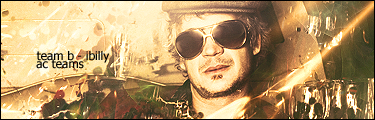
Another thing, the subject doesn't fit well with the background, in fact it seems rather misplaced. I suggest finding something that complements master chief, try looking up some tutorials on google for blending the subject into the background (of course its not as simple as that, the sig I made below took an hour to evolve to what you see now) - it will look a lot better.

Finally, stay away from that nasty glow effect you used on the text and master chief, honestly it doesn't look good at all, especially in its default yellow setting.

Other than that, huge step up from your old sig haha but i doubt you tried for that one. Keep going at it, it just takes time. I have never used a tutorial for any of my work, ever. I have always taught myself how to use the program, who knows, that may work best for you too.

keep at it ^_^

User avatar
Necro-Mage
Valued Member
Posts: 458
Joined: Tue Apr 03, 2007 4:42 am
Quick Reply: Yes
Location: venice

Post by Necro-Mage »

Oh cool, thanks Bluey!
Image

iBilly
Active Member
Posts: 849
Joined: Mon Jul 30, 2007 7:18 pm
Quick Reply: Yes
Location: Romford, Essex, England

Post by iBilly »

Do I hear monotone?

Nah, just check out some tutorials and keep practising, you'll be fine. Don't expect to master Photoshop in a week though, keep at it.
Permanently retired from Silkroad Online.
- Playing Lord of the Rings Online.

Image

User avatar
Rizla
Ex-Staff
Posts: 1197
Joined: Sun Jun 11, 2006 4:17 am
Quick Reply: Yes
Location: Artist's Corner

Post by Rizla »

I honestly think Moogies character cut out guide is one of the worst examples of selections Ive ever seen. Using that in future pieces will set yourself up for shoddy work - it's very amateur and obviously so.

Stay away from stock layer styles, such as outer glow. If you're going to use it atleast change the color... :banghead: I see so many pieces and that baby puke yellow is a dead give away to somebodies first time in Photoshop.


kuler.adobe.com

go make some color schemes, and take the sig off the rocks ;)
Image

Post Reply

Return to “Artists Corner”