Vista and SRO - Problems and solutions here

If your having problems installing or playing Silkroad Online, please post here. Includes general computer health and technical problems.
Post Reply
User avatar
xzaz
Loyal Member
Posts: 1574
Joined: Sat Sep 02, 2006 8:53 pm
Quick Reply: Yes
Location: Greece

Vista and SRO - Problems and solutions here

Post by xzaz »

-Get everything updated and clean-
Make sure you got this:
- You got a good smoothly windows Vista running
- You got the lastest sro version running (at least launghing) and installed
- You got Administrator rights
- You got the newest Windows Vista updates.

-Put compatibility on-
Because JoyMax did "updated" sro for Windows Vista users it should all work directly after installing sro. But most of the time it dosnt work :P
- Right click on the sro icon on your desktop
- Click on the tab compatibility
- Put this on "Windows XP (Service Pack 2)"
- Press OK


-Alsow-
Try this:
- Allow SRO to access/trusted Program.
- Disable auto updates from windows vista


--------> Try not to run xfire, msn enc kind of programs. First try a "clean" laungh. <--------
Now try to run sro.

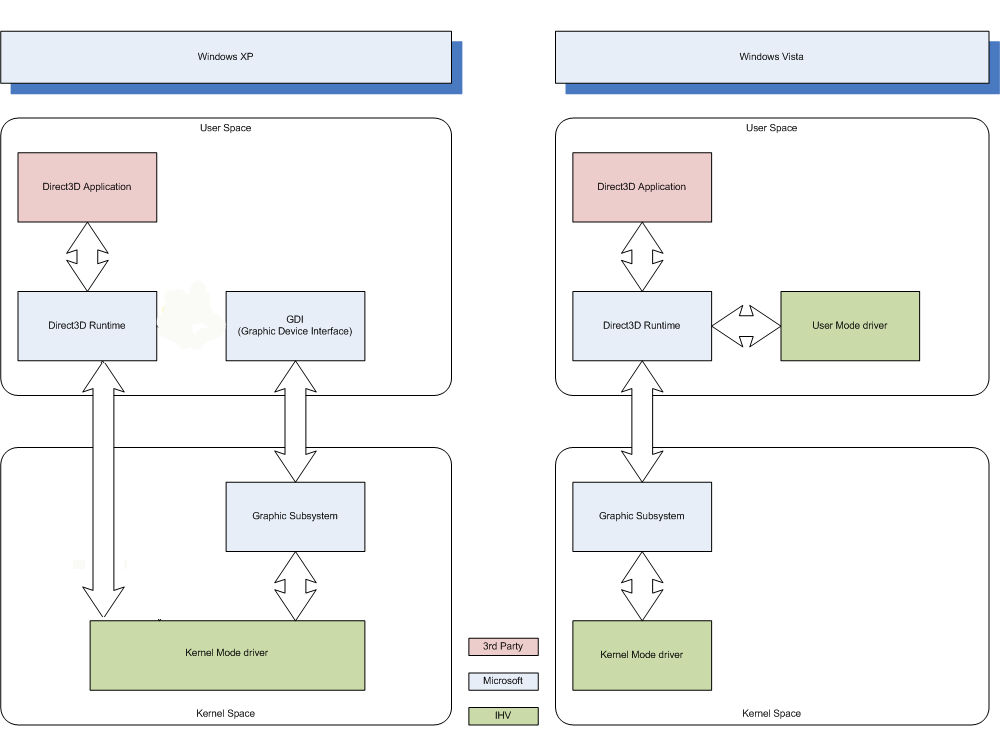
I think the most of the problems should be fixed with this. I think the most of the problems are because of Windows Vista with the new Dx 10 version has a completly new system. Alsow there is a option that its the fault of Game Guard. On their website Here You can see here that GameGuard isnt compatible with Vista.

-Not working?-
- Try to run SRO as Administrator

-Alright if it dosnt work-
- Go to Control Panel
- Add a program to Windows Firewall
- Add here sro_client.exe and silkroad.exe
- Search for new updates on Windows Vista.
- Restart your computer


-Try to update the following stuff-
- http://www.microsoft.com/downloads/deta ... laylang=en

And if you think its impossible, it aint because i (and many others) run SrO on Vista.

If you stil got problems pleas post this:

Code: Select all

[b]OS version (Ultimate enc):[/b]

[b]Error:[/b]

[b]Screenshot:[/b]

[b]Your configuration:[/b]
CPU:
Memory:
Graphic card:
Motherboard:

[b]Comment:[/b]


If you want your computer information (spec for DirectX) press WinKey + R and type: "dxdiag" and press "enter".

-Other (download) links-
- [Europe update Mirror 1] http://files.filefront.com/SilkroadOnli ... einfo.html
- [Europe update Mirror 2] http://files.filefront.com//;7974758
- [Europe update Mirror 3] http://www.silkroadonline.net
- [Europe update Mirror 4] -
- [Europe update Mirror 5] http://files.filefront.com//;7966156;;/
- [Europe update Mirror 6] http://lsob.de/pub/SRO_GlobalOfficial_v1_110.exe
- [Europe update Mirror 7] Google is your friend :)

- [Other faq about vista ] http://members.cox.net/ddchen/troubleshoot.htm#vista tnx to pengachu
- [Other Technical Help topic ] http://www.silkroadforums.com/viewtopic.php?t=52682
- [Other Technical Help topic ] http://www.silkroadforums.com/viewtopic.php?t=53167
- [ Nvidia drivers ] http://www.nvidia.com/content/drivers/drivers.asp
- [ Ati drivers ] http://ati.amd.com/support/driver.html

I should try to continue help and expent this faq/tuto with lovely sro and vista :D
Last edited by xzaz on Mon Sep 24, 2007 7:54 pm, edited 21 times in total.
Image

heads
New Member
Posts: 36
Joined: Fri Jun 29, 2007 1:22 am
Quick Reply: Yes
Location: Pacific

Post by heads »

SRO runs smoothly for the most part but when leaving the character on or playing after awhile for a period of time, it closes and states its a visual c++ error. Sorry no pics right now because I dont have my laptop with me tonight. Any help would be appreciated. :D

User avatar
xzaz
Loyal Member
Posts: 1574
Joined: Sat Sep 02, 2006 8:53 pm
Quick Reply: Yes
Location: Greece

Post by xzaz »

Image

coolguy889
Hi, I'm New Here
Posts: 2
Joined: Sun Jul 29, 2007 5:01 am

Post by coolguy889 »

Hi I have windows vista home premium. I have a gateway computer with and intel core duo processor 2.0 Ghz, 1014MB RAM, i think my graphic card is a Intel GMA 950. Sorry I don't have a screenshot. I can run the game but the screen constantly flashes black during the opening. i can log in and go to the character create screen but once it gets there it freezes. after i minimize the program there is an error that constantly pops up that says the directx driver has stopped working and has recovered. thanks for you help.

I run the program as an admin and in the XP Service pack 2 compatibility. I also added SRO to the okay in the windows firewall and have dowloaded the thing from the link you gave.

User avatar
xzaz
Loyal Member
Posts: 1574
Joined: Sat Sep 02, 2006 8:53 pm
Quick Reply: Yes
Location: Greece

Post by xzaz »

Are you sure you are using the latest vid driver? Else try here:
try alsow not to set windows vista in Windows vista Aero. Just take the normal one.
Image

coolguy889
Hi, I'm New Here
Posts: 2
Joined: Sun Jul 29, 2007 5:01 am

Post by coolguy889 »

i updated the driver and have windows running in classic but still no luck. Is it possible that my driver just sucks? lol. it says it has 224MB of approximate total memory.

User avatar
xzaz
Loyal Member
Posts: 1574
Joined: Sat Sep 02, 2006 8:53 pm
Quick Reply: Yes
Location: Greece

Post by xzaz »

Well check you driver version and the version on the official hompage of your manufacture.
Image

User avatar
sheeplol6
Active Member
Posts: 720
Joined: Sat Sep 22, 2007 11:43 pm
Quick Reply: Yes
Location: Venus

Post by sheeplol6 »

i cant run utorrent.
it says install
i click allow and it says "cant run from temporary directory in windows this is probably not what you want to do. click OK to install uTorrent.

then it says

"unable to install uTorrent to C:\Porgramme Files\utorrent\utorrent.exe"

what do i do? :oops:
Image

Thanks MasterKojito for the sig <3

User avatar
xzaz
Loyal Member
Posts: 1574
Joined: Sat Sep 02, 2006 8:53 pm
Quick Reply: Yes
Location: Greece

Post by xzaz »

Try one of the links above to download it directly.
Image

User avatar
sheeplol6
Active Member
Posts: 720
Joined: Sat Sep 22, 2007 11:43 pm
Quick Reply: Yes
Location: Venus

Post by sheeplol6 »

ok i did that :)
but now after it says please wait i get a message saying this is a client file that can only be used after the europe update.
Image

Thanks MasterKojito for the sig <3

User avatar
sheeplol6
Active Member
Posts: 720
Joined: Sat Sep 22, 2007 11:43 pm
Quick Reply: Yes
Location: Venus

Post by sheeplol6 »

ok it just decided to work :D
it keeps doing that :P
does it after a few tries :)

thanks for your help. this should be stickied if it isnt already.
Image

Thanks MasterKojito for the sig <3

shiratori
Hi, I'm New Here
Posts: 13
Joined: Sat Sep 22, 2007 4:52 am

Post by shiratori »

excuse me i am not very good at in vista so i would like to ask how can i run this game as Administrator

User avatar
xzaz
Loyal Member
Posts: 1574
Joined: Sat Sep 02, 2006 8:53 pm
Quick Reply: Yes
Location: Greece

Post by xzaz »

shiratori wrote:excuse me i am not very good at in vista so i would like to ask how can i run this game as Administrator

If you still need the answer, Right click on the icon on your desktop then "Run as Administrator"

Shadowman20818
Loyal Member
Posts: 1506
Joined: Wed Jul 18, 2007 12:19 am

Post by Shadowman20818 »

Now go bother cin to put this on sticky, although it's probably not gonna fall to page two in a long time.
-Back in '08-

User avatar
Da_Realest
Advanced Member
Posts: 2435
Joined: Sun Apr 16, 2006 4:30 pm
Quick Reply: Yes
Location: Off Topic

Post by Da_Realest »

OS version (Ultimate enc):
Vista Home Premium

Error:
Crashes after a period of time.

Screenshot:
Image

Your configuration:
CPU: AMD Turion64 X2 Mobile Technology TL-50 1.60GHz
Memory: 2047MB
Graphics Card: GeForce Go 7600
Motherboard: Don't know.

Comment:
Don't know if this will help but here is a link to the laptop.

http://www.everex.com/products/xt5000t/xt5000t.htm

EDIT: Fixed my problem. Undervolted my laptop with RM Clock. The crashes seem to have stopped.
Ziegfried wrote:What you do or say in any game is a small extension of who you really are. It's the anonymity that can allow them to show their true self, or who they would be if there was no "penalty" for their actions.

User avatar
FliiipZ
Loyal Member
Posts: 1521
Joined: Mon Jul 16, 2007 10:43 pm
Quick Reply: Yes
Location: School

Post by FliiipZ »

Thank you! :3
Image
Image

User avatar
crazy_foo
Frequent Member
Posts: 1387
Joined: Wed Dec 13, 2006 9:04 pm
Quick Reply: Yes
Location: Olympus

Post by crazy_foo »

I get the blue screen of death half the time I freaking play sro now and I have windows vista ultimate and I already did everything else mentioned on here. All my drivers are up to date as well. I find it kind of odd that I can play Crysis for 3 hours with an overclocked graphics card stable and not run sro for over 10 min without something going wrong :x

Post Reply

Return to “Technical Help”