
Thundertiger Force:SKILL_CH_LIGHTNING_GIGONGTA_A
Thundersky Force:SKILL_CH_LIGHTNING_GIGONGTA_B
Thunderking Force:SKILL_CH_LIGHTNING_GIGONGTA_C
Thunderdragon Force:SKILL_CH_LIGHTNING_GIGONGTA_D
Must-piercing Force:SKILL_CH_LIGHTNING_GWANTONG_A
Flow-piercing Force:SKILL_CH_LIGHTNING_GWANTONG_B
Speed-piercing Force:SKILL_CH_LIGHTNING_GWANTONG_C
Force-piercing Force:SKILL_CH_LIGHTNING_GWANTONG_D
Grass-walk Flow:SKILL_CH_LIGHTNING_GYEONGGONG_A
Graas-walk Phantom:SKILL_CH_LIGHTNING_GYEONGGONG_B
Graas-walk Speed:SKILL_CH_LIGHTNING_GYEONGGONG_C
Shock-lion Shout:SKILL_CH_LIGHTNING_CHUNDUNG_A
Heaven-lion Shout:SKILL_CH_LIGHTNING_CHUNDUNG_B
Earth-lion Shout:SKILL_CH_LIGHTNING_CHUNDUNG_C
Consentration-1:SKILL_CH_LIGHTNING_JIPJUNG_A
Consentration-2:SKILL_CH_LIGHTNING_JIPJUNG_B
Consentration-3:SKILL_CH_LIGHTNING_JIPJUNG_C
Wolf`s Thunder-bolt:SKILL_CH_LIGHTNING_STORM_A
Tiger`s Thunder-bolt:SKILL_CH_LIGHTNING_STORM_B
Done! btw i may edit the Fire Skill Codes! when i make sure.
Lightning Skill Codes! 100% Sure This Time :D
Lightning Skill Codes! 100% Sure This Time :D
IGN: Unknown
Lvl: Unknown
Server: RedSea

Lvl: Unknown
Server: RedSea
-
darkshadowss

- New Member
- Posts: 41
- Joined: Mon Jun 18, 2007 2:56 am
darkshadowss wrote:how do u change it?
and wat about the icon codes?
changeing......
Shooty wrote:Hi guys,
Sorry for the long wait and everything. I have exams coming up and all so yeah.
Here goes:
Note: You must have prior experience with .pk2 editing!
Note: Gigongta = imbue
Ganggi = buff
Cold = Ice force
Fire = Fire force
Lightning = lightning force
so if you want to change first ice imbue to cloud ice force then you would put "cold" instead of "fire". Same goes for lightning.
1. Open media.pk2 in XVI32. Make a backup before you start.
2. First I'll teach you how to quickly edit your imbue. I'll be dealing with Extreme Fire Force -> Soul Fire Force. Remember - this is only changing the way they look in game!
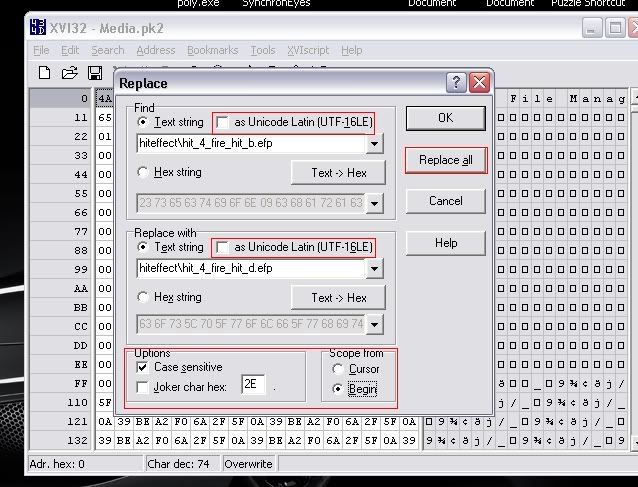
3. In media.pk2, find and replace all - make sure you're in ANSI mode which means "as Unicode Latin" is unchecked:
find: hiteffect\hit_4_fire_hit_b.efp (it would be "a" if your dealing with river fire force and same goes for c)
replace all: hiteffect\hit_4_fire_hit_d.efp
make sure all your options are the same as the image I've shone below
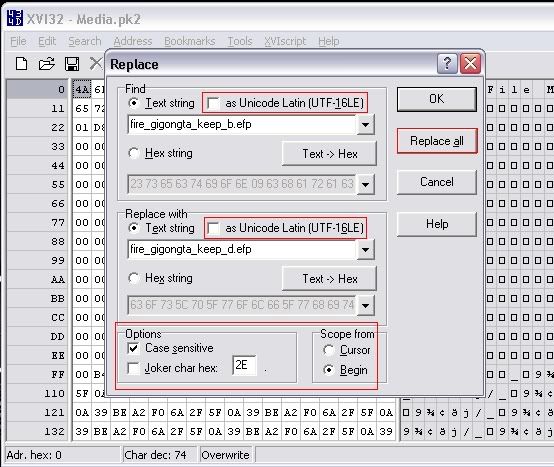
4. In media.pk2, find and replace all - make sure you're in ANSI mode again:
find: fire_gigongta_keep_b.efp
replace all: fire_gigongta_keep_d.efp
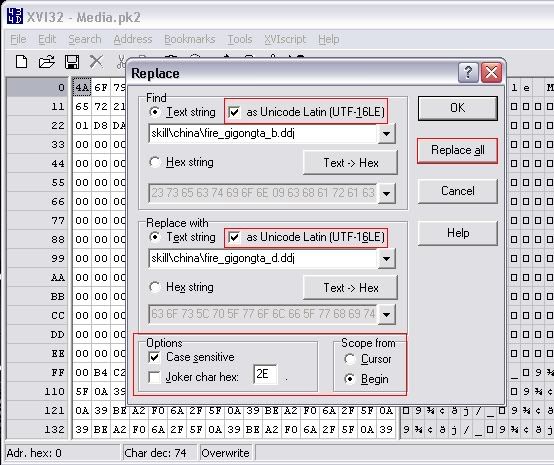
5. Now to edit the icon in-game (optional) - make sure you're OUT of ANSI mode and in Unicode mode - meaning Unicode Latin is checked:
find: skill\china\fire_gigongta_b.ddj
replace all: skill\china\fire_gigongta_d.ddj
see image below.
THERE YOU HAVE IT - THAT'S PRETTY MUCH IMBUES!
I WILL HAVE BUFFS COMING TOMORROW.. I'M REALLY TIRED. IF YOU HAVE ANY QUESTIONS PM ME!
-Shooty
icon codes..... will......... i`ll put the imbues.
oky doky here we go:
thunder tiger force: skill\china\lightning_gigongta_a.ddj
thunder sky force: skill\china\lightning_gigongta_b.ddj
thunder king force: skill\china\lightning_gigongta_c.ddj
thunder dragon force: skill\china\lightning_gigongta_d.ddj
the others later.
hope ur enough for now
IGN: Unknown
Lvl: Unknown
Server: RedSea
Lvl: Unknown
Server: RedSea
-
darkshadowss
- New Member
- Posts: 41
- Joined: Mon Jun 18, 2007 2:56 am
darkshadowss wrote:uhh ... thx for the code for the icon
but um ... the guide is for imbues
do u kno anyways to change it so it will work for buff??
if u tell me plz i really like to kno!
after i kno it i will make a guide maybe
it keep making
 error, 2 bad.
but here u go:
must piercing force: skill\china\lightning_gwantong_a.ddj
flow piercing force: skill\china\lightning_gwantong_b.ddj
speed piercing force: skill\china\lightning_gwantong_c.ddj
force piercing force: skill\china\lightning_gwantong_d.ddj
grass walk flow: skill\china\lightning_gyeonggong_a.ddj
grass walk fantom: skill\china\lightning_gyonggong_b.ddj
grass walk speed: skill\china\lightning_gyeonggong_c.ddj
shock lion shout: skill\china\lightning_chundng_a.ddj
heaven lion shout: skill\china\lightning_chunding_b.ddj
earth lion shhout: skill\china\lightning_chunding_c.ddj
wolf`s thunder bolt: skill\china\lightning_storm_a.ddj
tiger`s thunder bolt: skill\china\lightninig_storm_b.ddj
the fire do the same! lighting: fire, blah blah: blah blah, a:a etc........
wow, next time i`m not gonna write lol, my hands r broken, ouch, lol kidding.
IGN: Unknown
Lvl: Unknown
Server: RedSea
Lvl: Unknown
Server: RedSea
-
darkshadowss
- New Member
- Posts: 41
- Joined: Mon Jun 18, 2007 2:56 am

-
Hellzowner

- Active Member
- Posts: 820
- Joined: Sat May 19, 2007 6:00 am
- Quick Reply: Yes
- Location: OLYMPUS
thunderstorm wrote:darkshadowss wrote:Thx i did it
now i should edit my other buffs too =]
o thx for the icons! they all worked exept fire protector
Mayb i did it wrong? ill try again
Thanks A lot
did it work? if it did tell me how!
Lol?
Your the one who posted a 'Guide' on how to pk2 edit.. YOU should know how to even pk2 edit buffs! Thats like.. basic, lol


-
darkshadowss
- New Member
- Posts: 41
- Joined: Mon Jun 18, 2007 2:56 am
LOL
bloodinator wrote:thunderstorm wrote:darkshadowss wrote:Thx i did it
now i should edit my other buffs too =]
o thx for the icons! they all worked exept fire protector
Mayb i did it wrong? ill try again
Thanks A lot
did it work? if it did tell me how!
Lol?
Your the one who posted a 'Guide' on how to pk2 edit.. YOU should know how to even pk2 edit buffs! Thats like.. basic, lol
LoL yah wat he said XD
also yah it did work!!
i just did wat it said in there but in buff ...


RedSea = Lvl 55 Pure Str
Olympus = Lvl 69 Pure Str
Zeus - Lvl 30 Pure Int
bloodinator wrote:thunderstorm wrote:darkshadowss wrote:Thx i did it
now i should edit my other buffs too =]
o thx for the icons! they all worked exept fire protector
Mayb i did it wrong? ill try again
Thanks A lot
did it work? if it did tell me how!
Lol?
Your the one who posted a 'Guide' on how to pk2 edit.. YOU should know how to even pk2 edit buffs! Thats like.. basic, lol
lol. i know how to edit buffs but it keep making ???? error, now i had a way, but havent tryed it yet.
IGN: Unknown
Lvl: Unknown
Server: RedSea
Lvl: Unknown
Server: RedSea