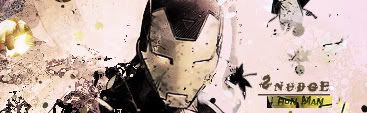
New sig, Iron Man! :o

Digital art design, renderings, signatures and anything art related. Upload pictures of your newest work or ask for feedback. Post graphics requests or discuss art in general.
Post Reply
Snudge
Senior Member
Posts: 4200
Joined: Sun Jun 11, 2006 8:20 pm
Quick Reply: Yes
Location: Artist Corner
Contact:

New sig, Iron Man! :o

Post by Snudge »

Image

I'm not entirely happy with this one.. =/
<<banned from SRF for proof of botting. -SG>>

pherball
Valued Member
Posts: 398
Joined: Wed Jul 19, 2006 6:16 am
Quick Reply: Yes
Location: Xian

Post by pherball »

the yellow box sticks out alot, lol.
Image

User avatar
Priam
Forum Legend
Posts: 7885
Joined: Tue Jul 11, 2006 8:38 am
Quick Reply: Yes
Location: At the apple store, Cause i'm an iAddict.

Post by Priam »

it's a tad bit to messy for me, there's no line to the sig.
Image

User avatar
rek
Ex-Staff
Posts: 5607
Joined: Sun Dec 31, 2006 10:46 am
Quick Reply: Yes
Location: darkroot garden
Contact:

Post by rek »

The colours go wrong with the render. A little too messy and the yellow box under the text is..not that great. Keep working at it :wink: 6/10
Image
<3
0len

User avatar
Rizla
Ex-Staff
Posts: 1197
Joined: Sun Jun 11, 2006 4:17 am
Quick Reply: Yes
Location: Artist's Corner

Post by Rizla »

Im with Rek there, on a completely neutral playing field it doesnt really matter, but since I know Ironman is vibrant, I feel like hes not being given his due :love: :P


I would cut the grunginess in half and add in an extra midground element near the focal to kind of 'hold' or support it.

good attempt at the whole grunge style. I have a tutorial I need to find that does what you were looking to do, its strictly LR (learning rights, meaning you can post results for critique, but actually wearing the outcome is a no-no)
when I find it I will post it ;)
Image

Snudge
Senior Member
Posts: 4200
Joined: Sun Jun 11, 2006 8:20 pm
Quick Reply: Yes
Location: Artist Corner
Contact:

Post by Snudge »

Rizla wrote:Im with Rek there, on a completely neutral playing field it doesnt really matter, but since I know Ironman is vibrant, I feel like hes not being given his due :love: :P


I would cut the grunginess in half and add in an extra midground element near the focal to kind of 'hold' or support it.

good attempt at the whole grunge style. I have a tutorial I need to find that does what you were looking to do, its strictly LR (learning rights, meaning you can post results for critique, but actually wearing the outcome is a no-no)
when I find it I will post it ;)

Please do :)

And thanks for the comments all :D
<<banned from SRF for proof of botting. -SG>>

User avatar
CrimsonNuker
Dom's Slut
Posts: 13791
Joined: Sun Aug 06, 2006 3:31 am
Quick Reply: Yes
Location: guildwars2

Post by CrimsonNuker »

REMOVE THE YELLOW BOX IMMEDIATLY!
ImageImageImage

Snudge
Senior Member
Posts: 4200
Joined: Sun Jun 11, 2006 8:20 pm
Quick Reply: Yes
Location: Artist Corner
Contact:

Post by Snudge »

If you look close, you can see that's his face. I used to have the focal un-edited. But somehow I can't edit the layer masks(From the gradients nd the photo filters) anymore =/
<<banned from SRF for proof of botting. -SG>>

User avatar
Rizla
Ex-Staff
Posts: 1197
Joined: Sun Jun 11, 2006 4:17 am
Quick Reply: Yes
Location: Artist's Corner

Post by Rizla »

then reuuse some grunge effects with that deep yellow (maybe some yellow lighting) on the empty areas of your sig, if ya cant change layer for the sig, change the sig for the layer I guess :P


orrrrrrr

make a new layer and go to image-->apply image then brush on a dark grey over the yellow and change the layer mode to saturation.
Image

User avatar
Rizla
Ex-Staff
Posts: 1197
Joined: Sun Jun 11, 2006 4:17 am
Quick Reply: Yes
Location: Artist's Corner

Post by Rizla »

Some tuts that have effects similar to this style.


These three tutorials are public access courtesy of Stoneface at Tech-GFX.net
He is not the original creator of all of them, but has purchased rights to the PSD's in the past and broke them down into tutorials.

Enjoy, hope you can get something out of one of them that is close to what you were looking for.

http://www.fileden.com/files/2006/10/13 ... tagtut.png
http://www.fileden.com/files/2006/10/13 ... /fancy.png
http://www.fileden.com/files/2007/3/20/ ... 614375.png
Image

Snudge
Senior Member
Posts: 4200
Joined: Sun Jun 11, 2006 8:20 pm
Quick Reply: Yes
Location: Artist Corner
Contact:

Post by Snudge »

Thanks a lot :D Ill try these out ^^
<<banned from SRF for proof of botting. -SG>>

Post Reply

Return to “Artists Corner”




