
Ok heres the deal, Im going to upgrade my old 128mb Radeon X300 graphics card and I have a few questions. I have a Dell 8400.
1) Will i be able to use an Nvida card on my motherboard if it used to have an ati card?
2)Will i even be able to use new cards with my board?
3) Is there a big difference between a 512 mb card and a 256 mb card
4)What would you recommend ($0-$250)?
Calling all computer people
Calling all computer people
LvL 3x pure int light nuker.
get free silk here
get free silk here
-
truez

- Frequent Member
- Posts: 1288
- Joined: Mon Jan 15, 2007 9:36 pm
- Quick Reply: Yes
- Location: Greece
Did u try to check on http://www.dell.com
u shld have a link for buidlin ur own computer.. chk over there wat is te compatible video cards for ur Dell comp...
Hope this helps.
EDIT - forgot to mention, u can alternatively chk on http://support.dell.com/
u need to get ur service tag .... well its been a long time.. i used to work for Dell...
u shld have a link for buidlin ur own computer.. chk over there wat is te compatible video cards for ur Dell comp...
Hope this helps.
EDIT - forgot to mention, u can alternatively chk on http://support.dell.com/
u need to get ur service tag .... well its been a long time.. i used to work for Dell...
Cheers,
Truez
NVDIA Drivers
BSOD
Download anything for FREE
Truez
Zero_Doom wrote:Quick Easy Fix Turn off your computer, beat it with a hammer. If it turns back on when prompted, turn it back off and do again until it doesn't come on again. Once that is taken care of, go get a book and learn about computers.
NVDIA Drivers
BSOD
Download anything for FREE

First, you'll need to tell us is what type of graphics card you have (I'm assuming AGP), and also, what is the bus speed on the AGP slot (e.g. 2x, 4x, or 8x). Yes you can use Nvidia if you've used ATI before, you just have to make sure you uninstall the drivers, shutdown, remove ATI, insert Nvidia, reboot. Will you be able to use new cards. Depends. If the highest bus speed that's supported is 2x, then probably not, since most cards are 8x. Also, a new type of graphics card architecture is gaining ground (it's the "latest and greatest") which is a PCI-Express 16x slot. Since you probably have AGP, you're going to have to upgrade your entire motherboard to use PCI-E. You'll also need to buy a new graphics card that fits in PCI-E slots. Is there a big difference. Depends. The higher your screen resolution and the more graphics "goodies" that you want, then yes, you want a card with more RAM. Just make sure it's tranferring data at the fastest rate it can (again, the 2x, 4x, 8x).
well my GFX card is a raderon x300 128mb card. if you tell me how to get the stats on my motherboard i would be happy to give those to you( its a dell one that you customized so i dont know what board i have).
Edit: I found out my computer is compatible with raderon x1300 and e-GeForce 7300 if that helps at all, each of which uses pci-express, so i guess i have that...
Edit: I found out my computer is compatible with raderon x1300 and e-GeForce 7300 if that helps at all, each of which uses pci-express, so i guess i have that...
LvL 3x pure int light nuker.
get free silk here
get free silk here
-
mN_nubcake

- Hi, I'm New Here
- Posts: 21
- Joined: Tue May 29, 2007 1:33 pm
- Quick Reply: Yes
- Location: Olympus
Dell service tag will show you everything.
Like what kind of upgrades are available for your machine and which components are compatible with it.
Like what kind of upgrades are available for your machine and which components are compatible with it.

=) grinding everyday
Server: Olympus
IGN: SugarSweet
LVL: 41
Build: Pure int S/S/S nuker
Masteries: Fire/Lighting/Ice/Bicheon/Heuksal
Guild: SealOfGore- LvL 3 55%
Status: Active and preparing for lvl 52 9 gap
farming.
Motherboard is generally hard to find out unless you know it already. Most likely it will involve a trip inside the case of your computer. Try mN_nubcake's suggestion first, if it still doesn't work, read this article: http://www.pcnineoneone.com/howto/moboid1.html. You will need a + head screwdriver of the right size to unscrew the screws on the back of the case easily. You need to make sure that you DO NOT touch anything inside. Instructions to open a case: http://www.helpwithpcs.com/upgrading/re ... covers.htm.
-
truez
- Frequent Member
- Posts: 1288
- Joined: Mon Jan 15, 2007 9:36 pm
- Quick Reply: Yes
- Location: Greece
Can u PM me ur service tag -- i wuld get ur system details from my friend who is in Dell ??
or
Call Dell Support and giv thm ur svc tag and ask thm for compatible video cards.... well Dell Support works 24*7 and they wuld help if u r witin warranty ...
Incase ur comp is out of warranty they might dump u down -- PM me ur svc tag
or
Call Dell Support and giv thm ur svc tag and ask thm for compatible video cards.... well Dell Support works 24*7 and they wuld help if u r witin warranty ...
Incase ur comp is out of warranty they might dump u down
-- PM me ur svc tag Cheers,
Truez
NVDIA Drivers
BSOD
Download anything for FREE
Truez
Zero_Doom wrote:Quick Easy Fix Turn off your computer, beat it with a hammer. If it turns back on when prompted, turn it back off and do again until it doesn't come on again. Once that is taken care of, go get a book and learn about computers.
NVDIA Drivers
BSOD
Download anything for FREE
Download cpu-z from http://www.cpuid.com and run the cpu-z.exe.
Under the tag named mainboard u will propably see ur motherboard's name along with chipset info and other stuff.
Your computer is compatible with any pci-express card as long as it fits inside the case, and can be handled by your power supply unit.
A good and cheap card would be a Radeon X1950pro 512mb (here in Greece its below 200$), but if you want to have directx 10 in Windows Vista u will have to buy an nvidia card from the 8xxx series or the newest ati 2900xt.
Under the tag named mainboard u will propably see ur motherboard's name along with chipset info and other stuff.
Your computer is compatible with any pci-express card as long as it fits inside the case, and can be handled by your power supply unit.
A good and cheap card would be a Radeon X1950pro 512mb (here in Greece its below 200$), but if you want to have directx 10 in Windows Vista u will have to buy an nvidia card from the 8xxx series or the newest ati 2900xt.
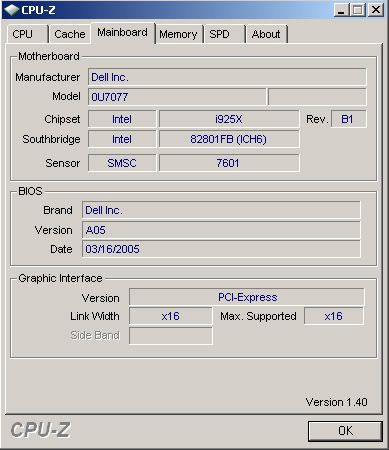
There is motherboard, and yes, it is pci-e compatible
ty alphanine for the link, this was exactly the kind of thing i needed
Edit: i guess its a 2 year old computer...
LvL 3x pure int light nuker.
get free silk here
get free silk here
Ok then. PCI-E cards are pretty high end. They generally run $100 and up, though you may be able to find them for cheaper. You simply uninstall your drivers, reboot, remove old card, install new card, reboot, install new drivers. I can't recommend any PCI-E cards, you'll have to wait on someone else.
ddcc wrote:Ok then. PCI-E cards are pretty high end. They generally run $100 and up, though you may be able to find them for cheaper. You simply uninstall your drivers, reboot, remove old card, install new card, reboot, install new drivers. I can't recommend any PCI-E cards, you'll have to wait on someone else.
ty for your help and time, i appreciate it

So, what cards would you guys recommend with a budget of $250?
LvL 3x pure int light nuker.
get free silk here
get free silk here
-
truez
- Frequent Member
- Posts: 1288
- Joined: Mon Jan 15, 2007 9:36 pm
- Quick Reply: Yes
- Location: Greece
maj wrote:ddcc wrote:Ok then. PCI-E cards are pretty high end. They generally run $100 and up, though you may be able to find them for cheaper. You simply uninstall your drivers, reboot, remove old card, install new card, reboot, install new drivers. I can't recommend any PCI-E cards, you'll have to wait on someone else.
ty for your help and time, i appreciate it
So, what cards would you guys recommend with a budget of $250?
Check ur pvt msg - i sent a link from dell site
Cheers,
Truez
NVDIA Drivers
BSOD
Download anything for FREE
Truez
Zero_Doom wrote:Quick Easy Fix Turn off your computer, beat it with a hammer. If it turns back on when prompted, turn it back off and do again until it doesn't come on again. Once that is taken care of, go get a book and learn about computers.
NVDIA Drivers
BSOD
Download anything for FREE