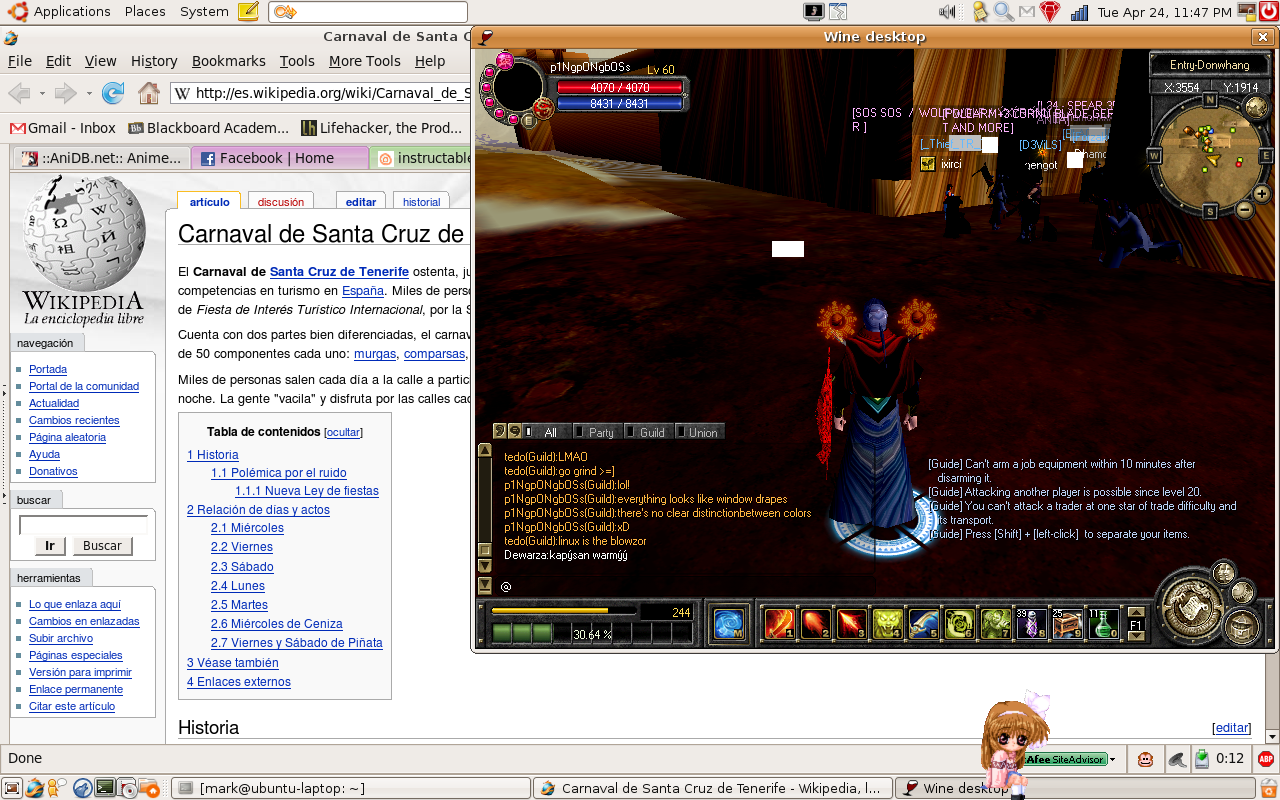
RUNNING SRO UNDER UBUNTU

If your having problems installing or playing Silkroad Online, please post here. Includes general computer health and technical problems.
User avatar
verbious
Casual Member
Posts: 62
Joined: Mon Apr 16, 2007 2:36 am
Quick Reply: Yes

Post by verbious »

Lith wrote:You have to use virtual desktop or it will crash randomly and you also have to set it to Windows 98. I acually got the guild names and other users names to work. I was going to take a SS, but for some reason, my Wine is considered as a "broken" pakage" after I rebooted it. :cry:


What did you do to get the guild names to work?

What are you running?
Greece level 39
Pure INT Sword
Full SoS Protector Set
> 5k SP and still farming FTW!
7 level gap

PLAYING SRO ON UBUNTU LINUX!

User avatar
ddcc
Regular Member
Posts: 291
Joined: Wed Jan 17, 2007 3:29 am
Quick Reply: Yes
Location: USA

Post by ddcc »

I think I might update my solutions guide to include SRO in Ubuntu.
I'm running SRO in Ubuntu Feisty in VMware. I don't really have access to a real Ubuntu machine that I can manage except at school where I don't think installing games works very well.

Virtual Desktop>go to winecfg. Then Graphics. Check "Emulate a virtual desktop." Add the size.

edit: Even with virtual desktop and set to windows 98, after launching SRO and showing the little sro box, it crashes back to desktop on me.
Silkroad Online Troubleshooting Guide: http://members.cox.net/ddchen

Server: Alps
IGN: ddcc
Level: 3x

Lith
Active Member
Posts: 565
Joined: Mon Jan 15, 2007 10:08 pm
Quick Reply: Yes
Location: Lulz

Post by Lith »

verbious wrote:
Lith wrote:You have to use virtual desktop or it will crash randomly and you also have to set it to Windows 98. I acually got the guild names and other users names to work. I was going to take a SS, but for some reason, my Wine is considered as a "broken" pakage" after I rebooted it. :cry:


What did you do to get the guild names to work?

What are you running?


Was running Ubuntu 6.06 Dapper, I think.

I don't know how I got the guild names to work but recently I installed some Fonts to use on IE for fun, maybe try to install the default ones from Windows into Wine.
<<banned from SRF for moderator disrespect and rules violations. -SG>>

User avatar
verbious
Casual Member
Posts: 62
Joined: Mon Apr 16, 2007 2:36 am
Quick Reply: Yes

Post by verbious »

Well I can tell you that if you msttcorefonts package installed, the game will start, game guard will run, and then the logon screen will start and the screen will go black, but crash to desktop.

After i uninstalled msttcorefonts package, it works just fine.
Greece level 39
Pure INT Sword
Full SoS Protector Set
> 5k SP and still farming FTW!
7 level gap

PLAYING SRO ON UBUNTU LINUX!

deep.in
Advanced Member
Posts: 2133
Joined: Mon Mar 19, 2007 11:55 am
Quick Reply: Yes
Location: .........
Contact:

Post by deep.in »

Deadly EYez wrote:
I hate how people don't know shit about linux.
Linux is way better than windows, and there's user version and server version.
I have ubuntu and it's great.
you can run sro on ubuntu i think using Cedega but it's 5$ a month :(
I've been trying to run my wow over ubuntu using wine but i failed xD
Still new to linux.


So, you hate people who don't know a shit about linux...but you still new to linux, you failed to run wow, so i guess you hate yourself too :roll:


And yes, linux ubuntu is way better than windows...because you will have some difficult times runnig simple game...and when you run it, game doesent work properly...

So i can proudly say that Bill Gates is officially OWNED by pinguin...
<<banned from SRF for bot admission. -SG>>

User avatar
ddcc
Regular Member
Posts: 291
Joined: Wed Jan 17, 2007 3:29 am
Quick Reply: Yes
Location: USA

Post by ddcc »

That's really odd. I'll try removing it then. When you install WINE, it specifically states that installing msttcorefonts is advised.
Silkroad Online Troubleshooting Guide: http://members.cox.net/ddchen

Server: Alps
IGN: ddcc
Level: 3x

User avatar
ddcc
Regular Member
Posts: 291
Joined: Wed Jan 17, 2007 3:29 am
Quick Reply: Yes
Location: USA

Post by ddcc »

Ahhhh. The wonders of virtual machine based gaming with 20sec response times at like 0.1 frames/sec.
I'd experiment with the text issues, but in a virtual machine I don't think that's going to happen.
Image
Silkroad Online Troubleshooting Guide: http://members.cox.net/ddchen

Server: Alps
IGN: ddcc
Level: 3x

User avatar
pingpongboss
Active Member
Posts: 509
Joined: Wed Apr 19, 2006 1:17 am
Quick Reply: Yes
Location: Xian

Post by pingpongboss »

verbious wrote:Are you just testing it on VMWare? Why not run it through Wine?

I have a 2 Gig processor, 1 Gig of RAM, and an Nvidia 6200LE video card. The game runs perfectly except for the text/guild/union emblem issue.

The core fonts package had no effect.

PingPongBoss, any luck?


dammit... i'm so close... x__x

i'm still stuck at the part where the screen resizes. I think i can catch a glimpse of the intro animation thing with the cursor, but it flicks into black and the wine virtual window disappears. without all the *fixme* lines, here's what my wine output says:

Code: Select all

$ WINEDEBUG=fixme-all wine silkroad.exe 
err:ole:CoGetClassObject class {4955dd33-b159-11d0-8fcf-00aa006bcc59} not registered
err:ole:CoGetClassObject no class object {4955dd33-b159-11d0-8fcf-00aa006bcc59} could be created for context 0x1
err:wave:DSDB_MapBuffer Could not map sound device for direct access (Input/output error)
err:wave:DSDB_MapBuffer Please run winecfg, open "Audio" page and set
"Hardware Acceleration" to "Emulation".
[b]err:seh:raise_exception Unhandled exception code e06d7363 flags 1 addr 0x7b842690[/b]


i have windows 98 set in winecfg, pixel shader turned on, emulated desktop to 800x600. I have a feeling that it has somehting to do with the intel integrated graphics card.

has anyone with an intel integrated gpu gotten sro to work?
Image
Image

User avatar
verbious
Casual Member
Posts: 62
Joined: Mon Apr 16, 2007 2:36 am
Quick Reply: Yes

Post by verbious »

Have you changed the audio setting as suggested by the fixme?

I installed fonts in Wine using WineXS and they had no effect.

I did:

Code: Select all

sudo apt-get install msttcorefonts
[/quote]

After this package installed, SRO would go to a black screen and then crash back to desktop.

Doing

Code: Select all

sudo apt-get autoremove msttcorefonts
got rid of the fonts and the game worked again.

PingPong....there are some links for improving the graphics if you are using the Intel GPU. There is a link posted to it in the Dapper Wiki. Not sure what version of Linux you are running.
Greece level 39
Pure INT Sword
Full SoS Protector Set
> 5k SP and still farming FTW!
7 level gap

PLAYING SRO ON UBUNTU LINUX!

User avatar
ddcc
Regular Member
Posts: 291
Joined: Wed Jan 17, 2007 3:29 am
Quick Reply: Yes
Location: USA

Post by ddcc »

Intel integrated should still do better than a virtual machine emulated graphics card. I've set the virtual desktop to 1024 X 768. Not sure if that makes a difference. Also, go into winecfg and make sure the sound is on OSS. Alternatively, disable the sound in the "Options" on the launcher. You can also make sure that you set the in-game resolution to match the one of the Silkroad window. Otherwise, make sure you have the latest version of wine and that you don't have msttcorefonts or xdg-utils installed.
Silkroad Online Troubleshooting Guide: http://members.cox.net/ddchen

Server: Alps
IGN: ddcc
Level: 3x

User avatar
pingpongboss
Active Member
Posts: 509
Joined: Wed Apr 19, 2006 1:17 am
Quick Reply: Yes
Location: Xian

Post by pingpongboss »

i deselected all sound modules (or watever u call them) in winecfg so I think the sound thing isnt really the problem. you guys mentioned setting the virtual desktop resolution higher and removing msttcorefonts and xdg-utils. I'll do that later.

@verbious: i'm using feisty. where's the guide u mentioned?
Image
Image

User avatar
verbious
Casual Member
Posts: 62
Joined: Mon Apr 16, 2007 2:36 am
Quick Reply: Yes

Post by verbious »

Maybe this can help: (Quoted from: [url]http://ubuntuguide.org/wiki/Ubuntu:Feisty#How_to_Correct_the_Graphics_Resolution_.28Intel.29
[/url]

How to Correct the Graphics Resolution (Intel)

* Read #How to enable Large Widescreen Support if you have a larger (>20") monitor

* Intel 915g, 945g, etc. graphics chipsets only have a limited set of resolutions initially installed, despite the correct driver being detected.
* Install the resolution altering tool:

Code: Select all

sudo apt-get install 915resolution


* Run the following to see the availible modes:

Code: Select all

915resolution -l


* Choose a resolution you don't need and replace, for example the following changes 1920x1440 to 1920x1200

Code: Select all

915resolution 5c 1920 1200


* This should add the option for that resolution to the "System>Preferences>Screen Resolution" tool.
* If it works correctly then you can make the change permanent:

Code: Select all

sudo gedit /etc/rc.local


* Simply add the command you typed in above before:

Code: Select all

exit 0
Greece level 39
Pure INT Sword
Full SoS Protector Set
> 5k SP and still farming FTW!
7 level gap

PLAYING SRO ON UBUNTU LINUX!

User avatar
pingpongboss
Active Member
Posts: 509
Joined: Wed Apr 19, 2006 1:17 am
Quick Reply: Yes
Location: Xian

Post by pingpongboss »

i don think the problem is with my desktop resolution. it is correctly set up at 1280 by 800 without the 915resolution tool. When i explained my problem, i meant that the wine virtual desktop was set to 800x600, not my actual system
Image
Image

User avatar
verbious
Casual Member
Posts: 62
Joined: Mon Apr 16, 2007 2:36 am
Quick Reply: Yes

Post by verbious »

I've found that anything to do with changing the fonts will either prevent the game from working or cause it to run super slow.

I installed Compiz and Eyecandy and the game wouldn't run. I installed the msttcorefonts package and the game would crash back to desktop, When I changed the fonts to enable smooth pixelization the game would run very slow.

I will just leave it as a practically brand new install, without all those bells and whistles and live with the lack of text and guild/union emblems.

I hope you get it working PPB.
Greece level 39
Pure INT Sword
Full SoS Protector Set
> 5k SP and still farming FTW!
7 level gap

PLAYING SRO ON UBUNTU LINUX!

User avatar
pingpongboss
Active Member
Posts: 509
Joined: Wed Apr 19, 2006 1:17 am
Quick Reply: Yes
Location: Xian

Post by pingpongboss »

verbious which ubuntu release are u using?
Image
Image

User avatar
pingpongboss
Active Member
Posts: 509
Joined: Wed Apr 19, 2006 1:17 am
Quick Reply: Yes
Location: Xian

Post by pingpongboss »

omg i finally got it past the crash-to-desktop thing!!

Image

but now I get about 1 frame every 2 seconds, which is to be expected, since sro wasn't running smoothly on windows anyways. Now i gotta try to log in xD

thx verbious! the msttcorefonts package was responsible for crashing sro everytime. now my regular fonts are all weird, but i can get sro started

update:
lol, everything's working, but it's unplayable. I get a frame every few seconds.. a shame xD at least i could coem on and chat soem times.

Image
Image
Image

User avatar
verbious
Casual Member
Posts: 62
Joined: Mon Apr 16, 2007 2:36 am
Quick Reply: Yes

Post by verbious »

Nice! Way to go PPB. Too bad it isn't playable, but at least you got it working.

I have just installed Feisty. I think today I am going to download and try a few other distros and see if it is any better or worse.

When I first installed SRO, it was very choppy. I have an Nvidia card, and just kept tweaking it.

Perhaps there is something you can tweak in you /etc/X11/xorg.conf or a different intel driver.

I will keep looking around for any helpful info.

I think I am going to play around with the CedegaCVS and see where that gets me.
Greece level 39
Pure INT Sword
Full SoS Protector Set
> 5k SP and still farming FTW!
7 level gap

PLAYING SRO ON UBUNTU LINUX!

User avatar
Elyanna
Hi, I'm New Here
Posts: 13
Joined: Wed Apr 25, 2007 1:40 pm
Quick Reply: Yes
Location: Caen, France, Europa

Post by Elyanna »

Hello all ! I just installed a Unbuntu 7.04 ( Festy Fawn ) on my computer. I 'm a complete noob in Linux ( first attemp ) and try to play at SRO on my linux. Here my hardware :

AMD 2600XP+
1 GB RAM KINGSTON
NVIDIA GE FORCE 6600 GT
Motherboard ABIT NF7S

My computer is working on Dual Boot Unbuntu Festy Fawn - XP Professional SP2.

Actually my SRO is working with all same problems as you got under Wine.

I first tried to run SRO under Cedega, but it simply doesn't work, neither installing it or using the installed folder under Windows.

I used Wine after that, with the package proposed by Unbuntu. Well, games working with no texts and some bugs on the cursor. I updated to the latest version of wine ( 0.9.35 ) --> Now the SRO Cursor and the stall icon appears correctly.

Using an Nvidia card, I activated the AGP fast Write by adding the line under /etc/X11/xorg.conf

Code: Select all

Option "NvAGP" "3" 


Seems to work faster.

The game is still very unsteable, because It is closing suddently after 1/2 hour of use.

I don't have sound, or very laggy using Alsa drivers ( jack.so lib mising, I haven't fixed this problem yet. )

I'm just hoping helping you by explaining my case. My theory is that future updates of Wine would make SRO playable.

Here a Screenshot of my SRO running ( Full Screen )
Image
[ Babel ] Guild Master of Chevalier. I'm looking for active Hunters/ traders English or/and french spoken players. pm me ^^

User avatar
ddcc
Regular Member
Posts: 291
Joined: Wed Jan 17, 2007 3:29 am
Quick Reply: Yes
Location: USA

Post by ddcc »

Elyanna: Try setting sound to OSS, and see if there's anything else that needs to be updated (System, Administrator, Update Manager, and hit Check). Also, btw it's Ubuntu.

Ppb: Looks sort of like graphics on the virtual machine. It seems like you're having the same issues as me, with the really slow frame rates and everything else. I guess it might just be a matter of googling your graphics card and the word ubuntu and maybe game and see if there's anything that comes up.
Silkroad Online Troubleshooting Guide: http://members.cox.net/ddchen

Server: Alps
IGN: ddcc
Level: 3x

User avatar
Elyanna
Hi, I'm New Here
Posts: 13
Joined: Wed Apr 25, 2007 1:40 pm
Quick Reply: Yes
Location: Caen, France, Europa

Post by Elyanna »

Thanks, but I already tried all differents drivers, and even OSS is crappy... It a good idea to google ATI or Nvidia+unbuntu to find some usefull tricks. I googled also Wine+unbuntu to find some answers to my problems and fixed some to manage too run the game 8)
[ Babel ] Guild Master of Chevalier. I'm looking for active Hunters/ traders English or/and french spoken players. pm me ^^

User avatar
ddcc
Regular Member
Posts: 291
Joined: Wed Jan 17, 2007 3:29 am
Quick Reply: Yes
Location: USA

Post by ddcc »

:wink: It's Ubuntu.
Silkroad Online Troubleshooting Guide: http://members.cox.net/ddchen

Server: Alps
IGN: ddcc
Level: 3x

User avatar
pingpongboss
Active Member
Posts: 509
Joined: Wed Apr 19, 2006 1:17 am
Quick Reply: Yes
Location: Xian

Post by pingpongboss »

lol yea, it is Ubuntu not Unbuntu

and thx verbious for ur help!

ddcc: ya i hope we can find a way to speed it up. right now it's more of a "look-what-i-can-do" thing.
Image
Image

Foviac_XD
Hi, I'm New Here
Posts: 4
Joined: Sat Jan 06, 2007 1:55 am

Post by Foviac_XD »

if everything is correctly configured, use sedega to install and emulatate ! then it will work!

User avatar
verbious
Casual Member
Posts: 62
Joined: Mon Apr 16, 2007 2:36 am
Quick Reply: Yes

Post by verbious »

i think sro works better under wine than it does under cedega.

cedega is a monthly subscription that some people don't want to pay. Pay to play a free game on a free operating system?

It is supposed to be possible to download cedega from CVS. I haven't had any luck.
Greece level 39
Pure INT Sword
Full SoS Protector Set
> 5k SP and still farming FTW!
7 level gap

PLAYING SRO ON UBUNTU LINUX!

User avatar
ddcc
Regular Member
Posts: 291
Joined: Wed Jan 17, 2007 3:29 am
Quick Reply: Yes
Location: USA

Post by ddcc »

Live CVS Respository: http://cvs.transgaming.org/cgi-bin/viewcvs.cgi

Instructions:
To convert an existing CVS SourceForge checkout to the new TransGaming.org CVS repository:

1. Download the cvschroot script from http://www.horae.dti.ne.jp/~gotoh/dist/ ... /cvschroot
2. sh cvschroot -d <path to your tree> :pserver:cvs@cvs.transgaming.org:/cvsroot winex
3. You should now be able to update CVS as usual

To checkout a new CVS respository:

1. cvs -d:pserver:cvs@cvs.transgaming.org:/cvsroot login
2. When prompted for the password enter "cvs"
3. cvs -z3 -d:pserver:cvs@cvs.transgaming.org:/cvsroot co winex
Silkroad Online Troubleshooting Guide: http://members.cox.net/ddchen

Server: Alps
IGN: ddcc
Level: 3x

User avatar
verbious
Casual Member
Posts: 62
Joined: Mon Apr 16, 2007 2:36 am
Quick Reply: Yes

Post by verbious »

I've already checked out the CedegaCVS. It is not quite as easy as visiting the links. Some stuff is really old, there are some problems compiling it on Ubuntu.

I think I will just continue to use Wine. I know it works.
Greece level 39
Pure INT Sword
Full SoS Protector Set
> 5k SP and still farming FTW!
7 level gap

PLAYING SRO ON UBUNTU LINUX!

User avatar
Elyanna
Hi, I'm New Here
Posts: 13
Joined: Wed Apr 25, 2007 1:40 pm
Quick Reply: Yes
Location: Caen, France, Europa

Post by Elyanna »

Sorry for my mistake ( I have difficulties with african words lol. ) Under Cedega, after installation, the info news appears, and when you hit start, a pop up window appears diplaying ' Please Execute Silkroad.exe '

When you go in the SRO directory and make a ' right click --> run with Cedega ' It wont work either ( game crash directly )

If anyone have made SRO running under Cedega, please give the way he made this miracle ( and like that I would put my XP in my trash definitelly :love: )
[ Babel ] Guild Master of Chevalier. I'm looking for active Hunters/ traders English or/and french spoken players. pm me ^^

User avatar
Elyanna
Hi, I'm New Here
Posts: 13
Joined: Wed Apr 25, 2007 1:40 pm
Quick Reply: Yes
Location: Caen, France, Europa

Post by Elyanna »

I worked a bit on SRO under linux and here are the news. I still have my sound problem and there's what wine display when I hit the audio tab of winecfg:

Code: Select all

fixme:jack:JACK_drvLoad error loading the jack library libjack.so, please install this library to use jack


If someone can tell me how to ind and install the libjack.so, it would be nice. :banghead:

I have some good news =)

I tried to find the M$ Font wich crash SRO... I made a .font directory in my personal folder to add new fonts. ( /home/username on Ubuntu. ) Then, I simply took .ttf fonts from my Windows partition ( remember, i'm in dual boot ) to it and putted the six basics fonts one by one.

When I put the Arial fonts in it, the game crashes. So I think Arial fonts are responsible of this problem ( I putted Verdana font without problems for example. )

Second good news is I've been able to play at SRO... I just lowered my Graphical options, like in the screenshot ( and as you said Verbious, we have to disable desktop effects to have playable settings :D ) Here my ' playable settings ' with my nvidia 6600 GT graphic card :

Image

As I said before, when I turn camera under certain angles, all is good displaying. Too bad that doesn't stay for long .... Here some screenshot in order to know if you have this too...

Image

Image

We are all close to make it working nicer !
[ Babel ] Guild Master of Chevalier. I'm looking for active Hunters/ traders English or/and french spoken players. pm me ^^

User avatar
verbious
Casual Member
Posts: 62
Joined: Mon Apr 16, 2007 2:36 am
Quick Reply: Yes

Post by verbious »

Nice job Elyanna!

Yes, if we all work together we can help each other get it running better. I think that we will be limited to what we get from Wine or Cedega though for compatibility.

Nice screens too!

Anyone else?
Greece level 39
Pure INT Sword
Full SoS Protector Set
> 5k SP and still farming FTW!
7 level gap

PLAYING SRO ON UBUNTU LINUX!

User avatar
Elyanna
Hi, I'm New Here
Posts: 13
Joined: Wed Apr 25, 2007 1:40 pm
Quick Reply: Yes
Location: Caen, France, Europa

Post by Elyanna »

Hi all.. today Wine updated, and graphics seems better for me ( less bugs. ) I used a pk2 extractor and extracted from media.pk2 a folder named fonts ( used within SRO :?: ) I putted them in my /home/username/.fonts folder, and tried to run SRO. It launches, but no more progress with fonts problem.

For anyone interested to use them, click HERE

BUT.... I was trying to change some graphical effect and scrolled down to see that more options exist, like metallic glow ( ON/OFF ) there the srcreenshot of this option ON :

Image

And same point ( I didn't moved at all ) with the Setting at OFF

Image

Then I opened a Stall and :shock:

Image

Well... please experiment all of that. Tomorrow I will make a clean install of SRO, hoping having some progress ( actually I just linked my Silkroad.exe located to my Windows partition ) . Please tell me if it change something with your computers...

And does anyone know how I can fix my Jack libraries problem ? You would be nice
[ Babel ] Guild Master of Chevalier. I'm looking for active Hunters/ traders English or/and french spoken players. pm me ^^

Post Reply

Return to “Technical Help”