.....ok wierd the armor code doesnt seeem to work.. but the weapons worked very nicely.. is this happenening to anybody if so help me out a bit thanx..
ps... there is degree 9 in international sro right? the site is shows only degree 8 so dont blame me for my stupidity..
***edit***
also can u show me directions to other posts that have other codes.. XD im all of a sudden addicted to modding SRO..
Majour Guide on PK Editing
-
_wolf_
- Valued Member
- Posts: 367
- Joined: Thu Mar 01, 2007 1:52 am
- Quick Reply: Yes
- Location: making a sro comeback
- Contact:
After succesfully changing weapon degree, I had difficulty changing armor and garmet degrees
On search and replace I has text and unicode both checked and everything else just as the tutorial said
First Try:
Find:
\heavy_04
Replace:
\heavy_08
Turned sro back on and ONLY my armor helmet had changed to the 8th degree, while I have helmet/chest/legs>4th degree and wrist/shoulder/feet>5th degree
Because this did not work, saw post above mine and thought maybe armor is unable to be edited or some other problem so, put on degree 1 garmet full set
Second Try:
Find:
\clothes_01
Replace:
\clothes_08
Did not work
I have read over the tutorial many times and do not see what I can e doing wrong after i succesfully changed weapon degree
Anybody have suggestions as to what I might be doing wrong?
Thanks
On search and replace I has text and unicode both checked and everything else just as the tutorial said
First Try:
Find:
\heavy_04
Replace:
\heavy_08
Turned sro back on and ONLY my armor helmet had changed to the 8th degree, while I have helmet/chest/legs>4th degree and wrist/shoulder/feet>5th degree
Because this did not work, saw post above mine and thought maybe armor is unable to be edited or some other problem so, put on degree 1 garmet full set
Second Try:
Find:
\clothes_01
Replace:
\clothes_08
Did not work
I have read over the tutorial many times and do not see what I can e doing wrong after i succesfully changed weapon degree
Anybody have suggestions as to what I might be doing wrong?
Thanks
<<banned from SRF for bot admission. -SG>>


-
Megalomaniac
- Veteran Member
- Posts: 3132
- Joined: Mon Jul 17, 2006 8:39 pm
- Quick Reply: Yes



-
Megalomaniac
- Veteran Member
- Posts: 3132
- Joined: Mon Jul 17, 2006 8:39 pm
- Quick Reply: Yes
Re: je
lolster wrote:wait if i do glow thing will teh aperance just chage or so will stats cause i wanna know... if i make sos thign will i actually have an sos wep?
Nope.
PK editing is ONLY for looks.
-
Megalomaniac
- Veteran Member
- Posts: 3132
- Joined: Mon Jul 17, 2006 8:39 pm
- Quick Reply: Yes
BryaN wrote:Courts or however he is named changed his clothes to GM clothes and he changed the stats.
Those stats are not real.
If you could wear GM clothes only by editing your SRO files the game would go to hell.
JM are maybe stupid but not THAT stupid lol.
All the PK editing is for looks, ONLY you can see what you have edited.



-
obeckcity81
- New Member
- Posts: 31
- Joined: Sun Mar 25, 2007 3:06 am
- Quick Reply: Yes
- Location: Bremen (Germany)
thx for the tut, this is what i made:
http://www.youtube.com/watch?v=0COJycH2Wxw
sorry for the bad quality

http://www.youtube.com/watch?v=0COJycH2Wxw
sorry for the bad quality
-
UniQ

- Active Member
- Posts: 548
- Joined: Wed Mar 07, 2007 6:42 pm
- Quick Reply: Yes
- Location: ZSZC Sro Fire
obeckcity81 wrote:thx for the tut, this is what i made:
http://www.youtube.com/watch?v=0COJycH2Wxw
sorry for the bad quality
wow nice editing, its awesome!!!
where did u find all those weird mobs to replace?
ZSZC Player
IGN: Hijack3R
Lvl: 101
Build: Full Str Bow (Pach105//Fire105//Light98//Ice52)
Server: Fire
IGN: Hijack3R
Lvl: 101
Build: Full Str Bow (Pach105//Fire105//Light98//Ice52)
Server: Fire
-
Jay

- Active Member
- Posts: 679
- Joined: Tue Aug 01, 2006 5:13 pm
- Quick Reply: Yes
- Location: South West London
QwertyNukes wrote:Whoo thanks for the guide
Here are some screens so maybe you can tell me if im doing something wrong:
<images of tthe walkthrough>
Didnt work

So any help would be appreciated
Erm, you said when you reinstalled that it worked, what did you reinstall sro and then redo it?
Yarkan locations Updated 12th Feb


-
kvistgotte

- Casual Member
- Posts: 69
- Joined: Wed Mar 28, 2007 3:15 pm
- Quick Reply: Yes
- Location: sparta
 please show me with pictures. Please i whant to have a Earth Ghost as pet
-
obeckcity81
- New Member
- Posts: 31
- Joined: Sun Mar 25, 2007 3:06 am
- Quick Reply: Yes
- Location: Bremen (Germany)

-
kvistgotte
- Casual Member
- Posts: 69
- Joined: Wed Mar 28, 2007 3:15 pm
- Quick Reply: Yes
- Location: sparta


-
William-CL

- Forum Legend
- Posts: 7363
- Joined: Wed Feb 28, 2007 10:10 am
- Quick Reply: Yes
- Location: N/A

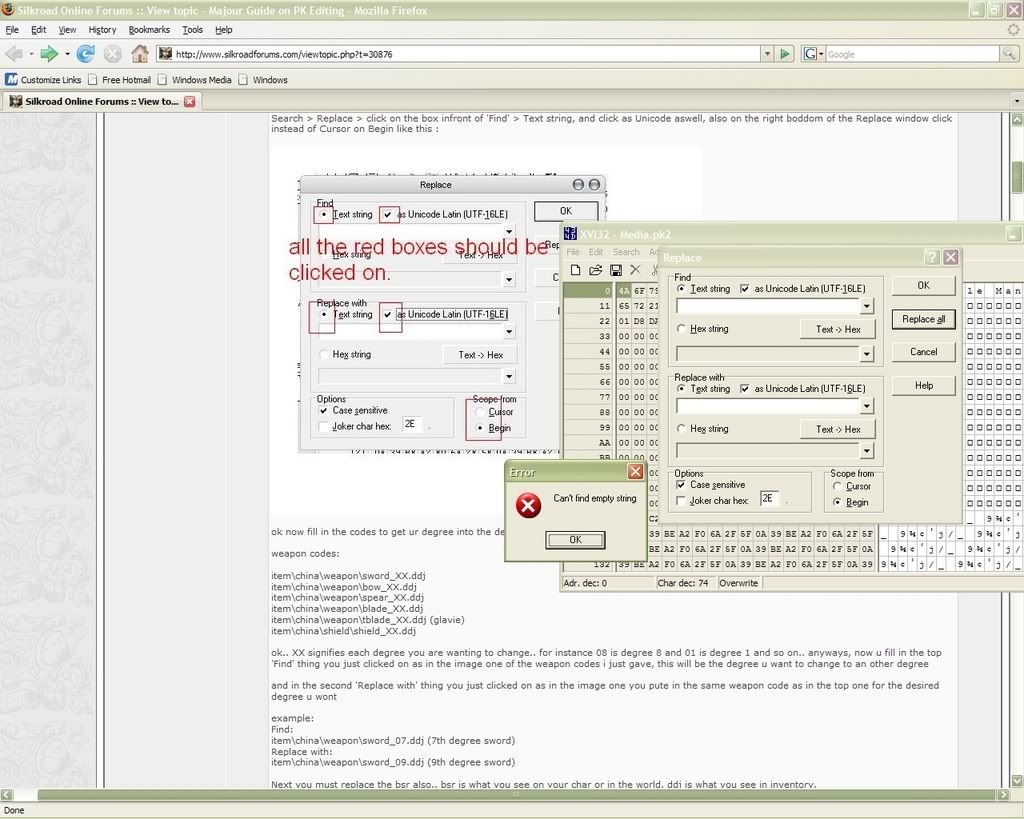
venom30 wrote:oh i would say because u didnt fill out the strings
u have to write what u want to change
What do I need to fill out in the strings? I just open the program...and I did that....yet it says something about strings sooooo; I don't know what the hell it's talking about xD
<<banned from SRF for remaking an account after a previous account ban. -SG>>>>
-
chickenfeather

- Frequent Member
- Posts: 1497
- Joined: Tue Aug 15, 2006 3:24 pm
- Quick Reply: Yes
- Location: Origin Online
- Contact:
tigercat wrote:What do I need to fill out in the strings? I just open the program...and I did that....yet it says something about strings sooooo; I don't know what the hell it's talking about xD
You need to put what you are changing in the "find" box and what you are changing it to in the "replace" box.
Origin Online
EdgeworthScoundrels
EdgeworthScoundrels
-
chickenfeather
- Frequent Member
- Posts: 1497
- Joined: Tue Aug 15, 2006 3:24 pm
- Quick Reply: Yes
- Location: Origin Online
- Contact:

