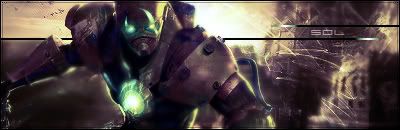
First Time EVER
-
Tag_Z...
- New Member
- Posts: 31
- Joined: Sat Feb 24, 2007 9:24 pm
- Quick Reply: Yes
- Location: Troy
- Contact:
First Time EVER
This is my first time ever using photoshop... so be honest but constructive =)




-
CrimsonNuker

- Dom's Slut
- Posts: 13791
- Joined: Sun Aug 06, 2006 3:31 am
- Quick Reply: Yes
- Location: guildwars2
brush in white, take your render(s) and paste them all over the sig (literally), gaussian blur (4.0) all of them then set them all to overlay, past your render at the place u want it to be, duplicate it, set the duplicated render to gaussian blur then overlay, add some fancy text, new layer>ctrl+a>edit>stroke (i think it was lol)>1px,main colour of ur sig,inside,ok
that should make a simple decent looking sig lmao
that should make a simple decent looking sig lmao




-
ranger4life

- Addicted Member
- Posts: 2526
- Joined: Thu Mar 16, 2006 11:05 pm
- Quick Reply: Yes
- Location: Off Topic


-
0l3n

- Elite Member
- Posts: 5184
- Joined: Fri Jun 16, 2006 1:45 pm
- Quick Reply: Yes
- Location: Artists Corner
CrimsonNuker wrote:brush in white, take your render(s) and paste them all over the sig (literally), gaussian blur (4.0) all of them then set them all to overlay, past your render at the place u want it to be, duplicate it, set the duplicated render to gaussian blur then overlay, add some fancy text, new layer>ctrl+a>edit>stroke (i think it was lol)>1px,main colour of ur sig,inside,ok
that should make a simple decent looking sig lmao
That was how I did my sigs before.


-
CrimsonNuker
- Dom's Slut
- Posts: 13791
- Joined: Sun Aug 06, 2006 3:31 am
- Quick Reply: Yes
- Location: guildwars2