Foreign versions of SRO in English

Discussion portal for kSRO, jSRO, vSRO, cSRO, and all other SRO versions.
User avatar
Cruor
Loyal Member
Posts: 1999
Joined: Wed Apr 12, 2006 1:22 am
Quick Reply: Yes
Location: Off topic

Foreign versions of SRO in English

Post by Cruor »

This is just a quick guide I threw together because I think it is useful. In order to do this, you must edit PK2 files. I have only tested this with kSRO so I am not sure if the process is exactly the same for other versions but it should be very similar.

You will need a hex editor
(I recommend HexEdit from http://www.catch22.net/)

Step 1:
Make a backup of your up-to-date Media.pk2 file. This is very important, in case you screw up.
Image

Step 2:
Open your kSRO (or cSRO, tSRO, jSRO) Media.pk2 file in HexEdit. Hit CTRL+F to bring up the search dialog. Make sure that the "Data Type" dropdown is set to "ANSI String". Now in the "Find What" field type in "Korean", "Chinese", "Taiwan", or "Japan" for kSRO, cSRO, tSRO, and jSRO respectively. Click "Find".
Image

Step 3:
Look to see if what you found resembles the screenshot below. If the readable parts are shorter, and you don't see anything about "FTP" anywhere, press F3 to find the next instance. Once you are at the right spot, note the file size in the lower right of the window.
Image

Step 4:
Press the Insert key on your keyboard or double click "OVR" in the bottom right of the window to switch to insertion mode. Clear the first instance of Korean/Chinese/Taiwan/Japan and type "English" in it's place. If you are editing cSRO's Media.pk2 file you can move on to step 6.
Image

Step 5:
If you are editing the Media.pk2 file of kSRO, jSRO, or tSRO you must delete a byte or two to preserve the file size. Place your cursor in the hexadecimal column, as indicated in the picture, and clear the one byte for kSRO and tSRO or the two bytes for jSRO.
Image

Step 6:
If you did everything right, your file size should be the same as it was when you started. Check it in the lower right of the window to be sure. If it is not the same, you probably did something wrong. If it is the same, you can go ahead and save the file (it might take a while) and exit out of HexEdit.
Image

Step 7:
Now you can start up the game and test to see if it worked.
Image

Known Issues:
This method completely disables Unicode characters in the game. If you normally launch the game with AppLocale, all Unicode characters will be boxes. This makes it hard to select your server. Instead, you should launch the game without AppLocale so that Unicode characters are replaced with ASCII characters.

If you normally launch the game without AppLocale you would have noticed that number such as those in your HP and MP bars were gone. This will fix that, but the numbers will often be staggered and look odd. I am unsure of how to fix it.

If an English translation of something doesn't exist, it simply won't show up. This is pretty much a non-issue because you wouldn't have been able to read it anyway.

In kSRO this will disable the "nude" character skins. I don't consider this an issue because I would rather be able to play the game in English than have some eye-candy to look at. Regardless, there is a way to re-enable them ingame by editing the PK2 files (also works for versions that don't support them in the first place) and I am considering writing a guide on it.

User avatar
GuruSikh
Valued Member
Posts: 383
Joined: Wed Nov 01, 2006 11:36 am
Quick Reply: Yes
Location: Wandering this small world, for my purpose in life.

Post by GuruSikh »

I did everything and got to the login part, but a error comes up when I try to login
Error: Failed to connect to server (C7)

The same thing happened when I launched ksro with applcole.
I can login in if I lauch ksro normally.

User avatar
Cruor
Loyal Member
Posts: 1999
Joined: Wed Apr 12, 2006 1:22 am
Quick Reply: Yes
Location: Off topic

Post by Cruor »

GuruSikh wrote:I did everything and got to the login part, but a error comes up when I try to login
Error: Failed to connect to server (C7)

The same thing happened when I launched ksro with applcole.
I can login in if I lauch ksro normally.

Make sure you select your "channel" in the first box with "List" next to it. You have to do this because it tells the game which network to check for your account in (Yahoo and some other one). If you signed up with your Yahoo account click the first option in the box that pops up. If you signed up at that other place, click the second option.

User avatar
GuruSikh
Valued Member
Posts: 383
Joined: Wed Nov 01, 2006 11:36 am
Quick Reply: Yes
Location: Wandering this small world, for my purpose in life.

Post by GuruSikh »

It worked, thx :)

User avatar
ziddy1232
Frequent Member
Posts: 1391
Joined: Sat Sep 30, 2006 12:45 pm
Quick Reply: Yes
Location: Alps

Post by ziddy1232 »

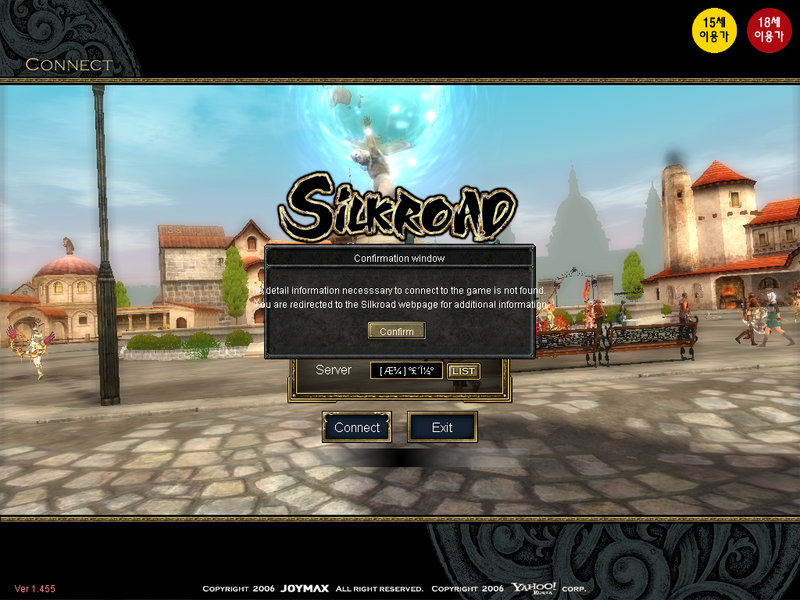
Any ideas :

Image

User avatar
Key-J
Retired Admin
Posts: 8237
Joined: Fri Jun 23, 2006 2:21 pm
Location: BF3 waiting for BF4
Contact:

Post by Key-J »

Hmmm very intersting, does this work ingame as well? Could you post some Ingame pictures please.
Image

User avatar
Cruor
Loyal Member
Posts: 1999
Joined: Wed Apr 12, 2006 1:22 am
Quick Reply: Yes
Location: Off topic

Post by Cruor »

ziddy1232 wrote:Any ideas :

Hmm, odd. I've never gotten that error before. Does it happen still when you switch back to your Media.pk2 backup?

Key-J wrote:Hmmm very intersting, does this work ingame as well? Could you post some Ingame pictures please.

Image
Image
Image

As I said earlier, this won't make new translations, but as Joymax translates things, they should pop up ingame for you to see.

User avatar
Key-J
Retired Admin
Posts: 8237
Joined: Fri Jun 23, 2006 2:21 pm
Location: BF3 waiting for BF4
Contact:

Post by Key-J »

Oooo great to know, how about for ingame items like weapons and stuff.
Image

User avatar
nnooss
Hi, I'm New Here
Posts: 13
Joined: Mon Feb 12, 2007 9:30 am

Post by nnooss »

hiii all ...

can you tell me hw to open thet file : data.pk2 beocuse when i press on it windows told me cannot open it and send me on a web page...
I need to search to download HexEdit??? and after open it?
Ok i try this and i have the same error lick ziddy1232
The error is not in english but i know i have same error becouse when i press confirm the game end and redirect me to a site.
And i have a korean acont.
i used babel fish for translation...

Some 1 can help me?

Thx. Nnooss >>> aege server
Image
Image X4
Image X12

User avatar
GuruSikh
Valued Member
Posts: 383
Joined: Wed Nov 01, 2006 11:36 am
Quick Reply: Yes
Location: Wandering this small world, for my purpose in life.

Post by GuruSikh »

Key-J heres some pics, the euro weapons name don't show up though. Also lvl 1-10, you can rez yourself at the spot, and not lose any exp pts if you die. I left that char only up to lvl 10, so I explore can ksro without any problems and not worry about dieing or use of pots.

Image Image Image Image Image

Edit: If you want to know anything else or want pics of something, I'm pretty sure I can get them.

User avatar
Key-J
Retired Admin
Posts: 8237
Joined: Fri Jun 23, 2006 2:21 pm
Location: BF3 waiting for BF4
Contact:

Post by Key-J »

Great, thnx for these.

I don't think i really need anything at the moment, but just keep up informed. If anything new like events and stuff
Image

User avatar
ziddy1232
Frequent Member
Posts: 1391
Joined: Sat Sep 30, 2006 12:45 pm
Quick Reply: Yes
Location: Alps

Post by ziddy1232 »

Cruor wrote:
ziddy1232 wrote:Any ideas :

Hmm, odd. I've never gotten that error before. Does it happen still when you switch back to your Media.pk2 backup?


Yep...

I have tried with my account username and password and my yahoo email and password, neither work.

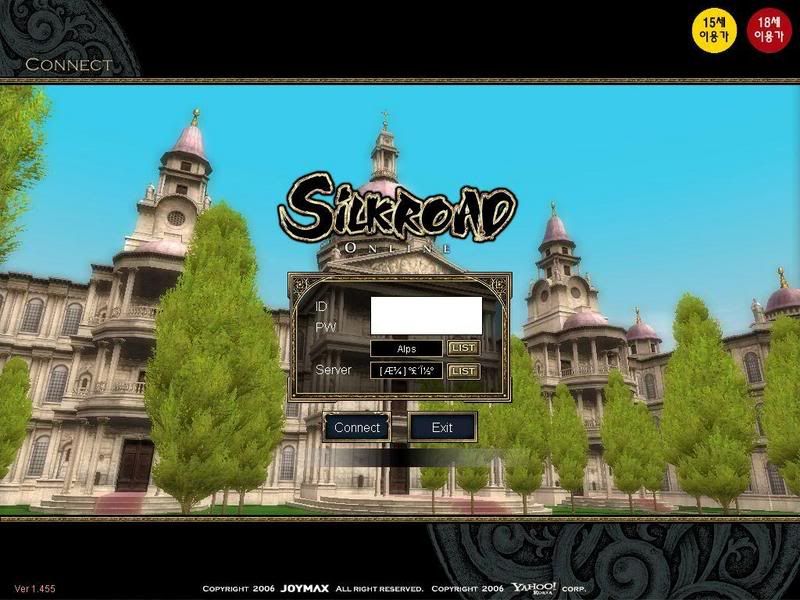
Also, i didnt know they would have Alps on Ksro :

Image

User avatar
Cruor
Loyal Member
Posts: 1999
Joined: Wed Apr 12, 2006 1:22 am
Quick Reply: Yes
Location: Off topic

Post by Cruor »

nnooss wrote:can you tell me hw to open thet file : data.pk2

Well first off, I clearly state that we are dealing with Media.pk2 in the guide. You will need to open Media.pk2, not Data.pk2.

nnooss wrote:I need to search to download HexEdit??? and after open it?

Yes, download and install HexEdit, then make a backup of Media.pk2 and open it in HexEdit, then follow the instructions from the guide.

nnooss wrote:Ok i try this and i have the same error lick ziddy1232

See my suggestion to ziddy1232

Key-J wrote:I don't think i really need anything at the moment, but just keep up informed. If anything new like events and stuff

IDK if you were asking if it translates events too, but the events will likely never be translated, unless they are coming to iSRO.

ziddy1232 wrote:Also, i didnt know they would have Alps on Ksro :

That is contributing to your problem, if it is not your problem completely.
Image
Keep in mind that there is only one server selection box, and it's on the bottom. When you switch the Korean to English, the first box, which is to select from account databases often gets mixed up with your server selection in iSRO. To fix it, click on "List" next to the box, select the first option (there is two, the first is for Yahoo accounts, the second is for accounts from another website), then click the "OK" button.

User avatar
Demix
Casual Member
Posts: 74
Joined: Sun Feb 04, 2007 7:51 pm
Quick Reply: Yes
Location: CSRO

Post by Demix »

just tried it I have 3 bytes extra what shell I do?
*edit*
understood with bytes but still I got problem our medias dont much they are bit different. So please someone tell me what areas can I clear, please cause I deleted from same coordinates but no luck
ISRO
Playing? [ ] Yes [x] Hell No!

Csro
Server - Inverted "?"
IGN - Demix
lvl - 1x(Ready for SP farming [ ]Yes [X]No
build-full int spear/Fire/Light/Cold
Guild - Machette

User avatar
GuruSikh
Valued Member
Posts: 383
Joined: Wed Nov 01, 2006 11:36 am
Quick Reply: Yes
Location: Wandering this small world, for my purpose in life.

Post by GuruSikh »

Sry was busy, but here are pics of the new event and some stuff in the item mall that isn't in the isro verison. The four pigs are the new jewel boxes rewards, once you get 1 of each, you talk to so-ok to get award. Like lvl 9 asterl, premium thing, and token thing and the pig aren't in the isro item mall.

Image Image Image Image Image

kabu
Hi, I'm New Here
Posts: 19
Joined: Tue Jan 16, 2007 2:53 am
Quick Reply: Yes
Location: Xian

Post by kabu »

Hey i have a question i edited the Media.pk2 file for csro and change the Chinese to english wen i load the game to play everything is in ????????????
and i have the east asian language pack installed. i Also did this for Jsro and its wrk perfectly everything is in english for jsro but it doesnt wrk for csro.any help r suggestion.

User avatar
zephyrsombre
Hi, I'm New Here
Posts: 3
Joined: Thu Feb 15, 2007 12:32 pm

Post by zephyrsombre »

I don't get why the can't just release the same version world wide a translate it

kabu
Hi, I'm New Here
Posts: 19
Joined: Tue Jan 16, 2007 2:53 am
Quick Reply: Yes
Location: Xian

Post by kabu »

zephyrsombre wrote:I don't get why the can't just release the same version world wide a translate it


yea i agree man

User avatar
Cruor
Loyal Member
Posts: 1999
Joined: Wed Apr 12, 2006 1:22 am
Quick Reply: Yes
Location: Off topic

Post by Cruor »

Demix wrote:just tried it I have 3 bytes extra what shell I do?

Not sure how that happened. Even if you are switching from Japanese to English, you should only have two more bytes because English is two letters longer than Japan.

Demix wrote:So please someone tell me what areas can I clear, please cause I deleted from same coordinates but no luck

You must clear the specific bytes I pointed out. It sounds like you cleared the bytes relative to their position in the window (E.G. "He deleted the bytes in the second and third columns of the twenty-fourth row.") or from their offsets. If you cleared them based on either of those, chances are you cleared the wrong bytes. You are looking to clear the carriage return (0D) and line feed (0A) bytes that are present immediately after the closing quote byte (22) of "pub/yahoogame/joymax/SRO_CREST" (note that if you are not changing kSRO, that address will be different, but I assume you would be able to infer it's relatives in the other versions' Media.pk2 files).

kabu wrote:Hey i have a question i edited the Media.pk2 file for csro and change the Chinese to english wen i load the game to play everything is in ????????????

So when you get ingame, all of what should be translated is question marks? I don't have that version to test with so it would be helpful if you elaborated and maybe provided some screenshots.

kabu
Hi, I'm New Here
Posts: 19
Joined: Tue Jan 16, 2007 2:53 am
Quick Reply: Yes
Location: Xian

Post by kabu »

ok i will provide a screenshot tomorrow.

User avatar
Demix
Casual Member
Posts: 74
Joined: Sun Feb 04, 2007 7:51 pm
Quick Reply: Yes
Location: CSRO

Post by Demix »

NO i found that 0EC17C90 row and edited that part and I Have ksro Image
it is not exactly like urs
ISRO
Playing? [ ] Yes [x] Hell No!

Csro
Server - Inverted "?"
IGN - Demix
lvl - 1x(Ready for SP farming [ ]Yes [X]No
build-full int spear/Fire/Light/Cold
Guild - Machette

User avatar
Cruor
Loyal Member
Posts: 1999
Joined: Wed Apr 12, 2006 1:22 am
Quick Reply: Yes
Location: Off topic

Post by Cruor »

Demix wrote:NO i found that 0EC17C90 row and edited that part and I Have ksro
it is not exactly like urs

I hope this picture clears things up. But from what I can tell, your file looks corrupted. Probably happened when you saved it. The same thing happened to me once or twice. Delete it and replace it with a copy of your backup.
Image

User avatar
Demix
Casual Member
Posts: 74
Joined: Sun Feb 04, 2007 7:51 pm
Quick Reply: Yes
Location: CSRO

Post by Demix »

ty that realy helped if I want to fix corruption I need to reinstall KSro? Cause it is backup file I only changed that Korean to English
ISRO
Playing? [ ] Yes [x] Hell No!

Csro
Server - Inverted "?"
IGN - Demix
lvl - 1x(Ready for SP farming [ ]Yes [X]No
build-full int spear/Fire/Light/Cold
Guild - Machette

User avatar
Cruor
Loyal Member
Posts: 1999
Joined: Wed Apr 12, 2006 1:22 am
Quick Reply: Yes
Location: Off topic

Post by Cruor »

Demix wrote:ty that realy helped if I want to fix corruption I need to reinstall KSro? Cause it is backup file I only changed that Korean to English

Sounds like you will have to reinstall. Sorry about that. Just make sure you do make a backup before you change anything this time.

slugz
Hi, I'm New Here
Posts: 7
Joined: Mon Feb 19, 2007 6:13 pm

Post by slugz »

omfg dude I love you ^^ now i understand jsro U rock and deserve to be entitled with the name "The coolest motha ..... in the world"! 8)

User avatar
Demix
Casual Member
Posts: 74
Joined: Sun Feb 04, 2007 7:51 pm
Quick Reply: Yes
Location: CSRO

Post by Demix »

Cruor wrote:
Demix wrote:ty that realy helped if I want to fix corruption I need to reinstall KSro? Cause it is backup file I only changed that Korean to English

Sounds like you will have to reinstall. Sorry about that. Just make sure you do make a backup before you change anything this time.


I have backup but seems like media.pk2 file was already corrupted this all ........shit I have it from begining
ISRO
Playing? [ ] Yes [x] Hell No!

Csro
Server - Inverted "?"
IGN - Demix
lvl - 1x(Ready for SP farming [ ]Yes [X]No
build-full int spear/Fire/Light/Cold
Guild - Machette

User avatar
Demix
Casual Member
Posts: 74
Joined: Sun Feb 04, 2007 7:51 pm
Quick Reply: Yes
Location: CSRO

Post by Demix »

Cruor wrote:
Demix wrote:ty that realy helped if I want to fix corruption I need to reinstall KSro? Cause it is backup file I only changed that Korean to English

Sounds like you will have to reinstall. Sorry about that. Just make sure you do make a backup before you change anything this time.


I have backup but seems like media.pk2 file was already corrupted this all ........shit I have it from begining

*should I do it before or after update?*
ISRO
Playing? [ ] Yes [x] Hell No!

Csro
Server - Inverted "?"
IGN - Demix
lvl - 1x(Ready for SP farming [ ]Yes [X]No
build-full int spear/Fire/Light/Cold
Guild - Machette

User avatar
Cruor
Loyal Member
Posts: 1999
Joined: Wed Apr 12, 2006 1:22 am
Quick Reply: Yes
Location: Off topic

Post by Cruor »

Demix wrote:*should I do it before or after update?*

After. You want to backup the most recent Media.pk2 file. That way, until Media.pk2 gets updated again, you can just make a copy of your backup if you mess up and don't know what's wrong.

User avatar
djanvier
Casual Member
Posts: 53
Joined: Tue Oct 10, 2006 11:18 pm
Quick Reply: Yes
Location: Venus

Post by djanvier »

what are those little pigs in your inventory for? its gold, blue, black? i dont know what they for..

User avatar
Cruor
Loyal Member
Posts: 1999
Joined: Wed Apr 12, 2006 1:22 am
Quick Reply: Yes
Location: Off topic

Post by Cruor »

GuruSikh wrote:The four pigs are the new jewel boxes rewards, once you get 1 of each, you talk to so-ok to get award. Like lvl 9 asterl, premium thing, and token thing and the pig aren't in the isro item mall.

Locked

Return to “Other SRO versions”