
I using a dual screen atm with my laptop since my old comp got fried....
How do i choose which screen I can play sro on, I try draggin the icon, the start menu, etc onto my other screen but it keeps loading on my smaller laptop screen. I wanna play on the big one!! >< help!
Playing SRO on Dual Screens
Playing SRO on Dual Screens
IGN: Kamakura - Full Int/Fire/Light LvL 51
Nightmare
Done SP Farming: 162K (Dec. 9, 2006) -- 101K SP left (Feb. 17, 2007)
Weapon of choice: 64+9 SOS Spear


-- Quit Game, playing Age of Conan when it comes out ^^ --
Nightmare
Done SP Farming: 162K (Dec. 9, 2006) -- 101K SP left (Feb. 17, 2007)
Weapon of choice: 64+9 SOS Spear
-- Quit Game, playing Age of Conan when it comes out ^^ --
-
TyeMaiShu
- Regular Member
- Posts: 330
- Joined: Sat Oct 28, 2006 9:54 pm
- Quick Reply: Yes
- Location: Venice
Re: Playing SRO on Dual Screens
Kamakura wrote:I using a dual screen atm with my laptop since my old comp got fried....
How do i choose which screen I can play sro on, I try draggin the icon, the start menu, etc onto my other screen but it keeps loading on my smaller laptop screen. I wanna play on the big one!! >< help!
um i think you have to right click on the desktop on the bigger monitor, then go to properties>settings. then click the drop down menu and change the display: to the first slot on the graphics card (the one that doesnt say secondary) then you check extend my windows desktop onto this monitor and also "use this as my primary monitor". I've never tried this but it should definitely work.

ISRO China:TyeMaiShu ~ [BloodLine] ~ Lv 75 Glaiver~ Venice
ISRO Euro:MagicToaster ~ [BloodLine] ~ Lv 56 Wizard/Cleric ~9 gap~ Venice

Re: Playing SRO on Dual Screens
TyeMaiShu wrote:Kamakura wrote:I using a dual screen atm with my laptop since my old comp got fried....
How do i choose which screen I can play sro on, I try draggin the icon, the start menu, etc onto my other screen but it keeps loading on my smaller laptop screen. I wanna play on the big one!! >< help!
um i think you have to right click on the desktop on the bigger monitor, then go to properties>settings. then click the drop down menu and change the display: to the first slot on the graphics card (the one that doesnt say secondary) then you check extend my windows desktop onto this monitor and also "use this as my primary monitor". I've never tried this but it should definitely work.
this is correct.

-
ghostslave

- Casual Member
- Posts: 57
- Joined: Sat Jan 20, 2007 9:19 am
- Quick Reply: Yes
- Location: Hawaii
Can you help me out, I tried something similar and it did not work.
I have an extra monitor and the cables to make my screens connect but I cant play 2 games at once.
What I wanted to do was play SRO on one screen then Halflife/9 dragons/ browse the web whatever on the other.
But everytime I try to dual screen it stretches my desktop to the other one (Like half my wallpaper on monitor 1 and 2) or its only a clone.
How do I make the second monitor an extra window to do stuff in and can I play 2 full screen games with one graphics card?
I have an extra monitor and the cables to make my screens connect but I cant play 2 games at once.
What I wanted to do was play SRO on one screen then Halflife/9 dragons/ browse the web whatever on the other.
But everytime I try to dual screen it stretches my desktop to the other one (Like half my wallpaper on monitor 1 and 2) or its only a clone.
How do I make the second monitor an extra window to do stuff in and can I play 2 full screen games with one graphics card?

ghostslave wrote:Can you help me out, I tried something similar and it did not work.
I have an extra monitor and the cables to make my screens connect but I cant play 2 games at once.
What I wanted to do was play SRO on one screen then Halflife/9 dragons/ browse the web whatever on the other.
But everytime I try to dual screen it stretches my desktop to the other one (Like half my wallpaper on monitor 1 and 2) or its only a clone.
How do I make the second monitor an extra window to do stuff in and can I play 2 full screen games with one graphics card?
cant play two games at once... unless you run them both in window mode, but my guess is they would run like shit.

-
ghostslave
- Casual Member
- Posts: 57
- Joined: Sat Jan 20, 2007 9:19 am
- Quick Reply: Yes
- Location: Hawaii
SRO does have window mode, i forgot the f key you push, but it is one of the f keys or something like that, i d k.
Last edited by PsYch008 on Tue Feb 13, 2007 11:39 pm, edited 1 time in total.
-
[SD]happynoobing

- Advanced Member
- Posts: 2349
- Joined: Thu Jan 04, 2007 2:06 am
- Quick Reply: Yes
- Location: Off Topic

to make it work, put one of your monitors as primary, and one as secondary, and set it to "extend my windows desktop to this monitor" on your second monitor. then you can window mode two games and put one on each screen by draggin one over to the other screen.
but unless you have a SCREAMING computer... this will lag like no other.
also, the way to get it to work the best... my guess anyway... would be to have 2 separate hard drives with each game you want to run installed on a different hard drive so that the drive wont have to load two different games at once.
good luck.
but unless you have a SCREAMING computer... this will lag like no other.
also, the way to get it to work the best... my guess anyway... would be to have 2 separate hard drives with each game you want to run installed on a different hard drive so that the drive wont have to load two different games at once.
good luck.


thanks, i c exaclty what you mean except when i do that it grays out the option to "use this as my primary monitor" T_T..
still need help
heres an image i uploaded..the img might look weird since the dimensions of my screen arnt 4:3 like most of urs ><
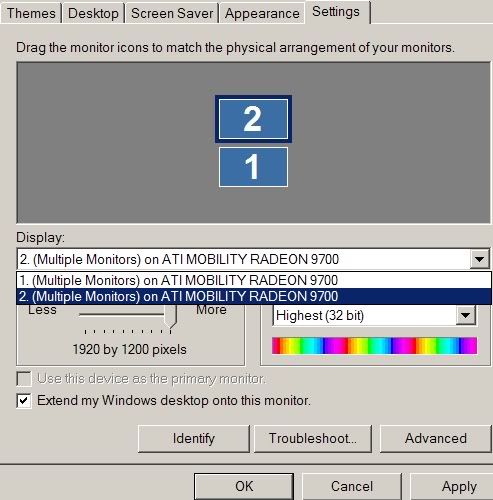
still need help
heres an image i uploaded..the img might look weird since the dimensions of my screen arnt 4:3 like most of urs ><
IGN: Kamakura - Full Int/Fire/Light LvL 51
Nightmare
Done SP Farming: 162K (Dec. 9, 2006) -- 101K SP left (Feb. 17, 2007)
Weapon of choice: 64+9 SOS Spear
-- Quit Game, playing Age of Conan when it comes out ^^ --
Nightmare
Done SP Farming: 162K (Dec. 9, 2006) -- 101K SP left (Feb. 17, 2007)
Weapon of choice: 64+9 SOS Spear
-- Quit Game, playing Age of Conan when it comes out ^^ --