Help In GIMP

Digital art design, renderings, signatures and anything art related. Upload pictures of your newest work or ask for feedback. Post graphics requests or discuss art in general.
Post Reply
AoENuker
Valued Member
Posts: 376
Joined: Sat Oct 07, 2006 12:09 am
Quick Reply: Yes
Location: Xian
Contact:

Help In GIMP

Post by AoENuker »

Hey How can i add an Image to a picture in GIMP? like if i make a background, how do i add an image to it?????????? help im working on my new image
Image
Image
Image
Image

User avatar
Reise
Forum Legend
Posts: 6650
Joined: Tue May 16, 2006 12:35 am
Location: Off Topic
Contact:

Post by Reise »

On the layers menu, right click your current layer and click "new layer." Then you should select transparency so you can paste the new image ontop of the old one. To make the new picture that you pasted flatten down on the new layer, go to Layer>Anchor Layer and you're set.
Image

User avatar
Caras
Frequent Member
Posts: 1337
Joined: Fri Sep 01, 2006 3:15 am
Quick Reply: Yes
Location: Place to place.

Post by Caras »

Follow tutorials, heres a great site to start win alot of tuts.
http://forums.nintendo.com/nintendo/boa ... .id=606970

AoENuker
Valued Member
Posts: 376
Joined: Sat Oct 07, 2006 12:09 am
Quick Reply: Yes
Location: Xian
Contact:

Post by AoENuker »

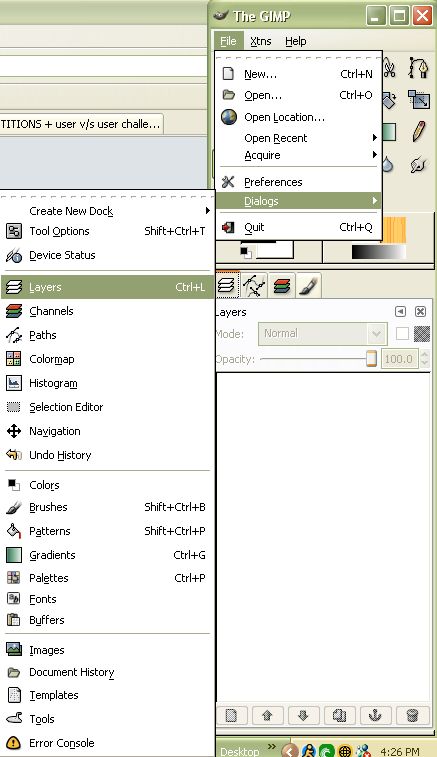
How do i get that think that pops up next to this thing becuase i closed it and dont know how to get it back up, umm its the thing with layers and background and all stuff :

Image
Image
Image
Image
Image

User avatar
Caras
Frequent Member
Posts: 1337
Joined: Fri Sep 01, 2006 3:15 am
Quick Reply: Yes
Location: Place to place.

Post by Caras »

Click on that botton and take the layers and put it back.

Image

AoENuker
Valued Member
Posts: 376
Joined: Sat Oct 07, 2006 12:09 am
Quick Reply: Yes
Location: Xian
Contact:

Post by AoENuker »

Thank you :), i will show you my first sig in a bit after i putt an image in it. i hope u all like it.
Image
Image
Image
Image

User avatar
Caras
Frequent Member
Posts: 1337
Joined: Fri Sep 01, 2006 3:15 am
Quick Reply: Yes
Location: Place to place.

Post by Caras »

Dont forget to follow the tutorials, im sure you'll learn and be good at it. ^^

AoENuker
Valued Member
Posts: 376
Joined: Sat Oct 07, 2006 12:09 am
Quick Reply: Yes
Location: Xian
Contact:

Post by AoENuker »

kinda stuck, in the layers part since i cant find my image, to putt in the background.
Image
Image
Image
Image

User avatar
Caras
Frequent Member
Posts: 1337
Joined: Fri Sep 01, 2006 3:15 am
Quick Reply: Yes
Location: Place to place.

Post by Caras »

When I 1st started makeing sigs the layers thing confused the hell out of me, nothing I can really say but follow the tuts and you'll get used to it.

Post Reply

Return to “Artists Corner”