internet help

Anything else. Post a funny site or tell us about yourself. Discuss current events or whatever else you want. Post off topic threads here.
Post Reply
User avatar
Gladiator_RN
SRF Herald
Posts: 2385
Joined: Sun Mar 16, 2008 6:12 pm
Quick Reply: Yes
Location: Netherlands
Contact:

internet help

Post by Gladiator_RN »

Hi there srf,

i got this new pc since like 2 months, and i really love it, but i do have a little problem i think. the internet.

ive been having the same problem over and over again, for the last few days.
it all started like last week, i was playing some BFBC2, was on TS3, so i definatly had internet connection. however, i could not go to any internet website whatsover, not on chrome, internet exploder, firefox etc. as soon as i clicked on "solve this problem" it gives an error that the pc doesnt know how to solve this problem. right after my internet goes poof, and i got no internet at all, not on broswer or games or TS3.

so everytime this happens i have to reset my router, not a big deal, takes alot of time.. but whatever. but yesterday i got the same shit as usual, only now i was resetting my internet, and i was 100% sure my internet was OUT, (i even toke the internet wire out of my PC) and i still could loginto SRO, TS3 and all that shit. While my complete router and wire was out of the PC, and I do not have any wireless internet whatsoever... ( browser still didnt work)

I think theres something wrong inside my PC or so, cuz wth, internet while all internet is for 100% sure offline?

HELP!

anyone? :) thanks.

User avatar
Toasty
Addicted Member
Posts: 2568
Joined: Sun Feb 04, 2007 2:23 pm
Quick Reply: Yes
Location: Venus
Contact:

Re: internet help

Post by Toasty »

Used to get this about a year ago on my home computer. In the end i replaced my router and it stopped happening. Dont know why it used to happen though.

User avatar
heroo
Forum Legend
Posts: 6618
Joined: Sat Sep 30, 2006 12:56 pm
Quick Reply: Yes
Location: Off Topic

Re: internet help

Post by heroo »

The thing with not able to connect internetsites used to happen to me alot too. I could download with uTorrent, but I couldn't connect to any site. I think the problem is with the router. The only time it happened to me is when I was at my own appartement and using the router of my housemate, when I was at my parent's place and using their router I didn't have the problem at all.
''When I die, make sure they bury me upside down, so that the world can kiss my ass.''

User avatar
The Invisible
Addicted Member
Posts: 2626
Joined: Sun Jan 23, 2011 1:28 pm
Quick Reply: Yes
Location: Home ._.

Re: internet help

Post by The Invisible »

If internet wasn't working how did you write that post .

Anyway try contacting your internet provider company .
So in the first week in college i went with jeans and the pajama's shirt. Didn't notice what i was wearing till after i returned home.

User avatar
Gladiator_RN
SRF Herald
Posts: 2385
Joined: Sun Mar 16, 2008 6:12 pm
Quick Reply: Yes
Location: Netherlands
Contact:

Re: internet help

Post by Gladiator_RN »

it is working now and then. its really really weird.

User avatar
CeLL
Senior Member
Posts: 4441
Joined: Tue Nov 18, 2008 4:26 am
Quick Reply: Yes
Location: SHEEKA JOOM BA BOOM BAH!! BAM! BAM BAM BAM BAM BAM!!!!!!!!!!!!

Re: internet help

Post by CeLL »

what it sounds like to me is that there is an error in the cable leading to your home. the frequency is too high or too low. probably too high. some machinary is too sensitve and will get shut off by it. others are created to handle these issues and wont even show signs of problems. can the internet company and have them check your line to make sure its in the right frequency range. if it is fine, have them check the modem. if it is fine go get a new router.
Image
^^Thanks Thomas42

User avatar
Fiction
Advanced Member
Posts: 2147
Joined: Sun Mar 23, 2008 11:49 am
Quick Reply: Yes
Location: Dead.(No Longer With Us)

Re: internet help

Post by Fiction »

Have you guys had many thunderstorms lately?
Image

User avatar
Hapjap
Common Member
Posts: 195
Joined: Sun Dec 27, 2009 3:15 am
Quick Reply: Yes
Location: under a bridge?

Re: internet help

Post by Hapjap »

might be some interference with your router. do you notice drops after using microwave or anything that produces a close to 2.4GHz radio frequency (other wireless home phones, cell phones, etc)?
NuclearSilo wrote:whore will put addict drug on her pussy to attract men

User avatar
dom
Global Moderator
Global Moderator
Posts: 9962
Joined: Wed Mar 08, 2006 10:46 pm
Quick Reply: Yes
Location: västkustskt

Re: internet help

Post by dom »

This has happened to me twice (both wired and wireless connections).

Problem was dead router.
Image

User avatar
Zanti
Regular Member
Posts: 223
Joined: Sun Oct 31, 2010 11:26 am
Quick Reply: Yes
Location: LoL

Re: internet help

Post by Zanti »

dom wrote:This has happened to me twice (both wired and wireless connections).

Problem was dead router.

same problems here, same cause.
Image
..:: I fall asleep in my bed and wake up in your dream ::..
Conquer Online - 120 Warrior

User avatar
Gladiator_RN
SRF Herald
Posts: 2385
Joined: Sun Mar 16, 2008 6:12 pm
Quick Reply: Yes
Location: Netherlands
Contact:

Re: internet help

Post by Gladiator_RN »

Yeah we do have a damn old shit router, (we do got a new modem tho)

gonna replace that router asap, lets hope it works.

ty.

User avatar
Zanti
Regular Member
Posts: 223
Joined: Sun Oct 31, 2010 11:26 am
Quick Reply: Yes
Location: LoL

Re: internet help

Post by Zanti »

I'm not sure how it goes with providers in your country, but where I live, you can contact the provider and get a free modem/router (wired+wireless) with decent speed. If you don't ask for the free one you actually risk getting less service. My brother bought a brand new router for 75 euro's or so, but it didnt work well with his provider. Then he switched to the free one and all his problems were gone. I'm currently using his router (gave it to me for free ;D).
Image
..:: I fall asleep in my bed and wake up in your dream ::..
Conquer Online - 120 Warrior

User avatar
BuDo
Senior Member
Posts: 4714
Joined: Wed Dec 24, 2008 6:16 am
Quick Reply: Yes
Location: Xian

Re: internet help

Post by BuDo »

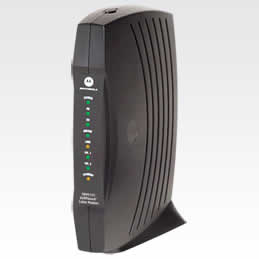
Before you run out and buy another router remove the router from the equation to make sure. Plug your PC directly into the modem and see if the problem persist. Cell said something about signal strength on your line coming into your home. That is true mostly for people who have a Cable Internet connection. If your modem looks like the one below: (or any brand of Motorola)

Image

Then try typing 192.168.100.1 into your web browser and press the enter key. It should bring up a screen that looks like this:

Image

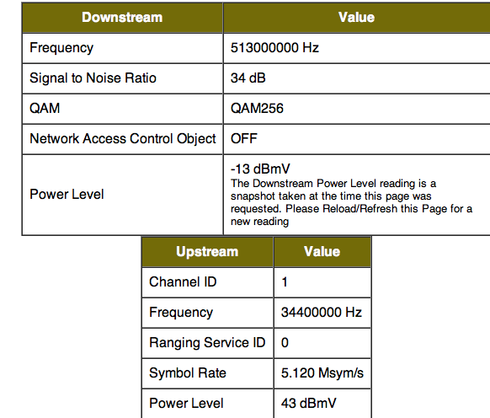
What you are seeing here is the cable modem's status. You want to look at the signal status. click on the signal tab on the left. It should take you to a screen that looks like this:

Image


look at the Signal to Noise Ratio in the "Downstream" section. If it's value is 30+ then that is good. Anything below that can cause Internet connection problems. The next thing you want to look at is the downstream power level. Anything between -8 and +8 is good. Anything between -15 and +15 is ok..going outside that is an indication of signal problems

The last thing to look at is the power level in the "Upstream" section. if it's value is between 38 and 45 (roughly) then signal levels are fine...anything outside of that range means you have a problem with signal strength. This problem can cause your Internet connection to intermittently shut down. Call your service provider if this is the case and they will fix it.
Image

_________________________________________________
BOW Full STR Fire level 102 -- ON A LONG BREAK..POSSIBLY FOREVER

Post Reply

Return to “Off Topic Lounge”