Spoiler!
Advice plz
-
DinoNuggets
- Frequent Member
- Posts: 1038
- Joined: Thu Jan 21, 2010 4:14 am
- Quick Reply: Yes
- Location: Meow
Advice plz
So i'm in photography class and me being new to this kind of art same with photoshop i was wondering what could make this image better looking cause my teacher told me today that it looks somewhat boring. this is my photo

-
0l3n

- Elite Member
- Posts: 5184
- Joined: Fri Jun 16, 2006 1:45 pm
- Quick Reply: Yes
- Location: Artists Corner
Re: Advice plz
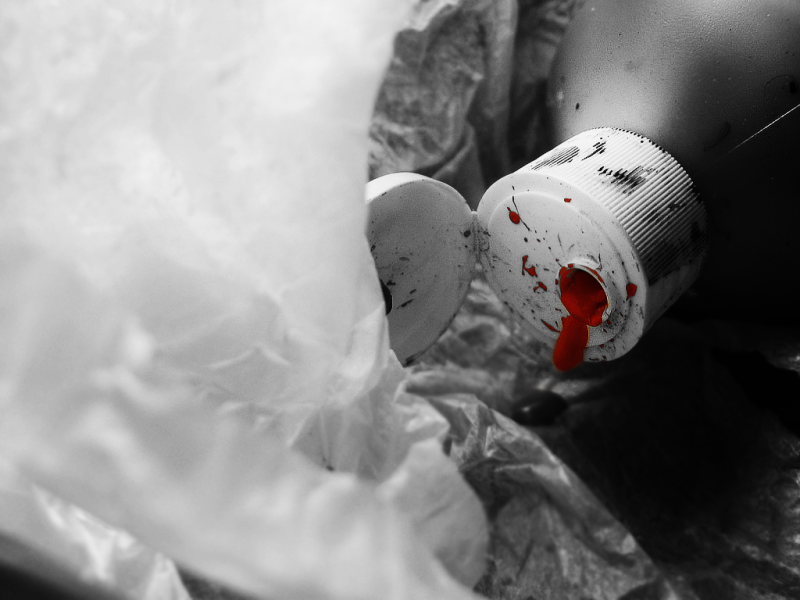
Im guessing your allowed to use photoshop right?
If so, you could try to do something along the lines of:
If so, you could try to do something along the lines of:
Spoiler!


-
Grounded

- Frequent Member
- Posts: 1358
- Joined: Wed Nov 26, 2008 8:08 pm
- Quick Reply: Yes
- Location: Demacia
Re: Advice plz
well the plastic bag on the left takes too much atention! and it shows nothing! thats why ur teacher says its boring!
and ol3n has a nice idea! u can play with it that way!
and ol3n has a nice idea! u can play with it that way!
Silkroad:
Probably lost all of my accounts already, but used to be something between:
Grounded, Murphy, Peach...
In many, many pservers...
League of Legends
*LAN - Groundy - lvl 30
-
DinoNuggets
- Frequent Member
- Posts: 1038
- Joined: Thu Jan 21, 2010 4:14 am
- Quick Reply: Yes
- Location: Meow

-
0l3n
- Elite Member
- Posts: 5184
- Joined: Fri Jun 16, 2006 1:45 pm
- Quick Reply: Yes
- Location: Artists Corner
Re: Advice plz
Well, first thing I did was to slap on a B&W gradient map because, well, the colors were a bit dull and bland.
Sharpened/blurred.
After that, some extensive use of the burn/dodge tools and I used a brightness/contrast layer.
Lastly I added the red color and set it to... god, cant remember what I set it to, nevermind just experiment, and I added some black and white brushing on the sides with a large soft brush.
Not really detailed but its the best I can do at 2am.
Sharpened/blurred.
After that, some extensive use of the burn/dodge tools and I used a brightness/contrast layer.
Lastly I added the red color and set it to... god, cant remember what I set it to, nevermind just experiment, and I added some black and white brushing on the sides with a large soft brush.
Not really detailed but its the best I can do at 2am.
-
DinoNuggets
- Frequent Member
- Posts: 1038
- Joined: Thu Jan 21, 2010 4:14 am
- Quick Reply: Yes
- Location: Meow
Re: Advice plz
0l3n wrote:Well, first thing I did was to slap on a B&W gradient map because, well, the colors were a bit dull and bland.
Sharpened/blurred.
After that, some extensive use of the burn/dodge tools and I used a brightness/contrast layer.
Lastly I added the red color and set it to... god, cant remember what I set it to, nevermind just experiment, and I added some black and white brushing on the sides with a large soft brush.
Not really detailed but its the best I can do at 2am.
alright sounds cool i'll play around with the stuff you just told me when i go back to school monday
i'll post a final picture soon by tuesday or thursday