Blue Screen of death (VISTA)
-
Gaigemasta

- Site Contributor
- Posts: 4474
- Joined: Sun Dec 24, 2006 3:12 pm
- Quick Reply: Yes
- Location: off topic
- Contact:
Blue Screen of death (VISTA)
Well I just built myself a new cheap server running AMD Athlon 3200+, 1GB Ram, ATI Radeon X1650 Pro, 4x500GB WD HDD, Windows Vista Ultimate. And when I run the computer for some time it randomly pops with a blue screen (unsimilar to the design of Windows 95-ME, but it countdowns and then restarts my pc. Anyone know this problem?


Re: Blue Screen of death (VISTA)
if you have a camera take a picture of the screen and post it
<< banned for remaking a banned account. -cin >>
-
Gaigemasta
- Site Contributor
- Posts: 4474
- Joined: Sun Dec 24, 2006 3:12 pm
- Quick Reply: Yes
- Location: off topic
- Contact:
Re: Blue Screen of death (VISTA)
lol I'lll just find an image on Google because the message didn't display a specific message, it basically said "you fail! your pc sux and I hate you because I'm Vista and I suck balls!) lol
edit..sumthin like this
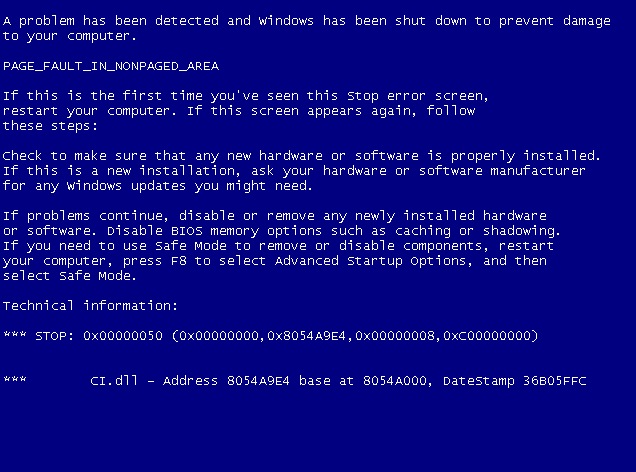
It restarts to quick though for me to see the message, I get a chance to see is the countdown... -_-
edit..sumthin like this
It restarts to quick though for me to see the message, I get a chance to see is the countdown... -_-
Last edited by Gaigemasta on Fri Apr 17, 2009 8:26 pm, edited 2 times in total.
-
pr0klobster

- Frequent Member
- Posts: 1427
- Joined: Wed Oct 17, 2007 2:28 pm
- Quick Reply: Yes
- Location: Olympus
Re: Blue Screen of death (VISTA)
Yep, post the screen or write down what the error says. O6 can be hardware, 02 is something else, etc, etc. Also it may say what the *.vxd or *.dll file that caused the error is.
As an example a BSOD that references "matrox.sys" would point towards a display driver.
As an example a BSOD that references "matrox.sys" would point towards a display driver.
If faith is a crutch, I'm not limping anymore.
-
Gaigemasta
- Site Contributor
- Posts: 4474
- Joined: Sun Dec 24, 2006 3:12 pm
- Quick Reply: Yes
- Location: off topic
- Contact:
Re: Blue Screen of death (VISTA)
ok, h/o lemme run my server and I'll try to find a specific message, so brb, I just run my server tehehehe, oh BTW IE8 is cool
-
pr0klobster
- Frequent Member
- Posts: 1427
- Joined: Wed Oct 17, 2007 2:28 pm
- Quick Reply: Yes
- Location: Olympus
Re: Blue Screen of death (VISTA)
Lots of hits...but CI.dll is fun because that means it could be several things.
http://www.file.net/process/ci.dll.html
http://www.programchecker.com/file/21238.aspx
http://www.windowsbbs.com/windows-vista ... rrupt.html
http://www.wilderssecurity.com/showthread.php?t=143245
http://forums.techguy.org/malware-remov ... -bsod.html
edit: added meanings of STOP error codes
http://www.updatexp.com/stop-messages.html
http://www.file.net/process/ci.dll.html
http://www.programchecker.com/file/21238.aspx
http://www.windowsbbs.com/windows-vista ... rrupt.html
http://www.wilderssecurity.com/showthread.php?t=143245
http://forums.techguy.org/malware-remov ... -bsod.html
edit: added meanings of STOP error codes
http://www.updatexp.com/stop-messages.html
If faith is a crutch, I'm not limping anymore.
-
Gaigemasta
- Site Contributor
- Posts: 4474
- Joined: Sun Dec 24, 2006 3:12 pm
- Quick Reply: Yes
- Location: off topic
- Contact:
Re: Blue Screen of death (VISTA)
Well I'm on the server now, and specific information requested? I'm just waiting for the blue
screen now
screen now
-
poehalcho

- Elite Member
- Posts: 6131
- Joined: Mon Apr 30, 2007 3:32 pm
- Quick Reply: Yes
- Location: ┌(╬ಠ益ಠ)╯( ̄ー ̄)(ノ◕ヮ◕)ノ:・✧(╯°Д°)╯彡┻━┻ψ(`∇´)ψ(☞゚∀゚)☞¯\_(ツ)_/¯ლ(ಥ益ಥლ)ԅ༼ ◔ڡ◔༽งヽ༼ʘ̚ل͜ʘ̚༽ノᕕ(ᐛ)ᕗ( ͡° ͜ʖ ͡°)
Re: Blue Screen of death (VISTA)
i'm no computer specialist, but didn't Vista require 2 gig RAM minimum?

Day[9] wrote:"Tea is a lot like gold expansions - it helps you kill people."
- Day[9] Daily 337 -
-
cuchulainn

- Advanced Member
- Posts: 2168
- Joined: Thu Apr 06, 2006 5:09 pm
- Quick Reply: Yes
- Location: Troy
Re: Blue Screen of death (VISTA)
poehalcho wrote:i'm no computer specialist, but didn't Vista require 2 gig RAM minimum?
I hope that doesn't say he has four 500GB harddrives and only 1 GB of ram. Even if it's just one 500GB harddrive, RAM is so cheap there's not reason not to get 4GB if you're running vista. Hell, I got 4 GB for 35 bucks of pretty decent OCZ RAM off newegg.
I'm in your posts, stealing your quotes.

-
Snoopy

- Senior Member
- Posts: 4016
- Joined: Sat Dec 22, 2007 8:50 am
- Quick Reply: Yes
- Location: Australia
Re: Blue Screen of death (VISTA)
poehalcho wrote:i'm no computer specialist, but didn't Vista require 2 gig RAM minimum?
Google tell's me otherwise:
Vista Home Basic:
1 GHz 32-bit (x86) or 64-bit (x64) processor
512 MB of system memory
20 GB hard drive with at least 15 GB of available space
Support for DirectX 9 graphics and 32 MB of graphics memory
DVD-ROM drive
Audio Output
Internet access (fees may apply)
Vista Home Premium/Business/Ultimate:
1 GHz 32-bit (x86) or 64-bit (x64) processor
1 GB of system memory
40 GB hard drive with at least 15 GB of available space
Support for DirectX 9 graphics with:
WDDM Driver
128 MB of graphics memory (minimum)
Pixel Shader 2.0 in hardware
32 bits per pixel
DVD-ROM drive
Audio Output
Internet access (fees may apply)
<< banned for racism. -cin >>
-
Gaigemasta
- Site Contributor
- Posts: 4474
- Joined: Sun Dec 24, 2006 3:12 pm
- Quick Reply: Yes
- Location: off topic
- Contact:
Re: Blue Screen of death (VISTA)
This is a server, and minimum for vista is 1GB, I wanted to invest my money into hdd space instead of ram, because my servers arn't really overloaded with operations but instead more of a storage space system for my clients. but lol I'm waiting for the blue screen lol $_$

Re: Blue Screen of death (VISTA)
Gaige wrote:1GB Ram
Need more. Windows Vista Ultimate requires 2Gigs or more. 1Gig just won't do.


Re: Blue Screen of death (VISTA)
Snoopy wrote:poehalcho wrote:i'm no computer specialist, but didn't Vista require 2 gig RAM minimum?
Google tell's me otherwise:
Vista Home Basic:
512 MB of system memory
Vista Home Premium/Business/Ultimate:
1 GB of system memory
Yeah but if you want to run anything besides just the OS you will need more than 1 gig RAM.
For example Windows XP system requirements are 128 mb of RAM but that will be occupied for 95% by just the OS.
Same goes for Vista.

-
Gaigemasta
- Site Contributor
- Posts: 4474
- Joined: Sun Dec 24, 2006 3:12 pm
- Quick Reply: Yes
- Location: off topic
- Contact:
Re: Blue Screen of death (VISTA)
lol I cant wait till Windows 7 cuz I'll pay full price !!!!!!!!!!!!!!!!! I want a good os for easy ram damnit!
-
slipknot03

- New Member
- Posts: 44
- Joined: Sat Mar 07, 2009 3:51 pm
- Quick Reply: Yes
- Location: Mercury
- Contact:
Re: Blue Screen of death (VISTA)
vista sucks <<'
vin7 will be very nice though ..
i have the beta ^^
but seriously.. vista sucks BIG TIME xD
vin7 will be very nice though ..
i have the beta ^^
but seriously.. vista sucks BIG TIME xD
"I am the only one who can walk both worlds..."

-
noobert mclagg

- Frequent Member
- Posts: 1165
- Joined: Wed Oct 17, 2007 1:44 am
- Quick Reply: Yes
- Location: Kittyland
Re: Blue Screen of death (VISTA)
I would get this sometimes when I SRO, but it hasn't happened for a while (knock on wood). My theory is it has something to do with a sudden increase in CPU usage.

-
Midori

- Veteran Member
- Posts: 3425
- Joined: Wed Mar 07, 2007 1:43 am
- Quick Reply: Yes
- Location: off topic
Re: Blue Screen of death (VISTA)
Learn to look up microsoft errors.
http://support.microsoft.com/kb/329293
Of course that's not Vista, but it's likely to be something similar.
http://www.computing.net/answers/window ... 71388.html
http://support.microsoft.com/kb/842465
Google didn't have any results with 0x8054A9E4.
Ask Microsoft support, im sure they will have a better answer than anyone else here has.
http://support.microsoft.com/kb/329293
Of course that's not Vista, but it's likely to be something similar.
http://www.computing.net/answers/window ... 71388.html
http://support.microsoft.com/kb/842465
Google didn't have any results with 0x8054A9E4.
Ask Microsoft support, im sure they will have a better answer than anyone else here has.

-
BloodyBlade

- Elite Member
- Posts: 5219
- Joined: Wed Nov 14, 2007 8:32 pm
- Quick Reply: Yes
- Location: Attending your mothers sexual needs :)
Re: Blue Screen of death (VISTA)
poehalcho wrote:i'm no computer specialist, but didn't Vista require 2 gig RAM minimum?
Uhh, I'm running vista downstairs with 1gb ram =/
My sig died
-
[SD]happynoobing

- Advanced Member
- Posts: 2349
- Joined: Thu Jan 04, 2007 2:06 am
- Quick Reply: Yes
- Location: Off Topic
Re: Blue Screen of death (VISTA)
hmm flashing BSOD after running for sometime... i used to have it when i first got my custom built computer. (for those of u with long term memory i actually had a thread here asking if it was CPU overheating)
it turned out that the RAM was not getting enough voltage from the power supply. it was fixed by tweaking the voltage sent to RAM and northbridge in BIOS. look into that if nothing else works.
it turned out that the RAM was not getting enough voltage from the power supply. it was fixed by tweaking the voltage sent to RAM and northbridge in BIOS. look into that if nothing else works.

-
raphaell666

- Loyal Member
- Posts: 1536
- Joined: Mon Nov 12, 2007 4:59 pm
- Quick Reply: Yes
- Location: Anywhere.
Re: Blue Screen of death (VISTA)
Try this:
When he says "Right click on CPU to AGP Controller" by the way, it'll probably be "blah blah PCI - Bridge blah" or something like that, depending on your machine, I think.
http://www.sightsea.com/pghpchd/pages/infinite_loop.html wrote:It's a problem with the video driver, device driver. ATI
Here's the fix for the infinite loop problem caused by ati2dvag.dll
that worked for me and has worked for some others.
Right click on My Computer
Choose Properties
Choose the Hardware(Tab)
Choose Device Manager(button)
Click the [+] next to System devices
Right click on CPU to AGP Controller
If you can't find this, emailing me will not help. Contact the manufacturer of your PC.
Choose the Update Driver(button)
Select Install from a list or specific location (Advanced)
Choose Next(button)
Select "Don't search. I will choose the driver to install."
Choose Next(button)
Select PCI standard PCI-to-PCI bridge
Hit Next(button)
Hit Finish(button)
Reboot.
When he says "Right click on CPU to AGP Controller" by the way, it'll probably be "blah blah PCI - Bridge blah" or something like that, depending on your machine, I think.
<< banned for remaking a banned account. -cin >>