NSR ~ Jin

Digital art design, renderings, signatures and anything art related. Upload pictures of your newest work or ask for feedback. Post graphics requests or discuss art in general.
Post Reply
User avatar
Kirkaldi
Veteran Member
Posts: 3083
Joined: Thu Jul 31, 2008 2:50 am
Quick Reply: Yes
Location: nyc

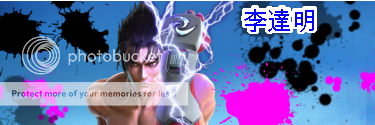
NSR ~ Jin

Post by Kirkaldi »

Image

I didn't really put a background, was too lazy so here.

CnC
Image

User avatar
brentonsbbe359
Addicted Member
Posts: 2615
Joined: Tue Mar 06, 2007 10:09 pm
Quick Reply: Yes
Location: I poopid :o
Contact:

Re: NSR ~ Jin

Post by brentonsbbe359 »

Nice....
photoshop CS3?
Image
Spoiler!

User avatar
Kirkaldi
Veteran Member
Posts: 3083
Joined: Thu Jul 31, 2008 2:50 am
Quick Reply: Yes
Location: nyc

Re: NSR ~ Jin

Post by Kirkaldi »

brentonsbbe359 wrote:Nice....
photoshop CS3?


No, GIMP, but I have Photoshop CS3 Extended, but I like GIMP more.
Image

User avatar
Bob
Common Member
Posts: 177
Joined: Tue Jun 24, 2008 5:27 pm
Quick Reply: Yes
Location: No-mans land.

Re: NSR ~ Jin

Post by Bob »

Sooo, all you did was copy+paste a render, mash some brushes on and add a text?
Image

User avatar
Melez
Veteran Member
Posts: 3009
Joined: Thu Jul 10, 2008 10:22 am
Location: лол шта
Contact:

Re: NSR ~ Jin

Post by Melez »

Bob wrote:Sooo, all you did was copy+paste a render, mash some brushes on and add a text?


Rofl true.

Add some flow. C4Ds could be useful. Blend the character in better. Add a light source.. etc.
Image

User avatar
Bob
Common Member
Posts: 177
Joined: Tue Jun 24, 2008 5:27 pm
Quick Reply: Yes
Location: No-mans land.

Re: NSR ~ Jin

Post by Bob »

Sooo, all you did was copy+paste a render, mash some brushes on and add a text?


Rofl true.

Add some flow. C4Ds could be useful. Blend the character in better. Add a light source.. etc.


Looking at this, I think he´s going a bit ´LOLWUUUUUUUT U TALKIN ABOOT?!\' at your post, soooooo;

Try to create a \'goal\' in your sig. What do you want to display with it? Looking at the render you picked, a \'strong\' theme might be best. Try to get a flow going from the character, to the outsides. Make the hand your main light source, add some soft brushes around it, in a light colour and try to blend them in, creating a light source.
Another tip is to take colours which fit the main theme/focal. A good site to create a nice lil\' colour palette for the occasion is kuler.adobe.com. Here you can make a palette based on monochromatic, complementary and many other themes. It\'s a nice way of looking whether or not 2 colours fit together.

A bit of basic tips there. :-) Although the best tip I can give you is; Practice. Seriously, it\'s not a sin, everybody starts out as a beginner, and only by practising and trying out tutorials you get better. :-)
Image

Post Reply

Return to “Artists Corner”
