Is there anyway to target a monster while ur running and then just go attack it using the auto attack button
For example, if anyone has played WOW, you can use the tab key or some key to target a monster or switch targets before you attack it, without selecting it with the moust, so i was wondering if there was a way to do that in SRO.
Anyway to target monster without mouse?
-
mystery777

- Casual Member
- Posts: 52
- Joined: Tue Jun 17, 2008 10:31 pm
- Quick Reply: Yes
- Location: Venus
-
Rosato

- Valued Member
- Posts: 404
- Joined: Sat Oct 20, 2007 2:09 am
- Quick Reply: Yes
- Location: Perfect World International
- Contact:
Re: Anyway to target monster without mouse?
Not that I know of but if you find out I would like to konw also.

Re: Anyway to target monster without mouse?
What's WOW?
-
IDontPlaySRO
- Regular Member
- Posts: 322
- Joined: Sun Sep 21, 2008 12:44 am
- Quick Reply: Yes
- Location: ...
Re: Anyway to target monster without mouse?
it would make grinding too convenient.
<<banned from SRF for remaking a banned account. -SG>>
-
foudre

- Veteran Member
- Posts: 3604
- Joined: Sun Jul 29, 2007 12:52 am
- Quick Reply: Yes
- Location: Venus
Re: Anyway to target monster without mouse?
IDontPlaySRO wrote:it would make grinding too convenient.
it would make autoit half bots too
there is a button for auto target enemies but it only counts for humans, if you are jobbing or ctf, or cape fights its pretty usefull, i have mine set to w, when i'm huntering i'll spam w while nuking spawns, just incase a human wants to show up right as a spawn happens, they'll get nuked almost instantly
A man once said, "Fear is contagious". So then the same must hold true for courage.
The Roar of a Crowd begins with one man.

Re: Anyway to target monster without mouse?
^There's also a support target, press it and you're target will be whatever your previous target was..targeting. Useful for uniques and such..
 Crumpets for Pres
-
Drew_Benton

- Active Member
- Posts: 639
- Joined: Mon Oct 16, 2006 8:46 pm
- Quick Reply: Yes
- Location: Texas
Re: Anyway to target monster without mouse?
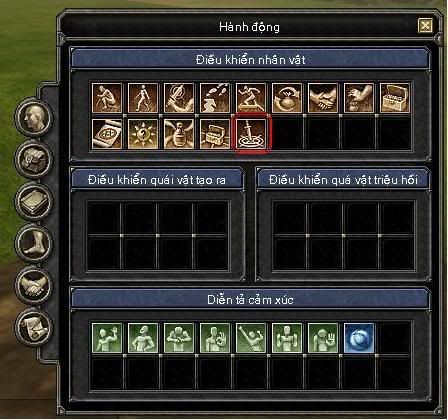
Silkroad does have an "Auto Select" feature that is disabled by default through the PK2 files. Most MMORPGs don't disable this feature, but Silkroad has. It does still exist in the client though, they just hide the icon to use it. However, you have to modify your PK2 files, and that is never recommended, so the following information is provided on a "use at your own risk / expense / for educational purposes only" basis.
The file you need to modify is "server_dep/silkroad/textdata/actionwnddata.txt". When you extract the file, you will see a line that is:
First you will have to take off the "//" at the front, to uncomment it. Next, you have to change the slot the icon will fall in the GUI at. Right now it's at slot 5, which is where the Exchange icon is used at. Modify the 5 to a 15 so the icon is added at the end of the icon box, after the fortress icon. Make a backup of your media.pk2 file first, then reimport the edited file using a PK2 modifier or if you are good at hex editing files, you can overwrite the two "//" with " ", then delete one of the spaces, then insert a 1 in front of the 5, so the file size is the exact same as it was when you started.
When you load up Silkroad you should see your new icon and you will be able to drag it to the quick bar and use a key to press it. However, since this functionality is disabled in the client files, the icon will not be in the quick bar when you restart the game. The server sends the client your quick slot bar data and that icon is not saved properly.
One last thing to mention in regards to this functionality is that the selection radius is very small, about 70 units or so in game. On screen, this is about 2-3 inches from your character. Due to this restriction, it is not an "effective means" to play Silkroad without a mouse (i.e. you only have a touchpad on a laptop), unless you are really good with using the arrow keys as movement (which Silkroad has a very weak key moving system implemented).
The file you need to modify is "server_dep/silkroad/textdata/actionwnddata.txt". When you extract the file, you will see a line that is:
Code: Select all
//1005 1 자동선택 UIIT_CTL_AUTOSELECT_TT icon\action\icon_cha_autotarget.ddj 1 5First you will have to take off the "//" at the front, to uncomment it. Next, you have to change the slot the icon will fall in the GUI at. Right now it's at slot 5, which is where the Exchange icon is used at. Modify the 5 to a 15 so the icon is added at the end of the icon box, after the fortress icon. Make a backup of your media.pk2 file first, then reimport the edited file using a PK2 modifier or if you are good at hex editing files, you can overwrite the two "//" with " ", then delete one of the spaces, then insert a 1 in front of the 5, so the file size is the exact same as it was when you started.
When you load up Silkroad you should see your new icon and you will be able to drag it to the quick bar and use a key to press it. However, since this functionality is disabled in the client files, the icon will not be in the quick bar when you restart the game. The server sends the client your quick slot bar data and that icon is not saved properly.
One last thing to mention in regards to this functionality is that the selection radius is very small, about 70 units or so in game. On screen, this is about 2-3 inches from your character. Due to this restriction, it is not an "effective means" to play Silkroad without a mouse (i.e. you only have a touchpad on a laptop), unless you are really good with using the arrow keys as movement (which Silkroad has a very weak key moving system implemented).
-
IDontPlaySRO
- Regular Member
- Posts: 322
- Joined: Sun Sep 21, 2008 12:44 am
- Quick Reply: Yes
- Location: ...
Re: Anyway to target monster without mouse?
Drew_Benton wrote:Silkroad does have an "Auto Select" feature that is disabled by default through the PK2 files. Most MMORPGs don't disable this feature, but Silkroad has. It does still exist in the client though, they just hide the icon to use it. However, you have to modify your PK2 files, and that is never recommended, so the following information is provided on a "use at your own risk / expense / for educational purposes only" basis.
The file you need to modify is "server_dep/silkroad/textdata/actionwnddata.txt". When you extract the file, you will see a line that is:Code: Select all
//1005 1 자동선택 UIIT_CTL_AUTOSELECT_TT icon\action\icon_cha_autotarget.ddj 1 5
First you will have to take off the "//" at the front, to uncomment it. Next, you have to change the slot the icon will fall in the GUI at. Right now it's at slot 5, which is where the Exchange icon is used at. Modify the 5 to a 15 so the icon is added at the end of the icon box, after the fortress icon. Make a backup of your media.pk2 file first, then reimport the edited file using a PK2 modifier or if you are good at hex editing files, you can overwrite the two "//" with " ", then delete one of the spaces, then insert a 1 in front of the 5, so the file size is the exact same as it was when you started.
When you load up Silkroad you should see your new icon and you will be able to drag it to the quick bar and use a key to press it. However, since this functionality is disabled in the client files, the icon will not be in the quick bar when you restart the game. The server sends the client your quick slot bar data and that icon is not saved properly.
One last thing to mention in regards to this functionality is that the selection radius is very small, about 70 units or so in game. On screen, this is about 2-3 inches from your character. Due to this restriction, it is not an "effective means" to play Silkroad without a mouse (i.e. you only have a touchpad on a laptop), unless you are really good with using the arrow keys as movement (which Silkroad has a very weak key moving system implemented).
Wow, well that's to bad on the 70 units. You sure know a lot about the ins and outs of silkroad. You're the one who told nuclear about info beings stored on memory correct?
<<banned from SRF for remaking a banned account. -SG>>
-
mystery777
- Casual Member
- Posts: 52
- Joined: Tue Jun 17, 2008 10:31 pm
- Quick Reply: Yes
- Location: Venus
Re: Anyway to target monster without mouse?
dang oh well I dont wanna mess with my pk2 files but oh well i was just hoping there was a keyboard select target button but oh well
thanx for helping guys
thanx for helping guys
-
ImmortalKiller

- Active Member
- Posts: 675
- Joined: Thu Aug 28, 2008 2:13 am
- Quick Reply: Yes
- Location: VA/CA
Re: Anyway to target monster without mouse?
Haha- I couldn't resist trying this out for fun!
Thanks Drew!!!
Thanks Drew!!!
Counter Strike... | Source
CAL...................................................................... | Main
Silkroad Online | Aege
...................................................................................................
CAL...................................................................... | Main
Silkroad Online | Aege
...................................................................................................
-
Nixie

- Frequent Member
- Posts: 1108
- Joined: Fri Aug 03, 2007 7:58 am
- Quick Reply: Yes
- Location: Off Topic
- Contact:
Re: Anyway to target monster without mouse?
When Silkroad is running you can find the data by reading a specific address in the memory. I didn't try this at any time but I believe it must be somewhere around 0x00CF0000 +/- 0x00080000 or so. Drew will know it better. ^^
<< banned for proof of botting. -cin >>
Re: Anyway to target monster without mouse?
Azilius wrote:^There's also a support target, press it and you're target will be whatever your previous target was..targeting. Useful for uniques and such..
Where is that button? I can't find it in actions menu???
.curve wrote:Unless Silkroad has a hole I can stick it in, I prefer spending money on the girlfriend.
Spoiler!
-
Nixie
- Frequent Member
- Posts: 1108
- Joined: Fri Aug 03, 2007 7:58 am
- Quick Reply: Yes
- Location: Off Topic
- Contact:
Re: Anyway to target monster without mouse?
Goseki wrote:Azilius wrote:^There's also a support target, press it and you're target will be whatever your previous target was..targeting. Useful for uniques and such..
Where is that button? I can't find it in actions menu???
Drew wrote how you can enable it.
<< banned for proof of botting. -cin >>

Re: Anyway to target monster without mouse?
Nixie wrote:Goseki wrote:Azilius wrote:^There's also a support target, press it and you're target will be whatever your previous target was..targeting. Useful for uniques and such..
Where is that button? I can't find it in actions menu???
Drew wrote how you can enable it.
Nah, he means the one allready implemented.
It's at the bottom of the sub menu 'Key Map' in options menu.
<< banned for being a constant problem. -cin >>
-
asusi

- Veteran Member
- Posts: 3223
- Joined: Tue Jul 08, 2008 7:04 pm
- Quick Reply: Yes
- Location: Off topic
- Contact:
Re: Anyway to target monster without mouse?
Goseki wrote:Azilius wrote:^There's also a support target, press it and you're target will be whatever your previous target was..targeting. Useful for uniques and such..
Where is that button? I can't find it in actions menu???
cause it's hiden.
Spoiler!

-
foudre
- Veteran Member
- Posts: 3604
- Joined: Sun Jul 29, 2007 12:52 am
- Quick Reply: Yes
- Location: Venus
Re: Anyway to target monster without mouse?
Goseki wrote:Azilius wrote:^There's also a support target, press it and you're target will be whatever your previous target was..targeting. Useful for uniques and such..
Where is that button? I can't find it in actions menu???
you gota go to options and set a key, its unbound by default
A man once said, "Fear is contagious". So then the same must hold true for courage.
The Roar of a Crowd begins with one man.
Re: Anyway to target monster without mouse?
ahh ok ty.
.curve wrote:Unless Silkroad has a hole I can stick it in, I prefer spending money on the girlfriend.
Spoiler!
-
Nixie
- Frequent Member
- Posts: 1108
- Joined: Fri Aug 03, 2007 7:58 am
- Quick Reply: Yes
- Location: Off Topic
- Contact:
Re: Anyway to target monster without mouse?
foudre wrote:Goseki wrote:Azilius wrote:^There's also a support target, press it and you're target will be whatever your previous target was..targeting. Useful for uniques and such..
Where is that button? I can't find it in actions menu???
you gota go to options and set a key, its unbound by default
But it doesn't work. I tried it, nothing happens. I tried all unbound and bound things, nothing worked. So, no, you can't set it in the options.
<< banned for proof of botting. -cin >>
-
N00B_THIEF

- Hi, I'm New Here
- Posts: 14
- Joined: Tue Sep 16, 2008 1:56 am
- Quick Reply: Yes
- Location: USA
Re: Anyway to target monster without mouse?
asusi wrote:Goseki wrote:Azilius wrote:^There's also a support target, press it and you're target will be whatever your previous target was..targeting. Useful for uniques and such..
Where is that button? I can't find it in actions menu???
cause it's hiden.
I think this is only for VSRO only, as I remember ISRO dosent have this type of window
-
asusi
- Veteran Member
- Posts: 3223
- Joined: Tue Jul 08, 2008 7:04 pm
- Quick Reply: Yes
- Location: Off topic
- Contact:
Re: Anyway to target monster without mouse?
N00B_THIEF wrote:I think this is only for VSRO only, as I remember ISRO dosent have this type of window
like i said its hidden, in iSRO they removed that button

Spoiler!
-
rawr1337

- Regular Member
- Posts: 203
- Joined: Mon Feb 18, 2008 3:57 pm
- Quick Reply: Yes
- Location: Fuxing everywhere!
Re: Anyway to target monster without mouse?
N00B_THIEF wrote:I think this is only for VSRO only, as I remember ISRO dosent have this type of window
mhm, it's hidden. Like Drew explained earlier, you have to get it through the pk2 files.

 [eXe*MSI]
-
foudre
- Veteran Member
- Posts: 3604
- Joined: Sun Jul 29, 2007 12:52 am
- Quick Reply: Yes
- Location: Venus
Re: Anyway to target monster without mouse?
Nixie wrote:But it doesn't work. I tried it, nothing happens. I tried all unbound and bound things, nothing worked. So, no, you can't set it in the options.
some of them only work against humans
A man once said, "Fear is contagious". So then the same must hold true for courage.
The Roar of a Crowd begins with one man.
Re: Anyway to target monster without mouse?
Nixie wrote:But it doesn't work. I tried it, nothing happens. I tried all unbound and bound things, nothing worked. So, no, you can't set it in the options.
The one I'm talking about does work, you click on a human and press it and your new target will be whatever the human was targeting. The auto target one works too, but it ONLY works on humans. The one drew is talking about are the 'hidden' ones, the ones I'm referring to are in the keymap in the options menu.
Crumpets for Pres-
foudre
- Veteran Member
- Posts: 3604
- Joined: Sun Jul 29, 2007 12:52 am
- Quick Reply: Yes
- Location: Venus
Re: Anyway to target monster without mouse?
Azilius wrote:Nixie wrote:But it doesn't work. I tried it, nothing happens. I tried all unbound and bound things, nothing worked. So, no, you can't set it in the options.
The one I'm talking about does work, you click on a human and press it and your new target will be whatever the human was targeting. The auto target one works too, but it ONLY works on humans. The one drew is talking about are the 'hidden' ones, the ones I'm referring to are in the keymap in the options menu.
wait there is one to target what your target is targeting? thats kinda cool actually
edit is it see target?
Last edited by foudre on Mon Oct 13, 2008 5:34 pm, edited 1 time in total.
A man once said, "Fear is contagious". So then the same must hold true for courage.
The Roar of a Crowd begins with one man.
-
IDontPlaySRO
- Regular Member
- Posts: 322
- Joined: Sun Sep 21, 2008 12:44 am
- Quick Reply: Yes
- Location: ...
Re: Anyway to target monster without mouse?
foudre wrote:Azilius wrote:Nixie wrote:But it doesn't work. I tried it, nothing happens. I tried all unbound and bound things, nothing worked. So, no, you can't set it in the options.
The one I'm talking about does work, you click on a human and press it and your new target will be whatever the human was targeting. The auto target one works too, but it ONLY works on humans. The one drew is talking about are the 'hidden' ones, the ones I'm referring to are in the keymap in the options menu.
wait there is one to target what your target is targeting? thats kinda actually
Target Support, you need to assign a key to it.
<<banned from SRF for remaking a banned account. -SG>>
-
Nixie
- Frequent Member
- Posts: 1108
- Joined: Fri Aug 03, 2007 7:58 am
- Quick Reply: Yes
- Location: Off Topic
- Contact:
Re: Anyway to target monster without mouse?
Azilius wrote:Nixie wrote:But it doesn't work. I tried it, nothing happens. I tried all unbound and bound things, nothing worked. So, no, you can't set it in the options.
The one I'm talking about does work, you click on a human and press it and your new target will be whatever the human was targeting. The auto target one works too, but it ONLY works on humans. The one drew is talking about are the 'hidden' ones, the ones I'm referring to are in the keymap in the options menu.
So what's the point then? Click the player, click a button... while you could just click the mob... x_x
<< banned for proof of botting. -cin >>
-
foudre
- Veteran Member
- Posts: 3604
- Joined: Sun Jul 29, 2007 12:52 am
- Quick Reply: Yes
- Location: Venus
Re: Anyway to target monster without mouse?
Nixie wrote:Azilius wrote:Nixie wrote:But it doesn't work. I tried it, nothing happens. I tried all unbound and bound things, nothing worked. So, no, you can't set it in the options.
The one I'm talking about does work, you click on a human and press it and your new target will be whatever the human was targeting. The auto target one works too, but it ONLY works on humans. The one drew is talking about are the 'hidden' ones, the ones I'm referring to are in the keymap in the options menu.
So what's the point then? Click the player, click a button... while you could just click the mob... x_x
if you're trying to get a unique too many spawns to click it, or would be usuable in pvp so you can link your attacks with some one
A man once said, "Fear is contagious". So then the same must hold true for courage.
The Roar of a Crowd begins with one man.
-
Nixie
- Frequent Member
- Posts: 1108
- Joined: Fri Aug 03, 2007 7:58 am
- Quick Reply: Yes
- Location: Off Topic
- Contact:
Re: Anyway to target monster without mouse?
foudre wrote:Nixie wrote:Azilius wrote:So what's the point then? Click the player, click a button... while you could just click the mob... x_x
if you're trying to get a unique too many spawns to click it, or would be usuable in pvp so you can link your attacks with some one
Didn't really think about that... it' may be really useful for a unique, while in PvP... I prefer 1v1.
<< banned for proof of botting. -cin >>
-
brentonsbbe359

- Addicted Member
- Posts: 2615
- Joined: Tue Mar 06, 2007 10:09 pm
- Quick Reply: Yes
- Location: I poopid :o
- Contact:
Re: Anyway to target monster without mouse?
IDontPlaySRO wrote:it would make grinding too convenient.
I would get some scotch tape and tape down the key that makes you auto attack if there was one
and id tape down all the skill keys too
and the tab key
and i wouldn't be botting.
i would be taping O.O

Spoiler!

-
foudre
- Veteran Member
- Posts: 3604
- Joined: Sun Jul 29, 2007 12:52 am
- Quick Reply: Yes
- Location: Venus
Re: Anyway to target monster without mouse?
brentonsbbe359 wrote:IDontPlaySRO wrote:it would make grinding too convenient.
I would get some scotch tape and tape down the key that makes you auto attack if there was one
and id tape down all the skill keys too
and the tab key
and i wouldn't be botting.
i would be taping O.O
taping is cutting net connection for a second to fire a shot or a gernade in safety, and plugging it back in before you time out, works on some games like soliderfront (used to, now some people do it something close but its a modded client where they push a button and it tells the server they shot every one) lol yay games that use client side perspective to tell if a shot hits, making lag advantageous
A man once said, "Fear is contagious". So then the same must hold true for courage.
The Roar of a Crowd begins with one man.