Digital art design, renderings, signatures and anything art related. Upload pictures of your newest work or ask for feedback. Post graphics requests or discuss art in general.
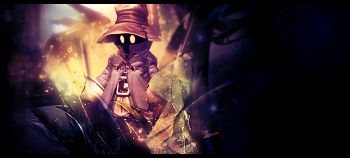
Heres my result! i hope you dont mind me using your tut to make my sig. cuz i really like it but i had some problems with the layer>new adjustment layer>gradient map, it always turned out to dark for me
Melon wrote:Heres my result! i hope you dont mind me using your tut to make my sig. cuz i really like it but i had some problems with the layer>new adjustment layer>gradient map, it always turned out to dark for me
Melon wrote:Heres my result! i hope you dont mind me using your tut to make my sig. cuz i really like it but i had some problems with the layer>new adjustment layer>gradient map, it always turned out to dark for me
Looks good! :} The tutorial is just a guide, if those gradient maps don't work for you, play around with the other ones.
Really cool signature, I love the result of it. But I dunno it seems way too much black/negative space, like half the signature is empty almost. I know if you look close you can see hints of bits which have been darkened and all the other things you did to the signature itself, but to me personally it seems a little too empty on half of it. The left side though is amazing.
Melon wrote:Heres my result! i hope you dont mind me using your tut to make my sig. cuz i really like it but i had some problems with the layer>new adjustment layer>gradient map, it always turned out to dark for me
Looks good! :} The tutorial is just a guide, if those gradient maps don't work for you, play around with the other ones.
Thanks so much for the tut Sae. Here is my finished product. I didn't get the splatting quite the way I wanted it so I cut it out. I need to work on lighting also. But this tut has been very very helpful! CnC please beyond these issues
**edit** Oh and I forgot to gaus blur it so it's not quite as "sparkly"... -.-






 [Scoundrels]