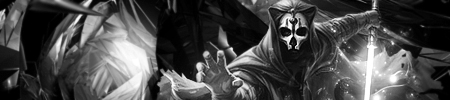
"Rendered by IceCrash" Noobish attempt at making a render xD

Digital art design, renderings, signatures and anything art related. Upload pictures of your newest work or ask for feedback. Post graphics requests or discuss art in general.
Post Reply
User avatar
IceCrash
Forum Legend
Posts: 6816
Joined: Thu Nov 09, 2006 4:49 pm
Quick Reply: Yes
Location: Anything goes

"Rendered by IceCrash" Noobish attempt at making a render xD

Post by IceCrash »

Haihai, this is like the second thingy i do, where i actually try to do a good job on O.o

It was relatively hard, and it took a while, i think it's not that bad

Image
Image

I think it's ok after all, i tryed to make it l00k pro with the sticky and shit lols, i think it looks alright, what do ya'll say about it?

Comments plýss :love: :love: :love:
Image

User avatar
0l3n
Elite Member
Posts: 5184
Joined: Fri Jun 16, 2006 1:45 pm
Quick Reply: Yes
Location: Artists Corner

Re: "Rendered by IceCrash" Noobish attempt at making a render xD

Post by 0l3n »

Parts look blured.
Image
Image

User avatar
IceCrash
Forum Legend
Posts: 6816
Joined: Thu Nov 09, 2006 4:49 pm
Quick Reply: Yes
Location: Anything goes

Re: "Rendered by IceCrash" Noobish attempt at making a render xD

Post by IceCrash »

thats because of the bg i took it from
could do nothing about that >.<
i just liked the thingies so i was like, cuttttttttteeeeeeeee imma make a render lol
Image

User avatar
crazyskwrls
Advanced Member
Posts: 2293
Joined: Sun Aug 19, 2007 10:16 pm
Quick Reply: Yes
Location: Off Topic

Re: "Rendered by IceCrash" Noobish attempt at making a render xD

Post by crazyskwrls »

enlighten me plz

i dont see wat u did there... cant u just cut it out and it looks exactly the same....

Image Image
thnx Kraq

User avatar
Dystopia
Advanced Member
Posts: 2317
Joined: Thu Jan 04, 2007 8:37 pm
Quick Reply: Yes
Location: Off Topic

Re: "Rendered by IceCrash" Noobish attempt at making a render xD

Post by Dystopia »

crazyskwrls wrote:enlighten me plz

i dont see wat u did there... cant u just cut it out and it looks exactly the same....


That's what he did, cut it out.

It's called rendering.
Image

User avatar
BrokenSaint
Veteran Member
Posts: 3473
Joined: Sun Jan 01, 2006 8:49 pm
Quick Reply: Yes
Location: Stuntin'.
Contact:

Re: "Rendered by IceCrash" Noobish attempt at making a render xD

Post by BrokenSaint »

Oh, nice one man. :D

If you want to get rid of the blurred sides, you should use the pen tool for rendering (assuming you didnt?).

User avatar
IceCrash
Forum Legend
Posts: 6816
Joined: Thu Nov 09, 2006 4:49 pm
Quick Reply: Yes
Location: Anything goes

Re: "Rendered by IceCrash" Noobish attempt at making a render xD

Post by IceCrash »

BrokenSaint wrote:Oh, nice one man. :D

If you want to get rid of the blurred sides, you should use the pen tool for rendering (assuming you didnt?).

i diiid :( lol
i use anti aliasing O.o
but still, trust meh, if you see how the BG is, its the bg that makes the characters look kinda blurred in some places i think/hope if not plýs tell me how i get it to not be like that lol, i think it might be the anti aliasing thingy, idk, just guessing
Image

User avatar
BrokenSaint
Veteran Member
Posts: 3473
Joined: Sun Jan 01, 2006 8:49 pm
Quick Reply: Yes
Location: Stuntin'.
Contact:

Re: "Rendered by IceCrash" Noobish attempt at making a render xD

Post by BrokenSaint »

Hm, probably looks that way cause you included part of the BG. That's nothin' tho good job. :P

User avatar
IceCrash
Forum Legend
Posts: 6816
Joined: Thu Nov 09, 2006 4:49 pm
Quick Reply: Yes
Location: Anything goes

Re: "Rendered by IceCrash" Noobish attempt at making a render xD

Post by IceCrash »

BrokenSaint wrote:Hm, probably looks that way cause you included part of the BG. That's nothin' tho good job. :P

Thanks mate :love:
Image

User avatar
RogueKiller
Loyal Member
Posts: 1893
Joined: Sat Jan 19, 2008 11:28 pm
Quick Reply: Yes
Location: GuildWars2

Re: "Rendered by IceCrash" Noobish attempt at making a render xD

Post by RogueKiller »

Save as .png
Looks good though.
Image

nightbloom
Elite Member
Posts: 5492
Joined: Fri Jan 20, 2006 2:11 am
Quick Reply: Yes
Location: Venus
Contact:

Re: "Rendered by IceCrash" Noobish attempt at making a render xD

Post by nightbloom »

It looks like you set the feathering too high or to the inside when you were anti-aliasing.

note: I dont know what they call it is PS, cause I dont use it. In PSP, they call it feathering, how far inside or outside the outline you want it to anti-alias. I generally use an outer feather then use the erase tool with a 75% hardness to crisp the edges by nipping off the small bit left over. (Dunno if that makes sense to anyone)
<<banned from SRF for rules violations: being a constant problem. -SG>>

User avatar
Hostage
Veteran Member
Posts: 3119
Joined: Thu Jan 25, 2007 8:34 pm
Quick Reply: Yes
Location: Canada,On

Re: "Rendered by IceCrash" Noobish attempt at making a render xD

Post by Hostage »

Yeah, it called "feathering" on Ps as well nightbloom.

Producing a useable render pretty much comes down to the stocks you choose to render. As with anything you do quality will always play a big roll in how good it looks, in this case the Bg is bleeding into the focal. You usually have to go back with a bit of clone stamping and re-drawing lines with a thin brush to repair it. all in all not bad just try to find higher quality stocks. :)

User avatar
IceCrash
Forum Legend
Posts: 6816
Joined: Thu Nov 09, 2006 4:49 pm
Quick Reply: Yes
Location: Anything goes

Re: "Rendered by IceCrash" Noobish attempt at making a render xD

Post by IceCrash »

Aye, i see
thanks for the comments :love:
^^
Image

User avatar
aazumak
Active Member
Posts: 918
Joined: Sat Jun 09, 2007 12:56 pm
Quick Reply: Yes
Location: Artist Corner
Contact:

Re: "Rendered by IceCrash" Noobish attempt at making a render xD

Post by aazumak »

as it was already posted, the only problem is the feathering
Image
Image
_____________________!!!!!!Rogue 7X !!!!!!
Image

Post Reply

Return to “Artists Corner”