I thought I'd start this over, because..I really like this one.
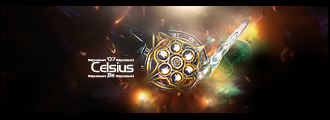
The text is simple, the way I like it. Just a gradiant overlay and a outer glow.
I made it match, and it seems to compliment the border, but a bit unnoticable on the right side.
I rounded out the bottom-left curve, in fact, I fixed the right and copied it in.
I still can't get the black transparent, becaue I want it to actually be transparent, and putting a backround in to do so, doesn't make it transparent in my eye.
Comments, opinions, advice, criticism. Maybe a rating or two.
This is my fifth sig attempt. (for those who didn't look at origional thread)
Signature.
-
NightShroud
- Regular Member
- Posts: 304
- Joined: Thu Jul 20, 2006 5:18 pm
- Quick Reply: Yes
- Location: Olympus
- Contact:
Signature.


-|IGN:NightShroud - 18 | Guild: SellSwords|- Thanks to MapleShilc for animation.
-
Mister_Eric

- Active Member
- Posts: 773
- Joined: Sat Apr 01, 2006 2:10 am
- Quick Reply: Yes
- Location: Iris



-
NightShroud
- Regular Member
- Posts: 304
- Joined: Thu Jul 20, 2006 5:18 pm
- Quick Reply: Yes
- Location: Olympus
- Contact:
No no no no, no matter WHAT you save it as, if it doesn't have a background, then it will be assigned the flat shade, in this case black. =( I want it to be TRULY transparent, and I know a way how I beleive. But a transparent white layer under it lolz.
-|IGN:NightShroud - 18 | Guild: SellSwords|- Thanks to MapleShilc for animation.
-
NightShroud
- Regular Member
- Posts: 304
- Joined: Thu Jul 20, 2006 5:18 pm
- Quick Reply: Yes
- Location: Olympus
- Contact:
-
[SD]Kratos

- Senior Member
- Posts: 4785
- Joined: Mon Apr 24, 2006 9:48 am
- Quick Reply: Yes
- Location: Venus





-
deathtoall

- Active Member
- Posts: 617
- Joined: Tue Jul 11, 2006 7:09 pm
- Quick Reply: Yes
- Location: Venus
- Contact:


-
NightShroud
- Regular Member
- Posts: 304
- Joined: Thu Jul 20, 2006 5:18 pm
- Quick Reply: Yes
- Location: Olympus
- Contact:
Re: how , like this?
-.-...Learn to read death. I want the black TRANSPARENT, not gone.
-|IGN:NightShroud - 18 | Guild: SellSwords|- Thanks to MapleShilc for animation.
-
Rockshmo

- Frequent Member
- Posts: 1062
- Joined: Mon May 29, 2006 5:00 pm
- Quick Reply: Yes
- Location: rehab
- Contact:
I think you need to learn to read NightShroud..
trans·par·ent (trns-pârnt, -pr-)
adj.
1. Capable of transmitting light so that objects or images can be seen as if there were no intervening material.
2. Permeable to electromagnetic radiation of specified frequencies, as to visible light or radio waves.
3. So fine in texture that it can be seen through; sheer.
That's straight from http://www.dictionary.com so maybe you should choose a different word.. eh?
trans·par·ent (trns-pârnt, -pr-)
adj.
1. Capable of transmitting light so that objects or images can be seen as if there were no intervening material.
2. Permeable to electromagnetic radiation of specified frequencies, as to visible light or radio waves.
3. So fine in texture that it can be seen through; sheer.
That's straight from http://www.dictionary.com so maybe you should choose a different word.. eh?

[Sparta][Pure STR][Lvl 5x]
-
NightShroud
- Regular Member
- Posts: 304
- Joined: Thu Jul 20, 2006 5:18 pm
- Quick Reply: Yes
- Location: Olympus
- Contact:
-
Rockshmo
- Frequent Member
- Posts: 1062
- Joined: Mon May 29, 2006 5:00 pm
- Quick Reply: Yes
- Location: rehab
- Contact:
I thought so, I was beginning to get confused..
Hmm if the black part you want is on a separate layer you could just lower the opacity of that layer to make it become more translucent. I'll mess around with a few things and see if I can come up with a better looking method.
Hmm if the black part you want is on a separate layer you could just lower the opacity of that layer to make it become more translucent. I'll mess around with a few things and see if I can come up with a better looking method.
[Sparta][Pure STR][Lvl 5x]

-
NightShroud
- Regular Member
- Posts: 304
- Joined: Thu Jul 20, 2006 5:18 pm
- Quick Reply: Yes
- Location: Olympus
- Contact:
-
deathtoall
- Active Member
- Posts: 617
- Joined: Tue Jul 11, 2006 7:09 pm
- Quick Reply: Yes
- Location: Venus
- Contact: