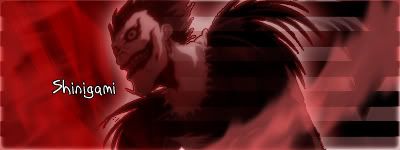
NSR ~ Shinigami

Digital art design, renderings, signatures and anything art related. Upload pictures of your newest work or ask for feedback. Post graphics requests or discuss art in general.
Post Reply
User avatar
Kraq
Advanced Member
Posts: 2076
Joined: Sat Dec 15, 2007 3:44 am
Location: ☮☮☮

NSR ~ Shinigami

Post by Kraq »

Image
V2:Image

CnC is greatly appreciated :D
Last edited by Kraq on Fri Jul 25, 2008 7:31 pm, edited 1 time in total.
Image

User avatar
Verfo
Veteran Member
Posts: 3655
Joined: Thu May 01, 2008 12:21 am
Quick Reply: Yes
Location: evol efil

Re: NSR ~ Shinigami

Post by Verfo »

Colors dont match, the render doesnt fit with the background, the background doesnt look good, the render doesnt look good 5/10, not your best man, i really liked the ichigo one
<< banned for proof of botting. -cin >>

User avatar
crazyskwrls
Advanced Member
Posts: 2293
Joined: Sun Aug 19, 2007 10:16 pm
Quick Reply: Yes
Location: Off Topic

Re: NSR ~ Shinigami

Post by crazyskwrls »

yeah i can barely see it, at first i thought it was a glare...
Image Image
thnx Kraq

User avatar
Kraq
Advanced Member
Posts: 2076
Joined: Sat Dec 15, 2007 3:44 am
Location: ☮☮☮

Re: NSR ~ Shinigami

Post by Kraq »

I didn't really wanna match the color with the stock since it would be to light. The stock was b&w at first but I was just playing with effects. Red's my fav color so thats why I did that, but thanks :]
Image

User avatar
IceCrash
Forum Legend
Posts: 6816
Joined: Thu Nov 09, 2006 4:49 pm
Quick Reply: Yes
Location: Anything goes

Re: NSR ~ Shinigami

Post by IceCrash »

you know
i think the bg is actually pretty good!
i think it woulda been a lot better if the render would be "normally" seen, and u'd blend it in with the bg, i think it'd look a lot better then :p
Image

User avatar
Kraq
Advanced Member
Posts: 2076
Joined: Sat Dec 15, 2007 3:44 am
Location: ☮☮☮

Re: NSR ~ Shinigami

Post by Kraq »

Thanks IceCrash :] I'll do that now.
Image
Image

User avatar
IceCrash
Forum Legend
Posts: 6816
Joined: Thu Nov 09, 2006 4:49 pm
Quick Reply: Yes
Location: Anything goes

Re: NSR ~ Shinigami

Post by IceCrash »

Kraq wrote:Thanks IceCrash :] I'll do that now.
Image


see mate
isn't it a lot better now? :D
Image

User avatar
Verfo
Veteran Member
Posts: 3655
Joined: Thu May 01, 2008 12:21 am
Quick Reply: Yes
Location: evol efil

Re: NSR ~ Shinigami

Post by Verfo »

look nice but work on the font a bit
<< banned for proof of botting. -cin >>

User avatar
IceCrash
Forum Legend
Posts: 6816
Joined: Thu Nov 09, 2006 4:49 pm
Quick Reply: Yes
Location: Anything goes

Re: NSR ~ Shinigami

Post by IceCrash »

Verfo wrote:look nice but work on the font a bit

Have you watched Death Note mate?
if you did you can understand why he chose that font :p
Image

User avatar
IceCrash
Forum Legend
Posts: 6816
Joined: Thu Nov 09, 2006 4:49 pm
Quick Reply: Yes
Location: Anything goes

Re: NSR ~ Shinigami

Post by IceCrash »

anyways mate, try this

Or add a 1px black border or a 2px white border, w.e you like.
also, try to Blur/smudge some places of the bg to give it a lil bit of depth maybe, just try ti and see how it looks xD

Also, if you want, make 7 or so duplicated layers than smudge em all, or just some, or w.e and see how it looks (this helps to blend the render with the bg most of the times)
Image

User avatar
Verfo
Veteran Member
Posts: 3655
Joined: Thu May 01, 2008 12:21 am
Quick Reply: Yes
Location: evol efil

Re: NSR ~ Shinigami

Post by Verfo »

IceCrash wrote:
Verfo wrote:look nice but work on the font a bit

Have you watched Death Note mate?
if you did you can understand why he chose that font :p

havent watched it thats probably why
<< banned for proof of botting. -cin >>

User avatar
Kraq
Advanced Member
Posts: 2076
Joined: Sat Dec 15, 2007 3:44 am
Location: ☮☮☮

Re: NSR ~ Shinigami

Post by Kraq »

IceCrash wrote:anyways mate, try this

Or add a 1px black border or a 2px white border, w.e you like.
also, try to Blur/smudge some places of the bg to give it a lil bit of depth maybe, just try ti and see how it looks xD

Also, if you want, make 7 or so duplicated layers than smudge em all, or just some, or w.e and see how it looks (this helps to blend the render with the bg most of the times)


Thanks, I'll try that too!
I'm still a newbie when it comes to PS and I've made 50+ sigs :s So, thats a little complicated for me :D
Image

Post Reply

Return to “Artists Corner”