Recomended programs:
PK2tools(PK2editor and extractor)
http://www.silkroadforums.com/viewtopic.php?t=73206
DDS/DDJ converter or manual ddj editing thread
Media.pk2 contens
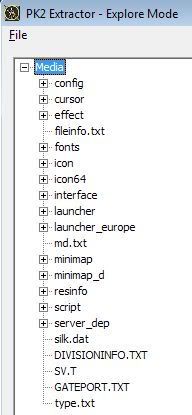
Config
Contains option.txt, which allows you to change intro movie, but only for KSRO.
Constantinople
Code: Select all
//StartProcess = "CPSLoadingMission"
StartProcess = "CPSVersionCheck"
//Map = "0"

StartCharacter = "1907"
StartWeapon = "0"
IntroName = "script\intro\constantinople.txt"
IntroBGM = "maintheme_cut.ogg"
Roc(last two lines)
Code: Select all
IntroName = "script\intro\roc.txt"
IntroBGM = "roc_bgm_total.ogg"
Chinesse ferry
Code: Select all
IntroName = "script\intro\china_wharf.txt"
IntroBGM = "maintheme_cut.ogg"
If you want play with it you can change script data(KSRO) in script\intro and respected txt file
Definition for camera script(KSRO), script\intro
Code: Select all
0.0 S_CameraInsert 0.0 78 105 8319.4 504.60 468.3 -0.979 4.334 -0.006 10Code: Select all
78 105Code: Select all
8319.4 504.60 468.3Code: Select all
-0.979 4.334 -0.006You can download premade option.txt for ksro here(intro_movie_KSRO_only.zip)
http://hosted.filefront.com/JanChlpik/2221400
Other files in config are not interesting
Cursor
Does not contain cursor used ingame so nothing to say
Effect effects for 2D items and targeting
the colored circle are the ones you see when you click on monster or ground


Fonts
0.dat, i.dat, y.dat is used in KSRO to make these letters different(0,i,y)
Fix is here
If you want change font you can do it in textuisystem.txt under entry UIC_STT_FONTNAME, make sure it is at right place(guide here)
Icon
Contains icons of various items(32x32)



Icon\action


Icon\cos





icon\etc\




icon\etc\icon

icon\item\avatar



icon\item\china\man








icon\item\china\shield

icon\item\china\weapon


icon\item\china\woman








icon\item\etc




























icon\item\europe\accessory

icon\item\europe\man







icon\item\europe\shield

icon\item\europe\weapon




icon\item\europe\woman







icon\item\fort

icon\npc

icon\skill\china











icon\skill\etc

icon\skill\europe










icon\skill\monster

icon\skill\tc

icon\skillgroup\Europe and icon\skillgroup\Europe
Contains icons of skill trees
icon\skillmastery

icon\skillmastery\China

icon\skillmastery\Europe

icon\stateodd


icon64
icon64\cos


icon64\item\avatar


icon64\item\etc



icon64\item\package

Interface
Contains pictures of inventory, underbar, minimap, alchemy window, party, window etc.
Launcher(+Eu)
Contains pictures of launcher, .dat are renamed BMP pictures mostly(only hex 3rd letter in file to P and rename it)
Minimap and MinimapD
Contains area maps shown in top right corner.(D version is for downhang dungeon).
Resinfo
Links text and pictures together
Example:
Code: Select all
   GDR_TEXT_CHINA:CIFTextBox
   {
      ClientRect=RECT,"0,0,0,0"
      Color=COLOR,"255,178,101,200"
      DDJ=STRING,""
      FontColor=COLOR,"255,255,255,255"
      FontIndex=INTEGER,"0"
      HAlign=INTEGER,"0"
      ID=INTEGER,"200"
      Rect=RECT,"19,47,401,87"
      Style=INTEGER,"0"
      SubSection=STRING,""
      Text=STRING,"UIO_NEWCHAR_CTL_CHINESE_TT"
      UV_LB=POINT,"0,1"
      UV_LT=POINT,"0,0"
      UV_RB=POINT,"1,1"
      UV_RT=POINT,"1,0"
VAlign=INTEGER,"0"GDR_TEXT_CHINA:CIFTextBox
Instruction continues at IFTextBox.txt
DDJ=STRING,"interface\\character\\chr_job.ddj"
Location of picture
or no picture
DDJ=STRING,""
Text=STRING,"UIO_NEWCHAR_CTL_CHINESE_TT"
Text(It will be loaded either from textdataname.txt, textuisystem.txt, textquest.txt, texthelp.txt, textzonename.txt or textevent.txt)
Color=COLOR,"255,178,101,200"
Determines color in ARGB system(which alpha means visibility(255=100%), but not sure about this As I was testing it and I am not sure if they dont have it defined in their own way.
Rect=RECT,"19,47,401,87"
is are, where it will be displayed.Not sure for what resolution is it or if it is resolution independent
Rest is text formating and aligment.
server_dep\silkroad
server_dep\silkroad\event
contains mall_notify.txt which allows you to turn item mall notification on/off and change text.
Code: Select all
Open = "1"

TextMargin = "5"
TextString = "New item(s) has been stocked\nin Item Mall."

Mall_Open = "1"
Mall_FrontImg = "interface\mall\mall_fur_avatawindow.ddj"
Mall_ManItemString = "Fur Dress(M)"
Mall_WomanItemString = "Fur Dress(F)"
Mall_SellingTime = "Until stocks are sold out"
Open = "1"
Mall popup, when you start game(1=on/0=off)
TextString = "New item(s) has been stocked\nin Item Mall."
text on popup
Rest configures item mall start page possibly
server_dep\silkroad\textdata
Contains textdataname.txt, textuisystem.txt, textquest.txt, texthelp.txt, textzonename.txt and textevent.txt, which contain text in game(item names, quest contents, npc dialogues, system msg etc)
Rest of textdata not explored yet, but I can say its 99% complete.

 well done.