Final Fantasy

Digital art design, renderings, signatures and anything art related. Upload pictures of your newest work or ask for feedback. Post graphics requests or discuss art in general.
Post Reply
User avatar
RogueKiller
Loyal Member
Posts: 1893
Joined: Sat Jan 19, 2008 11:28 pm
Quick Reply: Yes
Location: GuildWars2

Final Fantasy

Post by RogueKiller »

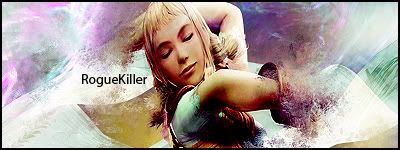
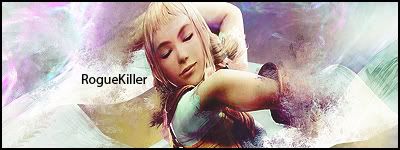
I'm still new at this. :oops:
Image

Would like some feedback on this.
Last edited by RogueKiller on Sat May 17, 2008 2:06 am, edited 2 times in total.
Image

User avatar
Panu
Veteran Member
Posts: 3536
Joined: Mon Aug 27, 2007 8:43 pm
Quick Reply: Yes
Location: Around

Re: Final Fantasy

Post by Panu »

border seems thick, sig looks flat, bit too many lightsources. other than that looks really good.

7.5/10
Image

User avatar
Rizla
Ex-Staff
Posts: 1197
Joined: Sun Jun 11, 2006 4:17 am
Quick Reply: Yes
Location: Artist's Corner

Re: Final Fantasy

Post by Rizla »

Incorporating your text into the image more would be my first piece of advice. One nice method I enjoy is by layermasking and somewhat altering the content of the mask. I would also give some lighting contrasts. The whole piece is bright with no dark areas. In art our eyes are most attracted to the greatest contrasting areas. Also, since you use two capital letters in your name, I suggest making it appear in either all lower, or uppercase form.

Here are just a couple adjustments I did to illustrate what I mean.
Image
Image

User avatar
RogueKiller
Loyal Member
Posts: 1893
Joined: Sat Jan 19, 2008 11:28 pm
Quick Reply: Yes
Location: GuildWars2

Re: Final Fantasy

Post by RogueKiller »

Image
Better?
Thinner Border.
Moved text. I personally didn't like the text being so big.
More contrast?
Image

cin

Re: Final Fantasy

Post by cin »

so with layermasking, you first make the text then use that for a
clipping mask?

User avatar
Rizla
Ex-Staff
Posts: 1197
Joined: Sun Jun 11, 2006 4:17 am
Quick Reply: Yes
Location: Artist's Corner

Re: Final Fantasy

Post by Rizla »

its overcontrasted now, be a bit more selective on where you're cranking the contrast. Use the contrast to guide our eyes where you want them.

yeah cin, lol I meant clipping mask not layer mask :P Ive been in shitty gen ed classes for 3 months :/
Image

User avatar
RogueKiller
Loyal Member
Posts: 1893
Joined: Sat Jan 19, 2008 11:28 pm
Quick Reply: Yes
Location: GuildWars2

Re: Final Fantasy

Post by RogueKiller »

Image
Cranked the contrast down a bit.
Better? Or still over contrasted?
Image

User avatar
Rizla
Ex-Staff
Posts: 1197
Joined: Sun Jun 11, 2006 4:17 am
Quick Reply: Yes
Location: Artist's Corner

Re: Final Fantasy

Post by Rizla »

I would tone it down a bit more where the shadow from her arm is cast on her breast.

edit. some light blurring on the sides where its oversharpened would be a nice touch imo. its grabbing my eyes away from your name and focal point (the girl)
Image

User avatar
RogueKiller
Loyal Member
Posts: 1893
Joined: Sat Jan 19, 2008 11:28 pm
Quick Reply: Yes
Location: GuildWars2

Re: Final Fantasy

Post by RogueKiller »

Image
Slightly brighter under her arm.
Image

User avatar
Rizla
Ex-Staff
Posts: 1197
Joined: Sun Jun 11, 2006 4:17 am
Quick Reply: Yes
Location: Artist's Corner

Re: Final Fantasy

Post by Rizla »

much better than the first draft!
Image

User avatar
Mcclane
Frequent Member
Posts: 1027
Joined: Thu Nov 01, 2007 4:57 am
Quick Reply: Yes
Location: Zeus

Re: Final Fantasy

Post by Mcclane »

i like the 3rd one the best, the contrast really helps
Post count +1
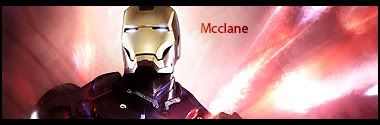
Image
^ Thanks RogueKiller

Post Reply

Return to “Artists Corner”