
hello , skillbar but different skin, how??
-
Boiler

- Frequent Member
- Posts: 1007
- Joined: Fri Apr 25, 2008 3:15 pm
- Quick Reply: Yes
- Location: whereever i feel like..
- Contact:
hello , skillbar but different skin, how??
hi everyone im new here.. anyway i seen people have differnt looking skillsbars! and i wonder how i can do like that.. maybe some1 here knows?
Last edited by Boiler on Mon Apr 28, 2008 1:09 pm, edited 1 time in total.


Re: hello got a request!
Well..different skillbar means different class/subclass and/or Euro <-> Chinese >.>

Props to chrisorg for the sig <3
-
Boiler
- Frequent Member
- Posts: 1007
- Joined: Fri Apr 25, 2008 3:15 pm
- Quick Reply: Yes
- Location: whereever i feel like..
- Contact:
Re: hello got a request!
no i mean like this he have differnt from what i have..
http://img392.imageshack.us/img392/5549/90813889aj0.jpg
he have differnt from what i have.. http://img392.imageshack.us/img392/5549/90813889aj0.jpg
-
Blindfire

- Site Contributor
- Posts: 3843
- Joined: Sat Feb 09, 2008 9:36 pm
- Quick Reply: Yes
- Location: ...
Re: hello got a request!
Boiler wrote:no i mean like this
http://img392.imageshack.us/img392/5549/90813889aj0.jpg
He has higher level skills, when you get to the second book of a skill the image is different.
-
Boiler
- Frequent Member
- Posts: 1007
- Joined: Fri Apr 25, 2008 3:15 pm
- Quick Reply: Yes
- Location: whereever i feel like..
- Contact:
Re: hello got a request!
damit i suck at telling people what i mean.. ill try again lol
i know about the skills etc but to me it looks like he pk2? his skillbar..
compare this two, i hope you see what i mean..
http://img519.imageshack.us/img519/6583 ... 948qu8.jpg
http://img247.imageshack.us/img247/4035 ... 851qi8.jpg
i know about the skills etc but to me it looks like he pk2? his skillbar..
compare this two, i hope you see what i mean..
http://img519.imageshack.us/img519/6583 ... 948qu8.jpg
http://img247.imageshack.us/img247/4035 ... 851qi8.jpg
-
RogueKiller
- Loyal Member
- Posts: 1893
- Joined: Sat Jan 19, 2008 11:28 pm
- Quick Reply: Yes
- Location: GuildWars2
Re: hello got a request!
Two different people.
Are you talking about what I have in my sig? The skill bar...
If so then Photoshop or some paint program.
Are you talking about what I have in my sig? The skill bar...
If so then Photoshop or some paint program.
-
AnarChaos

- Active Member
- Posts: 572
- Joined: Wed Jan 30, 2008 8:59 am
- Quick Reply: Yes
- Location: SILKROAD SALVATION
- Contact:
Re: hello got a request!
Guys.. You don't get what he means. He is trying to tell the look of the skill bar itself. The guy (tbk22) changed how it looks.
So he is asking how to change the skin of the skill bar !!
I get what he means but I don't know how to change that. Sorry Boiler.
So he is asking how to change the skin of the skill bar !!
I get what he means but I don't know how to change that. Sorry Boiler.


-
Boiler
- Frequent Member
- Posts: 1007
- Joined: Fri Apr 25, 2008 3:15 pm
- Quick Reply: Yes
- Location: whereever i feel like..
- Contact:
Re: hello got a request!
AnarChaos wrote:Guys.. You don't get what he means. He is trying to tell the look of the skill bar itself. The guy (tbk22) changed how it looks.
So he is asking how to change the skin of the skill bar !!
I get what he means but I don't know how to change that. Sorry Boiler.
yes, that what i mean so can any1 help

Re: hello , skillbar but different skin, how??
I always thought it was an add-on from some softmod or something, but I think I'm wrong lolz
Props to chrisorg for the sig <3
-
BloodyBlade

- Elite Member
- Posts: 5219
- Joined: Wed Nov 14, 2007 8:32 pm
- Quick Reply: Yes
- Location: Attending your mothers sexual needs :)
Re: hello , skillbar but different skin, how??
Dear god, the ppl on srf are slow in understanding.
Well, I knew you could get some skins on 0x33, but I'm not supporting it, because it mostly comes along with bots.
Well, I knew you could get some skins on 0x33, but I'm not supporting it, because it mostly comes along with bots.
My sig died
-
Boiler
- Frequent Member
- Posts: 1007
- Joined: Fri Apr 25, 2008 3:15 pm
- Quick Reply: Yes
- Location: whereever i feel like..
- Contact:
Re: hello , skillbar but different skin, how??
hmm ok , any1 here got a nice skin to send me or that i can dl ?
-
SpInKsTaR
- Valued Member
- Posts: 412
- Joined: Fri Oct 19, 2007 4:45 pm
- Quick Reply: Yes
- Location: Pacific
- Contact:
Re: hello , skillbar but different skin, how??
PK2 Edit...somehow :s
<<banned from SRF for bot admission. -SG>>
-
JanChlpik
- Common Member
- Posts: 151
- Joined: Sun Mar 23, 2008 11:46 pm
- Quick Reply: Yes
- Location: Czech
- Contact:
Re: hello , skillbar but different skin, how??
Its not hard to edit, but need someone to paint this first. I am not painter myself, but can explain which files change(need dds editor)
I thought you mean mod like this.

I thought you mean mod like this.
My threads:
CSRO/KSRO fully english(premade) + anySRO fully english
Media.pk2 Revealed [56k Warning]
[Release]DDJ/DDS converter
All europe quest
Inactive.
Send me pm if something is not working. But reply may take longer.
CSRO/KSRO fully english(premade) + anySRO fully english
Media.pk2 Revealed [56k Warning]
[Release]DDJ/DDS converter
All europe quest
Inactive.
Send me pm if something is not working. But reply may take longer.
-
RogueKiller
- Loyal Member
- Posts: 1893
- Joined: Sat Jan 19, 2008 11:28 pm
- Quick Reply: Yes
- Location: GuildWars2
Re: hello , skillbar but different skin, how??
For everyone who want to try to make their own underbar (part of the Silkroad GUI), here is a pretty decent PSD file with the right shapes and the right height's / width's.
I tried to make the PSD as structured as possible, and named every layer and sorted them into layer groups. Most shapes are vector shapes, so they won't be unsharp even if you choose to Edit/Free transform. If you use the base shapes, it should be pretty easy to get it in-game after, with some simple pk2 editing.
I made a few different base shapes. Included in the PSD (the images in the rar are just previews of the shapes). Here is one.
Download Here (Sendspace) (v.1.1)
Mirror 1 (Rapidshare) (v.1.1)
361KB
==============================
Extra info:
You need to remember that the pk2 files cut these up into many images. Here's the basics of how the p2k cuts it up. (The orbs are also single images, "laying" on top of the rest.)
So you haven't got much area to play around on
This means, you will fail if you do like this, at least it wont be able to work in-game.
This will work
2 Examples. Hopefully some inspiration for someone.
==============================
Underbars by users so far:
cryx
ItachiKun
timmey_x
Saiyan
JayDee
spacejumper
Tray
Nicole
Korhan
aBDUCTr
spacejumper
SoraZ
kaneco
Pheonix_SRB
lynxz
What are you looking at? Open Photoshop already (;





Sorry it took so long
Last edited by RogueKiller on Thu May 01, 2008 8:23 pm, edited 2 times in total.
-
JanChlpik
- Common Member
- Posts: 151
- Joined: Sun Mar 23, 2008 11:46 pm
- Quick Reply: Yes
- Location: Czech
- Contact:
Re: hello , skillbar but different skin, how??
very nice. Master revealed himself. Did you make overall skin or only underbar? All the files are placed in media.pk2(Skill pictures in icons directory and underbar in interface/underbar).
These pictures are named something.ddj
You need to open it with hexeditor(XVI for example freeware hexeditor http://www.chmaas.handshake.de/delphi/freeware/xvi32/xvi32.htm
After loading it will look like this
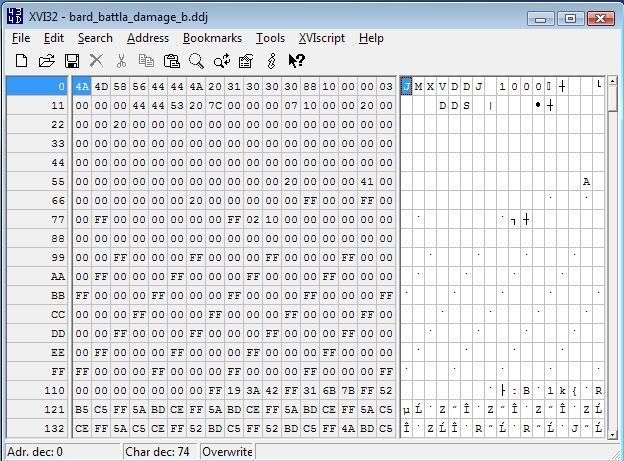
You need to edit so DDS is at first place
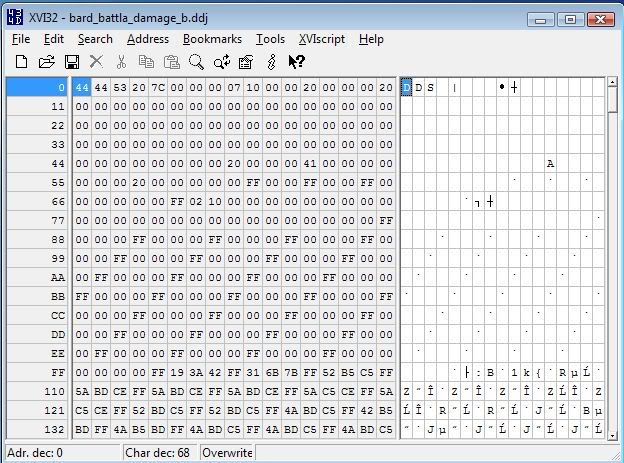
and save as something.dds
You can view the dds files with
Microsoft DirectX Texture Tool
or Irfanview(http://www.irfanview.com/), do not forget to install all plugins for irfanview as well(they have it in one file)
You can edit them with Adobe photoshop(as mentioned above) and possibly need to put back the header from original file and rename it to something.ddj.
These pictures are named something.ddj
You need to open it with hexeditor(XVI for example freeware hexeditor http://www.chmaas.handshake.de/delphi/freeware/xvi32/xvi32.htm
After loading it will look like this
You need to edit so DDS is at first place
and save as something.dds
You can view the dds files with
Microsoft DirectX Texture Tool
or Irfanview(http://www.irfanview.com/), do not forget to install all plugins for irfanview as well(they have it in one file)
You can edit them with Adobe photoshop(as mentioned above) and possibly need to put back the header from original file and rename it to something.ddj.
Last edited by JanChlpik on Fri May 02, 2008 9:05 pm, edited 1 time in total.
My threads:
CSRO/KSRO fully english(premade) + anySRO fully english
Media.pk2 Revealed [56k Warning]
[Release]DDJ/DDS converter
All europe quest
Inactive.
Send me pm if something is not working. But reply may take longer.
CSRO/KSRO fully english(premade) + anySRO fully english
Media.pk2 Revealed [56k Warning]
[Release]DDJ/DDS converter
All europe quest
Inactive.
Send me pm if something is not working. But reply may take longer.
-
penfold1992

- Senior Member
- Posts: 4059
- Joined: Sun Apr 22, 2007 9:48 am
- Quick Reply: Yes
- Location: Uranus
Re: hello , skillbar but different skin, how??
im sorry if im sounding dumb, but what was the last post about (made by JanChlpiK)
i am wanting to know what to edit and how to edit, maybe with a skin to download and test out before the rest of us bugger up making our own skins.
whats really needed is a guide. by the looks of it. most of its done its the pk2 editing left and the DDJ part.
thanks in advanced great info so far sheding lots of light over here!
i am wanting to know what to edit and how to edit, maybe with a skin to download and test out before the rest of us bugger up making our own skins.
whats really needed is a guide. by the looks of it. most of its done its the pk2 editing left and the DDJ part.
thanks in advanced great info so far sheding lots of light over here!

-
JanChlpik
- Common Member
- Posts: 151
- Joined: Sun Mar 23, 2008 11:46 pm
- Quick Reply: Yes
- Location: Czech
- Contact:
Re: hello , skillbar but different skin, how??
First get pk2 editor/extractor
http://www.silkroadforums.com/viewtopic.php?f=5&t=73206
Open your media.pk2(placed in program files\silkroad possibly)

Icons are placed under icon directory(highlighted)
You want to edit skill icons possibly
Next underbar and minimap is placed in interface directory.
You need to extract all the contens you want edit.
If you have the files ready then click insert string(Ctrl+I) and input hex data from original file(it is every time different so thats the dificult part).
You can download the original underbar in dds format here http://files.filefront.com/underbarzip/;10115958;/fileinfo.html
note this files cannot import into pk2 file, they are just for viewing purpose.
DDS plugin from nvidia and texture tools from nvidia here
http://developer.nvidia.com/object/photoshop_dds_plugins.html#downloads
http://www.silkroadforums.com/viewtopic.php?f=5&t=73206
Open your media.pk2(placed in program files\silkroad possibly)
Icons are placed under icon directory(highlighted)
You want to edit skill icons possibly
Next underbar and minimap is placed in interface directory.
You need to extract all the contens you want edit.
If you have the files ready then click insert string(Ctrl+I) and input hex data from original file(it is every time different so thats the dificult part).
You can download the original underbar in dds format here http://files.filefront.com/underbarzip/;10115958;/fileinfo.html
note this files cannot import into pk2 file, they are just for viewing purpose.
DDS plugin from nvidia and texture tools from nvidia here
http://developer.nvidia.com/object/photoshop_dds_plugins.html#downloads
Last edited by JanChlpik on Fri May 02, 2008 9:16 am, edited 1 time in total.
My threads:
CSRO/KSRO fully english(premade) + anySRO fully english
Media.pk2 Revealed [56k Warning]
[Release]DDJ/DDS converter
All europe quest
Inactive.
Send me pm if something is not working. But reply may take longer.
CSRO/KSRO fully english(premade) + anySRO fully english
Media.pk2 Revealed [56k Warning]
[Release]DDJ/DDS converter
All europe quest
Inactive.
Send me pm if something is not working. But reply may take longer.
-
penfold1992
- Senior Member
- Posts: 4059
- Joined: Sun Apr 22, 2007 9:48 am
- Quick Reply: Yes
- Location: Uranus
Re: hello , skillbar but different skin, how??
as i said it would be nice if it was made into a proper guide in the guides and tuts sections
can someone send me the link the the newest pk2 editor the rapidshare one i had doesnt work...
thanks in advanced
ps. the ddj files have many entries, am i right in suggesting the ub_window_01 and ub_window_02 are the actual user bar and the deco are the bits on the left and right (i would view them but i need the pk editor)
can someone send me the link the the newest pk2 editor the rapidshare one i had doesnt work...
thanks in advanced
ps. the ddj files have many entries, am i right in suggesting the ub_window_01 and ub_window_02 are the actual user bar and the deco are the bits on the left and right (i would view them but i need the pk editor)
-
raphaell666

- Loyal Member
- Posts: 1536
- Joined: Mon Nov 12, 2007 4:59 pm
- Quick Reply: Yes
- Location: Anywhere.
Re: hello , skillbar but different skin, how??
<< banned for remaking a banned account. -cin >>
-
FrozenTimes
- Hi, I'm New Here
- Posts: 5
- Joined: Tue Apr 29, 2008 11:47 pm
- Quick Reply: Yes
- Location: Hera
Re: hello , skillbar but different skin, how??
RogueKiller wrote:For everyone who want to try to make their own underbar (part of the Silkroad GUI), here is a pretty decent PSD file with the right shapes and the right height's / width's.
I tried to make the PSD as structured as possible, and named every layer and sorted them into layer groups. Most shapes are vector shapes, so they won't be unsharp even if you choose to Edit/Free transform. If you use the base shapes, it should be pretty easy to get it in-game after, with some simple pk2 editing.
I made a few different base shapes. Included in the PSD (the images in the rar are just previews of the shapes). Here is one.
Download Here (Sendspace) (v.1.1)
Mirror 1 (Rapidshare) (v.1.1)
361KB
==============================
Extra info:
You need to remember that the pk2 files cut these up into many images. Here's the basics of how the p2k cuts it up. (The orbs are also single images, "laying" on top of the rest.)
So you haven't got much area to play around on
This means, you will fail if you do like this, at least it wont be able to work in-game.
This will work
2 Examples. Hopefully some inspiration for someone.
==============================
Underbars by users so far:
cryx
ItachiKun
timmey_x
Saiyan
JayDee
spacejumper
Tray
Nicole
Korhan
aBDUCTr
spacejumper
SoraZ
kaneco
Pheonix_SRB
lynxz
What are you looking at? Open Photoshop already (;
Sorry it took so long
Can you help me how to make mine like itachikuns. I have no idea how to do it. Well i know that you have to use the pk2 program and stuff but can you just make a lil guide to it plz. Its a lil request.

-
RogueKiller
- Loyal Member
- Posts: 1893
- Joined: Sat Jan 19, 2008 11:28 pm
- Quick Reply: Yes
- Location: GuildWars2