1. Media.pk2(KSRO, CSRO), txt files, images for KSRO or other SRO
(note I created KSRO directory at filefront if you can not find it)
2. Updating you media.pk2 with txt files tutorial
3. Modifiing txt files for different silkroad versions
4. Changing game intro(welcome movie)-KSRO only
5. Typing koren guide(KSRO)
Media.pk2
For these versions
CSRO 1.128(lv100 update, fixed guild picture bug. works for 1.129)
KSRO 1.563
Extracting media.pk2 from media.zip and replace it with original media.pk2 in silkroad directory (or rename original media.pk2 and copy this)
If you just installed the game you have to let it update first and then replace media.pk2.
Hi I have finally finished quest part edit of media.pk2 so now is CSRO fully in english.
So everything like quest, npc chat, monster names, item names etc is now in english.
I did the quest,npc chat and help part myself (typed just to prevent future questions) and it is based on burny209's work
So you can download either
media.pk2(1.128 works with 1.129) for csro version 1.127+(lvl 100 client)
media.pk2 for ksro version 1.566
(make sure to update your silkroad before replacing original media.pk2)
txt files(version free), Premade files (for CSRO, KSRO) - Source_anySRO_CSRO_premade.zip or KSRO_source.zip
All images - help images and launcher images from isro - Images_one_directory.zip
Manual images - loading screen images(and splash screen after start), need to update files manualy 1 by 1, every file twice, contains 32 files - loading_picturesmanual_ony.zip
Download link
http://dashboard.filefront.com/JanChlpik/
KSRO http://hosted.filefront.com/JanChlpik/2221400
Alternative DL links
CSRO media.pk2(1.129 - rar archive,2 parts) Part1 Part2
KSRO media.pk2(1.566 - rar archive, 2 parts)Part1 Part2
CSRO source(txt files) http://www.mediafire.com/?30vtywgymng
KSRO source(txt files) http://www.mediafire.com/?mchoaxecqtq
Updating you media.pk2 with txt files tutorial
First get PK2 editor from from http://www.silkroadforums.com/viewtopic.php?t=73206 or direct link is http://rapidshare.com/files/79703126/PK2Tools.zip
Start your PK2 editor

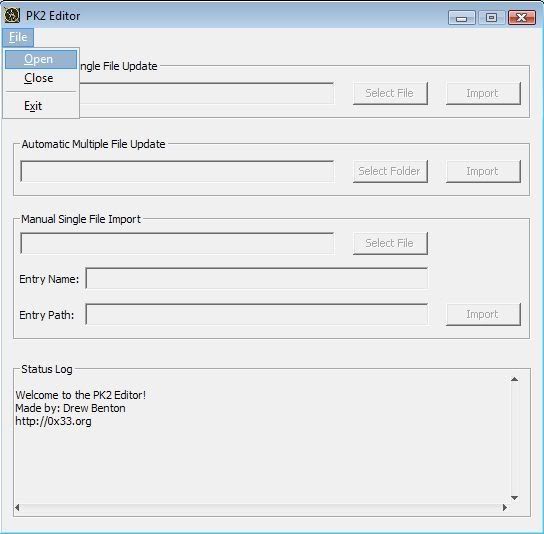
Select open file
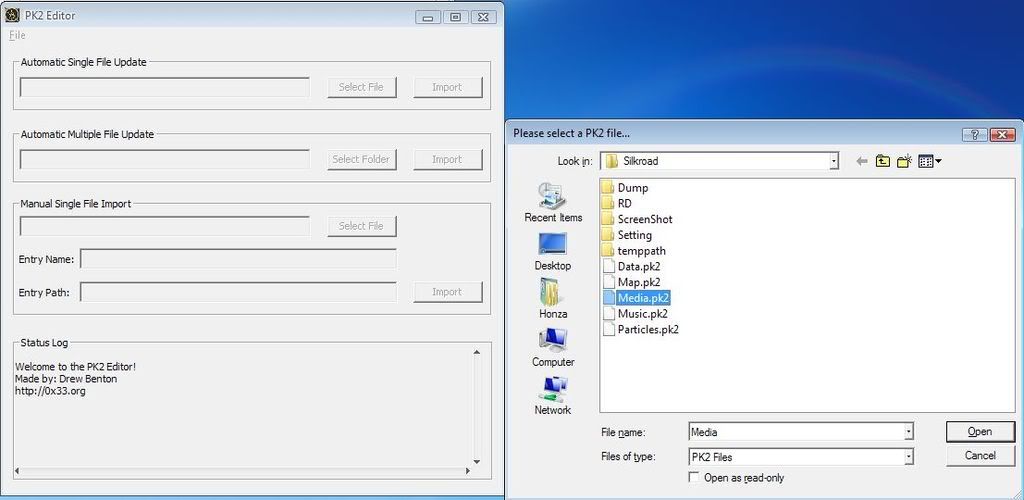
Select media.pk2 in your silkroad folder and click open
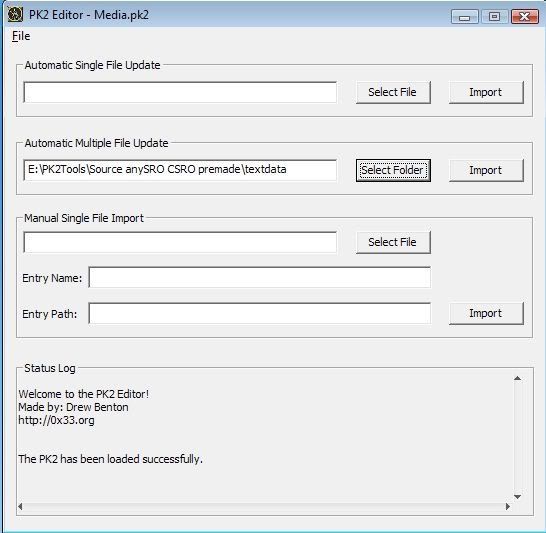
Now click SELECT FOLDER
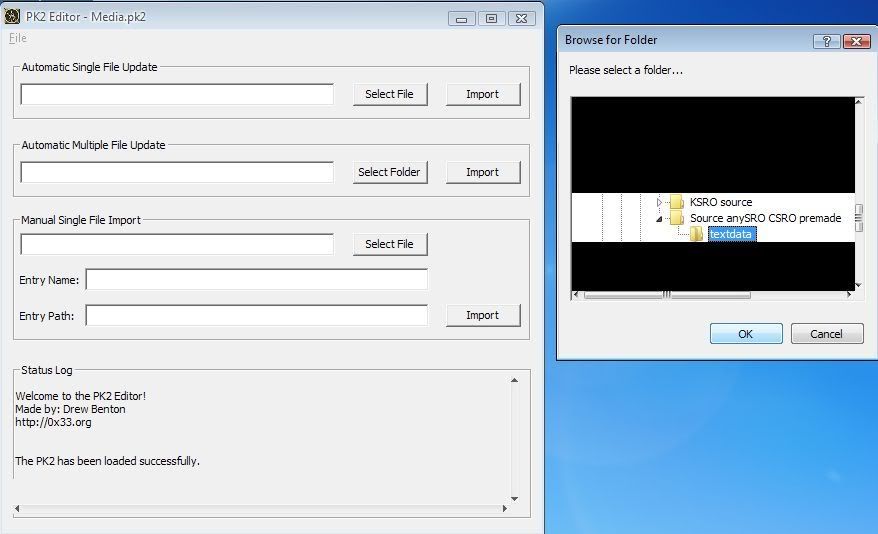
Now your PK2 editor will look similar like this
Click IMPORT
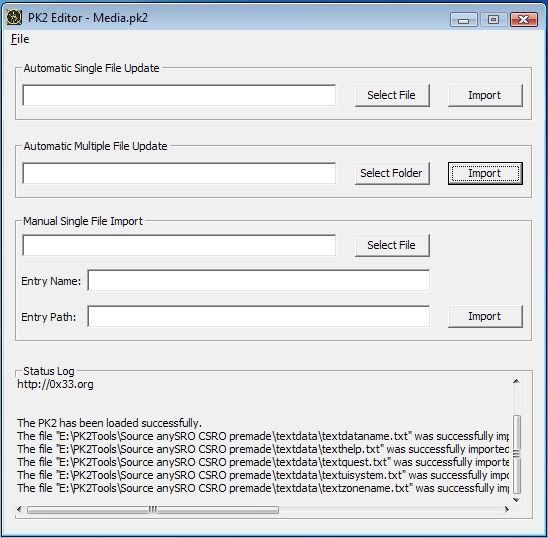
And it is done. Congratulations you have updated your silkroad to english by yourself.
Modifiing txt files for different silkroad versions
(These files are textdataname, textquest, textuisystem, texthelp, textzonename)
You need to download pk2 editor/extractor
from http://www.silkroadforums.com/viewtopic.php?t=73206
Thanks Drew Benton for this tool.
then you need any unicode text editor(something with 0 loading time, because of notepad is just to slow and not unicode - will not save special characters)
I use SuperEdi(but its up to you)
http://www.wolosoft.com/en/superedi/
In all source files you need to move text to right place by tabelators
Languages are placed in this order(example with redirection command for registration in textuisystem.txt)
1 UIO_MSG_GOTO_URL kr.silkroad.yahoo.com/member/member_point.asp http://www.srocn.com http://www.sro.com.tw http://www.silkonline.jp/ http://www.silkroadonline.net/ http://www.conduongtolua.com.vn/
What you see is text divided by tabelators (used
 as tabelator mark(the key above your caps lock))
1 UIO_MSG_GOTO_URL
Korea China Taiwan Japan Global(english) VietnamSo all you need is to put exact amount of tabelators between the system command and text
Amount of tabelators
Korea 1 China 4 Taiwan 5 Japan 6 Global 7 Vietnam 8In my files you can find switchquest or swq divided by tabelators(default 4 tabelators total for chinese version)
so its like
1 UIIS_STT_MSG_INSTALL_START
SWQ SWQ SWQ Install 'Silkroad Online'. Now if you want for example use it for vietnamese version you need to replace
SWQ SWQ SWQ to have there 8 tabelatorsSo it will look like
1 UIIS_STT_MSG_INSTALL_START
Install 'Silkroad Online'.or
1 UIIS_STT_MSG_INSTALL_START
SWQ SWQ SWQ SWQ SWQ SWQ SWQ Install 'Silkroad Online'. (as text does not matter only tabelators)
P.S. use replace all comand for whole txt file
Now use the pk2 editor
Create directory named textdata and move there these txt files
Open your media.pk2
Click Select folder under Automatic multiple files update
Select the textdata folder you created and which contains the txt files
Click import and done
Why not single file automatic update?
Single file automatic update does change media.pk2 size, while after multiple file update it will remain the same like original.
If you want modify it to your language version just replace english with your language text
For example
Original
English
Replaced(1st option if you want keep english)
Spanish
Englishor only
Spanish
Changing game intro(welcome movie)-KSRO only
1. Extract option.txt from media.pk2
2.Last two lines of the file look like this(for roc intro)
IntroName = "script\intro\roc.txt"
IntroBGM = "roc_bgm_total.ogg"
For chinese ferry change it to this
IntroName = "script\intro\china_wharf.txt"
IntroBGM = "maintheme_cut.ogg"
For constantinople change it to this
IntroName = "script\intro\constantinople.txt"
IntroBGM = "maintheme_cut.ogg"
or just download intro_movie_KSRO_only.zip from filefront and rename either optionrocmountain.txt, optionchineseferry.txt or optionconstantinople.txt as option.txt and import it into media.pk2
Note: This only works for KSRO
Typing koren guide
1. setup language for non-unicode programs as korean(control panel > regional and language options > advanced(last tab) and choose korean.
2. click on your silkroad icon then click on language bar and choose korean ime
3. If you use tablet pc from microsoft it is easier but regular keyboard also works. Use right alt to switch between korean and english
keyboard layout

Caps

Click on picture to enlarge it. Print it if you dont want use alt+tab.
Fixing letters y,i and 0 in KSRO
follow this guide and update the media.pk2 with files y.dat, i.dat, 0.dat
or you can download these files from filefront(media.pk2 is already updated with it)