cant get sro to work on my laptop
-
shabowsdawn
- Regular Member
- Posts: 262
- Joined: Mon Dec 31, 2007 3:48 am
- Quick Reply: Yes
- Location: Venice
cant get sro to work on my laptop
my computer is windows 2000 has all requirements to run sro but comes up with an error saying i need directx sdk and i cant find it anywere
<<banned from SRF for proof of botting. -SG>>
-
loveisintheair

- Valued Member
- Posts: 352
- Joined: Wed Dec 12, 2007 5:04 pm
- Quick Reply: Yes
- Location: Gaia
Re: cant get sro to work on my laptop
shabowsdawn wrote:my computer is windows 2000 has all requirements to run sro but comes up with an error saying i need directx sdk and i cant find it anywere
Google.

-
shabowsdawn
- Regular Member
- Posts: 262
- Joined: Mon Dec 31, 2007 3:48 am
- Quick Reply: Yes
- Location: Venice
Re: cant get sro to work on my laptop
loveisintheair wrote:shabowsdawn wrote:my computer is windows 2000 has all requirements to run sro but comes up with an error saying i need directx sdk and i cant find it anywere
Google.
i tried that and when i try to install it says its not for my operating system so im getting the wrong one but iv tried different kinds and it wont work
<<banned from SRF for proof of botting. -SG>>
-
LuisFigoa

- Common Member
- Posts: 125
- Joined: Sat Jul 07, 2007 4:57 pm
- Quick Reply: Yes
- Location: Alexander
Re: cant get sro to work on my laptop
try downloading/installing directx9.0c
if sro still thoes not work just install xp home on your laptop.
and post your laptop specs processor/ram/grafic card
if you cant find it go to
start/run and type dxdiag
if sro still thoes not work just install xp home on your laptop.
and post your laptop specs processor/ram/grafic card
if you cant find it go to
start/run and type dxdiag
Server: Alexander
Nick: l3lo0DyH3lL
warior/cleric 91
Respected Quote
Nick: l3lo0DyH3lL
warior/cleric 91
Respected Quote
Topdog wrote:all clerics are is a auto pot on legs as I call my self lol.
-
shabowsdawn
- Regular Member
- Posts: 262
- Joined: Mon Dec 31, 2007 3:48 am
- Quick Reply: Yes
- Location: Venice
Re: cant get sro to work on my laptop
OS: Microsoft Windows 2000 Professional
BIOS: Default BIOS
Processor: (i think this might also be a problem i thought the processor was big enough)Unkown Intel P6 Processor ~10MHz
Memory: 128 RAM
DirectX Version: DirectX 9.0c
Display Tab
Name: ATI Technologies Inc. RAGE P/M Mobility AGP 2X
Approx Total Memory: 8.0 MB (might also be a problem lol)
so probaly it cant run it anyways guess i didnt see ALL of my computer specs
BIOS: Default BIOS
Processor: (i think this might also be a problem i thought the processor was big enough)Unkown Intel P6 Processor ~10MHz
Memory: 128 RAM
DirectX Version: DirectX 9.0c
Display Tab
Name: ATI Technologies Inc. RAGE P/M Mobility AGP 2X
Approx Total Memory: 8.0 MB (might also be a problem lol)
so probaly it cant run it anyways guess i didnt see ALL of my computer specs
<<banned from SRF for proof of botting. -SG>>
-
truez

- Frequent Member
- Posts: 1288
- Joined: Mon Jan 15, 2007 9:36 pm
- Quick Reply: Yes
- Location: Greece
Re: cant get sro to work on my laptop
From Microsoft website - Directx download from this link
Supported Operating Systems: TabletPC; Windows 2000; Windows 2000 Advanced Server; Windows 2000 Professional Edition ; Windows 2000 Server; Windows 2000 Service Pack 2; Windows 2000 Service Pack 3; Windows 2000 Service Pack 4; Windows 98; Windows 98 Second Edition; Windows ME; Windows Server 2003; Windows XP; Windows XP Home Edition ; Windows XP Media Center Edition; Windows XP Professional Edition ; Windows XP Professional Edition Service Pack 2 ; Windows XP Service Pack 1
Very low memory... prolly upgrade to 1gb .. game works faster
BTW not sure if ur mother board support 1 gb 
Hope this helps
PS - I just google'd it
Google Link - Chk here
Supported Operating Systems: TabletPC; Windows 2000; Windows 2000 Advanced Server; Windows 2000 Professional Edition ; Windows 2000 Server; Windows 2000 Service Pack 2; Windows 2000 Service Pack 3; Windows 2000 Service Pack 4; Windows 98; Windows 98 Second Edition; Windows ME; Windows Server 2003; Windows XP; Windows XP Home Edition ; Windows XP Media Center Edition; Windows XP Professional Edition ; Windows XP Professional Edition Service Pack 2 ; Windows XP Service Pack 1
shabowsdawn wrote:OS: Microsoft Windows 2000 Professional
BIOS: Default BIOS
Processor: (i think this might also be a problem i thought the processor was big enough)Unkown Intel P6 Processor ~10MHz
Memory: 128 RAM
DirectX Version: DirectX 9.0c
Display Tab
Name: ATI Technologies Inc. RAGE P/M Mobility AGP 2X
Approx Total Memory: 8.0 MB (might also be a problem lol)
so probaly it cant run it anyways guess i didnt see ALL of my computer specs
Very low memory... prolly upgrade to 1gb .. game works faster
BTW not sure if ur mother board support 1 gb
Hope this helps
PS - I just google'd it
Google Link - Chk here
Cheers,
Truez
NVDIA Drivers
BSOD
Download anything for FREE
Truez
Zero_Doom wrote:Quick Easy Fix Turn off your computer, beat it with a hammer. If it turns back on when prompted, turn it back off and do again until it doesn't come on again. Once that is taken care of, go get a book and learn about computers.
NVDIA Drivers
BSOD
Download anything for FREE
-
shabowsdawn
- Regular Member
- Posts: 262
- Joined: Mon Dec 31, 2007 3:48 am
- Quick Reply: Yes
- Location: Venice
Re: cant get sro to work on my laptop
truez wrote:From Microsoft website - Directx download from this link
Supported Operating Systems: TabletPC; Windows 2000; Windows 2000 Advanced Server; Windows 2000 Professional Edition ; Windows 2000 Server; Windows 2000 Service Pack 2; Windows 2000 Service Pack 3; Windows 2000 Service Pack 4; Windows 98; Windows 98 Second Edition; Windows ME; Windows Server 2003; Windows XP; Windows XP Home Edition ; Windows XP Media Center Edition; Windows XP Professional Edition ; Windows XP Professional Edition Service Pack 2 ; Windows XP Service Pack 1shabowsdawn wrote:OS: Microsoft Windows 2000 Professional
BIOS: Default BIOS
Processor: (i think this might also be a problem i thought the processor was big enough)Unkown Intel P6 Processor ~10MHz
Memory: 128 RAM
DirectX Version: DirectX 9.0c
Display Tab
Name: ATI Technologies Inc. RAGE P/M Mobility AGP 2X
Approx Total Memory: 8.0 MB (might also be a problem lol)
so probaly it cant run it anyways guess i didnt see ALL of my computer specs
Very low memory... prolly upgrade to 1gb .. game works faster
BTW not sure if ur mother board support 1 gb
Hope this helps
PS - I just google'd it
Google Link - Chk here
if its like something 2007 i tried that didn't work ill probably download the sevrvice packs for 2000 cuz its right off the disc and thx for the links and im at school now so i can view them atm
<<banned from SRF for proof of botting. -SG>>
-
inky

- Senior Member
- Posts: 4024
- Joined: Sun Nov 26, 2006 11:47 pm
- Quick Reply: Yes
- Location: GuildWars2
Re: cant get sro to work on my laptop
As truez mentioned, the RAM is too low.
Wikipedia: System Requirements
-Intel Pentium III
-500 MHz CPU
-128 MB RAM
-GeForce 2 graphics card or ATI 9000
-DirectX 8.0b compatible sound card
-3400 MB of free hard disk space
-Internet connection
However, I'm not sure where I read it but I think SRO requires a minimum RAM around 300+ in order for the computer to run the game although it's probably going to be laggy as hell.
Wikipedia: System Requirements
-Intel Pentium III
-500 MHz CPU
-128 MB RAM
-GeForce 2 graphics card or ATI 9000
-DirectX 8.0b compatible sound card
-3400 MB of free hard disk space
-Internet connection
However, I'm not sure where I read it but I think SRO requires a minimum RAM around 300+ in order for the computer to run the game although it's probably going to be laggy as hell.

 Alastor Crow
-
shabowsdawn
- Regular Member
- Posts: 262
- Joined: Mon Dec 31, 2007 3:48 am
- Quick Reply: Yes
- Location: Venice
Re: cant get sro to work on my laptop
hmm tried the like went to the thingy for Genuine and it says i need to update it and stuff >< dam this laptop sucks
EDIT: i so hope theres a servise pack 4 because i dont know all of them and i got a service pack 4 from microsoft lol
EDIT: i so hope theres a servise pack 4 because i dont know all of them and i got a service pack 4 from microsoft lol
<<banned from SRF for proof of botting. -SG>>
-
pr0klobster

- Frequent Member
- Posts: 1427
- Joined: Wed Oct 17, 2007 2:28 pm
- Quick Reply: Yes
- Location: Olympus
Re: cant get sro to work on my laptop
Min. Specification
CPU: Pentium 3 800MHz or higher
RAM: 256MB
VGA: 3D speed over GeForce2 or ATI 9000
SOUND: DirectX 9.0c Compatibility card
HDD: 4GB or higher(including swap and temporary file)
OS: Windows 98, ME, 2000, XP, Vista
Optimum Specification
CPU: Pentium 4 2.4GHz or higher
Memory: 512MB
VGA: 3D speed over GeForce FX 5600 or ATI9500
Sound:DirectX 9.0c Compatibility card
HDD: 4GB or higher (including swap and temporary file)
OS: Windows 98, ME, 2000, XP, Vista
Firstly, your RAM is too low. Next, I'm pretty sure a Mobility Rage II/Pro won't have enough texture RAM, (if it has any) and lastly, it also is not DX9 compatible.
Honestly, your laptop is just not going to run SRO, sorry.
CPU: Pentium 3 800MHz or higher
RAM: 256MB
VGA: 3D speed over GeForce2 or ATI 9000
SOUND: DirectX 9.0c Compatibility card
HDD: 4GB or higher(including swap and temporary file)
OS: Windows 98, ME, 2000, XP, Vista
Optimum Specification
CPU: Pentium 4 2.4GHz or higher
Memory: 512MB
VGA: 3D speed over GeForce FX 5600 or ATI9500
Sound:DirectX 9.0c Compatibility card
HDD: 4GB or higher (including swap and temporary file)
OS: Windows 98, ME, 2000, XP, Vista
Firstly, your RAM is too low. Next, I'm pretty sure a Mobility Rage II/Pro won't have enough texture RAM, (if it has any) and lastly, it also is not DX9 compatible.
Honestly, your laptop is just not going to run SRO, sorry.
If faith is a crutch, I'm not limping anymore.
-
shabowsdawn
- Regular Member
- Posts: 262
- Joined: Mon Dec 31, 2007 3:48 am
- Quick Reply: Yes
- Location: Venice
Re: cant get sro to work on my laptop
i thought it probaly wouldnt but i installed warcraft 3 and it works o.0 and thats a high graffic game and yet it works its just confusing me now
<<banned from SRF for proof of botting. -SG>>
-
truez
- Frequent Member
- Posts: 1288
- Joined: Mon Jan 15, 2007 9:36 pm
- Quick Reply: Yes
- Location: Greece
Re: cant get sro to work on my laptop
shabowsdawn wrote:i thought it probaly wouldnt but i installed warcraft 3 and it works o.0 and thats a high graffic game and yet it works its just confusing me now
My old computer had 128MB with windows 98, i used to play SRO.. but those days no traffic.. so less lag... but now with 128MB .. i might quit SRO.....
WOW - Min. Requirements:
• Windows 98/Me/2000/XP or MAC OS 10.3.5
• 800 MHz CPU
• 256MB RAM
• 4GB HD space
• 32 MB VPU
Source
Cheers,
Truez
NVDIA Drivers
BSOD
Download anything for FREE
Truez
Zero_Doom wrote:Quick Easy Fix Turn off your computer, beat it with a hammer. If it turns back on when prompted, turn it back off and do again until it doesn't come on again. Once that is taken care of, go get a book and learn about computers.
NVDIA Drivers
BSOD
Download anything for FREE
-
pr0klobster
- Frequent Member
- Posts: 1427
- Joined: Wed Oct 17, 2007 2:28 pm
- Quick Reply: Yes
- Location: Olympus
Re: cant get sro to work on my laptop
shabowsdawn wrote:i thought it probaly wouldnt but i installed warcraft 3 and it works o.0 and thats a high graffic game and yet it works its just confusing me now
Well, I don't know, then. Joymax seems to indicate (by the system requirements) it won't work, but I'm not a programmer for them. I guess I can't say for sure it won't, it looked like it wouldn't though.
Warcraft probably has different system requirements.
If faith is a crutch, I'm not limping anymore.
-
shabowsdawn
- Regular Member
- Posts: 262
- Joined: Mon Dec 31, 2007 3:48 am
- Quick Reply: Yes
- Location: Venice
Re: cant get sro to work on my laptop
• Windows 98/ME/2000/XP
• Pentium II 400 MHz or equivalent
• 128MB RAM
• 700MB HD space
• 8MB DirectX-compatible video card
• 4X CD-ROM drive
• DirectX 8.1
warcraft 3 not wow and sro
Wikipedia: System Requirements
-Intel Pentium III
-500 MHz CPU
-128 MB RAM
-GeForce 2 graphics card or ATI 9000
-DirectX 8.0b compatible sound card
-3400 MB of free hard disk space
-Internet connection
also heres a differance
• Pentium II 400 MHz or equivalent
• 128MB RAM
• 700MB HD space
• 8MB DirectX-compatible video card
• 4X CD-ROM drive
• DirectX 8.1
warcraft 3 not wow and sro
Wikipedia: System Requirements
-Intel Pentium III
-500 MHz CPU
-128 MB RAM
-GeForce 2 graphics card or ATI 9000
-DirectX 8.0b compatible sound card
-3400 MB of free hard disk space
-Internet connection
also heres a differance
<<banned from SRF for proof of botting. -SG>>
-
inky
- Senior Member
- Posts: 4024
- Joined: Sun Nov 26, 2006 11:47 pm
- Quick Reply: Yes
- Location: GuildWars2
Re: cant get sro to work on my laptop
I think the minimum RAM requirement stated by wikipedia is a bit outdated. With all the new features and increased number of players, anything below 300 would be pretty much insufficient.
Alastor Crow-
cpinney

- Ex-Staff
- Posts: 5718
- Joined: Sun Aug 26, 2007 8:34 am
- Quick Reply: Yes
- Location: Maine, USA
- Contact:
Re: cant get sro to work on my laptop
shabowsdawn wrote:Processor: (i think this might also be a problem i thought the processor was big enough)Unkown Intel P6 Processor ~10MHz
10 Mhz processor o_0????

-
pr0klobster
- Frequent Member
- Posts: 1427
- Joined: Wed Oct 17, 2007 2:28 pm
- Quick Reply: Yes
- Location: Olympus
Re: cant get sro to work on my laptop
cpinney wrote:shabowsdawn wrote:Processor: (i think this might also be a problem i thought the processor was big enough)Unkown Intel P6 Processor ~10MHz
10 Mhz processor o_0????
I have to believe that dxdiag is messing up and misreporting, however the P6 line started with Pentium Pro's, which IIRC ran 33 mhz. P6 goes all the way up to the Core processors too.
If he ran CPU-Z we'd have a better idea of the actual speed.
If faith is a crutch, I'm not limping anymore.
-
shabowsdawn
- Regular Member
- Posts: 262
- Joined: Mon Dec 31, 2007 3:48 am
- Quick Reply: Yes
- Location: Venice
Re: cant get sro to work on my laptop
pr0klobster wrote:cpinney wrote:shabowsdawn wrote:Processor: (i think this might also be a problem i thought the processor was big enough)Unkown Intel P6 Processor ~10MHz
10 Mhz processor o_0????
I have to believe that dxdiag is messing up and misreporting, however the P6 line started with Pentium Pro's, which IIRC ran 33 mhz. P6 goes all the way up to the Core processors too.
If he ran CPU-Z we'd have a better idea of the actual speed.
i dont know of any programs like that (not that big on this area of computers)
<<banned from SRF for proof of botting. -SG>>
-
pr0klobster
- Frequent Member
- Posts: 1427
- Joined: Wed Oct 17, 2007 2:28 pm
- Quick Reply: Yes
- Location: Olympus
Re: cant get sro to work on my laptop
Check out this link:
http://www.cpuid.com/cpuz.php
"CPU-Z does not need to be installed. Just unzip the files in a directory and run the .exe. In order to remove the program, just delete the files.
The program does not copy any file in any directory, neither writes in the registry."
Just download the file, unzip it, and double-click the EXE file. It will come back with something like this:
http://www.flickr.com/photos/adsk/530500576/
That will tell you what speed your processor is, how many cores, etc.
http://www.cpuid.com/cpuz.php
"CPU-Z does not need to be installed. Just unzip the files in a directory and run the .exe. In order to remove the program, just delete the files.
The program does not copy any file in any directory, neither writes in the registry."
Just download the file, unzip it, and double-click the EXE file. It will come back with something like this:
http://www.flickr.com/photos/adsk/530500576/
That will tell you what speed your processor is, how many cores, etc.
If faith is a crutch, I'm not limping anymore.
-
shabowsdawn
- Regular Member
- Posts: 262
- Joined: Mon Dec 31, 2007 3:48 am
- Quick Reply: Yes
- Location: Venice
Re: cant get sro to work on my laptop
pr0klobster wrote:Check out this link:
http://www.cpuid.com/cpuz.php
"CPU-Z does not need to be installed. Just unzip the files in a directory and run the .exe. In order to remove the program, just delete the files.
The program does not copy any file in any directory, neither writes in the registry."
Just download the file, unzip it, and double-click the EXE file. It will come back with something like this:
http://www.flickr.com/photos/adsk/530500576/
That will tell you what speed your processor is, how many cores, etc.
thx man once i get home ill post the screen shot of my computer stasts and btw nice computer
<<banned from SRF for proof of botting. -SG>>
-
pr0klobster
- Frequent Member
- Posts: 1427
- Joined: Wed Oct 17, 2007 2:28 pm
- Quick Reply: Yes
- Location: Olympus
Re: cant get sro to work on my laptop
shabowsdawn wrote:pr0klobster wrote:Check out this link:
http://www.cpuid.com/cpuz.php
"CPU-Z does not need to be installed. Just unzip the files in a directory and run the .exe. In order to remove the program, just delete the files.
The program does not copy any file in any directory, neither writes in the registry."
Just download the file, unzip it, and double-click the EXE file. It will come back with something like this:
http://www.flickr.com/photos/adsk/530500576/
That will tell you what speed your processor is, how many cores, etc.
thx man once i get home ill post the screen shot of my computer stasts and btw nice computer
Sounds good.
No, unfortunately, that's not mine. I currently have a dual-core Athlon 3800 soon to be replaced by a 6600 - the 3800 will be retired to Linux server duty, replacing a P4 3.06 in the basement. Then maybe I can get rid of the other 7 P2's and P3's I have lying around...
If faith is a crutch, I'm not limping anymore.
-
shabowsdawn
- Regular Member
- Posts: 262
- Joined: Mon Dec 31, 2007 3:48 am
- Quick Reply: Yes
- Location: Venice
Re: cant get sro to work on my laptop
dam this is more then i thought my cpu would be lol 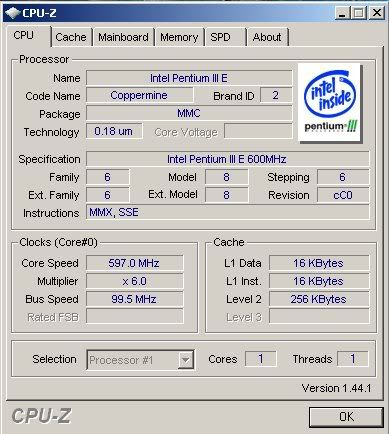 and i didnt think it was a pen 3
and wow this is my main computer o.0 that much for a single core or a dual core idk
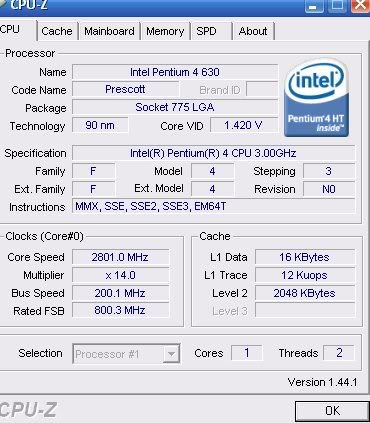
and i didnt think it was a pen 3and wow this is my main computer o.0 that much for a single core or a dual core idk
<<banned from SRF for proof of botting. -SG>>
-
pr0klobster
- Frequent Member
- Posts: 1427
- Joined: Wed Oct 17, 2007 2:28 pm
- Quick Reply: Yes
- Location: Olympus
Re: cant get sro to work on my laptop
Ok, your processor may be ok, so I think it's your video holding you back, that plus lack of RAM.
Your main PC is a 2.8 P4 HT (Hyperthreading). See the 2 threads on the right? It's kind of like a dual-core, but only logically, it doesn't physically have two cores.
Actually, you can tell it's single-core because the duals start with the 8xx series...
Your main PC is a 2.8 P4 HT (Hyperthreading). See the 2 threads on the right? It's kind of like a dual-core, but only logically, it doesn't physically have two cores.
Actually, you can tell it's single-core because the duals start with the 8xx series...
If faith is a crutch, I'm not limping anymore.
-
shabowsdawn
- Regular Member
- Posts: 262
- Joined: Mon Dec 31, 2007 3:48 am
- Quick Reply: Yes
- Location: Venice
Re: cant get sro to work on my laptop
pr0klobster wrote:Ok, your processor may be ok, so I think it's your video holding you back, that plus lack of RAM.
Your main PC is a 2.8 P4 HT (Hyperthreading). See the 2 threads on the right? It's kind of like a dual-core, but only logically, it doesn't physically have two cores.
Actually, you can tell it's single-core because the duals start with the 8xx series...
ehh ya i tried dling that sdk thing didnt work spent an hour looking for some sdk stuff and it still wont work >< i dont know whats wrong but the graffics card might hold me back but the ram i remember playing battlefield just fine with 128 ram no graffics card and a single core on my old comp ^^
and woot i got the sdk downloaded loaded and sro loads hella slow i restarted and trying again ill post a ss of it when/if it runs
<<banned from SRF for proof of botting. -SG>>