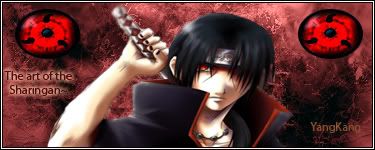
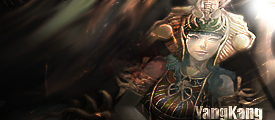
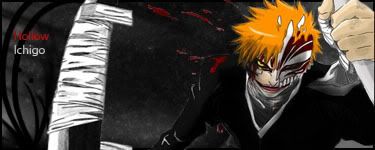
EDIT : My first sig done :D

Digital art design, renderings, signatures and anything art related. Upload pictures of your newest work or ask for feedback. Post graphics requests or discuss art in general.
Post Reply
User avatar
YangKang
Active Member
Posts: 838
Joined: Wed Dec 13, 2006 4:26 pm
Quick Reply: Yes
Location: Uranus

EDIT : My first sig done :D

Post by YangKang »

Hey guys im new to this Art stuff :P Im trying to do my first sig but having some problems. When I paste my picture, the background gets messed up, it does take the background of the old picture with it .. what do you guys do to solve that problem?

Edit :

Image

Its my first time I use photoshop... I had a damn hard time but **** im so proud of myself now XD

Made another one
Image

I know the text sucks but ~.~ meh
Last edited by YangKang on Mon Dec 24, 2007 9:55 pm, edited 4 times in total.
Image

deep.in
Advanced Member
Posts: 2133
Joined: Mon Mar 19, 2007 11:55 am
Quick Reply: Yes
Location: .........
Contact:

Post by deep.in »

There is selection tools, like: lasso, Polygonal Lasso Tool, magnetic lasso Tool...you can find them in the bar located in the left corner of Photoshop window. Just select object from the image, the copy and paste to other image.

I hope you using PS :D
<<banned from SRF for bot admission. -SG>>

User avatar
YangKang
Active Member
Posts: 838
Joined: Wed Dec 13, 2006 4:26 pm
Quick Reply: Yes
Location: Uranus

Post by YangKang »

I do but you got to be kidding... this is madness lol I cant even draw 2 lines that are straight on >_< wait Ill show you the pic where i want to cut out the background


there ya go

http://www.sendspace.com/file/xmb3gh

you cant tell me that you do that by hand >_>
Image

User avatar
0l3n
Elite Member
Posts: 5184
Joined: Fri Jun 16, 2006 1:45 pm
Quick Reply: Yes
Location: Artists Corner

Post by 0l3n »

YangKang wrote:I do but you got to be kidding... this is madness lol I cant even draw 2 lines that are straight on >_< wait Ill show you the pic where i want to cut out the background


there ya go

http://www.sendspace.com/file/xmb3gh

you cant tell me that you do that by hand >_>


Use the Polygonal Lasso Tool (or the pen toll later on when you know how to use it.) If you cant find it right click on the Lasso icon.
Image
Image

User avatar
YangKang
Active Member
Posts: 838
Joined: Wed Dec 13, 2006 4:26 pm
Quick Reply: Yes
Location: Uranus

Post by YangKang »

Okay so I kinda got that down but when I copy it over my layer the background dissappears and its jsut half pic half sig what can I do against that?
Image

User avatar
BrokenSaint
Veteran Member
Posts: 3473
Joined: Sun Jan 01, 2006 8:49 pm
Quick Reply: Yes
Location: Stuntin'.
Contact:

Post by BrokenSaint »

I don't know about you guys about I use the marquee tool. Just select the part you want to cut out, Ctrl + C(Copy) then use Ctrl + V(Paste) to another document. If you want to cut out the WHOLE image, just Ctrl + A to automatically select the whole document with marquee, the copy and paste.

User avatar
YangKang
Active Member
Posts: 838
Joined: Wed Dec 13, 2006 4:26 pm
Quick Reply: Yes
Location: Uranus

Post by YangKang »

Alright I frigging erased all parts with the eraser ( 1 pixel ftw ! ) the only thing is I have no idea about the fonts any quick guide?
Image

Luoma
Veteran Member
Posts: 3895
Joined: Thu Sep 14, 2006 8:23 am
Quick Reply: Yes
Location: Artists Corner & Aege

Post by Luoma »

Hehe for a first sig thats a hell of alot better than me xD good job!
<<banned from SRF for proof of botting. -SG>>

User avatar
YangKang
Active Member
Posts: 838
Joined: Wed Dec 13, 2006 4:26 pm
Quick Reply: Yes
Location: Uranus

Post by YangKang »

Whoa! Thank you and that from someone of your caliber ( sp xD ) btw I added you to MSN could you accept me ?
Image

Luoma
Veteran Member
Posts: 3895
Joined: Thu Sep 14, 2006 8:23 am
Quick Reply: Yes
Location: Artists Corner & Aege

Post by Luoma »

YangKang wrote:Whoa! Thank you and that from someone of your caliber ( sp xD ) btw I added you to MSN could you accept me ?


"of that caliber" ? :D

Ima accept you right now! <3
<<banned from SRF for proof of botting. -SG>>

User avatar
Trice
Ex-Staff
Posts: 2364
Joined: Mon Jun 11, 2007 3:48 pm
Location: Everywhere. All the Time... But more specifically, England

Post by Trice »

Nice job! thats far far better than my first sig (some would say its better than my sigs now ^_^ )

grats :D
My stories + songs
Story Search: [Story] author Trice
Parody Search: [Parody] author Trice

Image
Image
Ty cin :love:
Sarcasm makes you more attractive to the opposite sex

User avatar
SuicideGrl
Retired Admin
Posts: 8004
Joined: Fri Jan 27, 2006 4:17 pm
Location: World of Warcraft

Post by SuicideGrl »

excellent job for a first sig. you are in the stage where you have chosen a good render and have used some nice brushes, and done a decent job of not making it look pasted on. now try to do three new things:

a) define a significant light source. make the whole sig react to that light somehow.

b) establish a flow. the sig should make the eye naturally move from place to place in a way that makes sense.

c) work on havnig the render blend into the sig so that the two are one rather than individual layers.


nice job for a first-timer, better than most!
Image
Thx IceCrash for my awesome sig :)
SRF Name Change Policy
Having trouble accessing SRF?

dom wrote:
RuYi wrote:Are you from outer space or something?
He's from Jersey. Close enough.

User avatar
YangKang
Active Member
Posts: 838
Joined: Wed Dec 13, 2006 4:26 pm
Quick Reply: Yes
Location: Uranus

Post by YangKang »

Ah thank you all

@ SG thx =D Ill work on these I also think thats stuff everyone should be able to do after a while
Image

User avatar
HOLLAstir
Loyal Member
Posts: 1637
Joined: Tue Aug 28, 2007 7:17 pm
Quick Reply: Yes
Location: 206
Contact:

Post by HOLLAstir »

SuicideGrl wrote:a) define a significant light source. make the whole sig react to that light somehow.

b) establish a flow. the sig should make the eye naturally move from place to place in a way that makes sense.

c) work on havnig the render blend into the sig so that the two are one rather than individual layers.


+1. I agree, Great sig for a first timer. Way better then anything I made within my first month or two with photoshop.
Image

Image

User avatar
HeiWengLong
Hi, I'm New Here
Posts: 5
Joined: Mon Dec 24, 2007 2:57 pm
Quick Reply: Yes
Contact:

Post by HeiWengLong »

Its not a spam i want to open a new thread
Last edited by HeiWengLong on Mon Dec 24, 2007 3:43 pm, edited 1 time in total.
Image

User avatar
iNunoPT
Common Member
Posts: 154
Joined: Thu Aug 09, 2007 9:20 pm
Quick Reply: Yes
Location: quit sro long time ago

Post by iNunoPT »

open a a thread for ur self in the forum then... :D

User avatar
YangKang
Active Member
Posts: 838
Joined: Wed Dec 13, 2006 4:26 pm
Quick Reply: Yes
Location: Uranus

Post by YangKang »

Seriously.. dont steal my show xD

btw made a new sig look at the first post
Image

User avatar
Faiien
Active Member
Posts: 889
Joined: Sun Oct 28, 2007 5:10 pm
Quick Reply: Yes
Location: Artist Corner

Post by Faiien »

it looks too streched out
but gj

User avatar
YangKang
Active Member
Posts: 838
Joined: Wed Dec 13, 2006 4:26 pm
Quick Reply: Yes
Location: Uranus

Post by YangKang »

Omg I cant help it but making sigs. Im PS addicted :D Rate pls on them oh and I know hitsugayas sword is raped >_<

1.

Image


2.

Image


Edit: Yeah i forgot borders...
Image

TwelveEleven
Veteran Member
Posts: 3806
Joined: Sat Mar 17, 2007 1:11 am
Quick Reply: Yes
Location: Heaven
Contact:

Post by TwelveEleven »

they are not bad for first ones, but! the render on the second one is cut out REALLY bad, I advice you to use sites such as http://planetrenders.net for your cut outs
<<banned from SRF for proof of botting. -SG>>

User avatar
Faiien
Active Member
Posts: 889
Joined: Sun Oct 28, 2007 5:10 pm
Quick Reply: Yes
Location: Artist Corner

Post by Faiien »

when you shrink your renders be sure to hold the shift key as to not strech them out. And use the corner squares to minimize cause int he sigs you just made both renders look too streched out or too big
nt :)
User avatar
YangKang
Active Member
Posts: 838
Joined: Wed Dec 13, 2006 4:26 pm
Quick Reply: Yes
Location: Uranus

Post by YangKang »

I dont get it the Hitsugaya picture may be scretched but grimjows never ... thats the actually size I just shrinked it a bit

@1211 yep your right but couldnt clean it better >_<
Image

User avatar
MissLe2
Active Member
Posts: 809
Joined: Fri Oct 19, 2007 12:31 pm
Quick Reply: Yes
Location: Alexander
Contact:

Post by MissLe2 »

i like it but i dont even know anything about PS
these guy sound like pros
they will help you make it even better
:oops:
Ray
"Let's call it a draw"
"I'll have to do em left handed"
Play Alexander
Image
Image

TwelveEleven
Veteran Member
Posts: 3806
Joined: Sat Mar 17, 2007 1:11 am
Quick Reply: Yes
Location: Heaven
Contact:

Post by TwelveEleven »

YangKang wrote:I dont get it the Hitsugaya picture may be scretched but grimjows never ... thats the actually size I just shrinked it a bit

@1211 yep your right but couldnt clean it better >_<


Advice, just use your tools smudge, blur etc to let it look better/blend it in
<<banned from SRF for proof of botting. -SG>>

User avatar
YangKang
Active Member
Posts: 838
Joined: Wed Dec 13, 2006 4:26 pm
Quick Reply: Yes
Location: Uranus

Post by YangKang »

Well If I wouldhave blurred the sword it would have looked like some blurry thing is sticking out and it would totally have lost its form..


@ Missle2 thank you I guys oO dont worry you can get good within no time hook me up on msn im sure I could help you creating a sig
Image

Post Reply

Return to “Artists Corner”