NSR ~ Pan's Labyrinth

Digital art design, renderings, signatures and anything art related. Upload pictures of your newest work or ask for feedback. Post graphics requests or discuss art in general.
Post Reply
mmellu
Active Member
Posts: 837
Joined: Sat May 05, 2007 3:23 pm
Quick Reply: Yes
Location: Off Topic
Contact:

NSR ~ Pan's Labyrinth

Post by mmellu »

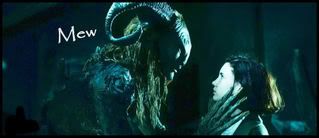
I try make sig from my favorite movie.
But this went too dark. i try put more lights. >< so here it is. u.u


Image

EDIT:
Image
Last edited by mmellu on Wed Jan 23, 2008 3:31 pm, edited 3 times in total.
<<banned from SRF for proof of botting. -SG>>

cin

Post by cin »

couple things.

1. its a little bit too dark, but i like it anyway.
2. the txt would be better if blended in somewhere, like above the head of the girl,
to the right of the weirdo's head.
3. adding a better lightsource would make this sig a ton better. atm, its obvious where
the light comes from, but the source is still dark.

mmellu
Active Member
Posts: 837
Joined: Sat May 05, 2007 3:23 pm
Quick Reply: Yes
Location: Off Topic
Contact:

Re: NSR ~ Pan's Labyrinth

Post by mmellu »

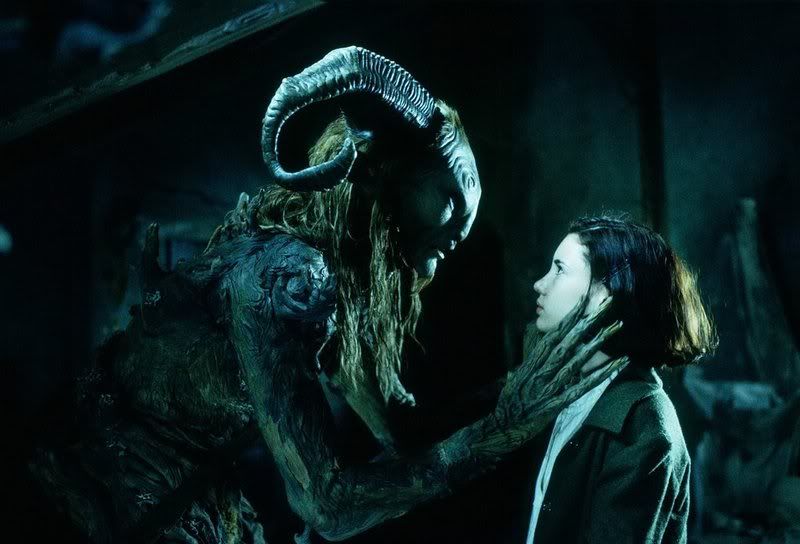
Here the real pic
Image

I try change some things in it :p
<<banned from SRF for proof of botting. -SG>>

cin

Post by cin »

yes. for example, make a new layer (ctrl+shift+N), go Image - Apply image.
this will add a layer on your sig that includes all layers you made.

next, go Filter -> Render -> Lighting effects.
now move the 2 dots around untill you get the light from the top right corner.
this might create a better lighting than like you have it atm.
after that, you can perhaps take a soft big brush, white, and brush the bottom of
a large soft dot somewhere on the top right, where you think the light comes from.

^ these changes, base them on version 1 of the sig, not the edited one ;]

edit:
text would look better here if the angle of it wasnt straight. imo, horizontal text
would be best for this sig. try putting the text on the right side of the weird guy
and put that layer on soft light. duplicate that layer 1 or 2 times, till the text
is visible but blends in nicely. thats a quick trick to get the txt not to overrule
the sig.

mmellu
Active Member
Posts: 837
Joined: Sat May 05, 2007 3:23 pm
Quick Reply: Yes
Location: Off Topic
Contact:

Re: NSR ~ Pan's Labyrinth

Post by mmellu »

I need better photoshop. ^^
<<banned from SRF for proof of botting. -SG>>

TwelveEleven
Veteran Member
Posts: 3806
Joined: Sat Mar 17, 2007 1:11 am
Quick Reply: Yes
Location: Heaven
Contact:

Re: NSR ~ Pan's Labyrinth

Post by TwelveEleven »

download the cs3 trial
<<banned from SRF for proof of botting. -SG>>

User avatar
Faiien
Active Member
Posts: 889
Joined: Sun Oct 28, 2007 5:10 pm
Quick Reply: Yes
Location: Artist Corner

Re: NSR ~ Pan's Labyrinth

Post by Faiien »

tbh it looks like all you did was resize :?

cin

Re: NSR ~ Pan's Labyrinth

Post by cin »

2 more things i see in a glitch

- moved / changed txt
- changed lighting (look at left side of the sig)

Post Reply

Return to “Artists Corner”