tut

Digital art design, renderings, signatures and anything art related. Upload pictures of your newest work or ask for feedback. Post graphics requests or discuss art in general.
Post Reply
User avatar
christina
Frequent Member
Posts: 1017
Joined: Sun Oct 07, 2007 6:58 pm
Quick Reply: Yes
Location: Artist Corner

tut

Post by christina »

Image
well it suks ass
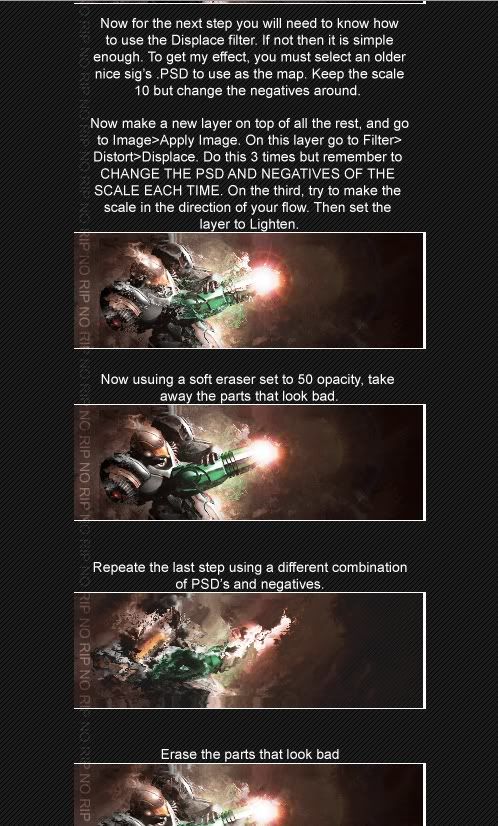
I dont get the part with the distort displace and the negitives and positives =(
Help me again :D
THIS PART =(
Image
<<Left because of dumbshit people like stallowned>>

User avatar
binnosh
Regular Member
Posts: 201
Joined: Sun Aug 19, 2007 9:11 pm
Quick Reply: Yes
Location: Red Sea

Post by binnosh »

i gotyou a tutorial wich explains everything really really well on how to do the smudging and how to set some things:

it's from deviant art aswell made by ILovecoHeed

don't know if i'm allowed ot paste this tut here, hope so, it's just to help out cristina :p
http://ilovecoheed.deviantart.com/art/I ... t-27390923
Image


lvl 6x [Warrior/Cleric]
lvl 5x [Rogue/Warlock]
lvl 4x [Str/Bow]
Red Sea
still going strong

User avatar
aazumak
Active Member
Posts: 918
Joined: Sat Jun 09, 2007 12:56 pm
Quick Reply: Yes
Location: Artist Corner
Contact:

Post by aazumak »

distort is a wonderful tool

it involes basicly having a layer which is the entire sig compressed, then distorting it, what you do is go to filter>distort>displace, then just click ok for now, leave it at the %'s its at, then select another sig, it then distorts your image based on what your other sig looks like,


teh guy in teh tut called the other sigs negatives, thast what they kinda are here
Image
Image
_____________________!!!!!!Rogue 7X !!!!!!
Image

Post Reply

Return to “Artists Corner”