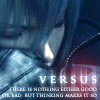
First Sig

Digital art design, renderings, signatures and anything art related. Upload pictures of your newest work or ask for feedback. Post graphics requests or discuss art in general.
Post Reply
User avatar
pui
Hi, I'm New Here
Posts: 23
Joined: Fri Dec 29, 2006 11:31 pm
Quick Reply: Yes
Location: tibet

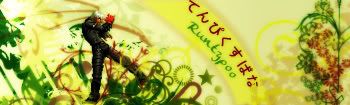
First Sig

Post by pui »

It's the one I've been using lately. I've never made a sig before, and I decided to put my SRO character name instead of my forum name, for some reason. It made sense to me anyway. :wink: I like them shorter, obviously.

So, try not to be too harsh, I'm not a professional sig-maker. (And I'm crazy about over exposure and blown-out light) Enough from me, let me know what you think :love:
Image

User avatar
runtypoo
Casual Member
Posts: 83
Joined: Thu Jan 04, 2007 4:11 am
Quick Reply: Yes
Location: Australia

Post by runtypoo »

dude its pretty good for ur first sig, if ur using photoshop i can give u a link to a good starting tute

http://www.silkroadforums.com/viewtopic.php?t=25617
Image
Image
Image

User avatar
Gseh
Valued Member
Posts: 413
Joined: Wed Jul 26, 2006 2:39 am
Quick Reply: Yes
Location: Greece

Post by Gseh »

perfect!
Image

User avatar
pui
Hi, I'm New Here
Posts: 23
Joined: Fri Dec 29, 2006 11:31 pm
Quick Reply: Yes
Location: tibet

Post by pui »

runtypoo wrote:dude its pretty good for ur first sig, if ur using photoshop i can give u a link to a good starting tute

http://www.silkroadforums.com/viewtopic.php?t=25617


Thanks! I'm very familiar with photoshop but I've never used it for sig purposes. So thanks for the link, I need to get better at all those effects and sparkles.

Gseh wrote:perfect!


Thank you! :oops:
Image

User avatar
AvengedSevenfold
Common Member
Posts: 120
Joined: Fri Aug 25, 2006 2:57 am
Quick Reply: Yes
Location: Babel
Contact:

Post by AvengedSevenfold »

i dont see the tute from that link ... cuz i really wanna learn how to use photoshop for sigs too ... i made the one im using from photoshop .. but its the first one ive ever made and i didnt use any brushes ... sept for the scratch effects ...

so could someone give me a good tute link please? (sorry pui for aking a question on your thread .. =\)
Image

User avatar
Speciest
Casual Member
Posts: 54
Joined: Fri Nov 10, 2006 5:14 pm
Quick Reply: Yes
Location: Xian

Post by Speciest »

WOW nice dang thats awesome for ur first, ur gunna be a damn good sig maker.
Image
Image
IGN:PepsiKilCoke
Level: 37
Build:Pure Str Fire Blade
Guild: PrimeJustice (level 4 hunter/trader guild recruiting ACTIVE and LEGIT players)

User avatar
pui
Hi, I'm New Here
Posts: 23
Joined: Fri Dec 29, 2006 11:31 pm
Quick Reply: Yes
Location: tibet

Post by pui »

Speciest wrote:WOW nice dang thats awesome for ur first, ur gunna be a damn good sig maker.


Thanks! They're fun. I've always made icons/avatars so I thought I would extend to sigs.

AvengedSevenfold wrote:(sorry pui for aking a question on your thread .. =\)


lol, that's quite alright. I hope you get your link :P
Image

Luoma
Veteran Member
Posts: 3895
Joined: Thu Sep 14, 2006 8:23 am
Quick Reply: Yes
Location: Artists Corner & Aege

Post by Luoma »

good size too! all it might be missing is a border :? otherwise very nice! :D
<<banned from SRF for proof of botting. -SG>>

User avatar
pui
Hi, I'm New Here
Posts: 23
Joined: Fri Dec 29, 2006 11:31 pm
Quick Reply: Yes
Location: tibet

Post by pui »

Luoma wrote:good size too! all it might be missing is a border :? otherwise very nice! :D


Yeah! I attempted a border since I thought it would help frame it, but I made the text to low, and I feel I'll lose my comp. if I raise it any. Though hunting down a border tutorial sounds like a helpful thing to do!
Image

User avatar
Grimjaw
Elite Member
Posts: 5136
Joined: Thu Nov 30, 2006 6:17 pm
Quick Reply: Yes
Location: Final Fantasy Versus 13.

Post by Grimjaw »

Those are really impressive. :)

Btw: 400 Posts!
Bmw 6 Series owner. Bleach fan. Music Fan.
Image Reise for Mod.
~ Those who make peaceful revolution impossible will make violent revolution inevitable..

Post Reply

Return to “Artists Corner”