Digital art design, renderings, signatures and anything art related. Upload pictures of your newest work or ask for feedback. Post graphics requests or discuss art in general.
0l3n
Elite Member
Posts: 5184 Joined: Fri Jun 16, 2006 1:45 pmQuick Reply: YesLocation: Artists Corner
Post
by 0l3n Sat Dec 16, 2006 9:24 pm
tHANX pLUTIE
here is the render i used
post your ressults if you try this out.
Last edited by
0l3n on Sat Dec 16, 2006 10:30 pm, edited 2 times in total.
plutie
Casual Member
Posts: 62 Joined: Tue Dec 05, 2006 1:02 pm
Post
by plutie Sat Dec 16, 2006 9:29 pm
hahahha
Misaklo
Loyal Member
Posts: 1508 Joined: Sun Mar 05, 2006 4:03 pmQuick Reply: YesLocation: troy
Post
by Misaklo Sat Dec 16, 2006 9:29 pm
............
that is all. i waned to see it
"Everybody defamates from miles away,But face to face, they haven't got a thing to say!" -Slipknot
0l3n
Elite Member
Posts: 5184 Joined: Fri Jun 16, 2006 1:45 pmQuick Reply: YesLocation: Artists Corner
Post
by 0l3n Sat Dec 16, 2006 9:45 pm
its 1.7 mb and neither imagehack or photobucket can upload it correctly!
0l3n
Elite Member
Posts: 5184 Joined: Fri Jun 16, 2006 1:45 pmQuick Reply: YesLocation: Artists Corner
Post
by 0l3n Sun Dec 17, 2006 12:26 am
is everyone asleep or what?
Neo11989
Hi, I'm New Here
Posts: 11 Joined: Sun Dec 17, 2006 3:31 amQuick Reply: YesLocation: aege
Contact:
Post
by Neo11989 Sun Dec 17, 2006 4:35 am
hmm not bad i do mine differently but i shall try this one out
Priam
Forum Legend
Posts: 7885 Joined: Tue Jul 11, 2006 8:38 amQuick Reply: YesLocation: At the apple store, Cause i'm an iAddict.
Post
by Priam Sun Dec 17, 2006 10:42 am
Gj on the tutorial ol3n.
plutie
Casual Member
Posts: 62 Joined: Tue Dec 05, 2006 1:02 pm
Post
by plutie Sun Dec 17, 2006 11:10 am
hell of a good work , and if i was u i would write By 0l3n with almost invisible text over the whole thing
0l3n
Elite Member
Posts: 5184 Joined: Fri Jun 16, 2006 1:45 pmQuick Reply: YesLocation: Artists Corner
Post
by 0l3n Sun Dec 17, 2006 12:40 pm
plutie wrote: hell of a good work , and if i was u i would write By 0l3n with almost invisible text over the whole thing
nice idea
.
and thanx for the nice coments
Meteorain
Hi, I'm New Here
Posts: 23 Joined: Tue Nov 28, 2006 12:12 pmQuick Reply: YesLocation: Xian
Post
by Meteorain Sun Dec 17, 2006 2:16 pm
Hey, pretty simple and nice.
"...that you are not a compleat morron" (excerpt from tut)
Lol, I found that slightly ironic
IGN: Jain_Zar
Level: 3x
Guild: Toramusha
Miyoko
Regular Member
Posts: 267 Joined: Fri Sep 15, 2006 11:46 amQuick Reply: YesLocation: Venice
Post
by Miyoko Sun Dec 17, 2006 10:26 pm
Very nice and simple tutorial, might be really useful for new people (new to photoshop).
Although... work on your spelling / grammar, that really needs a fix here and there
Mizuko: lvl 52 | Proud leader of: "Domination"
0l3n
Elite Member
Posts: 5184 Joined: Fri Jun 16, 2006 1:45 pmQuick Reply: YesLocation: Artists Corner
Post
by 0l3n Mon Dec 18, 2006 6:03 pm
Miyoko wrote: Very nice and simple tutorial, might be really useful for new people (new to photoshop).
Although... work on your spelling / grammar, that really needs a fix here and there
yeah lol i know, but it was like 3am and i was in a hurry, but i dont know why i misspelled some of those words, well my mistake.
excentric
Hi, I'm New Here
Posts: 12 Joined: Mon Dec 18, 2006 6:13 pm
Post
by excentric Tue Dec 19, 2006 12:02 am
Good tutorial but i see this technique used way to much these days. Mess with filters, smudging is getting old.
Guild:
Fayt Eternal
0l3n
Elite Member
Posts: 5184 Joined: Fri Jun 16, 2006 1:45 pmQuick Reply: YesLocation: Artists Corner
Post
by 0l3n Tue Dec 19, 2006 8:25 am
yeah i did that with my name, must have posted the wrong file.
M4K3L0V3
Hi, I'm New Here
Posts: 5 Joined: Fri Dec 15, 2006 3:51 pmQuick Reply: YesLocation: Eldorado
Post
by M4K3L0V3 Tue Dec 19, 2006 9:51 am
Nice olen keep goin
naljamees51
Frequent Member
Posts: 1054 Joined: Tue Mar 21, 2006 1:34 pmQuick Reply: YesLocation: Estonia
Post
by naljamees51 Fri Feb 09, 2007 12:22 pm
well done tutorial
and the sig... it looks sweet ^^
I'm gay, lets cry.
woutR
Elite Member
Posts: 5573 Joined: Wed Feb 08, 2006 5:20 pmQuick Reply: YesLocation: Netherlands
Contact:
Post
by woutR Fri Feb 09, 2007 4:51 pm
too hard for me.
<<
>>
Miyoko
Regular Member
Posts: 267 Joined: Fri Sep 15, 2006 11:46 amQuick Reply: YesLocation: Venice
Post
by Miyoko Fri Feb 09, 2007 7:34 pm
This is one of the most easy things to start off with
How can it be too hard for you
Mizuko: lvl 52 | Proud leader of: "Domination"
0l3n
Elite Member
Posts: 5184 Joined: Fri Jun 16, 2006 1:45 pmQuick Reply: YesLocation: Artists Corner
Post
by 0l3n Fri Feb 09, 2007 8:20 pm
i guess a brushing tutorial would be easier
[TS]=Hark=[TS]
Loyal Member
Posts: 1596 Joined: Thu Feb 01, 2007 9:16 pmQuick Reply: YesLocation: Black Desert Online
Post
by [TS]=Hark=[TS] Wed Feb 14, 2007 9:44 pm
where do you get photo shop? cause it is on my compters at school but it didnt come with my new computer.
Miyoko
Regular Member
Posts: 267 Joined: Fri Sep 15, 2006 11:46 amQuick Reply: YesLocation: Venice
Post
by Miyoko Wed Feb 14, 2007 11:44 pm
Where I got it? From the "photo-shop". I bought it
Mizuko: lvl 52 | Proud leader of: "Domination"
Dorlingz
Regular Member
Posts: 203 Joined: Thu Oct 26, 2006 9:30 amQuick Reply: YesLocation: Australia
Contact:
Post
by Dorlingz Sat Feb 17, 2007 3:44 am
[TS]=Hark=[TS] wrote: where do you get photo shop? cause it is on my compters at school but it didnt come with my new computer.
*cough*torrents*cough*
5m0k3 wrote: r tards
Midnite8
Common Member
Posts: 147 Joined: Thu Jan 04, 2007 5:23 amQuick Reply: Yes
Contact:
Post
by Midnite8 Sat Feb 17, 2007 4:08 am
simple and easy for beginners, gj
Pure INT Fire/Light/Spear Nuker
Sol
Regular Member
Posts: 321 Joined: Tue Jan 30, 2007 9:21 amQuick Reply: YesLocation: Sparta
Contact:
Post
by Sol Sat Feb 17, 2007 11:35 am
nice tutorial. some of ur techinques i haven't come across before and some i have. ty i learn something new everyday.
0l3n
Elite Member
Posts: 5184 Joined: Fri Jun 16, 2006 1:45 pmQuick Reply: YesLocation: Artists Corner
Post
by 0l3n Sat Feb 17, 2007 2:06 pm
Sol wrote: also i noticed that u tend to have a kinda sharpend look to your sigs is this intentional?
Yeah It Is, and most of the things I do Is intentional. Maby 1 or 2 things might be by accident. 1 layer out of 60 aint' much.
Sol
Regular Member
Posts: 321 Joined: Tue Jan 30, 2007 9:21 amQuick Reply: YesLocation: Sparta
Contact:
Post
by Sol Sat Feb 17, 2007 4:24 pm
bah i tried doing it m8 but i think i got a difficult render to work with.
0l3n
Elite Member
Posts: 5184 Joined: Fri Jun 16, 2006 1:45 pmQuick Reply: YesLocation: Artists Corner
Post
by 0l3n Sat Feb 17, 2007 5:15 pm
If the sigs to bright than you can do several things like adding a dark gradient or just paint with black on a new layer and change the blendingmodes or opacity.
Sol
Regular Member
Posts: 321 Joined: Tue Jan 30, 2007 9:21 amQuick Reply: YesLocation: Sparta
Contact:
Post
by Sol Sat Feb 17, 2007 5:42 pm
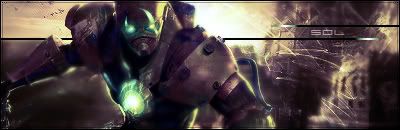
Here's my attempt i'm not to keen on it. render is to small.
0l3n
Elite Member
Posts: 5184 Joined: Fri Jun 16, 2006 1:45 pmQuick Reply: YesLocation: Artists Corner
Post
by 0l3n Sat Feb 17, 2007 6:20 pm
It looks good, I dont like the text and i see your render is smudged, smudging the render is ok when its on the otline but not when it covers the whole render.

















 >>
>> How can it be too hard for you