Official Post And Discuss Your Ui Topic
-
lavapockets
- Frequent Member
- Posts: 1126
- Joined: Fri May 25, 2007 3:27 pm
- Quick Reply: Yes
- Location: right behind you
Re: Official Post And Discuss Your Ui Topic
Noop what's the addon for your bars called? I like it better than what I'm using.


-
.curve

- Elite Member
- Posts: 5167
- Joined: Sun Dec 28, 2008 9:59 am
- Quick Reply: Yes
- Location: Antelope Valley, CA
Re: Official Post And Discuss Your Ui Topic

Precise. Compact. I love it.
Small difference now is that I have CoolLine just above my target box.
Speak the truth, even if your voice shakes.

-
bakafish

- Veteran Member
- Posts: 3358
- Joined: Tue Jan 23, 2007 5:47 pm
- Quick Reply: Yes
- Location: EU-Kor'gall
Re: Official Post And Discuss Your Ui Topic
Since everyone seems to have no addons that function during combat...


-
Skullbasher62
- Active Member
- Posts: 898
- Joined: Tue Mar 07, 2006 1:53 pm
- Quick Reply: Yes
- Location: tEH Intarwebz
- Contact:
Re: Official Post And Discuss Your Ui Topic
i lost my screenshot folder (ie, i forgot to save it when i reformatted >.<) so i don't have any of the ones i used to spend hours making/customizing. i recently started back (because sae made me, evil woman) an have been playing around with nUI+, i'll post screenies later, but its pretty neat, i like how lots of addons i use integrate in it easily and quickly.
 <--by Sae<3
Kasu/Gunza
DOTA2, Age of Conan

Re: Official Post And Discuss Your Ui Topic
http://www.wowinterface.com/downloads/f ... 12035#info
My UI but i completly remade it since my res didnt work with it..
Have fun
My UI but i completly remade it since my res didnt work with it..
Have fun
-
[TS]=Hark=[TS]

- Loyal Member
- Posts: 1596
- Joined: Thu Feb 01, 2007 9:16 pm
- Quick Reply: Yes
- Location: Black Desert Online
Re: Official Post And Discuss Your Ui Topic
hey bakafish what addon is that for your minimap? and the panal at the top?
^^ mAd propps to Verfo for the sig:P thankx man!
Re: Official Post And Discuss Your Ui Topic
[TS]=Hark=[TS] wrote:hey bakafish what addon is that for your minimap? and the panal at the top?
SimpleMiniMap or Sexymap
and
Titan panel
-
cuchulainn

- Advanced Member
- Posts: 2168
- Joined: Thu Apr 06, 2006 5:09 pm
- Quick Reply: Yes
- Location: Troy
Re: Official Post And Discuss Your Ui Topic
Noop wrote:[TS]=Hark=[TS] wrote:hey bakafish what addon is that for your minimap? and the panal at the top?
SimpleMiniMap or Sexymap
and
Titan panel
That's FuBar, not TitanPanel.
Get Chinchilla for maps. Anything else is bad.
I'm in your posts, stealing your quotes.

-
.curve
- Elite Member
- Posts: 5167
- Joined: Sun Dec 28, 2008 9:59 am
- Quick Reply: Yes
- Location: Antelope Valley, CA
Re: Official Post And Discuss Your Ui Topic
cuchulainn wrote:Noop wrote:[TS]=Hark=[TS] wrote:hey bakafish what addon is that for your minimap? and the panal at the top?
SimpleMiniMap or Sexymap
and
Titan panel
That's FuBar, not TitanPanel.
Get Chinchilla for maps. Anything else is bad.
That's TitanPanel buddy.
Speak the truth, even if your voice shakes.
-
cuchulainn
- Advanced Member
- Posts: 2168
- Joined: Thu Apr 06, 2006 5:09 pm
- Quick Reply: Yes
- Location: Troy
Re: Official Post And Discuss Your Ui Topic
.curve wrote:That's TitanPanel buddy.
Bah, you're right.
It's Titan Panel with the same texture that FuBar has as default.
Both are shitty. If you're going to have em, hide em so they don't show unless on mouseover.
I'm in your posts, stealing your quotes.
-
Necrobat
- Advanced Member
- Posts: 2011
- Joined: Wed Aug 29, 2007 11:39 am
- Quick Reply: Yes
- Location: Australia
Re: Official Post And Discuss Your Ui Topic
cuchulainn wrote:.curve wrote:That's TitanPanel buddy.
Bah, you're right.
It's Titan Panel with the same texture that FuBar has as default.
Both are shitty. If you're going to have em, hide em so they don't show unless on mouseover.
No, that's the TitanPanel default skin buddy.

FuBar's default is just a transparent black; it's not textured by default.

-
bakafish
- Veteran Member
- Posts: 3358
- Joined: Tue Jan 23, 2007 5:47 pm
- Quick Reply: Yes
- Location: EU-Kor'gall
Re: Official Post And Discuss Your Ui Topic
Yeah, it's like the most default Titan Panel background rofl. I tried having it show on mouseover once but I was so used to looking at the ETA of Wintergrasp so it had to be here. And it also fucked up my buff icons a bit, in a way they always leave a gap for Titan Panels now even if it's mouseover. Currently I have the background completely invisible, seeing it's quite popular in here and it looks a tad bit better.
-
[TS]=Hark=[TS]
- Loyal Member
- Posts: 1596
- Joined: Thu Feb 01, 2007 9:16 pm
- Quick Reply: Yes
- Location: Black Desert Online
Re: Official Post And Discuss Your Ui Topic
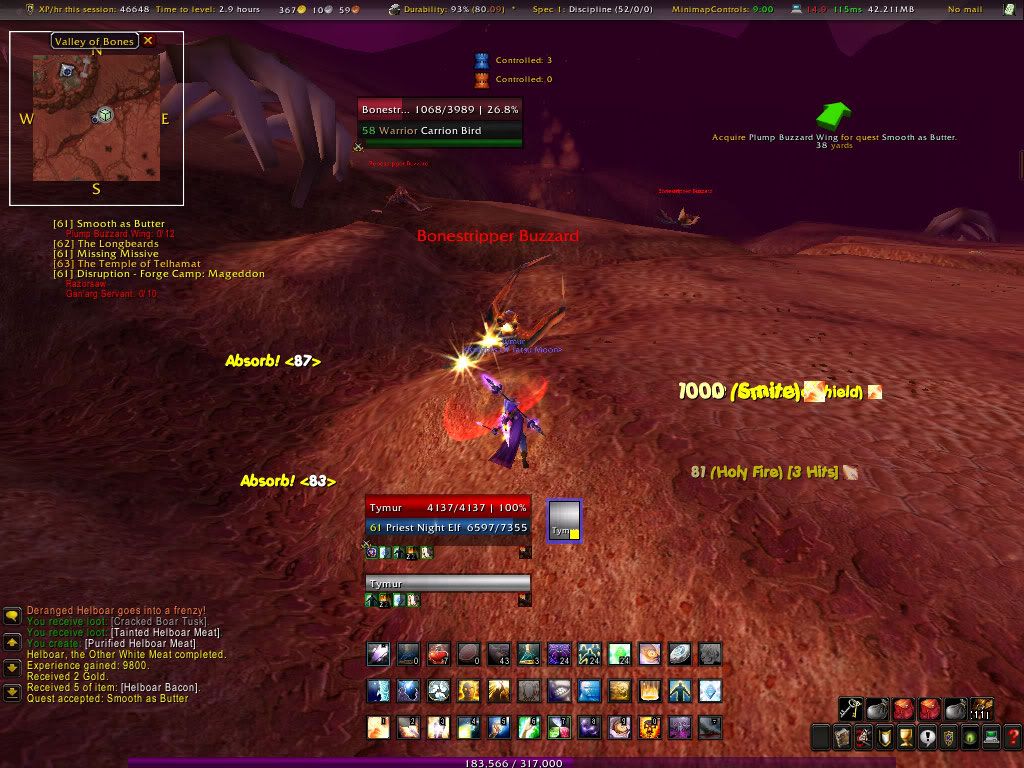
used some ideas from you guys. now i got this...
im trying to open it up a little bit more. idk how its working but i got rid of the party bars and just use grid now. its smaller and i was going to use it anyways, this way i got two birds in one mod lol.
im trying to open it up a little bit more. idk how its working but i got rid of the party bars and just use grid now. its smaller and i was going to use it anyways, this way i got two birds in one mod lol.
Spoiler!
^^ mAd propps to Verfo for the sig:P thankx man!
-
.curve
- Elite Member
- Posts: 5167
- Joined: Sun Dec 28, 2008 9:59 am
- Quick Reply: Yes
- Location: Antelope Valley, CA
Re: Official Post And Discuss Your Ui Topic
My UI in action:

Speak the truth, even if your voice shakes.
-
[TS]=Hark=[TS]
- Loyal Member
- Posts: 1596
- Joined: Thu Feb 01, 2007 9:16 pm
- Quick Reply: Yes
- Location: Black Desert Online
Re: Official Post And Discuss Your Ui Topic
hey curve how do you get your buffs to align along the very right side? i moved my minimap and now theres a gap between where my buffs start and where the minimap was. id like my buffs to look like yours.
^^ mAd propps to Verfo for the sig:P thankx man!
-
cuchulainn
- Advanced Member
- Posts: 2168
- Joined: Thu Apr 06, 2006 5:09 pm
- Quick Reply: Yes
- Location: Troy
Re: Official Post And Discuss Your Ui Topic
[TS]=Hark=[TS] wrote:hey curve how do you get your buffs to align along the very right side? i moved my minimap and now theres a gap between where my buffs start and where the minimap was. id like my buffs to look like yours.
Get SBF for your buffs instead of using blizzard's default. Get button facade if you wanna make them look nice too
I'm in your posts, stealing your quotes.
-
.curve
- Elite Member
- Posts: 5167
- Joined: Sun Dec 28, 2008 9:59 am
- Quick Reply: Yes
- Location: Antelope Valley, CA
Re: Official Post And Discuss Your Ui Topic
cuchulainn wrote:[TS]=Hark=[TS] wrote:hey curve how do you get your buffs to align along the very right side? i moved my minimap and now theres a gap between where my buffs start and where the minimap was. id like my buffs to look like yours.
Get SBF for your buffs instead of using blizzard's default. Get button facade if you wanna make them look nice too
rBuff is what I use. It's super hard to find though. I just have skills, and I put a lot of time into my UI. You were right about the Button Facade though. Button Facade - Caith UI skin.
Speak the truth, even if your voice shakes.
-
[TS]=Hark=[TS]
- Loyal Member
- Posts: 1596
- Joined: Thu Feb 01, 2007 9:16 pm
- Quick Reply: Yes
- Location: Black Desert Online
Re: Official Post And Discuss Your Ui Topic
.curve wrote:cuchulainn wrote:[TS]=Hark=[TS] wrote:hey curve how do you get your buffs to align along the very right side? i moved my minimap and now theres a gap between where my buffs start and where the minimap was. id like my buffs to look like yours.
Get SBF for your buffs instead of using blizzard's default. Get button facade if you wanna make them look nice too
rBuff is what I use. It's super hard to find though. I just have skills, and I put a lot of time into my UI. You were right about the Button Facade though. Button Facade - Caith UI skin.
thanks. i had button facade for a while but i didnt know which skin you where using. picked that up a few days ago when someone mentioned it (possably you? and mabey in another thread idk).
btw thank you guys for all the help. ive been working on my ui alot latly. messing with little things here and there. i like it alot but theres still a few things i might change.
^^ mAd propps to Verfo for the sig:P thankx man!
-
Zero_Doom
- Loyal Member
- Posts: 1572
- Joined: Thu Jul 06, 2006 6:58 am
- Quick Reply: Yes
- Location: Venus
Re: Official Post And Discuss Your Ui Topic
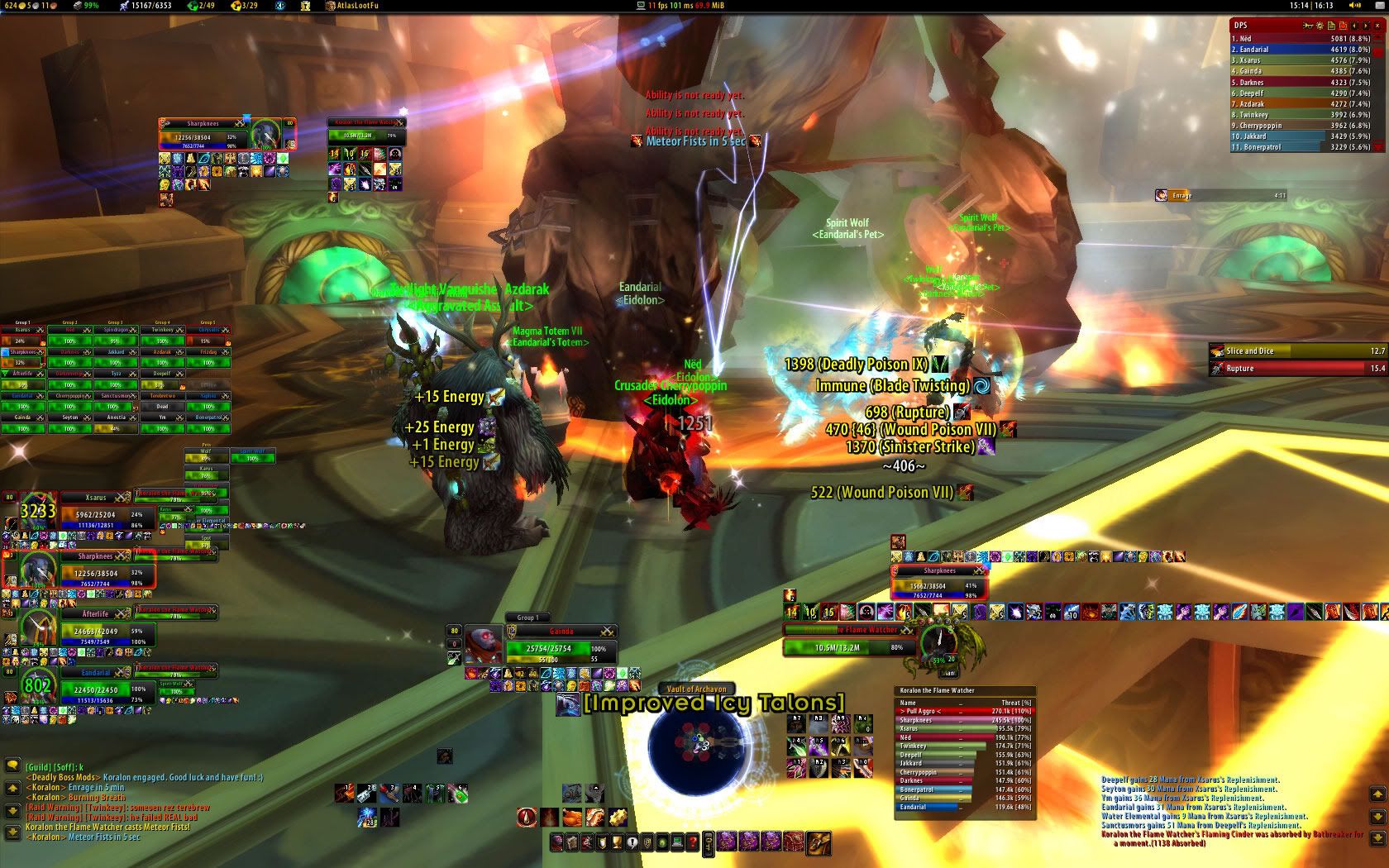
Decided to bring this back... since spartanui wasnt getting updated, I had to change mine around a bit.



Re: Official Post And Discuss Your Ui Topic
What do you use to change your font?

Saddam✓ Osama✓ Gaddafi✓ Justin Bieber☐ Rebecca Black☐
Re: Official Post And Discuss Your Ui Topic
Zero_Doom wrote:Which one?
All of them... I mean, that isnt the default font that you are using.
Saddam✓ Osama✓ Gaddafi✓ Justin Bieber☐ Rebecca Black☐
-
cuchulainn
- Advanced Member
- Posts: 2168
- Joined: Thu Apr 06, 2006 5:09 pm
- Quick Reply: Yes
- Location: Troy
Re: Official Post And Discuss Your Ui Topic
Lempi wrote:Zero_Doom wrote:Which one?
All of them... I mean, that isnt the default font that you are using.
Sharedmedia has a bunch of fonts. Most addons can access them so you can change them in the addons themselves.
Also, try out Clearfont if that doesn't work.
I'm in your posts, stealing your quotes.
-
Zero_Doom
- Loyal Member
- Posts: 1572
- Joined: Thu Jul 06, 2006 6:58 am
- Quick Reply: Yes
- Location: Venus
Re: Official Post And Discuss Your Ui Topic
Lempi wrote:Zero_Doom wrote:Which one?
All of them... I mean, that isnt the default font that you are using.
I don't intentionally change them, that's all part of various addons. All the names, the red text at the top "Ability is not ready yet.", and the chat windows on either side should be the original fonts.
Addons:
Fubar
DBM
SCT
SCTD
xperl


Re: Official Post And Discuss Your Ui Topic
Nice curve.
How did you get your icons to have a gloss finish?
How did you get your icons to have a gloss finish?
-
bakafish
- Veteran Member
- Posts: 3358
- Joined: Tue Jan 23, 2007 5:47 pm
- Quick Reply: Yes
- Location: EU-Kor'gall
Re: Official Post And Discuss Your Ui Topic
Panu wrote:Nice curve.
How did you get your icons to have a gloss finish?
ButtonFacade.
-
.curve
- Elite Member
- Posts: 5167
- Joined: Sun Dec 28, 2008 9:59 am
- Quick Reply: Yes
- Location: Antelope Valley, CA
Re: Official Post And Discuss Your Ui Topic
bakafish wrote:Panu wrote:Nice curve.
How did you get your icons to have a gloss finish?
ButtonFacade.
ButtonFacade: Caith to be more exact.
Speak the truth, even if your voice shakes.
-
bakafish
- Veteran Member
- Posts: 3358
- Joined: Tue Jan 23, 2007 5:47 pm
- Quick Reply: Yes
- Location: EU-Kor'gall
Re: Official Post And Discuss Your Ui Topic
.curve wrote:bakafish wrote:Panu wrote:Nice curve.
How did you get your icons to have a gloss finish?
ButtonFacade.
ButtonFacade: Caith to be more exact.
You can add gloss to any skin you use.