New Card is To Big

If your having problems installing or playing Silkroad Online, please post here. Includes general computer health and technical problems.
Post Reply
User avatar
Midori
Veteran Member
Posts: 3425
Joined: Wed Mar 07, 2007 1:43 am
Quick Reply: Yes
Location: off topic

New Card is To Big

Post by Midori »

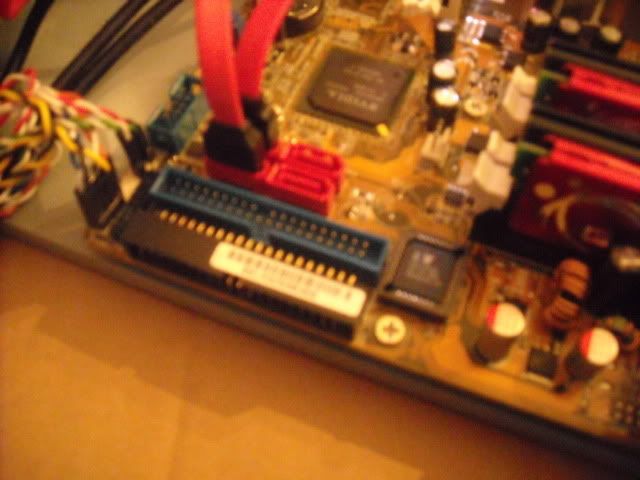
so i decided to get a new graphics card. When i went on to install it i came to find out that it's to big, well... more like to HDD cable is to big. While inspecting the motherboard i see that theres another place i can plug it in, pointing sideways. (well, sort of.) (It's the black one.)

Image

Do you think it's ok to plug it in to that one? Don't really want to fry any part of my computer.


It would be nice to get any kind of answer sometime soon.

Image

User avatar
cpinney
Ex-Staff
Posts: 5718
Joined: Sun Aug 26, 2007 8:34 am
Quick Reply: Yes
Location: Maine, USA
Contact:

Re: New Card is To Big

Post by cpinney »

first it would be good to know what kind of graphics card you have and what type it is (pci, agp, exc).

and by looking at it, i dont believe it would go in there but i dont know what kind of motherboard u have either, both of these peices of information would help :)
Image

User avatar
Midori
Veteran Member
Posts: 3425
Joined: Wed Mar 07, 2007 1:43 am
Quick Reply: Yes
Location: off topic

Re: New Card is To Big

Post by Midori »

cpinney wrote:first it would be good to know what kind of graphics card you have and what type it is (pci, agp, exc).

and by looking at it, i dont believe it would go in there but i dont know what kind of motherboard u have either, both of these peices of information would help :)


card: http://www.newegg.com/Product/Product.a ... 6814130328
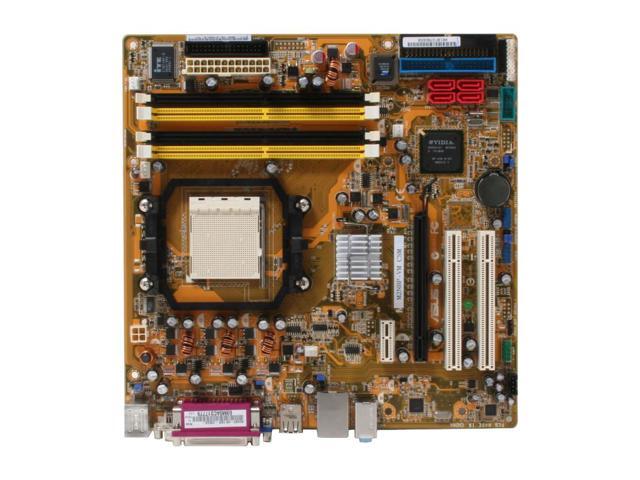
motherboard: http://www.newegg.com/Product/Product.a ... 6813131072


im pretty sure it can go in there, because i put it in just to check if it fits.
Image

User avatar
cpinney
Ex-Staff
Posts: 5718
Joined: Sun Aug 26, 2007 8:34 am
Quick Reply: Yes
Location: Maine, USA
Contact:

Re: New Card is To Big

Post by cpinney »

to be honest i have no idea how or if u got ur graphics card in the black port u showed.

Image

as u can see by the pic its a IDE connector :\

were u should be plugging it in is PCI express x16 slot below next to the other two pci slots. some tbh im kinda confused by what u have stated previously :?
Image

User avatar
Midori
Veteran Member
Posts: 3425
Joined: Wed Mar 07, 2007 1:43 am
Quick Reply: Yes
Location: off topic

Re: New Card is To Big

Post by Midori »

oh dear, i didn't explain it to well. yes, the card is in the pci-e slot but it's so long that the HDD cable won't fit into the blue socket, but that diagram says that the black one right above it will also work. so do you think it will be okay to boot it up?
Image

User avatar
cpinney
Ex-Staff
Posts: 5718
Joined: Sun Aug 26, 2007 8:34 am
Quick Reply: Yes
Location: Maine, USA
Contact:

Re: New Card is To Big

Post by cpinney »

wow thats a big ass card lol

anyway if it fits then yes why not, considering u have no other options lol
Image

User avatar
Midori
Veteran Member
Posts: 3425
Joined: Wed Mar 07, 2007 1:43 am
Quick Reply: Yes
Location: off topic

Re: New Card is To Big

Post by Midori »

cpinney wrote:wow thats a big ass card lol

anyway if it fits then yes why not, considering u have no other options lol


I'm just hoping i don't fry it.
Image

User avatar
cpinney
Ex-Staff
Posts: 5718
Joined: Sun Aug 26, 2007 8:34 am
Quick Reply: Yes
Location: Maine, USA
Contact:

Re: New Card is To Big

Post by cpinney »

shouldnt, considering u said they would both work, and that it fits in.
Image

User avatar
Midori
Veteran Member
Posts: 3425
Joined: Wed Mar 07, 2007 1:43 am
Quick Reply: Yes
Location: off topic

Re: New Card is To Big

Post by Midori »

cpinney wrote:shouldnt, considering u said they would both work, and that it fits in.


well i turned it on, came up with a black screen with that blinking white underline. so is something not getting enough power?

everything is plugged in and i don't know what to do...


what do i press for safe mode?


edit: im crying on the inside
Image

User avatar
cpinney
Ex-Staff
Posts: 5718
Joined: Sun Aug 26, 2007 8:34 am
Quick Reply: Yes
Location: Maine, USA
Contact:

Re: New Card is To Big

Post by cpinney »

hmm i dont know what u mean by blinking white underline.

it could be that your graphics card isnt in all the way try re-seeding it.
Image

User avatar
Midori
Veteran Member
Posts: 3425
Joined: Wed Mar 07, 2007 1:43 am
Quick Reply: Yes
Location: off topic

Re: New Card is To Big

Post by Midori »

cpinney wrote:hmm i dont know what u mean by blinking white underline.

it could be that your graphics card isnt in all the way try re-seeding it.


well, first im going to try starting up with my original card. just to make sure all the wires that i moved will work.
Image

User avatar
cpinney
Ex-Staff
Posts: 5718
Joined: Sun Aug 26, 2007 8:34 am
Quick Reply: Yes
Location: Maine, USA
Contact:

Re: New Card is To Big

Post by cpinney »

k sounds good.
Image

User avatar
Midori
Veteran Member
Posts: 3425
Joined: Wed Mar 07, 2007 1:43 am
Quick Reply: Yes
Location: off topic

Re: New Card is To Big

Post by Midori »

cpinney wrote:k sounds good.


wires work, so it has something to do with the card, i'll try re installing it tomorrow (whenever that is).

im getting output from the card im just not getting the output i want...
Image

User avatar
Downgraded
Hi, I'm New Here
Posts: 19
Joined: Fri Jul 18, 2008 6:42 am
Quick Reply: Yes
Location: Ohio

Re: New Card is To Big

Post by Downgraded »

Image
wait a minute.
are you trying to plug the cables which I have grouped in circle 1 into the black connector which I have labled circle 2?

If so, I wouldn't be suprised if you fried something. You are trying to plug SATA cables into an IDE connector.

User avatar
cpinney
Ex-Staff
Posts: 5718
Joined: Sun Aug 26, 2007 8:34 am
Quick Reply: Yes
Location: Maine, USA
Contact:

Re: New Card is To Big

Post by cpinney »

i dont believe he is

unless i misunderstood him... again :?
Image

User avatar
Downgraded
Hi, I'm New Here
Posts: 19
Joined: Fri Jul 18, 2008 6:42 am
Quick Reply: Yes
Location: Ohio

Re: New Card is To Big

Post by Downgraded »

I think he is. Well it's a totally different connector. Ther would explain the black screen with the white flashing cursor at the bottom. I hope he didn't end up frying his shit.

User avatar
Midori
Veteran Member
Posts: 3425
Joined: Wed Mar 07, 2007 1:43 am
Quick Reply: Yes
Location: off topic

Re: New Card is To Big

Post by Midori »

My god I've most likely explained this wrong.

I know where the wires go, they work, it has something to do with the card. it being to big isn't the issue anymore.

edit: forgot to add. nothing is fried as far as i know, and it runs just fine... as far as i know.
Image

User avatar
cpinney
Ex-Staff
Posts: 5718
Joined: Sun Aug 26, 2007 8:34 am
Quick Reply: Yes
Location: Maine, USA
Contact:

Re: New Card is To Big

Post by cpinney »

ok so ur problem is now your graphics card just isnt working?
Image

User avatar
Disturbed
Regular Member
Posts: 217
Joined: Tue Jul 03, 2007 7:31 pm
Quick Reply: Yes
Location: I can has location?

Re: New Card is To Big

Post by Disturbed »

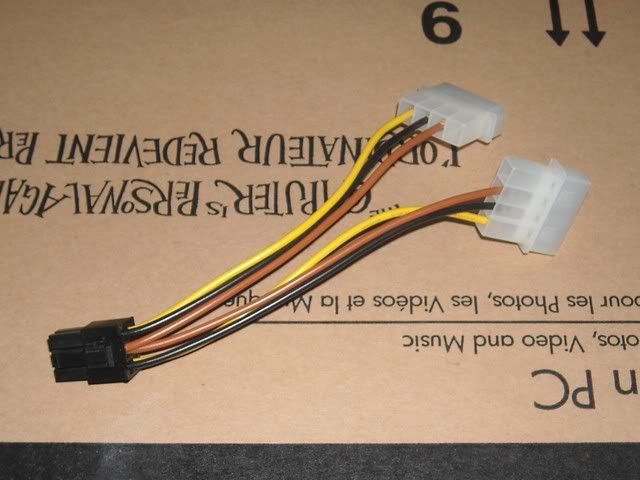
Make sure that you plugged in the pci-express power connector into the back of your video card.
If your power supply doesn't have a pci-express power connector then use the molex to pci-express adapter that came with your video card. Also make sure that your power supply has enough amps on the 12v rail. You can check by looking at your power supply and seeing what it says for 12v.
Premium Tickets, Letting rich kids win since 2007.

User avatar
Midori
Veteran Member
Posts: 3425
Joined: Wed Mar 07, 2007 1:43 am
Quick Reply: Yes
Location: off topic

Re: New Card is To Big

Post by Midori »

cpinney wrote:ok so ur problem is now your graphics card just isnt working?


Yes, that's the problem now.

Disturbed wrote:Make sure that you plugged in the pci-express power connector into the back of your video card.
If your power supply doesn't have a pci-express power connector then use the molex to pci-express adapter that came with your video card. Also make sure that your power supply has enough amps on the 12v rail. You can check by looking at your power supply and seeing what it says for 12v.


Don't know what adapter it's called but this is what i got:

Image
ignore the box, that's for my moms computer.

plugged that in (yes, both of them)

goes, to a blank screen with a blinking white underscore in the top left.


i wish this keyboard would let me get into safe mode.


Edit: Oh, and power supply has +12v and -12v on it. so i geuss it does.
Image

User avatar
Disturbed
Regular Member
Posts: 217
Joined: Tue Jul 03, 2007 7:31 pm
Quick Reply: Yes
Location: I can has location?

Re: New Card is To Big

Post by Disturbed »

Yea they all have +12 and -12v, I need to know what it says under or above it.
Ex: 27a
Premium Tickets, Letting rich kids win since 2007.

User avatar
Midori
Veteran Member
Posts: 3425
Joined: Wed Mar 07, 2007 1:43 am
Quick Reply: Yes
Location: off topic

Re: New Card is To Big

Post by Midori »

Disturbed wrote:Yea they all have +12 and -12v, I need to know what it says under or above it.
Ex: 27a


under +12v it says 19A and under -12v it says 0.8A
Image

User avatar
Disturbed
Regular Member
Posts: 217
Joined: Tue Jul 03, 2007 7:31 pm
Quick Reply: Yes
Location: I can has location?

Re: New Card is To Big

Post by Disturbed »

What are the specs of the rest of your system?
Premium Tickets, Letting rich kids win since 2007.

User avatar
Midori
Veteran Member
Posts: 3425
Joined: Wed Mar 07, 2007 1:43 am
Quick Reply: Yes
Location: off topic

Re: New Card is To Big

Post by Midori »

Disturbed wrote:What are the specs of the rest of your system?


Operating System: Windows XP Home Edition (5.1, Build 2600) Service Pack 2
Processor: AMD Athlon(tm) 64 X2 Dual Core Processor 5400+, MMX, 3DNow (2 CPUs), ~2.8GHz
Memory: 3070MB RAM
Page File: 592MB used, 4362MB available
Chip type: GeForce 7600 GT
Display Memory: 256.0 MB
Current Mode: 1280 x 1024 (32 bit) (60Hz)
Image

User avatar
Disturbed
Regular Member
Posts: 217
Joined: Tue Jul 03, 2007 7:31 pm
Quick Reply: Yes
Location: I can has location?

Re: New Card is To Big

Post by Disturbed »

You're definitely going to need a new power supply.
Yours doesn't have two +12v's does it?

http://www.newegg.com/Product/Product.a ... 6817139003

That would be a good upgrade for you considering that your power supply
is in desperate need of an upgrade.
Premium Tickets, Letting rich kids win since 2007.

User avatar
Midori
Veteran Member
Posts: 3425
Joined: Wed Mar 07, 2007 1:43 am
Quick Reply: Yes
Location: off topic

Re: New Card is To Big

Post by Midori »

Disturbed wrote:You're definitely going to need a new power supply.
Yours doesn't have two +12v's does it?

http://www.newegg.com/Product/Product.a ... 6817139003

That would be a good upgrade for you considering that your power supply
is in desperate need of an upgrade.


... another thing i need to upgrade :/


i know this is a stupid question but will it fit in the case i have now?
Image

User avatar
Disturbed
Regular Member
Posts: 217
Joined: Tue Jul 03, 2007 7:31 pm
Quick Reply: Yes
Location: I can has location?

Re: New Card is To Big

Post by Disturbed »

What kind of case or what computer do you have?
If your power supply says ATX Power Supply on the side it will fit definitely.
Premium Tickets, Letting rich kids win since 2007.

User avatar
Midori
Veteran Member
Posts: 3425
Joined: Wed Mar 07, 2007 1:43 am
Quick Reply: Yes
Location: off topic

Re: New Card is To Big

Post by Midori »

Disturbed wrote:What kind of case or what computer do you have?
If your power supply says ATX Power Supply on the side it will fit definitely.


oddly enough my computer isn't even sold on newegg anymore


this case though

http://www.newegg.com/Product/Product.a ... 6811119118


the power supply is different from the one in that case.
Image

User avatar
Disturbed
Regular Member
Posts: 217
Joined: Tue Jul 03, 2007 7:31 pm
Quick Reply: Yes
Location: I can has location?

Re: New Card is To Big

Post by Disturbed »

Yea the power supply will definitely work.
It has a PCI Express connector for your video card so you don't
have to use that adapter either.
Premium Tickets, Letting rich kids win since 2007.

User avatar
Midori
Veteran Member
Posts: 3425
Joined: Wed Mar 07, 2007 1:43 am
Quick Reply: Yes
Location: off topic

Re: New Card is To Big

Post by Midori »

this is going to be the most expensive upgrade i've done... and all for a new monitor :roll:
Image

Post Reply

Return to “Technical Help”


