Page 1 of 4

Silkroad on Linux Ubuntu. -20/9/08 Update-

Posted: Thu Jul 24, 2008 2:41 pm
by Sovereign
Hello Everyone.

I have decided to update my main tutorial as it really needs it.
This update should pretty much cover everything there is to know about how to install Ubuntu + Silkroad.
------------------------------------------------------------------------------------------------------------------------
Installing Ubuntu

1. Install Ubuntu using Wubi. http://wubi-installer.org/index.php

2. Its quite straightforward, just run Wubi, follow the instructions and it will install Ubuntu for you.

3. After Wubi has finished downloading Ubuntu, reboot your system, and this time in the boot menu it should have 2 options...Windows and Ubuntu.

4. Select Ubuntu and let it install.

You have now installed Ubuntu. Congrats.

Note: In Wubi, it will ask you to fill in a user name and password. Make sure you remember what you put typed, as you will need this to login to Ubuntu.

------------------------------------------------------------------------------------------------------------------------

Installing Silkroad

1. Even before installing Silkroad you will need a program that will let you install it.

2. You need to download Wine. http://www.winehq.org/site/download-deb

3. Once you have installed it and restarted your computer, its time to install Silkroad.

4. After downloading the Silkroad installer right click on the exe file and choose “Run with Wine Windows Program Loader”. If it doesn't say that then you need to manually find it by right clicking then press “Open with other Application”

5. The Silkroad installer should now be running, and after installing and updating, Silkroad will be ready to play.

6. If you need to use the manual patch to update your Silkroad to 1.158 then make sure you put the files inside the Silkroad folder in your virtual C Drive.


Notes:


In order to install and play Silkroad make sure you have done the following:

-Put Wine compatibility on Windows 98 mode

-If you get a Direct3D error when running Silkroad then go to System > Administration > Hardware Drivers. In the hardware menu, make sure you enable you graphics card if it is disabled. Remember to restart your system after enabling your graphics card.

-When in game you can turn the settings to maximum, but make sure you turn off Water Reflections, otherwise you will see an annoying graphics glitch.

-You may notice that the font inside Silkroad is different on Ubuntu compared to Windows. If you do not like the font then you can change it by doing: Applications > Accessories > Terminal and inside the terminal write :

Code: Select all

 sudo apt-get install msttcorefonts


-Silkroad and most other games WILL NOT WORK if you have an ATI or IntelChipset Graphics Cards.


Thats it. If you have followed these steps correctly then you will now be able to play Silkroad on Ubuntu. As always if you have any questions then post and i will answer


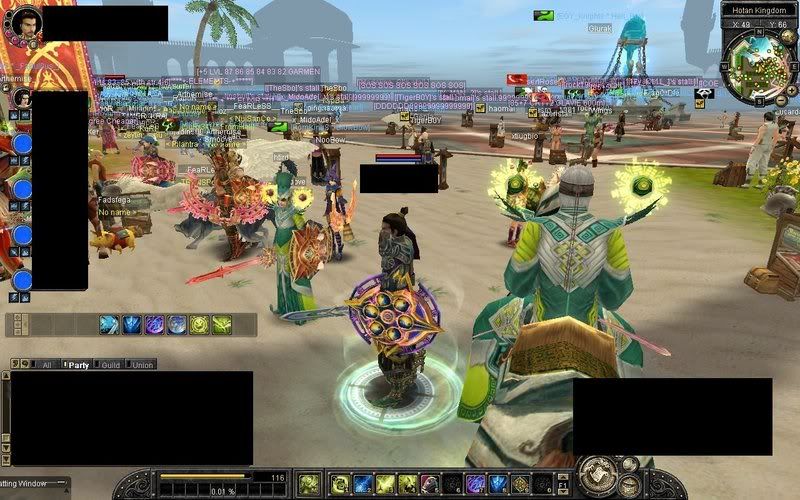
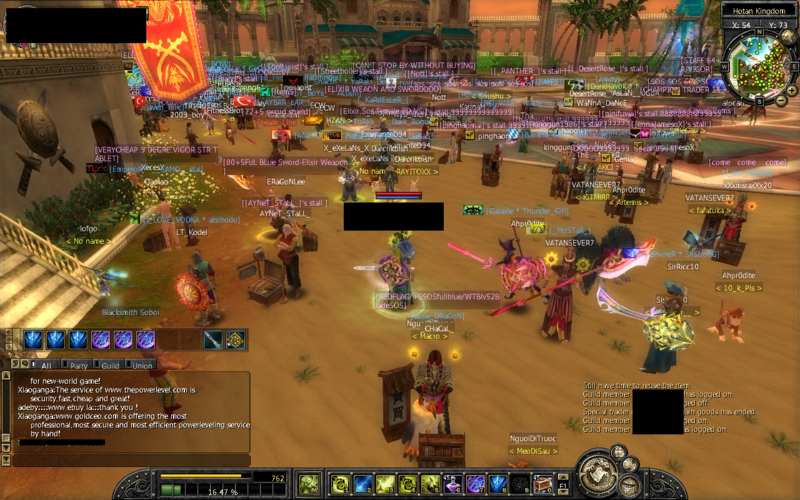
Here is screen shot to show how the difference between Windows and Ubuntu. I would take a video, but recording a video on Ubuntu is quite hard.

Both screen shots are at the same resolution and around the same place in hotan.

Vista (Before) Running on Low Settings. No Bloom. Low Fps
Image

Ubuntu (After) <Notice the change in font. Running On Max Settings, With bloom. High FPS
Image

So thats the end of this little guide. I hope it inspired some of you to try Ubuntu.

Thanks...

Re: Silkroad on Linux Ubuntu.

Posted: Thu Jul 24, 2008 3:57 pm
by Stress
I'm definitely going to try Ubuntu. Thought about it's compatibility with SRO before, and now that you've posted the guide, I might actually try it with no remorse.

Thank you :)

Re: Silkroad on Linux Ubuntu.

Posted: Thu Jul 24, 2008 4:22 pm
by Deathsythe
Awesome. My second laptop only has Ubuntu on it and I always wanted to have 2 clients running so now I can stall and play at the same time. Thanks :)

Re: Silkroad on Linux Ubuntu.

Posted: Thu Jul 24, 2008 5:19 pm
by Sovereign
Cool :) glad some people are interested.
At the moment i am working on how to get Wegame or Fraps to work with Ubuntu. As i think some nice movies could be made with the Ubuntu OS, due to the smoothness that it gives Silkroad.

I will post some updates if i get anywhere.

Re: Silkroad on Linux Ubuntu.

Posted: Thu Jul 24, 2008 5:55 pm
by Stress
Idk... it's weird. I can't seem to find my Silkroad partition when I install Ubuntu. Maybe I should try installing to a different partition than the one I installed it initially?
My Ubuntu and Silkroad were both in the same partition.

Also, I couldn't get the program to install. I just can't figure out how things work under Ubuntu.

I could use a little help on these two issues. :)

Re: Silkroad on Linux Ubuntu.

Posted: Thu Jul 24, 2008 6:40 pm
by Sovereign
Ok well im not sure about the first question, tell me some more info:
-Is Ubuntu and Windows on the same computer?

As for the second point.

1. Go to wine website then to download section. http://www.winehq.org/site/download-deb
2. Im presuming you using Ubuntu. So click on the Ubuntu icon.
3. On this page around half way down there is a line that says
If you are using Ubuntu, you can now install Wine by clicking this link.

4. Click the link and let Wine install.

Try from there. If you run into another problem then say :)

Re: Silkroad on Linux Ubuntu.

Posted: Sun Jul 27, 2008 8:00 am
by HawaiianMix
you could always just run vista in a virtual machine if you cant get wine to work in any of the buntus

i personally run sro in Xubuntu ... nice guide btw


~~~ EDIT ~~~

You mention the fonts in Ubuntu. If you need microsoft fonts, find your terminal and put this in it

Code: Select all

sudo apt-get install msttcorefonts


might ask you to put in your password ( it will be invisible as you type it )

Re: Silkroad on Linux Ubuntu.

Posted: Tue Jul 29, 2008 1:54 am
by Sovereign
I heard that using a virtual machine isn't the best idea, and in the long run it ruins your computer. Im not sure though.

Re: Silkroad on Linux Ubuntu.

Posted: Tue Jul 29, 2008 1:58 am
by HawaiianMix
what do you mean by "ruin" ... i have seen little problems with it .... and if all else fails, you can always dual boot ^__^

Re: Silkroad on Linux Ubuntu.

Posted: Tue Jul 29, 2008 12:51 pm
by DutchReflex
Still trying out. I can't get internet connection :?

Re: Silkroad on Linux Ubuntu.

Posted: Tue Jul 29, 2008 2:04 pm
by poffka
Hmm..i have problems with Wine :/ im get D3D9 Application error (could not findany compatible Direct3D) all time when im loading SRO .. any suggestions ?

Thanks :)

Re: Silkroad on Linux Ubuntu.

Posted: Wed Jul 30, 2008 6:32 pm
by pr0klobster
You might consider the other hurdle, which is not all Ubuntu distros will correctly install all 3d cards. 7.04 should work, but not always.

ATI drivers in Linux are a pain, they are why I switched to Nvidia.

Re: Silkroad on Linux Ubuntu.

Posted: Thu Jul 31, 2008 7:53 am
by juesi
Nice guide, but is wine freeware? :O Thought u would have pay to use it?

Re: Silkroad on Linux Ubuntu.

Posted: Thu Jul 31, 2008 9:02 am
by Rainigul
Nope. It's freeware. So enjoy.

Re: Silkroad on Linux Ubuntu.

Posted: Fri Aug 01, 2008 10:20 am
by HawaiianMix
pr0klobster wrote:You might consider the other hurdle, which is not all Ubuntu distros will correctly install all 3d cards. 7.04 should work, but not always.

ATI drivers in Linux are a pain, they are why I switched to Nvidia.


lol 7.04? I think you need to update since we are on 8.04 and in alpha for 8.10. :shock:

Btw, if you get an intel card on your system you wont have to worry about correctly installing drivers.

Re: Silkroad on Linux Ubuntu.

Posted: Sun Aug 03, 2008 8:04 am
by simi
I tried this but there is sth wrong with it. Graphics re weird and game is very laggy. Also sometimes a black screen appears.

http://img232.imageshack.us/img232/3337 ... ot1qa4.png
http://img227.imageshack.us/img227/6921 ... ot2hp5.png

Re: Silkroad on Linux Ubuntu.

Posted: Sun Aug 03, 2008 1:25 pm
by Maggi
can Silkroad run on BSD :)

Re: Silkroad on Linux Ubuntu.

Posted: Mon Aug 04, 2008 3:02 pm
by Rainigul
simi wrote:I tried this but there is sth wrong with it. Graphics re weird and game is very laggy. Also sometimes a black screen appears.

http://img232.imageshack.us/img232/3337 ... ot1qa4.png
http://img227.imageshack.us/img227/6921 ... ot2hp5.png


Make sure you have the latest drivers for your graphics card. Also if your using an ATI card, then that could be the problem, as Ubuntu dosen't always support ATI.
Its probably just a hardware problem, try testing on another system.

Re: Silkroad on Linux Ubuntu.

Posted: Tue Aug 05, 2008 1:21 am
by HawaiianMix
Maggi wrote:can Silkroad run on BSD :)


yes it can .... if any one requests i can write a ubuntu guide to set up virtual box to work with linux + windows

Re: Silkroad on Linux Ubuntu.

Posted: Tue Aug 05, 2008 2:44 pm
by pr0klobster
HawaiianMix wrote:
pr0klobster wrote:You might consider the other hurdle, which is not all Ubuntu distros will correctly install all 3d cards. 7.04 should work, but not always.

ATI drivers in Linux are a pain, they are why I switched to Nvidia.


lol 7.04? I think you need to update since we are on 8.04 and in alpha for 8.10. :shock:

Btw, if you get an intel card on your system you wont have to worry about correctly installing drivers.


I like stability...7.04 was good to me. I need to update my system, for sure, but I'm too busy having fun in Silkroad.

Intel graphics card...? No thanks. They typically don't have the power to play at my resolution (1440 by 900, or 1024 by 768 windowed).

Re: Silkroad on Linux Ubuntu.

Posted: Tue Aug 05, 2008 7:50 pm
by Rainigul
wtf, using intel graphics cards is retarded. They don't have any power. Just get an 8800 from Nvidia and your set for these days. Its getting cheaper to, and ubuntu supports it.

Re: Silkroad on Linux Ubuntu.

Posted: Wed Aug 06, 2008 1:40 am
by 360apples
well i successfully installed it. Buuutttt my wireless internet won't work because its not compatible to ubuntu so i won't bother lol but it works..

Re: Silkroad on Linux Ubuntu.

Posted: Wed Aug 06, 2008 4:06 pm
by Rainigul
360apples wrote:well i successfully installed it. Buuutttt my wireless internet won't work because its not compatible to ubuntu so i won't bother lol but it works..


Exactly the same with me.

Re: Silkroad on Linux Ubuntu.

Posted: Wed Aug 06, 2008 7:32 pm
by 360apples
Rainigul wrote:
360apples wrote:well i successfully installed it. Buuutttt my wireless internet won't work because its not compatible to ubuntu so i won't bother lol but it works..


Exactly the same with me.


if you find a solution lemme know, if i find i will also tell you.

just for the record

Compaq Presario V6000

i have this wireless switch beside my ear phone and Mic input, if it is functioning properly or on it flashes blue if it is disabled and not working it is orange.

basically if i use wired internet it will work.

Re: Silkroad on Linux Ubuntu.

Posted: Fri Aug 08, 2008 3:31 am
by Sovereign
Well Ubuntu does have some problems with some hardware. Im not very sure about what works and what dosen't but try searching for it on here.

http://ubuntuforums.org/forumdisplay.ph ... cbe0&f=332

If you can't find anything about your problem on there then i suggest you make a topic and ask on there.

As for the problem with not being able to connect with a wireless connection due to hardware issues, then i suggest that you try a wired connection and see if that works. Thats all i can think of to solve it.

Keep posting more Q&A's

Re: Silkroad on Linux Ubuntu.

Posted: Mon Aug 11, 2008 3:55 pm
by foudre
let me go ahead and assume you are using nvidia if you are using ati then i'd be surprised, and half tempted to try the newest ubuntu and wine (i doubt things have improved enough for ati in the past 5 months since i stoped using it)

Re: Silkroad on Linux Ubuntu.

Posted: Mon Aug 11, 2008 4:10 pm
by I Pk I
The wireless may not be working because your drivers get uninstalled sometimes jsut got to the site where you got your computer from :

ex. if you got it from hp goto http://www.hp.com

and go in driver section and get the Wireless Driver if that dosent work then it is not Linux Compatible as you said.

Re: Silkroad on Linux Ubuntu.

Posted: Mon Aug 18, 2008 7:44 pm
by Fai
hi guys
been using ubuntu for a while now but mostly for surfing n media management. had to install windows for games. was really glad to see this post

tried the steps listed above but the game wasnt running smoothly. seems like a graphics driver issue (had the same issue on windows til i installed the drivers)

any ideas where i can get the graphics drivers? im using onboard Intel G31/G33 chipset. the intellinux site said the latest linux shld already have it but i guess not..

hope u guys can help.. really hate to switch to windows juz to play sro

Re: Silkroad on Linux Ubuntu.

Posted: Tue Aug 19, 2008 4:17 pm
by foudre
i just got a new video card and it works well on linux now, i can even have the game running with compiz (i miss beryl manager this compiz fusion sucks, ok its better at most everything only thing pissing me off is at least with beryl i could find the options for my title bars other then just text)

to the guy above, idk of any one getting it to work not using nvidia, i had a decent ati card before this and all the objects looked like stain glass collection of flat panels, but the game ran, got a new card and now it works well, i have it taking up a corner of one of my desktops for stalling, i mean the game is running well even with compiz running, you can try looking around the ubuntu main forums and ask if any one else had any luck with the same card (i know its internal and not technically a card but what ever). If you dont' want to switch to windows i recomend a nvidia card if you are willing to buy one.

edit:

ya the font is a little messed up but you get used to it, the good thing is now i can see the differance between I and l

Sovereign wrote:Ok well im not sure about the first question, tell me some more info:
-Is Ubuntu and Windows on the same computer?

As for the second point.

1. Go to wine website then to download section. http://www.winehq.org/site/download-deb
2. Im presuming you using Ubuntu. So click on the Ubuntu icon.
3. On this page around half way down there is a line that says
If you are using Ubuntu, you can now install Wine by clicking this link.

4. Click the link and let Wine install.

Try from there. If you run into another problem then say :)


or the faster easier way, open a terminal type:
sudo apt-get install wine

after you tell it yes and it downlaods and installs type
winecfg
winecfg sets up wine for the current user, and if you ever need to mess with wine settings you can access it from typing winecfg again, make aplication specific options, graphic options, a cool one is using the virtual desktop so all windows programs will run in a virtual desktop rather then trying to act normally
and wine is good to go

Re: Silkroad on Linux Ubuntu.

Posted: Tue Aug 19, 2008 7:35 pm
by Sovereign
Hi everyone,

Glad everyone is taking interest.
For people having problems with Graphics ingame the only advice i can give you is...

-Only use an Nvidia card. 7 and 8 series cards work nicely.

-Most ATI and Intel Integrated Graphics or anything that isn't Nvidia will most likely have a problem. Thus resulting in you not being able to view the graphics correctly regardless of weather you have the latest drivers install or now.

Yeah so thats the truth on the matter. If you want to run Silkroad on Ubuntu then you need an Nvidia Card. Go pick one up you can get a cheap one for not so much. You dont even need an Nvidia 8800. Even a 8400 will be enough, as Ubuntu magically makes the game run so much better.

Thanks for all the feedback. Ill update my first post with all this info some time tonight.