How To Speed Up Your PC and increase SRO performance (pics)

Here you can post guides and tutorials you have written for Silkroad Online. If submitting a guide from another forum, please post credit to the author.
User avatar
Poochu
Active Member
Posts: 550
Joined: Thu Jun 07, 2007 8:37 pm
Quick Reply: Yes
Location: England

How To Speed Up Your PC and increase SRO performance (pics)

Post by Poochu »

THIS TUTORIAL IS BY ME AND ME ONLY, THE ONLY PLACES ALLOWED TO USE THIS ARE SROFORUMS ROTTENEGGS.COM AND NSWAREZ. IF I SEE IT ON YOUR WEBSITE, SAY GOODBYE TO IT.
-----------------------------------------------------------


this tutorial shows how to increase your pc performance, hardrive space, load times, and much more, also, everything in it is

free to download and use, although i will suggest some paid alternatives that are better. Now, to the tutorial:

you will need to download the following programs, if you have any of them, make sure you have the most recent update/verison of

them, as out of date sofware is as good as no software. I will explain what these programs do aswell:


JKDEFRAG - http://www.kessels.com/JkDefrag/

jkdefrag is a freeware simple to use defragmentation program, all you do is run the jkdefrag executable and let it do its thing.

an explanation of defragmentation - for example, when you download a program, it will put itself into a space into your

harddrive, then when you delete that program, it will leave a space where it was, making a virtual "hole" in your hardrive,

making it messy. then when you download another file, it will put part of it in the "hole" left from the last download and the

rest somewhere else. this will continue and continue until your data is messy and spread all over the harddrive. When your

hardrive is read, it is done in rows, and because of the data in lots of different places, it takes longer to load as it has to

read more rows.
When you defrag, it moves the data to be next to each other, so the data is organised and in rows, so when its read, its alot

quicker to load. thus making your pc faster. this is why you should defragment every month or so.

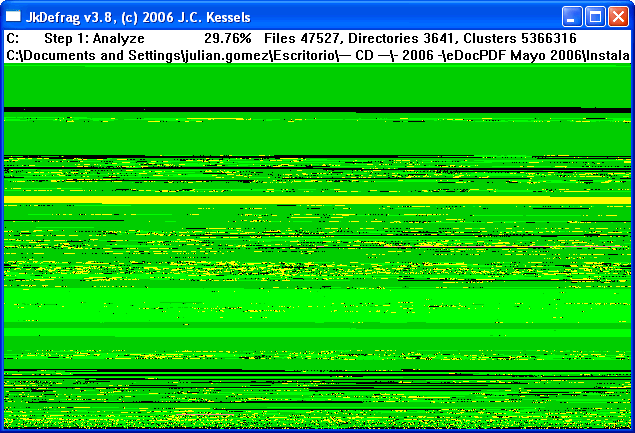
here is an example of a cluttered messy hardrive (notice the holes, and unorganised data)
Image


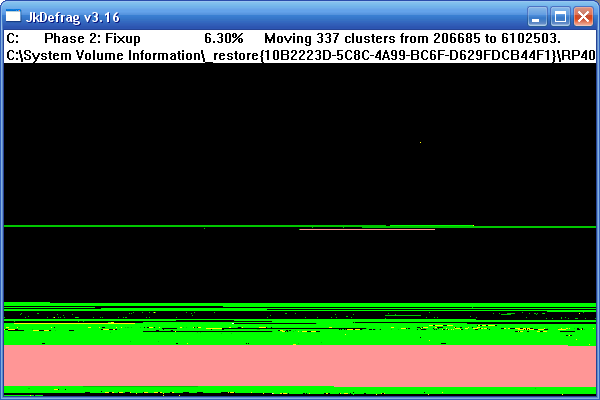
and here is an example of a clean organised hardrive (this is my drive i use for music, notice theres hardly any holes, and the

data is in neat rows)
Image


to use JKDefrag, all you do is run the jkdefrag.exe, and wait for it to finish.


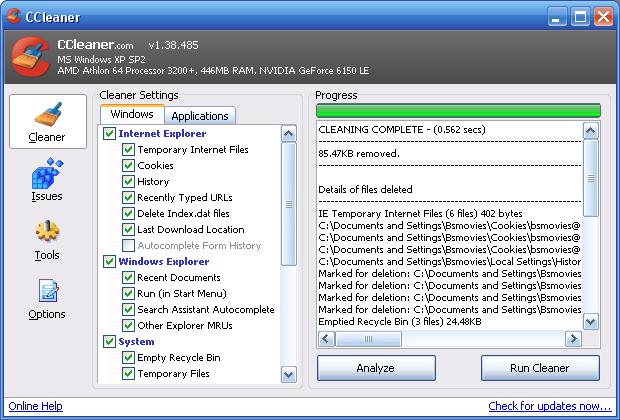
ccleaner (formerly known as crap cleaner) - http://www.ccleaner.com/

this is another freeware piece of software that is good at freeing up space by removing unused and useless files.

to use this, all you really need to do is click analyze, it will speed up the cleaning process, and show how much space can be

freed up (usually on your first run you free 100mb+)
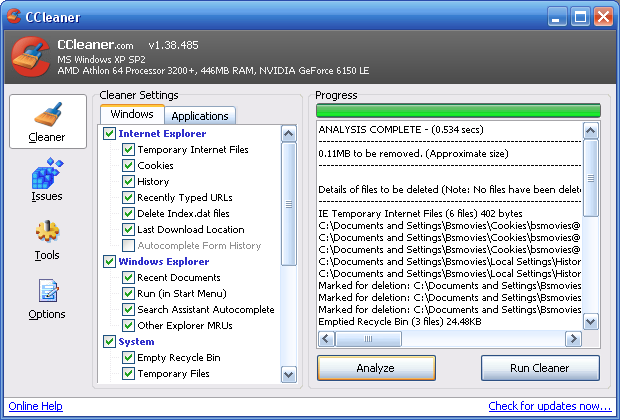
Image

then click run cleaner, and click ok, and it will clean, depending on your system power this can be anywhere up to 10 minutes.

when done it will show how much space it has freed up (mine is only a small amount, as it was running on one of my hardrives

with almost nothing on it).Image

now on ccleaner, click issues, make sure all the boxes are selected, and scan
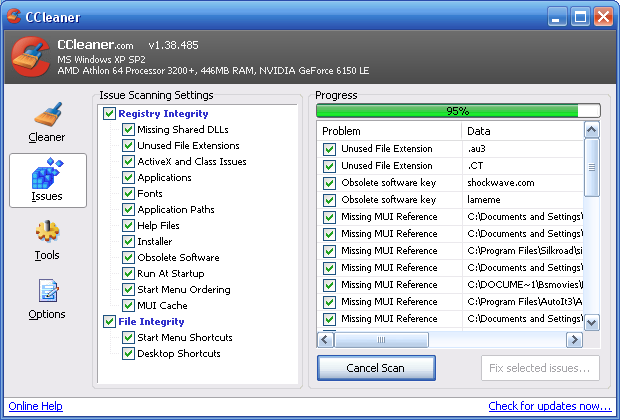
Image

when the menu pops up, select fix all selected issues and then wait for it to complete
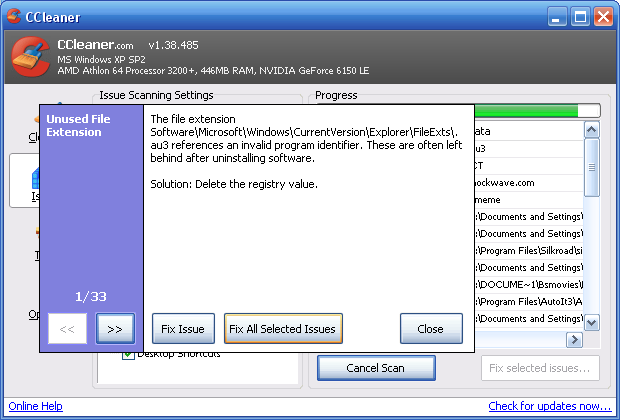
Image


a-squared antispyware (A2) free - http://www.emsisoft.com/en/software/free/

one of the best freeware anti spyware programs, also one of the fastest.
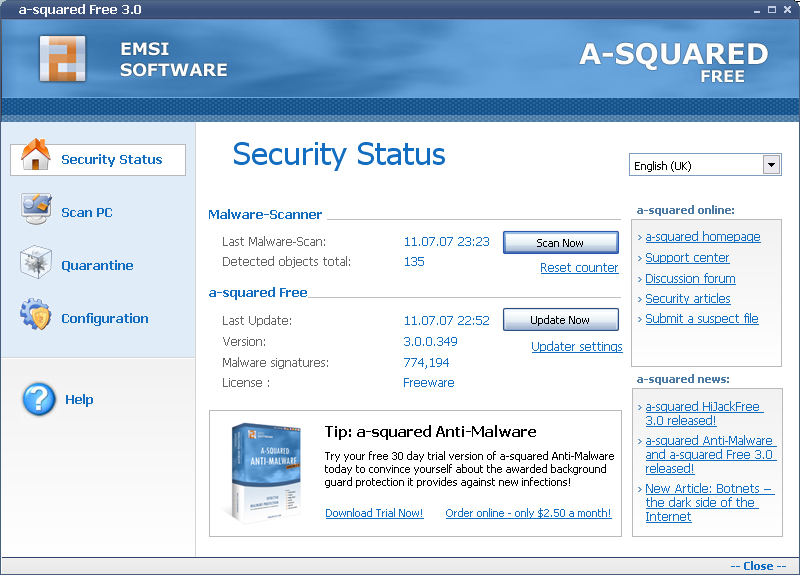
Image
all you need to do is click update and makes sure it is fully updated, then click scan now
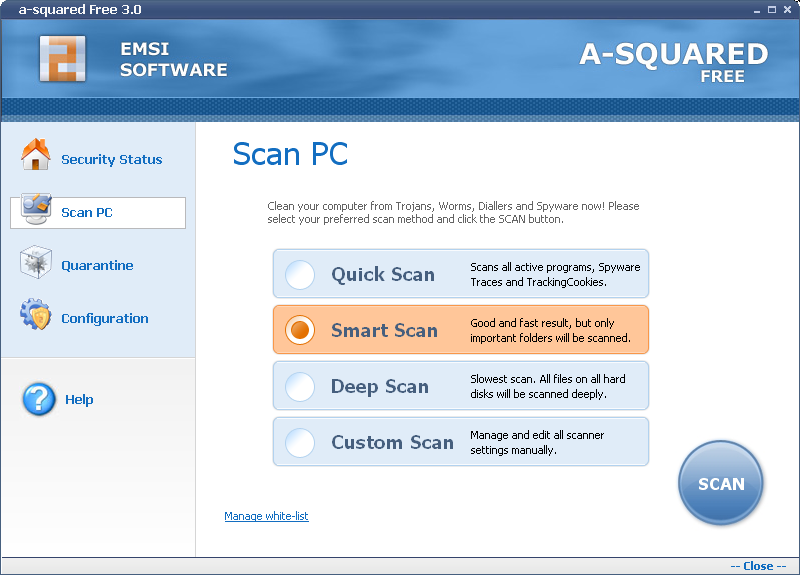
Image

then use the following, quick scan, then do a smart scan, this should only take 10 minutes, and will detect most spyware and

malware. once a month you should do a deep scan, which will only takes 20 minutes or less.


avg antivirus free - http://www.download.com/3000-2239_4-10703202.html

this is simple enough and dosent require instructions, its a free antivirus and on demand virus scanner, just install it, let it

update, and scan every month.

other free av alternatives:

avast! - http://www.avast.com/eng/avast_4_home.html

clamwin - http://www.clamwin.com/


------paid alternative----- a better and more reliable paid alternative is nod32 antivirus, do not use norton, as it is

unreliabe, it has a name and thats it, due to it giving out false alarms, locking out pc's, and using most of your processor

power. also, viruses are more likely to get past norton, as norton is the biggest antivirus around, hackers make their viruses

purposefully to get past nortons defences, as its what the target will most likely be using.


zone alarm - http://www.download.com/3000-2092-10039884.html

for a firewall i would recomend zonelabs zonealarm firewall free, it is a simple firewall, which uses low memory and only

requires you to allow or deny suspect programs, as with avg, this requires no pictures or tutorial.
Started playing again, on CSRO now though, not ISRO (:
Hybrid - 5x 70:70 Hybrid - Ocean[VIP] CSRO
_EXPO_ - 7x 1H Warrior Cleric - ISRO - QUIT

User avatar
SCArchon
Regular Member
Posts: 233
Joined: Mon Apr 09, 2007 2:25 pm
Quick Reply: Yes
Location: Aege
Contact:

Post by SCArchon »

(claps) good guide, i could do with it, i was wondering why my computer is still laggy even after i delete stuff :D
Image
PK2 lover
Thank you HyorunmarouZ for signature =)

User avatar
JeSsi3JaiJai
Regular Member
Posts: 269
Joined: Sat Dec 09, 2006 8:03 am
Quick Reply: Yes
Location: Venice

Post by JeSsi3JaiJai »

what's wrong with teh window version of defragmentation, i always use the window version.....

Edit: but anyway, good job, this is good guide for those who dont watn to use the window one..
Venice: WTB 3d SOSun Shield, Leave message to NYPD
Image Image Image

Lith
Active Member
Posts: 565
Joined: Mon Jan 15, 2007 10:08 pm
Quick Reply: Yes
Location: Lulz

Post by Lith »

Too bad that your notice won't do a thing if websites copy your guide anyways. It's a crappy guide overall, no offense why use another defrag program? Just use Window's Defrag, Spybot S&S, and Ad-Aware.

They work and both Spyware systems are known well.
<<banned from SRF for moderator disrespect and rules violations. -SG>>

User avatar
Crumpets
Forum Legend
Posts: 7800
Joined: Mon Aug 14, 2006 4:58 pm
Quick Reply: Yes
Location:         

Post by Crumpets »

JeSsi3JaiJai wrote:what's wrong with teh window version of defragmentation, i always use the window version.....

Edit: but anyway, good job, this is good guide for those who dont watn to use the window one..


Becasue you can do windows defrag 321087234-3287 times and it will never get rid of it all. I personally prefer DiskKeeper for defrags .. but I'll try out your alternative.
<< banned for being a constant problem. -cin >>

User avatar
Poochu
Active Member
Posts: 550
Joined: Thu Jun 07, 2007 8:37 pm
Quick Reply: Yes
Location: England

Post by Poochu »

windows defrag is slow and will not move all files.


it is windows, so it dosent touch windows installation files, update files etc.

and ive used the software in the guide my pc shop put on our custom build pc.s
Started playing again, on CSRO now though, not ISRO (:
Hybrid - 5x 70:70 Hybrid - Ocean[VIP] CSRO
_EXPO_ - 7x 1H Warrior Cleric - ISRO - QUIT

BuddahBless
Active Member
Posts: 998
Joined: Sat May 19, 2007 6:41 pm
Quick Reply: Yes
Location: Uranus

Post by BuddahBless »

LoL I use O&O Defrag. The windows defragmenter sucks.
<<banned from SRF for bot admission. -SG>>

User avatar
hadioz2004
Regular Member
Posts: 292
Joined: Mon Dec 18, 2006 11:58 pm
Quick Reply: Yes
Location: Eldorado

Post by hadioz2004 »

Sticky in my opinion :)
Farewell SG *sniff sniff*

feba
Valued Member
Posts: 356
Joined: Thu Jul 12, 2007 1:44 pm
Quick Reply: Yes
Location: odin
Contact:

Post by feba »

this would be interesting if it were actual performance tips for SRO, like "change this config file to "off" and your FPS should go up noticeably", as it is this is more "how to deal with Windows being crap."
Image
Wii #: 4818-7153-8518-3854

cin

Post by cin »

stickied in big sticky chapter "Other"

User avatar
Millenium
Ex-Staff
Posts: 2732
Joined: Tue Oct 24, 2006 6:36 pm
Quick Reply: Yes
Location: Waterloo
Contact:

Post by Millenium »

Great guide! :D

I can't believe I was noob enough to have used Windows Defrag all these years!
DID YOU KNOW? Milly has retired!!!!


Status: Into Minecraft

ImageImage

User avatar
Poochu
Active Member
Posts: 550
Joined: Thu Jun 07, 2007 8:37 pm
Quick Reply: Yes
Location: England

Post by Poochu »

feba wrote:this would be interesting if it were actual performance tips for SRO, like "change this config file to "off" and your FPS should go up noticeably", as it is this is more "how to deal with Windows being crap."


thats how to increase silkroad performance within itself.

but seriously, following this tutorial WILL DEFINETLY give your silkroad a performance boost.

it only wont if you have tidy hardrives, or enough space, and clean pc etc.
Started playing again, on CSRO now though, not ISRO (:
Hybrid - 5x 70:70 Hybrid - Ocean[VIP] CSRO
_EXPO_ - 7x 1H Warrior Cleric - ISRO - QUIT

User avatar
Temptation
Active Member
Posts: 657
Joined: Wed Jan 03, 2007 6:50 am
Quick Reply: Yes
Location: California

Post by Temptation »

WOW I just used CCleaner and deleted 1k MB of stuff. Thanks!

User avatar
Chief
Common Member
Posts: 102
Joined: Thu Jul 20, 2006 5:17 am
Quick Reply: Yes
Location: Xian

Post by Chief »

Hmm, i am really interested in using this guide, but i have windows Vista... would those software work on vista..?

also, umm how much did it speed up your SRO? maybe 3-4 FPS??

BTW, this is my 100th post :D
Image
Image

User avatar
DeCepTiCons
Common Member
Posts: 116
Joined: Fri Jul 13, 2007 5:17 am
Quick Reply: Yes
Location: Alexander

Post by DeCepTiCons »

cool

User avatar
hootsh
Active Member
Posts: 541
Joined: Wed Jun 13, 2007 9:15 am
Quick Reply: Yes
Location: Cairo, Egypt

Post by hootsh »

Thanks never knew about the CCleaner or the a-squared Free but i think there are lots of programs that defragment they all look the same to me including the windows version.

Thank you veeerrrryyy much :D :P

feba
Valued Member
Posts: 356
Joined: Thu Jul 12, 2007 1:44 pm
Quick Reply: Yes
Location: odin
Contact:

Post by feba »

Poochu wrote:
feba wrote:this would be interesting if it were actual performance tips for SRO, like "change this config file to "off" and your FPS should go up noticeably", as it is this is more "how to deal with Windows being crap."


thats how to increase silkroad performance within itself.

but seriously, following this tutorial WILL DEFINETLY give your silkroad a performance boost.

it only wont if you have tidy hardrives, or enough space, and clean pc etc.


Well exactly- it doesn't help those of us that don't use filesystems that aren't prone to fragmenting.
Image
Wii #: 4818-7153-8518-3854

User avatar
Poochu
Active Member
Posts: 550
Joined: Thu Jun 07, 2007 8:37 pm
Quick Reply: Yes
Location: England

Post by Poochu »

i havent actually tested the fps increase whoever asked, but it is a noticeable change, unlike a few fps.

also, all systems should be defragged, i even defrag my linux based server every month (i host counterstrike games)
Started playing again, on CSRO now though, not ISRO (:
Hybrid - 5x 70:70 Hybrid - Ocean[VIP] CSRO
_EXPO_ - 7x 1H Warrior Cleric - ISRO - QUIT

User avatar
bugy92
Regular Member
Posts: 294
Joined: Sat Oct 28, 2006 5:33 pm
Quick Reply: Yes
Location: Greece

Post by bugy92 »

THIS TUTORIAL IS BY ME AND ME ONLY, THE ONLY PLACES ALLOWED TO USE THIS ARE SROFORUMS ROTTENEGGS.COM AND NSWAREZ. IF I SEE IT ON YOUR WEBSITE, SAY GOODBYE TO IT.
LOL!!! :) Are you a hacker or what??:))))
Name:_Akon_
LvL:86
Guild:Romanasii
Build:Full str archer(fire/light).
Pet:HarryPotter(lvl 82)

Romanasii...Can`t live with them, can`t live without them...

98% of the teenagers will try or has tried smoking pot.If you're one of the 2% who hasn't, copy & paste this into your signature.

User avatar
Bhupinder5585
Hi, I'm New Here
Posts: 19
Joined: Sun Jul 15, 2007 4:09 pm
Quick Reply: Yes
Location: Eldorado
Contact:

Post by Bhupinder5585 »

why thank you so much but ITS NOT WORKING :banghead:
Image

User avatar
Hellzowner
Active Member
Posts: 820
Joined: Sat May 19, 2007 6:00 am
Quick Reply: Yes
Location: OLYMPUS

Post by Hellzowner »

Bhupinder5585 wrote:why thank you so much but ITS NOT WORKING :banghead:


What parts are you having problems with? If you actually TELL us, then *maybe*, we can help you out >.>
Image
Image

champsabin
Hi, I'm New Here
Posts: 18
Joined: Sun Jul 01, 2007 11:04 pm
Quick Reply: Yes
Location: Pacific

Post by champsabin »

Nice guide. But i am a little scared to do defrag.
Last time i did that with Windows one. Something went wrong and the blue screen of death came up

User avatar
Poochu
Active Member
Posts: 550
Joined: Thu Jun 07, 2007 8:37 pm
Quick Reply: Yes
Location: England

Post by Poochu »

jkdefrag is fine ^^.

also, blue screen of death is never majorly serious. only sometimes it is.

i get them on sro cos i press the hotkeys too fast whilst using my nukes and it crashes sro :P
Started playing again, on CSRO now though, not ISRO (:
Hybrid - 5x 70:70 Hybrid - Ocean[VIP] CSRO
_EXPO_ - 7x 1H Warrior Cleric - ISRO - QUIT

User avatar
_BloodStorm_
Common Member
Posts: 154
Joined: Wed Jun 06, 2007 5:41 pm
Quick Reply: Yes
Location: Poseidon
Contact:

Post by _BloodStorm_ »

awesome guide dude, that would deffinatly help me thanks
Image

User avatar
_BloodStorm_
Common Member
Posts: 154
Joined: Wed Jun 06, 2007 5:41 pm
Quick Reply: Yes
Location: Poseidon
Contact:

Post by _BloodStorm_ »

oops sory guys about that sig lol, i've been having problems with them, didn't mean it

User avatar
yesyes
Common Member
Posts: 163
Joined: Tue Jul 24, 2007 4:51 pm
Quick Reply: Yes
Location: Red Sea

Post by yesyes »

Man nice guide!
Image

AWatcher
Hi, I'm New Here
Posts: 5
Joined: Tue Jul 31, 2007 4:44 pm

Best Results

Post by AWatcher »

I also recommend CCleaner, I used it on my system and removed more than 5 GB of clutter. I have done my research around the net. The best one is either Comodo (free and actively developed) or Sygate Personal Firewall (old and discontinued but still works wonderfully for me).

I also noticed you plugged JKDEFRAG, which I have never heard of until now :? . I use Roxio PerfectDisk also recommended by MS, it has done the best job over all other defragmenters I have seen. They have a free 30 day fully active trial which doesn't require sign-up as long as you get the executable from another 3rd party site.

Zygis
Regular Member
Posts: 245
Joined: Tue Apr 10, 2007 3:44 pm

Post by Zygis »

Good guide thanks :) when i try to defrag my PC whole window looks green lol its fast too. Thanks again :) keep going with ur wizard char ^^
<<banned from SRF for moderator disrespect and rules violations. -SG>>

dShizznettt
Hi, I'm New Here
Posts: 17
Joined: Tue Jul 24, 2007 4:23 pm

Post by dShizznettt »

i dont know if its this guide that i followed but, ever since the defrag and all the scans, it keeps disconnecting me from SRO. and my internet has been Farking up. could the scan and the defrag have deleted something that was needed for my internet and sro to run properly?

User avatar
millsy888
New Member
Posts: 38
Joined: Thu Jul 26, 2007 8:14 pm
Quick Reply: Yes
Location: Sparta

Post by millsy888 »

i've used CCleaner for ages, i swear by it :)

And as for windows defrag all i can say is defrag using it then use another program, like the one mentiones in the OP. Then see the difference :)

Nice little guide :)

Post Reply

Return to “Guides and Tutorials”