Page 1 of 2

[GUIDE] Changing Seal Glows

Posted: Tue Jul 03, 2007 11:14 pm
by Cruor
This will not be as easy as most other PK2 edits. Try not to give up too easily. Before you do anything back up your PK2 files. Also keep in mind standard editing procedure like making sure your file sizes are the same. File sizes shouldn't be an issue with this tutorial however because you can complete it without ever going into INS mode on your hex editor. This is just a quickie but I think it should be sufficient for the more skilled PK2 editors.

1. Open up Media.pk2 in PK2Extractor and extract resinfo\itemrare.txt.
2. Look in that file for the equipment you want to change the glow of.
3. It can reference either one or two EFP files. Write down their paths.
4. Open up Particles.pk2 in PK2Extractor and go into the system directory (every seal glow EFP is in there).
5. Extract whichever ones you wrote down. To do mine I had to extract system_rareshield_a.efp for my shield, system_raretype_b_step1.efp for the mist on my blade, and system_raretype_b_step1_add.efp for the sparkle on my blade.
6. Open up your EFP files one by one in your hex editor and go through the following process:
    6a. You will see garbled stuff alongside readable words. Look (scroll down if you need to) until you find "DiffuseGraph", "SetGraphDiffuse", or "BlendDiffuseGraph". These are where the color triplets are located.
    6b. I've noticed there is a sort of pattern to how these three categories are layed out:
      DiffuseGraph
        1. Variable length header
        2. Five byte unknown
          2a. Three byte triplet
        3. Five byte footer
      Image

      SetGraphDiffuse
        1. Eighteen byte header
        2. Three byte triplet
          2a. One byte unknown
        3. Five byte footer
      Image

      BlendDiffuseGraph
        1. Sixteen byte header
        2. Three byte triplet
          2a. Five byte unknown
        3. No footer
      Image
    I provided some sample hex to help you visualize. Red is the header, blue is unknown bytes, green is the triplets, and yellow is the footer.
    6c.Now that you know where to spot them, you can replace each set of color triplets in the file. Note that they are in the BGR color space. This means that the first byte represents blue, the second represents green, and the third represents red. Also, lowering the value of a byte just makes that color less opaque. This means that if you have FFFFFF for your triplet you will get white, if you have 000000 you will get no color (the seal won't show up), and if you have 0000FF you will get pure red. You can do a simple hue shift to RGB/CMY by taking the highest and lowest values in the triplet and assigning the highest value to the color you want (for CMY you will need to assign it to two colors, green and blue for cyan, blue and red for magenta, or red and green for yellow). Then fill in what's left with the lowest value. For instance, if you come across a triplet "A06B52" that will translate to "526BA0" in the RGB color space. Say you want to change it to yellow. The highest value is A0 for blue, the lowest is 52 for red. Changing this triplet to yellow would yield "A0A052", with the highest values as red and green and the blue taking the lowest value. Flip it back around and you get "52A0A0" which you can then enter in your hex editor. Of course, if you get used to the BGR color space you don't have to worry so much about the flipping.
    6d.Once you are finished changing every set of triplets in the file save it as a *.mod.efp (to keep the original handy, just in case) and move on the the next on your list.
7.Once you have all your files the last step is of course injecting back into Particles.pk2. I assume you know how to do this by now if you've gotten this far. You might hit a snag because EFP files often reuse chunks of data so it might be hard to find a unique set of bytes to base your search off of. Once you do find the right file though you can figure out exactly now many files down (or up) the next file you need to replace is by counting them out in PK2Extractor (the files are in alphabetical order in the PK2 file).
8.Once you've got all your files injected save Particles.pk2, start up SRO, and hope to God you didn't screw up. :wink:

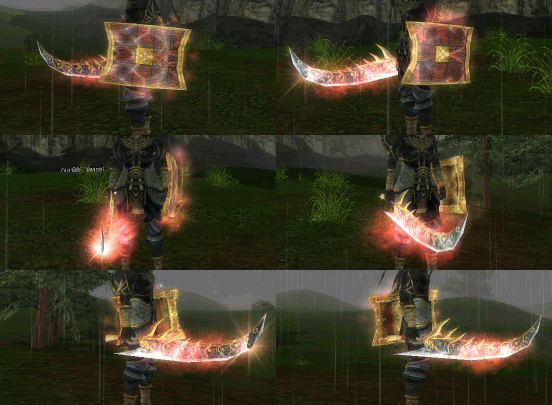
Here's the results:
Image

I will try to keep this thread updated if I find anything new (perhaps editing the other parts of the EFP file).

Posted: Tue Jul 03, 2007 11:21 pm
by Hellzowner
Yay cruor ^^

Nice tut, gonna try it out pretty soon :)

Re: [GUIDE] Changing Seal Glows

Posted: Tue Jul 03, 2007 11:39 pm
by HyorunmarouZ
Cruor wrote:8.Once you've got all your files injected save Particles.pk2, start up SRO, and hope to God you didn't screw up. :wink:


I think that should be a universal step in every guide :D

This sounds interesting... i want to try it out... (hmm cSRO has inspection... *opens pk2 extractor* )

Great guide... don't worry to try to make it simpler... more complex edits = more complex guides.

There's a lot of people who don't understand pk2 editing (count me in, i don't understand it completely) and just ask "TELL ME HOW TO DO IT!" you tell them... they screw up and then, it's your fault...

Posted: Wed Jul 04, 2007 12:15 am
by [SD]Twysta
Very nice tut Cruor :) GJ.

Posted: Wed Jul 04, 2007 1:12 am
by cin
wow. another good tut.

this will be added to the sticky soon

Posted: Wed Jul 04, 2007 8:15 am
by William-CL
Hey you made the guide i asked for thanks :D I was wondering what would happen if i could change the efps in itemrare I just had no clue how to do it cause i was busy with skills in csro to figure it out. Now I'm pissed cause i looked in particles so many times but never save the files cause i didn't know what to do with them. Thnx Cruor.

P.s. How would you make it black?

Posted: Thu Jul 05, 2007 9:33 pm
by Azilius
Good job, Cruor.

I have to say this one was pretty annoying to edit ><, finding where to inject it took a while, and I still need to tweak how strong the colours are, but, progress! :D

Image


Image

Image


Btw, as far as I know, 00 00 00 is black, but you say it shows up clear? =\

Posted: Thu Jul 05, 2007 10:09 pm
by Cruor
Azilius wrote:Btw, as far as I know, 00 00 00 is black, but you say it shows up clear? =\
Nah, it's just like the plus glows. I tested 00 00 00 and your glow just disappears.

Posted: Fri Jul 06, 2007 2:34 am
by SCArchon
you should totally do a guide on what each section in EFP does what and etc. btw, i totally needed this, i wanted to find out how to edit imbue colors, i spend 2 days trying (30 minutes each =D, im lazy, face it). in the end i gave up and cried in an emo corner (jk :D ).

Posted: Fri Jul 06, 2007 10:22 pm
by sholinkidd
lol got confused at step 5.
efp stuff got me confused.

Posted: Tue Jul 10, 2007 6:54 am
by William-CL
Color codes for all the colors you can think of.

Just remember that these are in RGB format so you have to switch em around to BGR

Posted: Tue Jul 10, 2007 3:35 pm
by penfold1992
6b takes ages and i dnt get 7 ^^ thats where cruor needs the guide fixed on

once again. learn from the best

Posted: Thu Jul 12, 2007 11:17 pm
by SCArchon
this can be applied to skills as well; in process of changing nuke and 90% done imbue, you just gotta use your head ;)

Posted: Fri Jul 13, 2007 1:25 am
by William-CL
SCArchon wrote:this can be applied to skills as well; in process of changing nuke and 90% done imbue, you just gotta use your head ;)
+1

You pretty much just gotta follow cruors guide and be able to determine what hex valuse are color codes.

Posted: Fri Jul 13, 2007 5:05 am
by SCArchon
^ hum have you changed any colors? just wondering :?

Posted: Fri Jul 13, 2007 9:31 am
by William-CL
SCArchon wrote:^ hum have you changed any colors? just wondering :?
Yea i have. Also changed My sun into a greenish blue one :D Cruor is the man. I'm Working on making a blue FlameWave Burn.

Posted: Fri Jul 13, 2007 3:08 pm
by penfold1992
no i dont kno how to inject back :( could sum1 help me?

Posted: Sun Jul 15, 2007 2:49 am
by viaticus
...... i have to use system_raretype_a_step2.efp because i use a 5th degree glavie.

i see all three of the entrys (BlendDiffuseGraph, SetGraphDiffuse, and DiffuseGraph) several times over with none of them looking like they realy have color values in them. could someone possibly help me out with this?

Posted: Sun Jul 15, 2007 8:29 am
by penfold1992
you dont see 1.000 0.000 0.000 , 0.000 1.000 0.000 or anything that looks close to that

the color triplets are in hexadecimal coding.

lets take a look at what we have right now.

sos glow is.... purple ish pink ish

efp (particles) are in BGR and this must be remembered.

purple is a mix between Blue and Red so the first and last digits of your color triplet are higher

for example

E5 38 DF

this will give a purple result

ok so now that has cleared that up lets move on ^^

as an example take SetGraphDiffuse

use cruors format to help you eg. header triplets footer (UNDERSTAND THESE VARY IN LENGTH!) and look out for 3 bytes where the two outside numbers are bigger.

when you find the triplets you will need to decide on ur color.

say.... we want..... red like cruors

BGR format eg. E5 42 F5 <------- atm this is PURPLE

PURE RED would be 00 00 FF this will look like the video

if you want a more natural blend of effects and colors change it this way

eg. E5 42 F5 take the larges and the smallest bytes (large F5 small 42)

and use that to base your color upon so for a natural red

E5 42 F5 would change into 42 42 F5 and you do this until you finesh
this is cruors hue switching


thank you for taking your time to read this. thanks for cruor for explaining it to me

and i dont kno why i cant insert it bk in ^^

i hope this helped

Posted: Sun Jul 15, 2007 7:40 pm
by viaticus
ok... you DONT understand the point man. it is OBVIOUS how to change the colors, i know they are in hex but what i am having problems with is the guide's format DOSE NOT WORK for the file i have to work with to change my glavie. in other words cant find the triples.

Posted: Sun Jul 15, 2007 8:50 pm
by penfold1992
sorry but your files are not "different" from every1 elses.

if cruor can do it. so can u.

this is difficult mod soo if you cant find the triplets then dont bother trying anymore.

EVERY ONE has a header and footer but not always a triplet.

they arnt made for you to change so changing them isnt like

HEY LOOK! HERE ARE THE TRIPLETS!

sorry but your is no different to any1 elses

Posted: Sun Jul 15, 2007 10:48 pm
by William-CL
penfold1992 wrote:sorry but your files are not "different" from every1 elses.

if cruor can do it. so can u.

this is difficult mod soo if you cant find the triplets then dont bother trying anymore.

EVERY ONE has a header and footer but not always a triplet.

they arnt made for you to change so changing them isnt like

HEY LOOK! HERE ARE THE TRIPLETS!

sorry but your is no different to any1 elses
Yes everyone's files are the same, but i have also noticed that some efps are longer or shorter than others, making it really difficult to find the color triplets.

Posted: Tue Jul 17, 2007 3:27 pm
by viaticus
well with his curent format things dont make sense no matter what you look at .things such as multiple sectors with the same name like graphDiffuse or whatever but after that for things like the header , footer, and deffinately the triplets donot work with his format from the scans i have done. has anyone checked resently to see if the formats have possibly changed? and remember people i am using a 4th degree GLAVIE, it just MAY use a diff footer/header format then soemthing like a sword ya know . just throwing that out there

Posted: Tue Jul 17, 2007 3:47 pm
by SCArchon
for clarity to have a (general) idea what ur editing
When open up your efp file in WORDPAD<-- not notepad, then find ur DiffuseGraph. Look below it for a section called "Textures" the "textures" is what the color ur changing. for example:
if i go to my 3rd "DiffuseGraph" and below it i see "Fire_ball_8.ddj" then i would know i would be editing the fireball part of my fire nuke. so when i go to HEXEDIT121<-- not XVIXI13 or w/e, i go to my 3rd diffusegraph and work my way down.

Posted: Tue Aug 21, 2007 2:31 pm
by liske
i love your videos seen them all now D:

Posted: Mon Aug 27, 2007 8:56 am
by Anti
:banghead: :? ok step 7, injecting...so im kinda new to the whole injecting part. i did everything else fine but the injecting part i get a F- in lol. 8)

so can someone try it for me or give me a breif area to put it?? my thing was raretype_a_step3.efp or something like that...lol. idk if this forum is active or what but would like some help here plz :)

Posted: Mon Aug 27, 2007 2:01 pm
by Timujin
Only 1 thing, i maight be wrong, but they've done a new patch, is it posible to do this even with this new patch? or i would get banned? I don't know what to do, so pls anwser my question :D

Posted: Tue Sep 18, 2007 9:34 pm
by Evil_Venom
Holy hell i cant follow one thing of that but it looks really cool

Posted: Wed Sep 19, 2007 1:11 am
by Test
it's look cool for SS =)

Posted: Fri Sep 28, 2007 10:56 pm
by Aby
Unique little edit ya got there. It looks real fresh