[GUIDE]PK2 Editing!

Here you can post guides and tutorials you have written for Silkroad Online. If submitting a guide from another forum, please post credit to the author.

Do U Find The Guide UseFull?

Yes
9
45%
No
11
55%
 
Total votes: 20

User avatar
FireMan
Common Member
Posts: 112
Joined: Wed May 30, 2007 1:39 pm
Quick Reply: Yes
Location: RedSea

[GUIDE]PK2 Editing!

Post by FireMan »

List Of Codes:
Diz wrote:I want to get a list of these codes so it can be easier for people to change their weapons, armors, horses, and pets when they pk2 edit. If you have any of the these codes, place them in this post, maybe it can get stickied for future reference, or over the summer when im not busy i can get into pk2 editing and find a lot of these codes. Thanks. :D

To get the .bsr, all you do is replace ".ddj" with ".bsr"

Don't thank me for them, i'm just trying to compile them all in one place. :D

So far these are all i know, credit to lynxz post with then:
item\china\weapon\sword_XX.ddj
item\china\weapon\bow_XX.ddj
item\china\weapon\spear_XX.ddj
item\china\weapon\blade_XX.ddj
item\china\weapon\tblade_XX.ddj (glavie)
item\china\shield\shield_XX.ddj
\clothes_XX (garment)
\light_XX (protector)
\heavy_XX (armor)


Monsters Codes:
HyorunmarouZ wrote:Oh well... i guess i can take my own idea...


CHINA

Mangyang: mob\china\mangnyang.bsr
Big/Small eyed ghost: mob\china\bigeyeghost.bsr
(Old) Weasel: mob\china\gyo.bsr
Water Ghost (Slave): mob\china\waterghost.bsr
(Broken) Stone Ghost: mob\china\stoneghost.bsr
(Decayed) Yeoha: mob\china\yeoha.bsr
Bandit Archer/Bowman: mob\china\banditarcher.bsr
(Young) Tiger: mob\china\tiger.bsr
Bandit (Subordinate): mob\china\bandit.bsr
Tomb Stone (Ghost): mob\china\tombstone.bsr
Black/White Tiger: mob\china\whitetiger.bsr
Chakji (Worker): mob\china\chakji.bsr


WESTERN CHINA

Ghost Bug: mob\wchina\ghostbug.bsr
Devil Bug: mob\wchina\devilbug.bsr
Hyungno Ghost (Soldier): mob\wchina\hyungno.bsr
(Meek) Earth Ghost: mob\wchina\earthghost.bsr
(Meek) Gun Powder: mob\wchina\gunpowderghost.bsr
Earth Taoist/Magician: mob\wchina\earthking.bsr
Demon/Devil Horse: mob\wchina\demonhorse.bsr
Hyeongcheon (Guard): mob\wchina\hyeongcheon.bsr


DH CAVE (Couldn't find the names... i'll type the ones i remember)

Soil/Earth Ghost Bug: mob\dunhuang\bugghost.bsr
Work Earth Ghost (?): mob\dunhuang\workearthghost.bsr
Power Earth Ghost: mob\dunhuang\soldierearthghost.bsr
(Blind) Mole: mob\dunhuang\blindmon.bsr
Yacha: mob\dunhuang\yacha.bsr
Nachal: mob\dunhuang\nachal.bsr


OASIS KINGDOM

(Black) Scorpion: mob\oasis\scorpion.bsr
(Blood) Ong: mob\oasis\ong.bsr
Bood /Devil Flower: mob\oasis\deserttrunkz.bsr
Black/Red Yeowa: mob\oasis\yeowa.bsr
Black Robber (Follower): mob\oasis\blackrobber.bsr
Black Robber Archer/Bowman: mob\oasis\blackrobberarcher.bsr
Red/Dark Eyed Ghost: mob\oasis\redeyeghost.bsr
(Small) Red Scorpion: mob\oasis\redscorpion.bsr


HOTAN KINGDOM

(Small) Bunwang: mob\khotan\bunwang.bsr
Golden/White Spider: mob\khotan\whitespider.bsr
Ujigi/Mujigi: mob\khotan\mujigi.bsr


KARAKORAM

Blue/White Faced Spider: mob\karakoram\gwhitespider.bsr
Ishade/Hashade: mob\karakoram\ishade.bsr
Big Blue/White Face Spider: mob\karakoram\spider.bsr
Sonar/Planar: mob\karakoram\planar.bsr
Penon Fighter: mob\karakoram\penon_f.bsr
Penon Warrior: mob\karakoram\penon_w.bsr
(Devil) Yeti: mob\karakoram\yeti.bsr


TAKLAMAKAN DESERT

Edimmu/Shakram: mob\taklamakan\edimmu.bsr
Death/Dark Kara: mob\taklamakan\deathkara.bsr
Demon/Devil Eye: mob\taklamakan\devileye.bsr
Niya Sniper/Hunter: mob\taklamakan\bonehunter.bsr
Niya Guard/Slodier: mob\taklamakan\bonesoldier.bsr
Niya Shaman/Mage: mob\taklamakan\bonemage.bsr
Niya Royal Guard/General: mob\taklamakan\bonegeneral.bsr


ROC MOUNTAIN

mob\roc\rocky.bsr
mob\roc\feathermask.bsr
mob\roc\goat.bsr
mob\roc\wingtribe.bsr
mob\roc\antelope.bsr
mob\roc\wingtribespear.bsr
mob\roc\tahomet.bsr

(I don't know their names so please don't ask)


UNIQUES

Tiger (Without her tiger): mob\china\tigerwoman.bsr
Cerberus: mob\europe\kerberos.bsr
Uruchi (Without his dragon): mob\oasis\uruchi.bsr
Isyutaru: mob\karakoram\isyutaru.bsr
Lord Yarkan: mob\taklamakan\bonelord.bsr
Roc: mob\roc\roc.bsr


UNIQUES RIDES

TG's tiger: mob\china\bluetiger.bsr
Uruchi's Dragon: mob\oasis\uruchidragon.bsr


Euro mobs:
mob\europe\movoi.bsr
mob\europe\edenp.bsr
mob\europe\wolf.bsr
mob\europe\baroi.bsr
mob\europe\bartis.bsr
mob\europe\dowb.bsr
mob\europe\kyklopess.bsr
mob\europe\ladon.bsr
mob\europe\lion.bsr
mob\europe\siren.bsr


PROTECTOR

Yeah, i think it's the black coil noob thing: mob\common\automob.bsr


EXTRAS:

cos\p_seowon.bsr (Looks like a pet)
Rudolph: cos\c_rudolph.bsr
The donkey: cos\t_donkey.bsr (Transport)
The donkey: cos\c_donkey.bsr (Ride)


Well that's all. YOU BETTER START EDITING because this took me long time...


Editing Chains:
HyorunmarouZ wrote:Well... Shooty and i were roaming through pk2 files and were interested in these popular thingies, so, shall we?

Program used: XVI32

Step 1:
Back up your Media.pk2 file, you don't want to reinstall again if you screw up (if you are new to this you WILL very likely screw it up, so back up)

Step 2:
Open Media.pk2 with XVI32

Image

Step 2:
Find this string in HEX mode:

23 73 65 63 74 69 6F 6E 09 63 68 61 72 61 63 74 65

Image

Image

Step 3:
Find the code of the chain you want to change, let's say, you want to change the lvl 29 Chain. Search for this:
SKILL_CH_SWORD_CHAIN_B
In ANSI mode (See the spot "Unicode Latin", leave it UNchecked):
Image

Image

Now notice this: "ANI_SKILL_" that's the thing you are interested on.
See the number?, in this case it's number 9, if you want a lvl 51 chain, like Ascension Chain. Replace this number, Ascension's number is 17. Just type it.

Image

Step 4: As we changed the number of characters and replaced a blank space, we'll add one. Place your cursor next to the 7, then go to Edit --> Insert String

Image

Chose Hex string, and add a blank space i.e. 00
And add it only once.

Image

Step 5:
Find the Ascension chain, we'll switch them so there are no errors, and it's easier:

Image

Image

Change the number in ANIM_SKILL to 9 and delete the 7:

Image

Step 6:

Now do another ANSI search for: SKILL_CH_SWORD_CHAIN_B

You will See this:
SKILL_CH_SWORD_CHAIN_B SHOT 1
Look for every line that has "SHOT" in it, As this is the lvl 29 CHain, it will have 4 shots.

Image

Change the B into D.

Image

Step 7:

Search for: SKILL_CH_SWORD_CHAIN_D from Cursor

Image

Do the same, but change D --> B (We switch them to avoid errors)

Image

Done, save and test.

Doing Chain (lvl 29) at lvl 14:

Image

The same thing is for Heuksal chains, you only need to change the ANIM_SKILL number.

Codes for the Bicheon Chains and Heuksal Chains.

Bicheon:

SKILL_CH_SWORD_CHAIN_A
SKILL_CH_SWORD_CHAIN_B
SKILL_CH_SWORD_CHAIN_C
SKILL_CH_SWORD_CHAIN_D
SKILL_CH_SWORD_CHAIN_E

Heuksal:

SKILL_CH_SPEAR_CHAIN_A
SKILL_CH_SPEAR_CHAIN_B
SKILL_CH_SPEAR_CHAIN_C
SKILL_CH_SPEAR_CHAIN_D
SKILL_CH_SPEAR_CHAIN_E

Extra:

You want to throw your sword/blade?
You want to do Soul Cut with your Spear/Glaive?

Bicheon:

SKILL_CH_SWORD_GEOMGI_A
SKILL_CH_SWORD_GEOMGI_B
SKILL_CH_SWORD_GEOMGI_C

Heuksal:

SKILL_CH_SPEAR_SHOOT_A
SKILL_CH_SPEAR_SHOOT_B


Editing Imbues:
Shooty wrote:Hi guys,

Sorry for the long wait and everything. I have exams coming up and all so yeah.

Here goes:

Note: You must have prior experience with .pk2 editing!
Note: Gigongta = imbue
Ganggi = buff

Cold = Ice force
Fire = Fire force
Lightning = lightning force

so if you want to change first ice imbue to cloud ice force then you would put "cold" instead of "fire". Same goes for lightning.

1. Open media.pk2 in XVI32. Make a backup before you start.

2. First I'll teach you how to quickly edit your imbue. I'll be dealing with Extreme Fire Force -> Soul Fire Force. Remember - this is only changing the way they look in game!

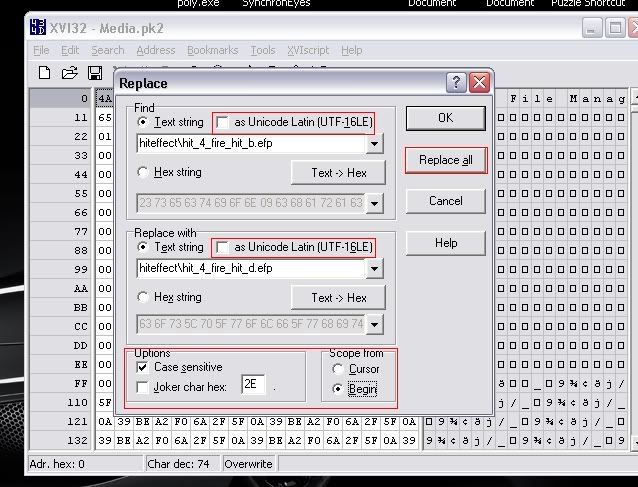
3. In media.pk2, find and replace all - make sure you're in ANSI mode which means "as Unicode Latin" is unchecked:
find: hiteffect\hit_4_fire_hit_b.efp (it would be "a" if your dealing with river fire force and same goes for c)
replace all: hiteffect\hit_4_fire_hit_d.efp

make sure all your options are the same as the image I've shone below

Image

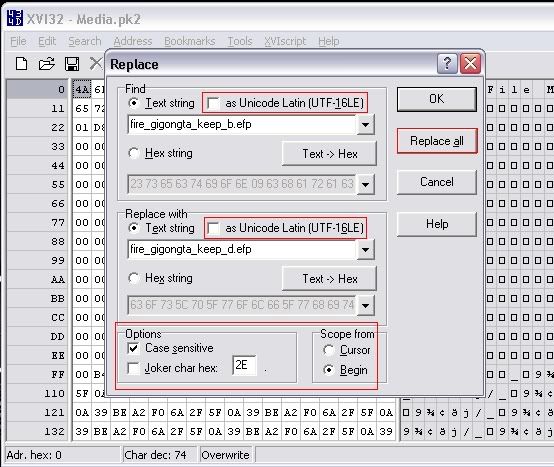
4. In media.pk2, find and replace all - make sure you're in ANSI mode again:
find: fire_gigongta_keep_b.efp
replace all: fire_gigongta_keep_d.efp

Image

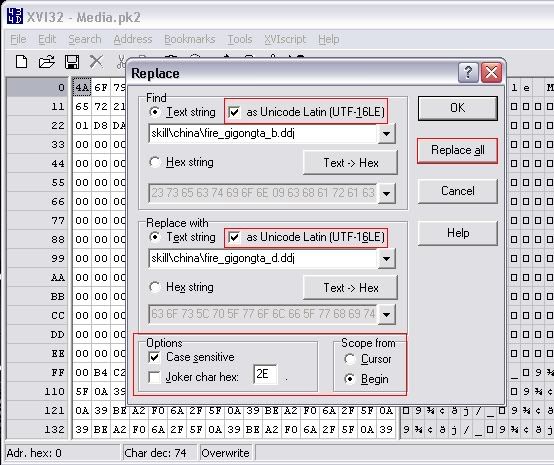
5. Now to edit the icon in-game (optional) - make sure you're OUT of ANSI mode and in Unicode mode - meaning Unicode Latin is checked:
find: skill\china\fire_gigongta_b.ddj
replace all: skill\china\fire_gigongta_d.ddj

see image below.

Image

THERE YOU HAVE IT - THAT'S PRETTY MUCH IMBUES!

I WILL HAVE BUFFS COMING TOMORROW.. I'M REALLY TIRED. IF YOU HAVE ANY QUESTIONS PM ME!

-Shooty

Thx For:
Diz
HyorunmarouZ
Shooty
thunderstorm (for the guide :D )

cya!!
Last edited by FireMan on Sun Jun 24, 2007 3:37 pm, edited 3 times in total.
IGN: Unknown

Lvl: Unknown

Server: RedSea

Image

User avatar
William-CL
Forum Legend
Posts: 7363
Joined: Wed Feb 28, 2007 10:10 am
Quick Reply: Yes
Location: N/A

Post by William-CL »

are the .efp files the textures of skills?
Image

User avatar
FireMan
Common Member
Posts: 112
Joined: Wed May 30, 2007 1:39 pm
Quick Reply: Yes
Location: RedSea

Post by FireMan »

yes they r
IGN: Unknown

Lvl: Unknown

Server: RedSea

Image

User avatar
William-CL
Forum Legend
Posts: 7363
Joined: Wed Feb 28, 2007 10:10 am
Quick Reply: Yes
Location: N/A

Post by William-CL »

ok thnx. wasn't 100% sure
Image

User avatar
FireMan
Common Member
Posts: 112
Joined: Wed May 30, 2007 1:39 pm
Quick Reply: Yes
Location: RedSea

Post by FireMan »

np
IGN: Unknown

Lvl: Unknown

Server: RedSea

Image

User avatar
William-CL
Forum Legend
Posts: 7363
Joined: Wed Feb 28, 2007 10:10 am
Quick Reply: Yes
Location: N/A

Post by William-CL »

What are the .wav files?
Image

User avatar
FireMan
Common Member
Posts: 112
Joined: Wed May 30, 2007 1:39 pm
Quick Reply: Yes
Location: RedSea

Post by FireMan »

Blackdragon6 wrote:What are the .wav files?


.wav? ask HyorunmarouZ not me! how the hell i`m suppose to know?
IGN: Unknown

Lvl: Unknown

Server: RedSea

Image

User avatar
Lance
Advanced Member
Posts: 2370
Joined: Fri Jul 14, 2006 12:46 pm
Quick Reply: Yes
Location: TROY

Post by Lance »

could you please teach me how i can change my 8th degree hood to hat please? ive already got a pimped hood, and jst found a hat, but would rather save some money if they are more or less the same stats, thanks :D
Image

User avatar
Azilius
Senior Member
Posts: 4236
Joined: Tue Oct 31, 2006 9:39 pm
Location: CS:GO

Post by Azilius »

thunderstorm wrote:
Blackdragon6 wrote:What are the .wav files?


.wav? ask HyorunmarouZ not me! how the hell i`m suppose to know?


.Wav are the sounds you hear in game. They're like .mp3 files, just in a different sound format. =)
ImageCrumpets for PresImage

User avatar
FireMan
Common Member
Posts: 112
Joined: Wed May 30, 2007 1:39 pm
Quick Reply: Yes
Location: RedSea

Post by FireMan »

Lance wrote:could you please teach me how i can change my 8th degree hood to hat please? ive already got a pimped hood, and jst found a hat, but would rather save some money if they are more or less the same stats, thanks :D


donno, havent though bout it, sry
IGN: Unknown

Lvl: Unknown

Server: RedSea

Image

User avatar
Hellzowner
Active Member
Posts: 820
Joined: Sat May 19, 2007 6:00 am
Quick Reply: Yes
Location: OLYMPUS

Post by Hellzowner »

Doesnt really seem like a guide to me...

More like youve compiled a couple of pk2 editing guides of others... In other words, doesnt really need to say 'Guide'
Image
Image

User avatar
HyorunmarouZ
Loyal Member
Posts: 1839
Joined: Wed Mar 21, 2007 9:03 pm
Quick Reply: Yes
Location: Hell.

Post by HyorunmarouZ »

Lance wrote:could you please teach me how i can change my 8th degree hood to hat please? ive already got a pimped hood, and jst found a hat, but would rather save some money if they are more or less the same stats, thanks :D


A gear piece string is like this:
item\china\woman_item\heavy_XX_YY.bsr

1 Can be either heavy (Armor), light (Protector) or clothes (Garment)
2 XX = Degree
3 YY = Body piece code

Cruor wrote:
Lord_Deems wrote:HA= Head
AA- Arms
SA= Shoulders
LA= Legs


HA = Helmet
CA = Crown
BA = Body
FA = Feet


Those are the codes for each gear piece.
Last edited by HyorunmarouZ on Sun Jun 24, 2007 2:37 am, edited 1 time in total.

User avatar
Lance
Advanced Member
Posts: 2370
Joined: Fri Jul 14, 2006 12:46 pm
Quick Reply: Yes
Location: TROY

Post by Lance »

mm i tried

replacing

item\\item\\china\\man_item\\clothes_08_CA.bsr

with

item\\item\\china\\man_item\\clothes_08_HA.bsr


but nothing happened when i finally managed to log back in :/
Image

User avatar
HyorunmarouZ
Loyal Member
Posts: 1839
Joined: Wed Mar 21, 2007 9:03 pm
Quick Reply: Yes
Location: Hell.

Post by HyorunmarouZ »

Lance wrote:mm i tried

replacing

item\\item\\china\\man_item\\clothes_08_CA.bsr

with

item\\item\\china\\man_item\\clothes_08_HA.bsr


but nothing happened when i finally managed to log back in :/


Don't use double slashes. You only need one, and be sure the Unicode settings are ON.

And it is "item\china" not "item\item\china"

Edit: i see now that the double "item" thing was my mistake :P sorry.

nicolasvc1234567
New Member
Posts: 31
Joined: Sun Jun 24, 2007 10:25 am

tunderstorm do you got some grew or somting like that

Post by nicolasvc1234567 »

tunderstorm do you got some grew or somting like that?
i need help editing buffs dont find a guide for it
i need help editng glows and seals it just wont work witht they glow and seals :(
http://www.youtube.com/watch?v=0pUnNyESjHw this is my movie with out seals and glows and buffs if i got that then i gonne make a trade :)

User avatar
FireMan
Common Member
Posts: 112
Joined: Wed May 30, 2007 1:39 pm
Quick Reply: Yes
Location: RedSea

Post by FireMan »

how to- edit buffs, i`ll post a guide here and in a new topic, now editing buffs i know, editing glows and seals i havent stuided that for now,

editing buffs:

1-open ur xvi32 program with media pk2.
2-press search>replace
3-lets say u want to edit weak guard of ice to might guard of ice. so: find: SKILL_CH_COLD_GANGGI_A
replace with: SKILL_CH_COLD_GANGGI_D

REPLACE ALL in ANSI mode.

4-to edit the ingame icon(OPTIONAL)
make sure ur out of ANSI mode.(Unicode Latin checked)
find: skill\china\cold_ganggi_a.ddj
replace with: skill\china\cold_ganggi_d.ddj

same goes with fire and lightning and every thing.

ps: if u wanna find the codes extract ur media file, :

open ur extractor with media pk2>scroll down to resinfo>open it> scroll down to find skilleffect.txt

hope it helps, and! dont ask me if ???? error appeared to u, it happen to me and i dont know how to get rid of it, any1 help?

2 bad u video is not workin to me
btw forum mods i found this:
u all forum mods


idk ho wrote it
IGN: Unknown

Lvl: Unknown

Server: RedSea

Image

nicolasvc1234567
New Member
Posts: 31
Joined: Sun Jun 24, 2007 10:25 am

thx

Post by nicolasvc1234567 »

thx now i only most find how to edit seals and glows i try it but i didn't work :(

User avatar
Lance
Advanced Member
Posts: 2370
Joined: Fri Jul 14, 2006 12:46 pm
Quick Reply: Yes
Location: TROY

Post by Lance »

HyorunmarouZ wrote:
Lance wrote:mm i tried

replacing

item\\\\item\\\\china\\\\man_item\\\\clothes_08_CA.bsr

with

item\\\\item\\\\china\\\\man_item\\\\clothes_08_HA.bsr


but nothing happened when i finally managed to log back in :/


Don\'t use double slashes. You only need one, and be sure the Unicode settings are ON.

And it is "item\\china" not "item\\item\\china"

Edit: i see now that the double "item" thing was my mistake :P sorry.


tried, and still nothing happened :(
Image

User avatar
FireMan
Common Member
Posts: 112
Joined: Wed May 30, 2007 1:39 pm
Quick Reply: Yes
Location: RedSea

Re: thx

Post by FireMan »

nicolasvc1234567 wrote:thx now i only most find how to edit seals and glows i try it but i didn't work :(


hold it! u mean u didnt get :? error?!?!?!?!?!

HELP ME :banghead: :banghead: :banghead: :banghead: :banghead: :banghead: :banghead: :banghead: :banghead: :banghead: :banghead: :banghead: :banghead: :banghead: :banghead: :banghead: :banghead: :banghead: :banghead: :banghead: :banghead: :banghead: :banghead: :banghead: :banghead: :banghead: :banghead: :banghead: :banghead: :banghead: :banghead: :banghead: :banghead: :banghead: :banghead: :banghead: :banghead: :banghead: :banghead: :banghead: :banghead: :banghead: :banghead: :banghead: :banghead: :banghead: :banghead: :banghead: :banghead: :banghead: :banghead: :banghead: :banghead: :banghead: :banghead: :banghead: :banghead: :banghead: :banghead: :banghead: :banghead: :banghead: :banghead: :banghead: :banghead: :banghead: :banghead: :banghead: :banghead: :banghead: :banghead: :banghead: :banghead: :banghead: :banghead: :banghead: :banghead: :banghead: :banghead: :banghead: :banghead: :banghead: :banghead: :banghead: :banghead: :banghead: :banghead: :banghead: :banghead: :banghead: :banghead: :banghead: :banghead: :banghead: :banghead: :banghead: :banghead: :banghead: :banghead: :banghead: :banghead: :banghead: :banghead: :banghead: :banghead: :banghead: :banghead: :banghead: :banghead: :banghead: :banghead: :banghead:
IGN: Unknown

Lvl: Unknown

Server: RedSea

Image

nicolasvc1234567
New Member
Posts: 31
Joined: Sun Jun 24, 2007 10:25 am

didn't check it yet

Post by nicolasvc1234567 »

didn't check it yet

nicolasvc1234567
New Member
Posts: 31
Joined: Sun Jun 24, 2007 10:25 am

dam

Post by nicolasvc1234567 »

same problem sombody help us :banghead: :banghead: :banghead: :banghead: :banghead: :banghead: :banghead:

cin

Re: thx

Post by cin »

thunderstorm wrote:
nicolasvc1234567 wrote:thx now i only most find how to edit seals and glows i try it but i didn't work :(


hold it! u mean u didnt get :? error?!?!?!?!?!

HELP ME


well i have a couple of things to say that will let you know why this guide will
not be stickied

1. this is a compilation of guides already posted.
2. you dont know what you are talking about so you cant help ppl with it.
3. you didnt write [GUIDE] in front of the topic name.

idk man, this just doesnt seem very helpful to me. at least next time you post
a guide, be sure that you can answer the questions people ask you about it.
i mean... *.wav files... lol

User avatar
FireMan
Common Member
Posts: 112
Joined: Wed May 30, 2007 1:39 pm
Quick Reply: Yes
Location: RedSea

Re: thx

Post by FireMan »

cin wrote:
thunderstorm wrote:
nicolasvc1234567 wrote:thx now i only most find how to edit seals and glows i try it but i didn't work :(


hold it! u mean u didnt get :? error?!?!?!?!?!

HELP ME


well i have a couple of things to say that will let you know why this guide will
not be stickied

1. this is a compilation of guides already posted.
2. you dont know what you are talking about so you cant help ppl with it.
3. you didnt write [GUIDE] in front of the topic name.

idk man, this just doesnt seem very helpful to me. at least next time you post
a guide, be sure that you can answer the questions people ask you about it.
i mean... *.wav files... lol


ok

1-i dont care if it didnt sticked
2-its title: pk2 editng GUIDE! and u say there is no [GUIDE] in it, i`ll edit it.
3-i never heared the .wav files or saw any1 talking bout them, so i dont care.
4-yes they have been posted before, and the majour pk2 guide, u stickied it and it stuff already been posted.

so shhhhhhhh
IGN: Unknown

Lvl: Unknown

Server: RedSea

Image

User avatar
William-CL
Forum Legend
Posts: 7363
Joined: Wed Feb 28, 2007 10:10 am
Quick Reply: Yes
Location: N/A

Re: thx

Post by William-CL »

thunderstorm wrote:
cin wrote:
thunderstorm wrote:
nicolasvc1234567 wrote:thx now i only most find how to edit seals and glows i try it but i didn't work :(


hold it! u mean u didnt get :? error?!?!?!?!?!

HELP ME


well i have a couple of things to say that will let you know why this guide will
not be stickied

1. this is a compilation of guides already posted.
2. you dont know what you are talking about so you cant help ppl with it.
3. you didnt write [GUIDE] in front of the topic name.

idk man, this just doesnt seem very helpful to me. at least next time you post
a guide, be sure that you can answer the questions people ask you about it.
i mean... *.wav files... lol


ok

1-i dont care if it didnt sticked
2-its title: pk2 editng GUIDE! and u say there is no [GUIDE] in it, i`ll edit it.
3-i never heared the .wav files or saw any1 talking bout them, so i dont care.
4-yes they have been posted before, and the majour pk2 guide, u stickied it and it stuff already been posted.

so shhhhhhhh
Why make a guide if your un imformed of what your saying? That's like a baby teaching math.

User avatar
FireMan
Common Member
Posts: 112
Joined: Wed May 30, 2007 1:39 pm
Quick Reply: Yes
Location: RedSea

Re: dam

Post by FireMan »

nicolasvc1234567 wrote:same problem sombody help us :banghead: :banghead: :banghead: :banghead: :banghead: :banghead: :banghead:

u heared the guy. HELP US PLZZZZZZZ

<< EDITED >>

NEVER, EVER use so many of these farking smilies again.
be patient and somebody will help you.


IT SUX! i mean the :? error

ps: all these bangheads means for me: help us plz! every one means help us plz!

i`ll be thankfull for the one ho help us
IGN: Unknown

Lvl: Unknown

Server: RedSea

Image

User avatar
William-CL
Forum Legend
Posts: 7363
Joined: Wed Feb 28, 2007 10:10 am
Quick Reply: Yes
Location: N/A

Re: dam

Post by William-CL »

thunderstorm wrote:
nicolasvc1234567 wrote:same problem sombody help us :banghead: :banghead: :banghead: :banghead: :banghead: :banghead: :banghead:

u heared the guy. HELP US PLZZZZZZZ

<< EDITED >>

NEVER, EVER use so many of these farking smilies again.
be patient and somebody will help you.


IT SUX! i mean the :? error

ps: all these bangheads means for me: help us plz! every one means help us plz!

i`ll be thankfull for the one ho help us
What exactly do u need help with?

User avatar
HyorunmarouZ
Loyal Member
Posts: 1839
Joined: Wed Mar 21, 2007 9:03 pm
Quick Reply: Yes
Location: Hell.

Post by HyorunmarouZ »

Lance wrote:
HyorunmarouZ wrote:
Lance wrote:mm i tried

replacing

item\\\\item\\\\china\\\\man_item\\\\clothes_08_CA.bsr

with

item\\\\item\\\\china\\\\man_item\\\\clothes_08_HA.bsr


but nothing happened when i finally managed to log back in :/


Don\'t use double slashes. You only need one, and be sure the Unicode settings are ON.

And it is "item\\china" not "item\\item\\china"

Edit: i see now that the double "item" thing was my mistake :P sorry.


tried, and still nothing happened :(


Try to do it manually, extract itemdata.txt from Media.pk2 and find the lines yourself, and change them, then inject the file again and test.

To know how to extract and inject the file back, you only need to look at the other guides, itemdata.txt is in the same location than characterdata.txt and skilleffect.txt used in other guides.

User avatar
korroke
Common Member
Posts: 194
Joined: Sun Jun 24, 2007 11:13 pm
Quick Reply: Yes
Location: Nowhere

Post by korroke »

hey im new to this forums...
i need help in pk2 editing... i still dont get how to edit my glaive chains to the lvl 69 ones and weapon to 9th degree . Can anyone please guide me throught these steps cause im absoultely clueless.....tyty..

edit:
can anyone comfirm this...
SKILL_CH_SPEAR_CHAIN_A
SKILL_CH_SPEAR_CHAIN_B
SKILL_CH_SPEAR_CHAIN_C
SKILL_CH_SPEAR_CHAIN_D
SKILL_CH_SPEAR_CHAIN_E

soo all i have to do is find
SKILL_CH_SPEAR_CHAIN_A
SKILL_CH_SPEAR_CHAIN_B and change it to

SKILL_CH_SPEAR_CHAIN_D
SKILL_CH_SPEAR_CHAIN_E

User avatar
FireMan
Common Member
Posts: 112
Joined: Wed May 30, 2007 1:39 pm
Quick Reply: Yes
Location: RedSea

Re: dam

Post by FireMan »

thunderstorm wrote:

<< EDITED >>

NEVER, EVER use so many of these farking smilies again.
be patient and somebody will help you.


sry, my bad, IF U HELPED ME I WOULDNT POST THEM ALL, and blackdragon, i`ll write this guide when i want! shut up! ur not my dad!
IGN: Unknown

Lvl: Unknown

Server: RedSea

Image

cin

Re: dam

Post by cin »

thunderstorm wrote:
thunderstorm wrote:

<< EDITED >>

NEVER, EVER use so many of these farking smilies again.
be patient and somebody will help you.


sry, my bad, IF U HELPED ME I WOULDNT POST THEM ALL, and blackdragon, i`ll write this guide when i want! shut up! ur not my dad!


i never said i was going to help you. i was telling you why this guide is not
that good.

and yet again.. how come the creator of a pk2 editing guide has to ask all
the questions and needs help all the time. it would have been easier for you
if you asked the questions without the guide. that would get rid of the idea
that most people have of you; that you can actually pk2 edit things yourself.

Post Reply

Return to “Guides and Tutorials”