Page 1 of 2
[GUIDE] EDITING IMBUES
Posted: Sat May 26, 2007 4:14 am
by Shooty
Hi guys,
Sorry for the long wait and everything. I have exams coming up and all so yeah.
Here goes:
Note: You must have prior experience with .pk2 editing!
Note: Gigongta = imbue
Ganggi = buff
Cold = Ice force
Fire = Fire force
Lightning = lightning force
so if you want to change first ice imbue to cloud ice force then you would put "cold" instead of "fire". Same goes for lightning.
1. Open media.pk2 in XVI32. Make a backup before you start.
2. First I'll teach you how to quickly edit your imbue. I'll be dealing with Extreme Fire Force -> Soul Fire Force. Remember - this is only changing the way they look in game!
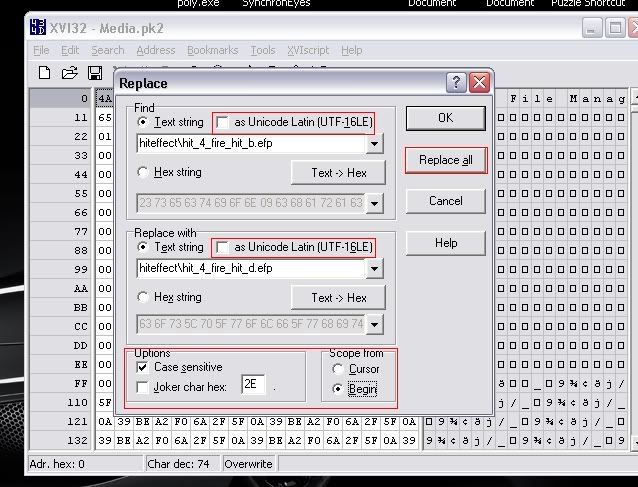
3. In media.pk2, find and replace all - make sure you're in ANSI mode which means "as Unicode Latin" is unchecked:
find: hiteffect\hit_4_fire_hit_b.efp (it would be "a" if your dealing with river fire force and same goes for c)
replace all: hiteffect\hit_4_fire_hit_d.efp
make sure all your options are the same as the image I've shone below
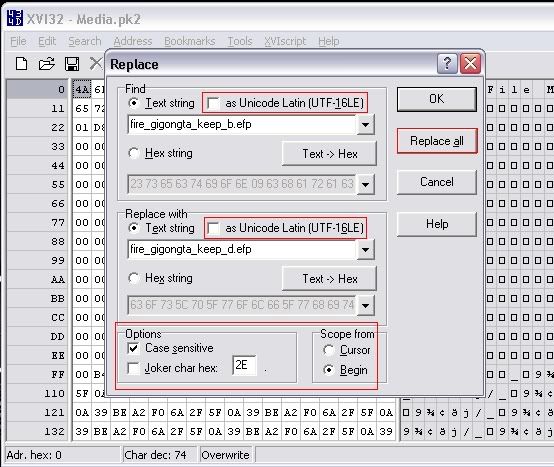
4. In media.pk2, find and replace all - make sure you're in ANSI mode again:
find: fire_gigongta_keep_b.efp
replace all: fire_gigongta_keep_d.efp
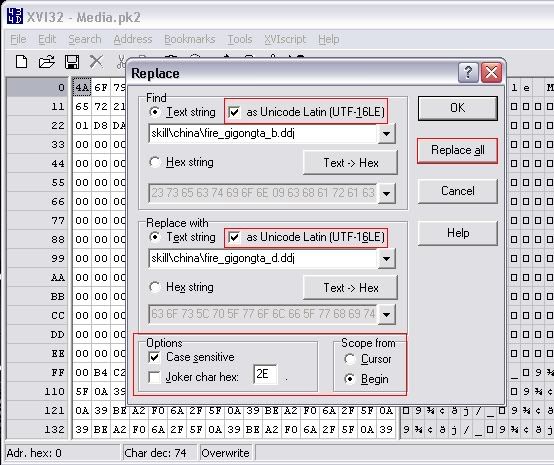
5. Now to edit the icon in-game (optional) - make sure you're OUT of ANSI mode and in Unicode mode - meaning Unicode Latin is checked:
find: skill\china\fire_gigongta_b.ddj
replace all: skill\china\fire_gigongta_d.ddj
see image below.
THERE YOU HAVE IT - THAT'S PRETTY MUCH IMBUES!
I WILL HAVE BUFFS COMING TOMORROW.. I'M REALLY TIRED. IF YOU HAVE ANY QUESTIONS PM ME!
-Shooty
Posted: Sat May 26, 2007 4:26 am
by HyorunmarouZ
Nice and easy. Just like a guide should be *thumbs up*
Though an advice for those who try to change Fire --> Light (or Ice or w/e), this method doesn't work, at least you will have to manually change one of them, good luck finding these files hehe
Posted: Sat May 26, 2007 4:28 am
by Shooty
thanks man

glad you like... i'll show a screenshot of the buffs... which will be coming soon... once i get time.
Posted: Sat May 26, 2007 4:36 am
by SCArchon
yay shooty! =D now we pretty much got all the basic stuff.. let's think up of more things we can write a guide about!
Posted: Sat May 26, 2007 4:38 am
by Shooty
i'm getting the buffs sooon... like i said.. but yea.. we gotta work on more stuff.
Posted: Sat May 26, 2007 5:16 am
by HyorunmarouZ
I'm trying to make the RAGE mode Cruor posted once hehe (grass walk with the red mist and the blue electricity from Berserk. No horns, and no change in appearance, just the effects).
That was awesome and i almost get it, just need a bit more tries, i'll see if i can do it tomorrow.
Posted: Sat May 26, 2007 5:18 am
by MastaChiefX
How bout something where it is like a blue lightning imbune that looks different?
Plausable.
Posted: Sat May 26, 2007 5:22 am
by HyorunmarouZ
MastaChiefX wrote:How bout something where it is like a blue lightning imbune that looks different?
Plausable.
Let us find the particle effect for it and you got it hehe and if you mean a custom made imbue that's more than just pk2 editing... that would need a bit of photoshop or something.
Hmm i have some ideas for those nukes... the problem is that i don't have a high level char to try them

Posted: Sat May 26, 2007 5:31 am
by MastaChiefX
HyorunmarouZ wrote:MastaChiefX wrote:How bout something where it is like a blue lightning imbune that looks different?
Plausable.
Let us find the particle effect for it and you got it hehe and if you mean a custom made imbue that's more than just pk2 editing... that would need a bit of photoshop or something.
Hmm i have some ideas for those nukes... the problem is that i don't have a high level char to try them
Eh.
I think you may be able to edit it by using the hex colors.
Posted: Sat May 26, 2007 6:06 am
by HyorunmarouZ
MastaChiefX wrote:HyorunmarouZ wrote:MastaChiefX wrote:How bout something where it is like a blue lightning imbune that looks different?
Plausable.
Let us find the particle effect for it and you got it hehe and if you mean a custom made imbue that's more than just pk2 editing... that would need a bit of photoshop or something.
Hmm i have some ideas for those nukes... the problem is that i don't have a high level char to try them
Eh.
I think you may be able to edit it by using the hex colors.
Uhh seems that i have still many things to learn hahaha didn't know about editing hex colors, but i'll take a look.
Posted: Sat May 26, 2007 9:40 am
by XMoshe
nice guide shooty, thumbs up...I'll try it out.
(if you got time maybe you can explain me (or make a guide) how to change fire -> ice or something =)
Posted: Sat May 26, 2007 10:14 am
by skillznl
good job shooty
nice guide
Posted: Sat May 26, 2007 11:13 am
by Shooty
thanks guys... yea xmoshe.... hyorunmarouz said that that'd take a little more work... i'll try though and see what happens.
Posted: Sat May 26, 2007 12:00 pm
by XMoshe
Shooty wrote:thanks guys... yea xmoshe.... hyorunmarouz said that that'd take a little more work... i'll try though and see what happens.
Ok thanks ^^ my pk2 extractor is working now so maybe can I take a look to =P
here's a screenie of the imbue (to show you its working =P )

Posted: Sat May 26, 2007 3:41 pm
by Shooty
nice screenshots
glad they worked
Posted: Sat May 26, 2007 3:47 pm
by bebrazz
thx for guide
look at this fire imube changed into cold

Posted: Sat May 26, 2007 4:03 pm
by HyorunmarouZ
bebrazz wrote:thx for guide
look at this fire imube changed into cold
Hehe you changed the "hiteffect" and the "keep", but you missed the "motion", in the screen you can see that the weapon still has the fire "shadow" when it moves.
But it looks even better.
It would be cool to see an Ice imbue, Fire hit effect, and Light motion hehe
Posted: Sat May 26, 2007 9:31 pm
by Shooty
i forgot to mention the motion. so another part - just add:
fire_gigongta_motion_b.efp -> fire_gigongta_motion_d.efp
there ya go - remember - ANSI mode (so Unicode Latin is unchecked) that should give you the motion that hyorunmarouz was talking bout
Posted: Wed May 30, 2007 7:55 pm
by swim
so... you mean to tell me that you cannot deal dmg if you change the imbume in anyway with tut ?
or... ?
also if you set this up does it save?
Posted: Tue Jul 03, 2007 8:41 am
by mmsicis
I got question. Can i change fire imbue looking like light imbue. Me rly like 4th light. Its blue ^^
Posted: Wed Jul 04, 2007 8:58 am
by logoff
if u post buff mods pls let me know
thx
Posted: Wed Jul 04, 2007 2:27 pm
by FireMan
mmsicis wrote:I got question. Can i change fire imbue looking like light imbue. I rly like 4th light. Its blue ^^
yes u can, not sure how but.......
change the hiteffect\hit_4_
fire_hit_(a, b, c or the thing u want).efp or somethin to hiteffect\hit_4_
lightning_hit_d.efp now do the same. only change the fire to lightning.
do the same to the icon thing and ur done.
btw ho`s moving to euro in SRO? i`m not

EDIT: ho know`s? ???? error. buttttttttttttttttttt. it works
Posted: Wed Jul 04, 2007 3:09 pm
by ALTERNATIVExoxo
Ok I can change the 2nd book of fire imbue to 4th book cold imbue and fire imbue. But the imbue that I REALLY like is the 4th book lightning and when I change it to 4th book lightning I get some error. Can someone post step-by-step how to change it to lightning?
Posted: Fri Jul 13, 2007 5:52 pm
by Megalomaniac
Great guide

Easy and working
Thanks.
I get an error when i include the "motion" so i just skip it, because i use lightning anyway so it doesnt make any difference at all xD
Oh i figured out how to edit buffs.
Transforming Basic Fire Protection into Hard Fire Protection:
-Open media.pk2 in XVI32.
-Find
fire_ganggi_keep_a.efp and replace it with
fire_ganggi_keep_c.efp
-Save & Test.
=========
Transforming Weak guard of ice into Might guard of ice:
-Open media.pk2 in XVI32.
-Find
cold_ganggi_keep_a.efp and replace it with
cold_ganggi_keep_d.efp
-Save & Test.
=========
Transforming Grass walk-Flow into Grass walk-Speed:
-Open media.pk2 in XVI32.
-Find
lightning_gyeonggong_keep_a.efp and replace it with
lightning_gyeonggong_keep_b.efp
-Save & Test.
=========
*Note: Make sure you leave Unicode Latin UNchecked!
Result:
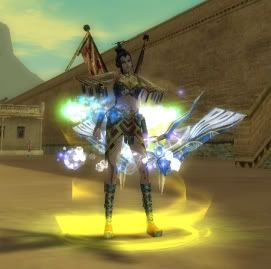
Pretty easy dont you think?
Hope it helps

Posted: Sat Jul 14, 2007 8:44 pm
by SCArchon
hey where did shooty go?

haven't seem him in a while.
Posted: Sat Jul 14, 2007 10:06 pm
by William-CL
SCArchon wrote:hey where did shooty go?
haven't seem him in a while.
yea me neither

Posted: Sun Aug 05, 2007 5:21 pm
by Maryte_LT
how do i change buff icons???
Posted: Sun Aug 05, 2007 6:40 pm
by Maryte_LT
oh i got it dont need any more bye
Posted: Thu Sep 27, 2007 5:52 pm
by WhiteSun
if any of u wanna pk2 the first ghost walk into the second here is the code, just replace it the same as with the other buffs:
lightning_bobeop_move_a.efp (the green one)
lightning_bobeop_move_b.efp (the blue one)
Posted: Sun Nov 25, 2007 4:33 pm
by Shooty
i left for a while... i went on silkroad my parents never knew i played so then umm they found out and i haven't played it in like a month or so... i wish they would just let me play...
